TOPIC: CLASSES OF COMPUTERS
Making sense of parallel and asynchronous execution in Python
 16th March 2026
Parallel processing in Python is often presented as a straightforward route to faster programs, though the reality is rather more nuanced. At its core, parallel processing means executing parts of a task simultaneously across multiple processors or cores on the same machine, with the intention of reducing the total time needed to complete the work. Any honest explanation must include an important caveat because parallelism brings overhead of its own: processes need to be created, scheduled and coordinated, and data often has to be passed between them. For small or lightweight tasks, that overhead can outweigh any gain, and two tasks that each take five seconds may still require around eight seconds when parallelised, rather than the ideal five.
The Multiprocessing Module
One of the standard ways to work with parallel execution in Python is the multiprocessing module This module creates subprocesses rather than threads, which matters because each process has its own memory space. On both Unix-like systems and Windows, this arrangement allows Python code to use multiple processors more effectively for independent work, and it sidesteps some of the limitations commonly associated with threads in CPython, particularly for CPU-bound tasks. Threads still have an important role, especially for workloads that are heavy on input/output operations, but multiprocessing is often the better fit when the work involves substantial computation.
Understanding the Global Interpreter Lock
The reason threads are less effective for CPU-bound work in CPython relates directly to the Global Interpreter Lock (GIL). The GIL is a mutex that allows only one thread to hold control of the Python interpreter at any one time, meaning that even in a multithreaded programme, only one thread can execute Python bytecode at a given moment. When a thread is waiting for an external input/output operation it releases the GIL, allowing other threads to run, which is why threading remains a reasonable choice for I/O-bound workloads. Multiprocessing sidesteps the GIL entirely by spawning separate processes, each with its own Python interpreter, allowing genuine parallel execution across cores.
How Many Processes Can Run in Parallel?
Before using multiprocessing, it helps to understand the practical ceiling on how many processes can run in parallel. The upper bound is usually tied to the number of logical processors or cores available on the machine, and Python exposes this through multiprocessing.cpu_count(), which returns the number of processors detected. That figure is a useful starting point rather than an absolute rule. In real applications, the best number of worker processes can vary according to available memory, the nature of the task and what else the machine is doing at the time.
Synchronous and Asynchronous Execution
Another foundation worth clarifying is the difference between synchronous and asynchronous execution. In synchronous execution, tasks are coordinated so that results are typically gathered in the same order in which they were started, and the main programme effectively waits for those tasks to finish. In asynchronous execution, by contrast, tasks can complete in any order and the results may not correspond to the original input sequence, which often improves throughput but requires the programmer to be more deliberate about collecting and arranging results.
Pool and Process: The Two Main Abstractions
The multiprocessing module offers two main abstractions for parallel work: Pool and Process. For most practical tasks, Pool is the easier and more convenient option. It manages a collection of worker processes and provides methods such as apply(), map() and starmap() for synchronous execution, alongside apply_async(), map_async() and starmap_async() for asynchronous execution. The lower-level Process class offers more control and suits more specialised cases, but for many data-processing jobs Pool is sufficient and considerably easier to reason about.
An Example: Counting Values in a Range
A useful way to see these ideas in action is through a concrete example. Suppose there is a two-dimensional list, or matrix, where each row contains a small set of integers, and the task is to count how many values in each row fall within a given range. In the example, the data are generated with NumPy using np.random.randint(0, 10, size=[200000, 5]) and then converted to a plain list of lists with tolist(). A simple function, howmany_within_range(row, minimum, maximum), loops through each number in a row and increments a counter whenever the number falls between the supplied minimum and maximum values.
Without any parallelism, this task is handled with a straightforward loop in which each row is passed to the function in turn and the returned counts are appended to a results list. This serial approach is simple, easy to read and often good enough as a baseline, and it provides an important benchmark because parallel processing should not be adopted merely because it is available but should address an actual performance problem.
Pool.apply()
To parallelise the same function, the first step is to create a process pool, typically with mp.Pool(mp.cpu_count()). The simplest method to understand is Pool.apply(), which runs a function in a worker process using the arguments supplied through args. In the range-counting example, each row is submitted with the same minimum and maximum values. The resulting code is concise, but there is an important detail to note: when apply() is used inside a list comprehension, each call still blocks until it completes. It is parallel in terms of the workers available, but it is not always the most efficient pattern for distributing a large iterable of similar tasks.
Pool.map()
That is where Pool.map() can be more suitable. The map() method accepts a single iterable and applies the target function to each element. Because the original howmany_within_range() function expects more than one argument, the example adapts it by defining howmany_within_range_rowonly(row, minimum=4, maximum=8), giving default values to the range bounds so that only the row must be supplied. This is not always the cleanest design, but it illustrates the central constraint of map(): it expects one iterable of inputs rather than multiple arguments per call. In return, it is often a good fit for simple, repeated operations over a dataset.
Pool.starmap()
When a function genuinely needs multiple arguments and one wants the convenience of map-like behaviour, Pool.starmap() is usually the better choice. Like map(), it takes a single iterable, but each element of that iterable is itself another iterable containing the arguments for one function call. In the example, the input becomes [(row, 4, 8) for row in data], with each tuple unpacked into howmany_within_range(). This tends to be clearer than altering function signatures purely to satisfy the constraints of map().
Asynchronous Variants
The asynchronous equivalents follow the same broad pattern but differ in one crucial respect: they do not force the main process to wait for each task in order. With Pool.apply_async(), tasks are submitted, and the programme can continue while workers process them in the background. The example demonstrates this by redefining the counting function as howmany_within_range2(i, row, minimum, maximum), which returns both the original index and the count, a distinction that matters because asynchronous execution may alter the order of results. A callback function appends each completed result to a shared list and, after all tasks finish, that list is sorted by index so that the final output matches the original row order.
There is also an alternative form of apply_async() that avoids callbacks by returning ApplyResult objects, which can later be resolved with .get() to retrieve the actual result. This approach can be easier to follow when callbacks feel too indirect, though it still requires care to ensure that the pool is properly closed and joined so that all processes complete. The use of pool.join() is particularly important here because it prevents subsequent lines of code from running until the queued work is finished. Asynchronous mapping methods are available too, including Pool.starmap_async(), which mirrors starmap() but returns an asynchronous result object whose data can be fetched with .get().
Parallelising Pandas DataFrames
Parallelism in Python is not restricted to plain lists. In data analysis and machine learning work, it is often more relevant to process pandas DataFrames, and there are several levels at which this can happen: a function can operate on one row, one column or an entire DataFrame. The first two can be managed with the standard multiprocessing module alone, while whole-DataFrame parallelism often needs more flexible serialisation support than the standard library provides.
Row-wise and Column-wise Parallelism
For row-wise work, one approach is to iterate over df.itertuples(name=False) so that each row is presented as a simple tuple. A hypotenuse(row) function can compute the square root of the sum of squares of two values from each row, with a pool of four worker processes handling the rows through pool.imap(). This resembles pd.apply() conceptually, but the work is spread across processes rather than performed in a single interpreter thread.
Column-wise parallelism follows the same idea but uses df.items() to iterate over columns (it is worth noting that df.iteritems(), which older examples may reference, was deprecated in pandas 1.5.0 and has since been removed, with df.items() being the correct modern equivalent). A sum_of_squares(column) function receives each column as a pair containing the column label and the series itself, and pool.imap() distributes this work across multiple processes. This pattern is useful when independent operations need to be applied to separate columns.
Whole-DataFrame Parallelism with Pathos
Parallelising functions that accept an entire DataFrame or similarly complex object is more difficult with the standard multiprocessing machinery because of serialisation constraints, since the standard library uses pickle internally and pickle has well-known limitations with certain object types. The pathos package addresses this by using dill internally, which supports serialising and deserialising almost all Python types. A DataFrame is split into chunks with np.array_split(df, cores, axis=0), and a ProcessingPool from pathos.multiprocessing maps a function across those chunks, with the results combined using np.vstack(). This extends the same Pool > Map > Close > Join pattern, though the pool is also cleared afterwards with pool.clear().
Lower-level Process Control and Queues
There are broader ways to think about parallel execution beyond multiprocessing.Pool. Lower-level process management with multiprocessing.Process gives explicit control over individual processes, and this can be paired with queues managed through multiprocessing.Manager() for inter-process communication. In such designs, one queue can hold tasks and another can collect results, with worker processes repeatedly fetching tasks, processing them and placing outputs in the result queue, terminating when they receive a sentinel value such as -1. This approach is more verbose than using a pool, but it can be valuable when workflows are dynamic or when processes need long-lived coordination.
Threads, Executors and External Commands
Python also offers other concurrency models worth knowing. Threads, available through the threading module or concurrent.futures.ThreadPoolExecutor, are often well suited to I/O-bound work such as downloading files or waiting on network responses. Because of the GIL in CPython, threads are less effective for CPU-bound pure Python code, though they can still provide concurrency when much of the time is spent waiting. Process-based approaches, including ProcessPoolExecutor, are generally more effective for CPU-heavy work because they achieve genuine parallel execution across cores.
External process execution forms another category entirely. The os.system() method can launch shell commands, potentially in the background, though it is relatively crude. The subprocess module is more robust, providing better control over arguments, output capture and return codes. These tools are useful when the work is best handled by external programmes rather than Python functions, though they are conceptually distinct from in-Python data parallelism.
Choosing the Right Approach for Parallel Processing in Python
What emerges from all of this is that parallel processing in Python is less about memorising one trick and more about matching the method to the problem at hand. For simple data transformations over independent records, Pool.map() or Pool.starmap() can be effective, while asynchronous methods come into play when result order is not guaranteed or when responsiveness matters. When working with pandas, row-wise and column-wise strategies fit naturally into the standard multiprocessing model, whereas whole-object processing may call for a package such as pathos. Lower-level process control, thread pools, external commands and task queues each have their place too.
It is also worth remembering that parallelism is not free. Process creation, serialisation, memory usage and coordination all introduce cost, and the right question is not whether code can be parallelised but whether the effort and overhead make sense for the workload in question. Python provides several mature tools for splitting work across processes and threads, and the multiprocessing module remains one of the most practical for CPU-bound tasks on a single machine, with the Pool interface offering the clearest path from serial code to parallel execution for many everyday applications.
Upheaval and miniaturisation
4th March 2025
The ongoing AI boom got me refreshing my computer assets. One was a hefty upgrade to my main workstation, still powered by Linux. Along the way, I learned a few lessons:
- Processing with LLM's only works on a graphics card when everything can remain within its onboard memory. It is all too easy to revert to system memory and CPU usage, given the amount of memory you get on consumer graphics cards. That applies even with the latest and greatest from Nvidia, when the main use case is for gaming. Things become prohibitively expensive when you go on from there.
- Even with water cooling, keeping a top of the range CPU cool and its fans running quietly remains a challenge, more so than when I last went for a major upgrade. It takes time for things to settle down.
- My Iiyama monitor now feels flaky with input from the latest technology. This is enough to make me look for a replacement, and it is waking up from dormancy that is the real issue. While it was always slow, plugging out from mains electricity and then back in again is a hack that is needed all too often.
- KVM switches may need upgrading to work with the latest graphical input. The monitor may have been a culprit with the problems that I was getting, yet things were smoother once I replaced the unit that I had been using with another that is more modern.
- AMD Ryzen 9 chips now have onboard graphics, a boon when things are not proceeding too well with a dedicated graphics card. Even though this was not the case when the last major upgrade happened, there were no issues like what I faced this time around.
- Having LED's on a motherboard to tell what might be stopping system startup is invaluable. This helped in July 2021 and averted confusion this time around as well. While only four of them were on offer, knowing which of CPU, DRAM, GPU or system boot needs attention is a big help.
- Optical drives are not needed any longer. Booting off a USB drive was enough to get Linux Mint installed, once I got the image loaded on there properly. Rufus got used, and I needed to select the low-level writing option before things proceeded as I had hoped.
Just like 2021, the 2025 upgrade cycle needed a few weeks for everything to settle down. The previous cycle was more challenging, and this was not just because of an accompanying heatwave. The latest one was not so bedevilled.
Given the above, one might be tempted to go for a less arduous path, like my acquisition of an iMac last year for another place that I own. After all, a Mac Mini packs in quite a lot of power, and it is not the only miniature option. Now that I have one, I have moved image processing off the workstation and onto it. The images are stored on the Linux machine and edited on the Mac, which has plenty of memory and storage of its own. There is also an M4 chip, so processing power is not lacking either.
It could have been used for work affairs, yet I acquired a Geekom A8 for just that. Though seeking work as I write this, my being an incorporated freelancer means that having a dedicated machine that uses my main monitor has its advantages. Virtualisation can allow drift from business affairs to business matters, that is not so easy when a separate machine is involved. There is no shortage of power either with an AMD Ryzen 9 8945HS and Radeon 780M Graphics on board. Add in 32 GB of memory and 2 TB of storage and all is commodious. It can be surprising what a small package can do.
The Iiyama's travails also pop up with these smaller machines, less so on the Geekom than with the Mac. The latter needs the HDMI cable to be removed and reinserted after a delay to sort out things. Maybe that new monitor may not be such an off the wall idea after all.
A little more freedom
10th December 2011
A few weeks ago, I decided to address the fact that my Toshiba laptop have next to useless battery life. The arrival of an issue of PC Pro that included a review of lower cost laptops was another spur for looking on the web to see what was in stock at nearby chain stores. In the end, I plumped for an HP Pavilion dm4 from a branch of Argos. In fact, they seem to have a wider range of laptops than PC World!
The Pavilion dm4 seems to come in two editions and I opted for the heavier of these, though it still is lighter than my Toshiba Equium as I found on a recent trip away from home. Its battery life is a revelation for someone who never has got anything better than three hours from a netbook. Having more than five hours certainly makes it suitable for those longer train journeys away from home, and I have seen remaining battery life being quoted as exceeding seven hours from time to time, though I wouldn't depend on that.
Of course, having longer battery life would be pointless if the machine didn't do what else was asked of it. It comes with the 64-bit of Windows 7 and this taught me that this edition of the operating system also runs 32-bit software, a reassuring discovering. There's a trial version of Office 2010 on there too and, having a licence key for the Home and Student edition, I fully activated it. Otherwise, I added a few extras to make myself at home, such as Dropbox and VirtuaWin (for virtual desktops as I would in Linux). While I was playing with the idea of adding Ubuntu using Wubi, I am not planning to set up dual booting of Windows and Linux like I have on the Toshiba. Little developments like this can wait.
Regarding the hardware, the CPU is an Intel Core i3 affair and there's 4 MB of memory on board. The 14" screen makes for a more compact machine without making it too diminutive. The keyboard is of the scrabble-key variety and works well too, as does the trackpad. There's a fingerprint scanner for logging in and out without using a password, but I haven't got to check how this works so far. It all zips along without any delays, and that's all that anyone can ask of a computer.
There is one eccentricity in my eyes though: it appears that the functions need to be used in combination with the Fn key for them to work like they would on a desktop machine. That makes functions like changing the brightness of the screen, adjusting the sound of the speakers and turning the Wi-Fi on and off more accessible. My Asus Eee PC netbook and the Toshiba Equium both have things the other way around, so I found this set of affairs unusual, but it's just a point to remember rather than being a nuisance.
Though HP may have had its wobbles regarding its future in the PC making business, the Pavilion feels well put together and very solidly built. The premium paid over the others on my shortlist seems to have been worth it. If HP does go down the premium laptop route as has been reported recently, this is the kind of quality that they would need to deliver to just higher prices. Saying that, is this the time to do such a thing with other devices challenging the PC's place in consumer computing? It would be a shame to lose the likes of the Pavilion dm4 from the market to an act of folly.
Battery life
2nd October 2011
In recent times, I have lugged my Toshiba Equium with me while working away from home; I needed a full screen laptop of my own for attending to various things after work hours, so it needs to come with me. It's not the most portable of things with its weight and the lack of battery life. Now that I think of it, I reckon that it's more of a desktop PC replacement machine than a mobile workhorse. After all, it only lasts an hour on its own battery away from a power socket. Virgin Trains' tightness with such things on their Pendolino trains is another matter...
Unless my BlackBerry is discounted, battery life seems to be something with which I haven't had much luck because my Asus Eee PC isn't too brilliant either. Without decent power management, two hours of battery life appears to be as good as I get from it. However, three to four hours become possible with better power management software on board. That makes the netbook even more usable, though there are others out there offering longer battery life. Still, I am not tempted by these because the gadget works well enough for me that I don't need to wonder about how money I am spending on building a mobile computing collection.
While I am not keen on spending too much cash or having a collection of computers, the battery life situation with my Toshiba more than gives me pause for thought. The figures quoted for MacBooks had me looking at them, even if they aren't at all cheap. Curiosity about the world of the Mac may make them attractive to me, only for the prices to forestall that, and the concept was left on the shelf.
Recently, PC Pro ran a remarkably well-timed review of laptops offering long battery life (in issue 205). The minimum lifetime in this collection was over five hours, so the list of reviewed devices is an interesting one for me. In fact, it even may become a shortlist should I decide to spend money on buying a more portable laptop than the Toshiba that I already have. The seventeen-hour battery life for a Sony VAIO SB series sounds intriguing, even if you need to buy an accessory to gain this. That it does over seven hours without the extra battery slice makes it more than attractive anyway. The review was food for thought and should come in handy if I decide that money needs spending.
Portable computing with the Asus Eee PC 1001 HA
7th October 2010
Having had an Asus Eee PC 1001 HA for a few weeks now, I thought that it might be opportune to share a few words about the thing on here. The first thing that struck me when I got it was the size of the box in which it came. Being accustomed to things coming in large boxes meant the relatively diminutive size of the package was hard not to notice. Within that small box was the netbook itself, along with the requisite power cable and not much else apart from warranty and quick-start guides; so that's how they kept things small.
Though I was well aware of the size of a netbook from previous bouts of window shopping, the small size of something with a 10" screen hadn't embedded itself into my consciousness. Despite that, it came with more items that reflect desktop computing than might be expected. First, there's a 160 GB hard disk and 1 GB of memory, neither of which is disgraceful and the memory module sits behind a panel opened by loosening a screw, which leaves me wondering about adding more. Sockets for network and VGA cables are included, along with three USB ports and sockets for a set of headphones and for a microphone. Portability starts to come to the fore with the inclusion of an Intel Atom CPU and a socket for an SD card. Unusual inclusions come in the form of an onboard webcam and microphone, both of which I intend to leave in the off position for the sake of privacy. Wi-Fi is another networking option, so you're not short of features. The keyboard is not too compromised either, and the mouse trackpad is the sort of thing that you'd find on full-size laptops. With the latter, you can use gestures too, so I need to learn what ones are available.
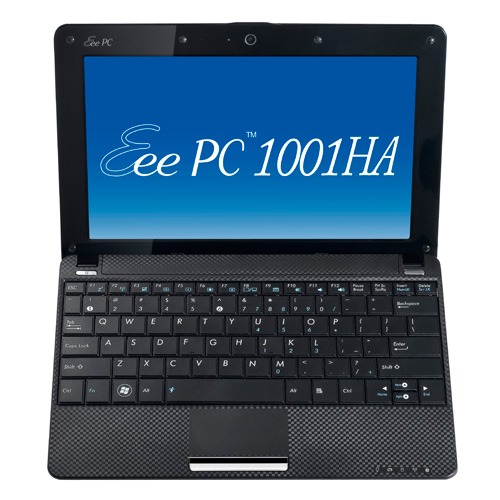
The operating system that comes with the machine is Windows XP, and there are some extras bundled with it. These include a trial of Trend Micro as an initial security software option, as well as Microsoft Works and a trial of Microsoft Office 2007. Then, there are some Asus utilities too, though they are not so useful to me. All in all, none of these burden the processing power too much and IE8 comes installed too. Being a tinkerer, I have put some of the sorts of things that I'd have on a full-size PC on there. Examples include Mozilla Firefox, Google Chrome, Adobe Reader and Adobe Digital Editions. Pushing the boat out further, I used Wubi to get Ubuntu 10.04 on there in the same way as I have done with my 15" Toshiba laptop. So far, nothing seems to overwhelm the available processing power, though I am left wondering about battery life.
The mention of battery life brings me to mulling over how well the machine operates. So far, I am finding that the battery lasts around three hours, much longer than on my Toshiba but nothing startling either. Nevertheless, it does preserve things by going into sleep mode when you leave it unattended for long enough. Still, I'd be inclined to find a socket if I was undertaking a long train journey.
According to the specifications, it is supposed to weigh around 1.4 kg and that seems not to be a weight that has been a burden to carry so far and the smaller size makes it easy to pop into any bag. It also seems sufficiently robust to allow its carrying by bicycle, though I wouldn't be inclined to carry it over too many rough roads. In fact, the manufacturer advises against carrying it anywhere (by bike or otherwise) without switching it off first, but that's a common-sense precaution.
Start-up times are respectable, though you feel the time going by when you're on a bus for a forty-minute journey, and shutdown needs some time set aside near the end. The screen resolution can be increased to 1024x600 and the shallowness can be noticed, reminding you that you are using a portable machine. For that reason, there have been times when I hit the F11 key to get a full-screen web browser session. Coupled with the Vodafone mobile broadband dongle that I have, it has done some useful things for me while on the move so long as there is sufficient signal strength (seeing the type of connection change between 3G, EDGE and GPRS is instructive). All in all, it's not a chore to use, as long as Internet connections aren't temperamental.
An avalanche of innovation?
23rd September 2010
It seems that, almost despite the uncertain times or maybe because of them, it feels like an era of change on the technology front. Computing is the domain of many of the postings on this website, and a hell of a lot seems to be going mobile at the moment. For a good while, I managed to stay clear of the attractions of smartphones until a change of job convinced me that having a BlackBerry was a good idea. Though the small size of the thing really places limitations on the sort of web surfing experience that you can have with it, you can keep an eye on the weather, news, traffic, bus and train times so long as the website in question is built for mobile browsing. Otherwise, it's more of a nuisance than a patchy phone network (in the U.K., T-Mobile could do better on this score, as I have discovered for myself; thankfully, a merger with the Orange network is coming next month).
Speaking of mobile websites, it almost feels as if a free for all has recurred for web designers. Just when the desktop or laptop computing situation had more or less stabilised, along came a whole pile of mobile phone platforms to make things interesting again. Familiar names like Opera, Safari, Firefox and even Internet Explorer are to be found popping up on handheld devices these days along with less familiar ones like Web 'n' Walk or BOLT. The operating system choices vary too, with iOS, Android, Symbian, Windows and others all competing for attention. It is the sort of flowering of innovation that makes one wonder if a time will come when things begin to consolidate, but it doesn't look like that at the moment.
The transformation of mobile phones into handheld computers isn't the only big change in computing, with the traditional formats of desktop and laptop PC's being flexed in all sorts of ways. First, there's the appearance of netbooks, and I have succumbed to the idea of owning an Asus Eee. Though you realise that these are not full-size laptops, it still didn't hit me how small these were until I owned one. They are undeniably portable, while tablets look even more interesting in the aftermath of Apple's iPad. Though you may call them over-sized mobile photo frames, the idea of making a touchscreen do the work for you has made the concept fly for many. Even so, I cannot say that I'm overly tempted, though I have said that before about other things.
Another area of interest for me is photography, and it is around this time of year that all sorts of innovations are revealed to the public. It's a long way from what, we thought, was the digital photography revolution when digital imaging sensors started to take the place of camera film in otherwise conventional compact and SLR cameras, making the former far more versatile than they used to be. Now, we have SLD cameras from Olympus, Panasonic, Samsung and Sony that eschew the reflex mirror and prism arrangement of an SLR using digital sensor and electronic viewfinders while offering the possibility of lens interchangeability and better quality than might be expected from such small cameras. Lately, Sony has offered SLR-style cameras with translucent mirror technology instead of the conventional mirror that is flipped out of the way when a photographic image is captured. Change doesn't end there, with movie making capabilities being part of the tool set of many a newly launched compact, SLD and SLR camera. The pixel race also seems to have ended though increases still happen as with the Pentax K-5 and Canon EOS 60D (both otherwise conventional offerings that have caught my eye, though so much comes on the market at this time of year that waiting is better for the bank balance).
The mention of digital photography brings to mind the subject of digital image processing and Adobe Photoshop Elements 9 is just announced after Photoshop CS5 appeared earlier this year. It almost feels as if a new version of Photoshop or its consumer cousin is released every year, causing me to skip releases when I don't see the point. Elements 6 and 8 were such versions for me, so I'll be in no hurry to upgrade to 9 yet either, even if the prospect of using content aware filling to eradicate unwanted objects from images is tempting. Nevertheless, that shouldn't stop anyone trying to exclude them in the first place. In fact, I may need to reduce the overall number of images that I collect in favour of coming away with only the better ones. The outstanding question on this is: can I slow down and calm my eagerness to bring at least one good image away from an outing by capturing anything that seems promising at the time? Some experimentation but being a little more choosy can save work later on.
While back on the subject of software, I'll voyage in to the world of the web before bringing these meanderings to a close. It almost feels as if there are web-based applications following web-based applications these days, when Twitter and Facebook nearly have become household names and cloud computing is a phrase that turns up all over the place. In fact, the former seems to have encouraged a whole swathe of applications all of itself. Applications written using technologies well-used on the web must stuff many a mobile phone app store too and that brings me full circle for it is these that put so much functionality on our handsets with Java seemingly powering those I use on my BlackBerry. Then there's the spat between Apple and Adobe regarding the former's support for Flash.
To close this mental amble, there may be technologies that didn't come to mind while I was pondering this piece, but they doubtless enliven the technological landscape too. However, what I have described is enough to take me back more than ten years ago, when desktop computing and the world of the web were a lot more nascent than is the case today. Then, the changes that were ongoing felt a little exciting now that I look back on them, and it does feel as if the same sort of thing is recurring though with things like phones creating the interest in place of new developments in desktop computing such as a new version of Window (though 7 was anticipated after Vista). Web designers may complain about a lack of standardisation, and they're not wrong, yet this may be an era of technological change that in time may be remembered with its own fondness too.
A bigger screen?
23rd February 2010
A recent bit of thinking has caused me to cast my mind back over all the screens that have sat in front of me while working with computers over the years. Well, things have come a long way from the spare television that I used with a Commodore 64 that I occasionally got to explore the thing. Needless to say, a variety of dedicated CRT screens ensued as I started to make use of Apple and IBM compatible PC's provided in computing labs and other such places before I bought an example of the latter as my first ever PC of my own. That sported a 15" display that stood out a little in times when 14" ones were mainstream, but a 17" Iiyama followed it when its operational quality deteriorated. That Iiyama came south with me from Edinburgh as I moved to where the work was and offered sterling service before it too started to succumb to ageing.
During the time that the Iiyama CRT screen was my mainstay at home, there were changes afoot in the world of computer displays. A weighty 21" Philips screen was what greeted me on my first day at work, only for 21" Eizo LCD monitors were set to replace those behemoths and remain in use as if to prove the longevity of LCD panels and the validity of using what had been sufficient for laptops for a decade or so. In fact, the same remark regarding reliability applies to the screen that now is what I use at home, a 17" Iiyama LCD panel (yes, I stuck with the same brand when I changed technologies longer ago than I like to remember).
However, that hasn't stopped me wondering about my display needs, and it's screen size that is making me think rather than the reliability of the current panel. While that is a reflection on how my home computing needs have changed over time, they also show how my non-computing interests have evolved too. Photography is but one of these and the move to digital capture has brought with a greater deal of image processing, so much that I wonder if I need to make less photos rather than bringing home so many that it can be challenging to pick out the ones that are deserving of a wider viewing. Though that is but one area where a bigger screen would help, there is another that arises from my interest in exploring some countryside on foot or on my bike: digital mapping. When planning outings, it would be nice to have a wider field of view to be able to see more at a larger scale.
None of the above is a showstopper that would be the case if the screen itself was unreliable, so I am going to take my time on this one. The prospect of sharing desktops across two screens is another idea, one that needs some thought about where it all would fit; the room that I have set aside for working at my computer isn't the largest. After the space side of things, then there's the matter of setting up the hardware. Quite how a dual display is going to work with a KVM setup is something to explore, as is the adding of extra video cards to existing machines. After the hardware fiddling, the software side of things is not a concern that I have because of when I used a laptop as my main machine for a while last year. That confirmed that Windows (Vista, but it has been possible since 2000 anyway...) and Ubuntu (other modern Linux distributions should work too...) can cope with desktop sharing out of the box.
Apart from the nice thoughts of having more desktop space, the other tempting side to all of this is what you can get for not much outlay. It isn't impossible to get a 22" display for less than £200 and the prices for 24" ones are tempting too. That's a far cry from paying next to £300 (if my memory serves me correctly) for that 17" Iiyama, and I'd hope that the quality is as good as ever.
It's all very well talking about pricing, but you need to sit down and choose a make and model when you get to deciding on a purchase. There is plenty of choice so that would take a while with magazine reviews coming in handy here. Saying that, last year's computing misadventures have me questioning the sense of going for what a magazine places on its A-list. They also have me thinking of going to a nearby computer shop to make a purchase rather than choosing a supplier on the web; it is easier to take back a faulty unit if you don't have far to go. Speaking of faulty units, last year has left me contemplating waiting until the year is older before making any acquisitions of computer kit. All of that has put the idea of buying a new screen on the low priority list, nice to have but not essential. For now, that is where it stays, but you never know what the attractions of a shiny new thing can do...
Best left until later in the year?
26th January 2010
In the middle of last year, my home computing experience was one of feeling displaced. A combination of a stupid accident and a power outage had rendered my main PC unusable. What followed was an enforced upgrade that used a combination that was familiar to me: Gigabyte motherboard, AMD CPU and Crucial memory. However, assembling that lot and attaching components from the old system from the old system resulted in the sound of whirring fans but nothing appearing on-screen. Not having useful beeps to guide me meant that it was a case of undertaking educated guesswork until the motherboard was found to be at fault.
In a situation like this, a better developed knowledge of electronics would have been handy and might have saved me money too. As for the motherboard, it is hard to say whether it was a faulty set from the outset or whether there was a mishap along the way, either due to ineptitude with static or incompatibility with a power supply. What really tells the tale on the mainboard was the fact that all the other components are working well in other circumstances, even that old power supply.
A few years back, I had another experience with a problematic motherboard, an Asus this time, that ate CPU's and damaged a hard drive before I stabilised things. That was another upgrade attempted in the first half of the year. My first round of PC building was in the third quarter of 1998 and that went smoothly once I realised that a new case was needed. Similarly, another PC rebuild around the same time of year in 2005 was equally painless. Based on these experiences, I should not be blamed for waiting until later in the year before doing another rebuild, preferably a planned one rather than an emergency.
Of course, there may be another factor involved too. The hint was a non-working Sony DVD writer that was acquired early last year when it really was obvious that we were in the middle of a downturn. Could older unsold inventory be a contributor? Well, it fits in with seeing poor results twice, In addition, it would certainly tally with a problematical PC rebuild in 2002 following the end of the Dot-com bubble and after the deadly Al-Qaeda attack on New York's World Trade Centre. An IBM hard drive that was acquired may not have been the best example of the bunch, and the same comment could apply to the Asus motherboard. Though the resulting construction may have been limping, it was working tolerably.
In contrast, last year's episode had me launched into using a Toshiba laptop and a spare older PC for my needs, with an external hard drive enclosure used to extract my data onto other external hard drives to keep me going. While it felt like a precarious arrangement, it was a useful experience in ways too.
There was cause for making acquaintance with nearby PC component stores that I hadn't visited before, and I got to learn about things that otherwise wouldn't have come my way. Using an external hard drive enclosure for accessing data on hard drives from a non-functioning PC is one of these. Discovering that it is possible to boot from external optical and hard disk drives came as a surprise too and will work so long as there is motherboard support for it.
Another experience came from a crisis of confidence that had me acquiring a bare-bones system from Novatech and populating it with optical and hard disk drives. Then, I discovered that I have no need for power supplies rated more than 300 watts (around 200 W suffices). Turning my PC off more often became a habit, friendly both to the planet and to household running costs too.
Then, there's the beneficial practice of shopping locally, which can suffice. You may not get what PC magazines stick on their hot lists, but shopping online for those pieces doesn't guarantee success either. All of these were useful lessons and, while I'd rather not throw away good money after bad, it goes to show that even unsuccessful acquisitions had something to offer in the form of learning opportunities. Whether you consider that is worthwhile is up to you.
From laptop limbo to a new desktop: A weekend restoration of computing order
12th July 2009
This weekend, I finally put my home computing displacement behind me. My laptop had become my main PC, with a combination of external hard drives and an Octigen external hard drive enclosure keeping me motoring in laptop limbo. Having had no joy in the realm of PC building, I decided to go down the partially built route and order a bare-bones system from Novatech. That gave me a Foxconn case and motherboard loaded up with an AMD 7850 dual-core CPU and 2 GB of RAM. With the motherboard offering onboard sound and video capability, all that was needed was to add drives. I added no floppy drive but instead installed a SATA DVD Writer (not sure that it was a successful purchase, though, but that can be resolved at my leisure) and the hard drives from the old behemoth that had been serving me until its demise. A session of work on the kitchen table and some toing and froing ensued as I inched my way towards a working system.
Once I had set all the expected hard disks into place, Ubuntu was capable of being summoned to life, with the only impediment being an insistence of scanning the 1 TB Western Digital and getting stuck along the way. Not having the patience, I skipped this at start up and later unmounted the drive to let fsck to do its thing while I got on with other tasks; the hold up had been the presence of VirtualBox disk images on the drive. Speaking of VirtualBox, I needed to scale back the capabilities of Compiz, so things would work as they should. Otherwise, it was a matter of updating various directories with files that had appeared on external drives without making it into their usual storage areas. Windows would never have been so tolerant and, as if to prove the point, I needed to repair an XP installation in one of my virtual machines.
In the instructions that came with the new box, Novatech stated that time was a vital ingredient for a build, and they weren't wrong. While the delivery arrived at 09:30, I later got a shock when I saw the time to be 15:15! However, it was time well spent when I noticed the speed increase on putting ImageMagick through its paces with a Perl script. In time, I might get brave and be tempted to add more memory to get up to 4 GB; the motherboard may only have two slots, but that's not such a problem with my planning on sticking with 32-bit Linux for a while to come. My brief brush with its 64-bit counterpart revealed some roughness that warded me off for a little while longer. For now, I'll leave well alone and allow things to settle down again. Lessons for the future remain, over which I may even mull in another post...
Is a spot of bother with computer self-building a case of the reverse Midas touch?
18th May 2009
Last week, a power outage put my main home PC out of action. While it may have been recoverable if that silly accident of a few weeks back hadn't happened, a troubled rebuild is progressing. Despite the challenges, I somehow manage to remain hopeful that an avenue of exploration will yield some fruit. Even so, thoughts of throwing in the towel and calling in professionals rather than throwing good money after bad are gathering. The saga is causing me to question the sense of self building in place of buying something ready built. Saying that, they can have their off days too.
Meanwhile, I have been displaced onto the spare desktop PC and the laptop. In other words, my home computing needs are being fulfilled to a point, though the feeling of frustrated displacement and partial disconnection from my data remains; because I have been able to extricate most of my digital photos and my web building, things are far from being hopeless. With every disappointment, there remains an opportunity or two. Since the spare desktop runs Debian, I have been spending some time seeing if I can bend that to my will, which can be done, sometimes after a fashion.
A few posts should result from this period, not least regarding working with Debian. On the subject of hardware, I will not elaborate until the matter comes to a more permanent resolution. From past attempts (all were successful in the end), I know that the business of PC building can feel like a dark art: you are left there wondering why none of your efforts summon a working system to life work until it all comes together in the blink of an eye leaving you to wonder why all the effort was expended. The best analogy that I can offer is awaiting a bus or train; it often seems that the waiting takes longer than the journey. Restoring my home computing to what it was before is a mere triviality compared to what some people have to suffer, but resolution of a problem always puts a spring in my step.