TOPIC: SCANDINAVIAN AIRLINES
Cross-platform file and directory renaming in SAS with added return code handling
 30th March 2026
Here is another post on operating system-level actions performed from within SAS for the sake of being both robust and cross-platform. File deletion has been one example, so here is file and directory renaming. That got used while doing some debugging as well as a piece of validation testing.
The rename function applies to more than files, though, which means that the "FILE" parameter (in quotes below) is as essential as those for source and target file paths. That tripped me up when I went about doing it for the first time. All the action happens within a data step:
data _null_;
	rc = rename("&file_name..xlsx", "&file_name..bak", "FILE");
	if rc = 0 then
		putlog "File renamed successfully";
	else;
		putlog "Rename failed";
		msg = sysmsg();
		putlog "SYSMSG: " msg;
run;
Here, we have a null data step, which means that no output is written to disk. We also capture the return code for the operation in a variable called rc. If that has a value of 0, the operation has completed successfully, while the alternative can have extra information that can be captured by the sysmsg function, as is seen above. Putting this all together, not only can you issue the result of the operation in the log using putlog statements, but also extra information useful for debugging what happened and fixing it.
As has been alluded earlier, the rename function can be used with other objects too. Instead of "file", you can have these for those: "ACCESS" for an access descriptor that was created using SAS/ACCESS software, "CATALOG" for a SAS catalog or catalog entry, 'DATA' for a SAS table or dataset (which is the default and explains how I got caught out as mentioned earlier), "VIEW" for a SAS table view. That makes it more useful, even if the DATASETS procedure is worth checking out for some of these.
Moving from 32-Bit to 64-Bit SAS on Windows
15th March 2026
Moving from 32-bit SAS on Microsoft Windows to a 64-bit environment can look deceptively straightforward from the outside. The operating system is still Windows, programmes often run without alteration, and many data sets open just as expected. Beneath that continuity, however, sit several technical differences that matter considerably in practice, especially for organisations with long-lived code, established format libraries and regular exchanges with Microsoft Office files.
What makes this transition particularly awkward is that SAS treats some of these changes as more than a simple in-place upgrade. As Jacques Thibault notes in his PharmaSUG 2012 paper, a new operating system will often be accompanied by a new version of surrounding applications, and what matters most is ensuring sufficient time and resources to fully test existing programmes under the new environment before committing to the change. SAS file types are not uniformly portable across the 32-bit to 64-bit boundary, and support behaviour also differs by SAS release, with SAS 9.3 marking the point at which some earlier friction was meaningfully reduced. As of 2025, the current release of the SAS 9 line is SAS 9.4 Maintenance 9 (M9), and organisations running any SAS 9.4 release benefit from the data-set interoperability improvements first introduced in SAS 9.3, whilst the catalog and Office-integration issues described in this article remain relevant across all SAS 9.x environments.
Data Sets and Catalogs: A Fundamental Distinction
The broadest distinction is between SAS data sets and SAS catalogs. Data sets are generally more forgiving, while catalogs are not. SAS Usage Note 38339 explains that when upgrading from 32-bit to 64-bit Windows SAS in releases earlier than SAS 9.3, Cross-Environment Data Access (CEDA) is invoked to access 32-bit SAS data sets. CEDA allows the file to be read without immediate conversion, though it can impose restrictions and may reduce performance. The same note states directly that 64-bit SAS provides no access to 32-bit catalogs at all.
That distinction sits at the centre of most migration problems, and it is the reason a move that feels routine can catch teams off guard when they first encounter the ERROR: CATALOG was created for a different operating system message. As Chris Hemedinger explains in a post on The SAS Dummy, the move from 32-bit SAS for Windows to 64-bit SAS for Windows is, for all intents and purposes, a platform change from SAS's perspective, even though only the bit architecture has changed, and SAS catalogs are not portable across platforms.
How SAS Handles Data Sets Across the Boundary
For data sets, the picture is comparatively manageable. If a 32-bit SAS data set is opened in a 64-bit SAS session in releases before SAS 9.3, SAS writes a note to the log stating that the file is native to another host or that its encoding differs from the current session encoding, and that Cross-Environment Data Access will be used, which might require additional CPU resources and might reduce performance. This is SAS performing translation work in the background, and whilst useful for continued access, it is not always ideal for regular production use.
There is an important nuance that changes things significantly with SAS 9.3. In 32-bit SAS on Windows, the data representation is WINDOWS_32, whilst in 64-bit SAS on Windows it is WINDOWS_64. Hemedinger notes that in SAS 9.3 the developers taught SAS for Windows to bypass the CEDA layer when the only encoding difference is WINDOWS_32 versus WINDOWS_64. SAS Knowledge Base article 38379 confirms this, stating that from SAS 9.3 onwards, Windows 32-bit data sets can be read, written and updated in Windows 64-bit SAS, and vice versa, as a result of a change in how SAS determines file compatibility at open time. Users on SAS 9.3 and later, including all SAS 9.4 maintenance releases, may therefore see fewer warnings and less friction with ordinary data sets originating in 32-bit Windows SAS.
Converting Data Sets to Native 64-Bit Format
Even with those SAS 9.3 improvements, many organisations prefer to convert files into the native 64-bit format rather than rely indefinitely on cross-environment access. For entire libraries, PROC MIGRATE is the recommended mechanism. SAS Usage Note 38339 notes that for releases preceding SAS 9.3, PROC MIGRATE can migrate 32-bit SAS data sets to 64-bit, changing their format so that CEDA is no longer required.
The advantages of PROC MIGRATE over the older conversion procedures are set out in detail by Diane Olson and David Wiehle of SAS Institute in their paper hosted by the University of Delaware. Unlike PROC COPY, PROC MIGRATE retains deleted observations, migrates audit trails, preserves all integrity constraints and automatically retains created and last-modified date/times, compression, encryption, indexes and passwords from the source library. It is designed to produce members in the target library that differ from the source only in being in the new SAS format.
When the task concerns individual SAS data files rather than a whole library, SAS Usage Note 38339 points to PROC COPY with the NOCLONE option. Used in a 64-bit SAS session, this copies a 32-bit Windows data set into a new file that is native to the 64-bit environment. The NOCLONE option prevents SAS from cloning the original data representation during the copy, so that the resulting file is written in the target environment's native format and CEDA is no longer needed to process it. Thibault's PharmaSUG paper illustrates this with an example using PROC COPY with the NOCLONE option together with an OUTREP setting on the target LIBNAME statement to force creation in the desired representation.
Catalogs: The Hard Problem
Catalogs are a different matter entirely. If a user running 64-bit SAS attempts to open a catalog created in a 32-bit SAS session, the familiar error appears: ERROR: CATALOG was created for a different operating system. In the case of format catalogs, a related message often reads ERROR: File LIBRARY.FORMATS.CATALOG was created for a different operating system, and this is frequently followed by failures to use user-defined formats attached to variables. As the SSCC guidance from the University of Wisconsin-Madison notes, this can prevent 64-bit SAS from reading the data set at all, with the error about formats recorded only in the log whilst the visible symptom is simply that the table did not open.
This matters because catalogs are machine-dependent. User-defined formats created by PROC FORMAT are usually stored in catalogs, often in a member named FORMATS. If those formats were built in 32-bit SAS, 64-bit SAS cannot use the catalog directly, and this affects not only explicit formatting in code but also routine data viewing because a data set linked to permanent user-defined formats may fail to display properly unless the associated format catalog is converted.
Options for Migrating Format Catalogs
There are several ways to address catalog incompatibility. If the original PROC FORMAT source code still exists, the cleanest option is simply to rerun it under 64-bit SAS, producing a fresh native catalog. The SSCC guidance treats this as the easiest solution that preserves the formats themselves, and it also describes a short-term workaround: adding a bare format female; statement to the DATA or PROC step, which removes the custom format from that variable, so there is no need to read the problem catalog file at all.
When source code is not available, transport-based conversion is the answer. In a 32-bit SAS session, PROC CPORT creates a transport file from the catalog library, and in a 64-bit SAS session, PROC CIMPORT recreates the catalog in the new environment. SAS Knowledge Base article KB0041614 provides sample code that creates a transport file in 32-bit SAS using proc cport lib=my32 file=trans memtype=catalog; select formats; and then unloads it in 64-bit SAS using PROC CIMPORT, after which a new Formats.sas7bcat file should be present in the target library. The same article notes that if access to a 32-bit SAS session is simply not available, the system option NOFMTERR can be submitted as a last resort: this allows the underlying data values to be displayed whilst user-defined formats are ignored, avoiding the error without converting the catalog.
A more robust route for user-defined formats is to avoid moving the catalog as a catalog at all. PROC FORMAT can write format definitions to a standard SAS data set using CNTLOUT, and later rebuild them from that data set using CNTLIN. Because SAS data sets are generally portable across the 32-bit to 64-bit boundary, this method sidesteps the catalog incompatibility directly. KB0041614 describes CNTLOUT/CNTLIN as the most robust method available for migrating user-defined format libraries. Karin LaPann, writing in a poster presented at a meeting of the Philadelphia Area SAS Users Group, reaches the same conclusion and recommends always creating data sets from format catalogs and storing them alongside the data in the same library as a matter of good practice.
Caveats: Item Stores, Compiled Macros and the PIPE Engine
SAS Usage Note 38339 explicitly states that stored compiled macro catalogs are not supported by PROC CPORT and must be recompiled in the new operating environment, with SAS Note 46846 covering compatibility guidance for those files specifically. The note also warns that the 32-bit version of SAS should not be removed until it can be verified that all 32-bit catalogs have been successfully migrated.
Thibault's PharmaSUG paper identifies two further file types that require attention. SAS Item Store files (.sas7bitm), which organisations may use to store standard PROC TEMPLATE output templates, are not compatible across 32-bit and 64-bit environments, and the practical solution is to recreate them under the new environment using the same programme that created them originally, targeting a different output directory to avoid a mixed 32-bit and 64-bit directory. Thibault also notes that programmes using the PIPE engine may produce errors on Windows 64-bit environments, and recommends replacing such code with newer SAS functions such as filename, dopen and dread to avoid the issue altogether. These are not universal blockers, but they underline why testing is essential rather than assumed.
Microsoft Office Integration After the Move
Another area where 64-bit moves catch users out is access to Microsoft Excel and Access files. The issue is not SAS data compatibility but the bit-ness of the Microsoft data providers. In 64-bit SAS for Windows, attempts to use PROC IMPORT with DBMS=EXCEL, PROC EXPORT with Excel or Access options, or LIBNAME EXCEL can fail with errors such as ERROR: Connect: Class not registered or Connection Failed. As Hemedinger explains, the cause is that the 64-bit SAS process cannot use the built-in data providers for Microsoft Excel or Microsoft Access, which are usually 32-bit modules. Thibault's paper confirms that installation of the PC Files Server on the same machine will be required, since the required 32-bit ODBC drivers are incompatible with 64-bit SAS on Windows.
The workarounds depend on the file type and local setup. SAS/ACCESS to PC Files provides methods such as DBMS=EXCELCS, DBMS=ACCESSCS and LIBNAME PCFILES, all of which use the PC Files Server as an intermediary, with an autostart feature that minimises configuration changes to existing SAS programmes. For .xlsx files, DBMS=XLSX removes the Microsoft data providers from the equation entirely and requires no additional setup from SAS 9.3 Maintenance 1 onwards. Installing 64-bit Microsoft Office may appear to solve the bit-ness mismatch by supplying 64-bit providers, but as Hemedinger cautions, Microsoft recommends the 64-bit version of Office in only a few circumstances, and that route can introduce other incompatibilities with how Office applications are used.
Identifying 32-Bit Catalogs in a Mixed Environment
In mixed environments, a practical challenge is identifying which catalogs are still 32-bit and which are already 64-bit. This was precisely the problem Michael Raithel posed on LinkedIn in March 2015, after finding that no SAS facility, whether PROC CATALOG, PROC CONTENTS, PROC DATASETS or the Dictionary Tables, provided a direct way to distinguish them. His solution treats the .sas7bcat file as a flat file rather than a catalog, reading the first record and searching for the character strings W32_7PRO (identifying a 32-bit catalog) and X64_7PRO (identifying a 64-bit catalog). The macro he developed can be run against any number of catalogs and builds a SAS data set recording the bit-ness and full path of each file, making large-scale inventory automation entirely practical during a phased transition.
For broader validation work, the Olson and Wiehle paper pairs PROC MIGRATE with macros based on PROC CONTENTS, PROC DATASETS and PROC COMPARE, documenting what existed in the source library before migration and verifying what exists in the target library afterwards. For highly regulated or large-scale environments, that kind of structured checking is not optional.
Navigating the Transition Without Unnecessary Disruption
The main lesson from all of this is that moving from 32-bit to 64-bit SAS on Windows is not simply a matter of reinstalling software and carrying on unchanged. Much will work as before, particularly with ordinary data sets and particularly in SAS 9.3 and later. Catalogs, format libraries, item stores and Microsoft Office integration, however, require deliberate attention.
The transition is not so much problematic as predictable. Keeping 32-bit SAS available until catalog migration is confirmed, using PROC MIGRATE for full libraries, using PROC COPY with NOCLONE for individual data sets, converting format catalogs via CPORT/CIMPORT or CNTLOUT/CNTLIN, recreating item stores and compiled macros in the new environment and testing Office-related workflows and PIPE based code before deployment together form a sound path through the process. With that preparation in place, the advantages of a 64-bit environment can be gained without avoidable disruption.
Modernising SAS: The 4GL Apps and SASjs Ecosystem
31st January 2026
Custom interfaces to the world's most powerful analytics platform are no longer a niche concern. In many organisations, SAS remains central to reporting, modelling and operational decision-making, yet the way users interact with that capability can vary widely. Some teams still rely on desktop applications, batch processes, shared drives and manual interventions, while others are moving towards web-based interfaces, stronger governance and a more modern development workflow. The material at sasapps.io points to an ecosystem built around precisely that transition, blending long-standing SAS expertise with open-source tooling and documented delivery methods.
The Company Behind the Ecosystem
At the centre of this transition is 4GL Apps. The company's positioning is straightforward: help organisations leverage their SAS investment through services, solutions and products that fit specific needs. Rather than replacing SAS, the aim is to extend it with custom interfaces and delivery approaches that are maintainable, transparent and based on standard frameworks. An emphasis on documentation appears throughout the site, suggesting that projects are intended either for handover to internal teams or for ongoing support under clearly defined packages.
That proposition matters because many SAS environments have grown over years, sometimes decades. In such settings, technical capability is rarely the issue. The challenge is more often how to expose that capability in ways that are usable, secure and sustainable. A powerful analytics platform can still be hampered by awkward user journeys, brittle desktop tooling or resource-heavy support arrangements, and the 4GL Apps model tries to address those practical concerns without discarding existing SAS infrastructure.
Services
The service offering gives a useful sense of how this approach is organised. One strand is SAS App Delivery, framed not merely as building applications, but also as building tools that make SAS app development faster. That detail points to an emphasis on repeatability rather than one-off implementation. Another strand is SAS App Support, aimed at organisations with existing SAS-powered applications but insufficient internal resource to keep them running. Fixed-price plans are offered to keep those interfaces active, which implies an attempt to make operational costs more predictable. A third service area is SASjs Enhancement, where new features can be added to SASjs at a discounted rate to support particular use cases.
Solutions
These services sit alongside a broader set of solutions. One is the creation of SAS-powered HTML5 applications, described as bespoke builds tailored to specific workflow and reporting requirements, using fully open-source tools, standard frameworks and full documentation. Clients are given a practical choice: maintain the application in-house or use a transparent support package. Another solution addresses end-user computing risk through data capture and control. Here, the approach enables business users to self-load VBA-driven Excel reporting tools into a preferred database while applying data quality checks at source, a four-eyes (or more) approval step at each stage and full audit traceability back to the original EUC artefact. A further solution is the modernisation of legacy AF/SCL desktop applications, with direct migration to SAS 9 or Viya in order to improve user experience, security and scalability while moving to a modern SAS stack supported by open-source technology.
That last area reveals a theme running through the whole ecosystem: modernisation does not necessarily mean abandoning what exists. In many SAS estates, AF/SCL applications remain deeply embedded in business processes, and replacing them outright can be costly and risky, especially when they encode years of operational logic. A migration path that preserves business function while improving maintainability and interface design will naturally appeal to teams that need progress without disruption.
Products
The product range fills out the picture further. Data Controller for SAS enables business users to make controlled changes to data in SAS. The SASjs Framework is a collection of open-source tools to accelerate SAS DevOps and the development of SAS-powered web applications. There is also an AF/SCL Kit, migration tooling for the rapid modernisation of monolithic AF/SCL applications. Together, these products form a stack covering interface delivery, governed data change and development workflow, and they suggest that the company's work is not limited to consultancy but includes reusable software assets with their own documentation and source code.
Data Controller: Governance and Audit
Data Controller receives the richest functional description in the ecosystem's documentation. It is intended for business owners in regulatory reporting environments and, more broadly, for any enterprise that needs to perform manual data uploads with validation, approval, security and control. The rationale is rooted in familiar SAS working practices. Users may place files on network drives for batch loading, update data directly using SAS code, open a dataset in Enterprise Guide and change a value, or ask a database administrator to run a script update. According to the product's own documentation, those approaches are less than ideal: every new piece of data may require a new programme, end users may need to have `modify` access to sensitive data locations, datasets can become locked, and change requests can slow the process.
Data Controller is presented as a response to those weaknesses. The goal is described as focusing on great user experience and auditor satisfaction, while saving years of development and testing compared with a custom-built alternative. It is a SAS-powered web application with real-time capabilities, where intraday concurrent updates are managed using a lock table and queuing mechanism. Updates are aborted if another user has changed the table since the approval difference was generated, which helps preserve consistency in multi-user environments. Authentication and authorisation rely on the existing SASLogon framework, and end users do not require direct access to the target tables.
The governance model is equally central. All data changes require one or more approvals before a table is updated, and the approver sees only the changes that will be applied to the target, including new, deleted and changed rows. The system supports loading tables of different types through SAS libname engines, with support for retained keys, SCD2 loads, bitemporal data and composite primary keys. Full audit history is a prominent feature: users can track every change to data, including who made it, when it was made, why it was made and what the actual change was, all accessible through a History page.
A particularly notable feature is that onboarding new tables requires zero code. Adding a table is a matter of configuration performed within the tool itself, without the need to define column types or lengths manually, as these are determined dynamically at runtime. Workflow extensibility is built in through configurable hook scripts that execute before and after each action, with examples such as running a data quality check after uploading a mapping table or running a model after changing a parameter. Taken together, those features position Data Controller less as a narrow upload utility and more as a governed operational layer for business-managed data change.
The application was designed to work on multiple devices and different screen types, combined with SAS scalability and security to provide flexibility and location independence when managing data. This suggests it is intended for practical day-to-day use by business teams rather than solely by technical specialists at a desktop workstation.
SASjs: DevOps for SAS
Underpinning much of the ecosystem is SASjs, described on its GitHub organisation page as "DevOps for SAS." It is designed to accelerate the development and deployment of solutions on all flavours of SAS, including Viya, EBI and Base. Everything in SASjs is MIT open-source and free for commercial use. The framework also explicitly underpins Data Controller for SAS, which connects the product and framework strands of the wider ecosystem. The GitHub organisation page notes that the SASjs project and its repositories are not affiliated with SAS Institute.
The resources page at sasjs.io lists the key GitHub repositories: the Macro Core library, the SASjs adapter for bidirectional SAS and JavaScript communication, the SASjs CLI, a minimal seed application and seed applications for React and Angular. Documentation sites cover the adapter, CLI, Macro Core library, SASjs Server and Data Controller. Useful external links from the same resources page include guides to building and deploying web applications with the SASjs CLI, scaffolding SAS projects with NPM and SASjs, extending Angular web applications on Viya and building a vanilla JavaScript application on SAS 9 or Viya. There is also mention of a Viya log parser, training resources, guides, FAQs and a glossary, pointing to an effort to support both implementation and adoption.
The SASjs CLI
The command-line tooling, documented at cli.sasjs.io, gives a clearer view of how SASjs approaches DevOps. The CLI is described as a Swiss-army knife with a flexible set of options and utilities for DevOps on SAS Viya, SAS 9 EBI and SASjs Server. Its core functions include creating a SAS Git repository in an opinionated way, compiling each service with all dependent macros, macro variables and pre- or post-code, building the master SAS deployment, deploying through local scripts and remote SAS programmes, running unit tests with coverage and generating a Doxygen documentation site with data lineage, homepage and project logo from the configuration file. There is also a feature for deploying a frontend as a streaming application, bypassing the need to access the SAS web server directly.
The full command set covers the project lifecycle. The CLI can add and authenticate targets, compile and build projects, deploy them to a SAS server location, generate documentation and manage contexts, folders and files. It can execute jobs, run arbitrary SAS code from the terminal, deploy a service pack and generate a snippets file for macro autocompletion in VS Code. It can also lint SAS code to identify common problems and run unit tests while collecting results in JSON or CSV format, together with logs. In effect, this brings SAS development considerably closer to the workflows commonly seen in mainstream software engineering, which may be especially valuable in organisations trying to standardise delivery practices across mixed technology estates.
Presentations and the Wider SAS Community
The slides.sasjs.io collection adds another dimension by showing that these ideas have been presented in conference and user group settings. Available decks cover DevOps for MSUG, SUGG and WUSS, SASjs for application development, SASjs Server, AF and AF/SCL modernisation, SASjs for PHUSE, testing and a legacy SAS apps presentation for FANS in January 2023. While slide decks alone do not prove adoption or outcomes, they do show a sustained effort to communicate methods and patterns to the broader SAS community, consistent with the open documentation and MIT licensing found throughout the ecosystem.
Building a Modern Layer Around an Established Platform
The most useful way to understand this ecosystem is not as a single product but as a layered approach. At one level, there are services for building and supporting applications. At another, there are packaged tools such as Data Controller and the AF/SCL Kit. Underneath both sits SASjs, providing open-source components and delivery practices intended to make SAS development more structured and scalable. The combination of bespoke SAS-powered HTML5 applications, governed data update tooling, AF/SCL migration support and open-source DevOps utilities points to a coherent effort to modernise how SAS is delivered and used, without severing ties to established platforms. SAS remains the analytical engine, but the interfaces, workflows and operational controls around it are updated to reflect current expectations in web application design, governance and DevOps practice.
ERROR: Ambiguous reference, column xx is in more than one table.
5th May 2012
Sometimes, SAS messages are not all that they seem, and a number of them are issued from PROC SQL when something goes awry with your code. In fact, I got a message like the above when ordering the results of the join using a variable that didn't exist in either of the datasets that were joined. This type of thing has been around for a while (I have been using SAS since version 6.11, and it was there then) and it amazes me that we haven't seen a better message in more recent versions of SAS; it was SAS 9.2 where I saw it most recently.
proc sql noprint;
    select a.yy, a.yyy, b.zz
        from a left join b
            on a.yy=b.yy
                order by xx;
quit;
Creating placeholder graphics in SAS using PROC GSLIDE for when no data are available
18th March 2012
Recently, I found myself with a plot to produce, but there were no data to be presented, so a placeholder output was needed. For a listing or a table, this is a matter of detecting if there are observations to be listed or summarised and then issuing a placeholder listing using PROC REPORT if there are no data available. Using SAS/GRAPH, something similar can be achieved using one of its curiosities.
In the case of SAS/GRAPH, PROC GSLIDE looks like the tool to user for the same purpose. The procedure does get covered as part of a SAS Institute SAS/GRAPH training course, but they tend to gloss over it. After all, there is little reason to go creating presentations in SAS when PowerPoint and its kind offer far more functionality. However, it would make an interesting tale to tell how GSLIDE became part of SAS/GRAPH in the first place. Its existence makes me wonder if it pre-exists the main slideshow production tools that we use today.
The code that uses PROC GSLIDE to create a placeholder graphic is as follows (detection of the number of observations in a SAS dataset is another entry on here):
proc gslide;
    note height=10;
    note j=center "No data are available";
run;
quit;
PROC GSLIDE is one of those run group procedures in SAS so a QUIT statement is needed to close it. The NOTE statements specify the text to be added to the graphic. The first of these creates a blank line of the required height for placing the main text in the middle of the graphic. It is the second one that adds the centred text that tells users of the generated output what has happened.
Smoother use of more than one SAS DMS session at a time
11th March 2012
Unless you have access to SAS Enterprise Guide, being able to work on one project at a time can be a little inconvenient. It is possible to open up more than one Display Manager System (DMS, the traditional SAS programming interface) session at a time only to get a pop-up window for SAS documentation for the second and subsequent sessions. You don't get your settings shared across them, either, while also losing any changes to session options after shutdown.
The cause of both of the above is the locking of the SASUSER directory files by the first SAS session. However, it is possible to set up a number of directories and set the -sasuser option to point at different ones for different sessions.
On Windows, the command in the SAS shortcut becomes:
C:\Program Files\SAS\SAS 9.1\sas.exe -sasuser "c:\sasuser\session 1\"
On UNIX or Linux, it would look similar to this:
sas -sasuser "~/sasuser/session1/"
Since the "session1" in the folder paths above can be replaced with whatever you need, you can have as many as you want too. It might not seem much of a need but synchronising the SASUSER folders every now and again can give you a more consistent set of settings across each session, all without intrusive pop up boxes or extra messages in the log too.
Reading data into SAS using the EXCEL and PCFILES library engines
4th March 2010
Recently, I had the opportunity to have a look at the Excel library engine again because I need to read Excel data into SAS. You need SAS Access for PC Files licensed for it to work, but it does simplify the process of getting data from spreadsheets into SAS. It all revolves around setting up a library pointing at the Excel file using the Excel engine. The result is that every worksheet in the file is treated like a SAS dataset, even if their names contain characters that SAS considers invalid for dataset names. The way around that is to enclose the worksheet name in single quotes with the letter n straight after the closing quote, much in the same way as you'd read in text strings as SAS date values ('04MAR2010'd, for example). To make all of this clearer, I have added some example code below.
libname testxl excel 'c:\test.xls';
data test;
    set testxl.'sheet1$'n;
run;
All of the above does apply to SAS on Windows (I have used it successfully in 9.1.3 and 9.2) but there appears to be a way of using the same type of thing on UNIX too. Again, SAS Access for PC Files is needed as well as a SAS PC Files server on an available Windows machine, and it is the PCFILES engine that is specified. While I cannot say that I have had the chance to see it working in practice but seeing it described in SAS Online Documentation corrected my previous misimpressions about the UNIX variant of SAS and its ability to read in Excel or Access data. Well, you learn something new every day.
Transferring data between SAS and R
5th June 2008
A question regarding the ability to transfer of data between SAS and R set me off on a spot of investigation a while back, and I have always planned to share the results of my labours. Once I managed to locate the required documentation, things became clearer with further inspection. Functions from the foreign package seem to offer the most from the data import and export point of view, so they're what I'll be featuring in this posting.
Here, I am starting with importing, and using the read.ssd function makes life so much easier for getting SAS data into R. When I discovered that the foreign package may not be loaded by default, that could be determined easily using the following command:
search()
If package:foreign isn't in the list, then you need to issue the following function call:
library(foreign)
Of course, if the foreign package isn't installed, none of this will work. It should live in the library sub-folder of the main R installation directory, but if it isn't there, then downloading the relevant binary package from CRAN is in order. Assuming that all is installed, then a command like the following will perform the needful:
read.ssd("c:/data","data1",sascmd="C:/Program Files/SAS Institute/SAS/V8/sas.exe")
This creates a temporary SAS program that converts the SAS data set into a transport file for reading by another R function that is called in the background, read.xport. From my experience, it all seems to work fairly seamlessly.
To get data out of R and into SAS is a multi-stage process, even with the foreign package. While there are other ways, using the write.foreign seems more useful than most. Here is an example function call:
write.foreign(data1,"C:/test.txt","C:/test.sas",package="SAS",dataname="data1",validvarname="V7")
While no SAS data sets are created at this stage, a text file is generated along with a SAS program for converting it into a data set. Running the SAS program is a separate step that follows the creation of the two files. Even if it is less streamlined than read.ssd, write.foreign does make it easier to transfer data into SAS than having to write a program from scratch to read in write.table output.
In summary, R can neither read nor write SAS data sets by itself, so you need SAS installed to really make things happen. SAS gets called by read.ssd and I feel that it would be better if was called by write.foreign also rather than a SAS program generated for execution later on. Even so, it is good to see some custom functionality being provided that makes life easier. There's also the hmisc package, but my experiences while working with that on S-Plus have been such that it compares less favourably with foreign on the reliability front. Saying that, things may have changed since I last tried it.
New version of SAS on the way
16th January 2008
This is something of a newsflash posting, but this morning's issue of the SAS Tech Report newsletter has said at last when SAS 9.2 is expected to be released. Though SAS has been talking a bit about 9.2, dates were elusive and, to a point, they still are. Nevertheless, hearing the Q1 of this year is the time slot for the unveiling is better than knowing nothing at all. Am I alone in wondering if it is coming later than was planned?
Controlling what the wpgm command calls in Windows SAS
30th November 2007
Recently, I was setting up a key mapping in SAS 8.1 such that the log and output windows are cleared and a SAS program run in the most recently used program editor window. The idea was that debugging would be easier, and the command was what you see below:
log; clear; output; clear; wpgm; submit
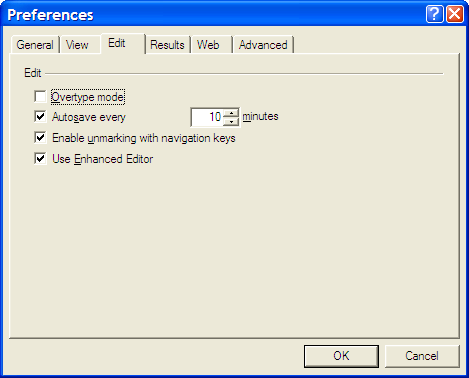
However, I was having trouble getting SAS to pick up the most recently used Enhanced Editor window, and it was opening up an old style Program Editor window in its place. If I had wanted to use that, I would have used pgm and not wpgm. What was conspiring against me was a pesky system option. Pottering over to Tools > Options > Preferences and navigating to the Edit tab brought me to the cause of the problem: the Use Enhanced Editor check box was in the clear, and fixing that set me on my way. SAS 9 could also be afflicted by the same irritation and that is where I got the screenshot that you see below where everything is hunky-dory.