Reading data into SAS using the EXCEL and PCFILES library engines
 4th March 2010
Recently, I had the opportunity to have a look at the Excel library engine again because I need to read Excel data into SAS. You need SAS Access for PC Files licensed for it to work, but it does simplify the process of getting data from spreadsheets into SAS. It all revolves around setting up a library pointing at the Excel file using the Excel engine. The result is that every worksheet in the file is treated like a SAS dataset, even if their names contain characters that SAS considers invalid for dataset names. The way around that is to enclose the worksheet name in single quotes with the letter n straight after the closing quote, much in the same way as you'd read in text strings as SAS date values ('04MAR2010'd, for example). To make all of this clearer, I have added some example code below.
libname testxl excel 'c:\test.xls';
data test;
    set testxl.'sheet1$'n;
run;
All of the above does apply to SAS on Windows (I have used it successfully in 9.1.3 and 9.2) but there appears to be a way of using the same type of thing on UNIX too. Again, SAS Access for PC Files is needed as well as a SAS PC Files server on an available Windows machine, and it is the PCFILES engine that is specified. While I cannot say that I have had the chance to see it working in practice but seeing it described in SAS Online Documentation corrected my previous misimpressions about the UNIX variant of SAS and its ability to read in Excel or Access data. Well, you learn something new every day.
A bigger screen?
23rd February 2010
A recent bit of thinking has caused me to cast my mind back over all the screens that have sat in front of me while working with computers over the years. Well, things have come a long way from the spare television that I used with a Commodore 64 that I occasionally got to explore the thing. Needless to say, a variety of dedicated CRT screens ensued as I started to make use of Apple and IBM compatible PC's provided in computing labs and other such places before I bought an example of the latter as my first ever PC of my own. That sported a 15" display that stood out a little in times when 14" ones were mainstream, but a 17" Iiyama followed it when its operational quality deteriorated. That Iiyama came south with me from Edinburgh as I moved to where the work was and offered sterling service before it too started to succumb to ageing.
During the time that the Iiyama CRT screen was my mainstay at home, there were changes afoot in the world of computer displays. A weighty 21" Philips screen was what greeted me on my first day at work, only for 21" Eizo LCD monitors were set to replace those behemoths and remain in use as if to prove the longevity of LCD panels and the validity of using what had been sufficient for laptops for a decade or so. In fact, the same remark regarding reliability applies to the screen that now is what I use at home, a 17" Iiyama LCD panel (yes, I stuck with the same brand when I changed technologies longer ago than I like to remember).
However, that hasn't stopped me wondering about my display needs, and it's screen size that is making me think rather than the reliability of the current panel. While that is a reflection on how my home computing needs have changed over time, they also show how my non-computing interests have evolved too. Photography is but one of these and the move to digital capture has brought with a greater deal of image processing, so much that I wonder if I need to make less photos rather than bringing home so many that it can be challenging to pick out the ones that are deserving of a wider viewing. Though that is but one area where a bigger screen would help, there is another that arises from my interest in exploring some countryside on foot or on my bike: digital mapping. When planning outings, it would be nice to have a wider field of view to be able to see more at a larger scale.
None of the above is a showstopper that would be the case if the screen itself was unreliable, so I am going to take my time on this one. The prospect of sharing desktops across two screens is another idea, one that needs some thought about where it all would fit; the room that I have set aside for working at my computer isn't the largest. After the space side of things, then there's the matter of setting up the hardware. Quite how a dual display is going to work with a KVM setup is something to explore, as is the adding of extra video cards to existing machines. After the hardware fiddling, the software side of things is not a concern that I have because of when I used a laptop as my main machine for a while last year. That confirmed that Windows (Vista, but it has been possible since 2000 anyway...) and Ubuntu (other modern Linux distributions should work too...) can cope with desktop sharing out of the box.
Apart from the nice thoughts of having more desktop space, the other tempting side to all of this is what you can get for not much outlay. It isn't impossible to get a 22" display for less than £200 and the prices for 24" ones are tempting too. That's a far cry from paying next to £300 (if my memory serves me correctly) for that 17" Iiyama, and I'd hope that the quality is as good as ever.
It's all very well talking about pricing, but you need to sit down and choose a make and model when you get to deciding on a purchase. There is plenty of choice so that would take a while with magazine reviews coming in handy here. Saying that, last year's computing misadventures have me questioning the sense of going for what a magazine places on its A-list. They also have me thinking of going to a nearby computer shop to make a purchase rather than choosing a supplier on the web; it is easier to take back a faulty unit if you don't have far to go. Speaking of faulty units, last year has left me contemplating waiting until the year is older before making any acquisitions of computer kit. All of that has put the idea of buying a new screen on the low priority list, nice to have but not essential. For now, that is where it stays, but you never know what the attractions of a shiny new thing can do...
Easier to print?
20th February 2010
One matter that really came to light was how well or not the pages on here and on my hill walking and photography website came out on the printed page. After spotting a WordPress Codex article and with an eye on improving things, I have made a distinction between screen and print stylesheets. The code in the XHTML looks like this:
<link rel="stylesheet" href="/style.css" type="text/css" media="screen" />

<link rel="stylesheet" href="/style_print.css" type="text/css" media="print" />
The media attribute seems to be respected by the browsers that I have been using for testing (latest versions of Firefox, MSIE and Opera) so it then was a matter of using CSS to control what was shown and how it was displayed. Extraneous items like sidebars were excluded from the printed page in favour of the real content that visitors would be wanting anyway, and everything else was made as monochrome as possible, with images being the only things to escape. After all, people don't want to be wasting paper and ink in these cash strained times, and there's no need to have any more colour than necessary either. Then, there's the distraction caused by non-functioning hyperlinks that has inspired the sharing of some wisdom on A List Apart. Returning to my implementation, please let me know in the comments what you think of what I have done on here and if there remains any room for improvement.
Best left until later in the year?
26th January 2010
In the middle of last year, my home computing experience was one of feeling displaced. A combination of a stupid accident and a power outage had rendered my main PC unusable. What followed was an enforced upgrade that used a combination that was familiar to me: Gigabyte motherboard, AMD CPU and Crucial memory. However, assembling that lot and attaching components from the old system from the old system resulted in the sound of whirring fans but nothing appearing on-screen. Not having useful beeps to guide me meant that it was a case of undertaking educated guesswork until the motherboard was found to be at fault.
In a situation like this, a better developed knowledge of electronics would have been handy and might have saved me money too. As for the motherboard, it is hard to say whether it was a faulty set from the outset or whether there was a mishap along the way, either due to ineptitude with static or incompatibility with a power supply. What really tells the tale on the mainboard was the fact that all the other components are working well in other circumstances, even that old power supply.
A few years back, I had another experience with a problematic motherboard, an Asus this time, that ate CPU's and damaged a hard drive before I stabilised things. That was another upgrade attempted in the first half of the year. My first round of PC building was in the third quarter of 1998 and that went smoothly once I realised that a new case was needed. Similarly, another PC rebuild around the same time of year in 2005 was equally painless. Based on these experiences, I should not be blamed for waiting until later in the year before doing another rebuild, preferably a planned one rather than an emergency.
Of course, there may be another factor involved too. The hint was a non-working Sony DVD writer that was acquired early last year when it really was obvious that we were in the middle of a downturn. Could older unsold inventory be a contributor? Well, it fits in with seeing poor results twice, In addition, it would certainly tally with a problematical PC rebuild in 2002 following the end of the Dot-com bubble and after the deadly Al-Qaeda attack on New York's World Trade Centre. An IBM hard drive that was acquired may not have been the best example of the bunch, and the same comment could apply to the Asus motherboard. Though the resulting construction may have been limping, it was working tolerably.
In contrast, last year's episode had me launched into using a Toshiba laptop and a spare older PC for my needs, with an external hard drive enclosure used to extract my data onto other external hard drives to keep me going. While it felt like a precarious arrangement, it was a useful experience in ways too.
There was cause for making acquaintance with nearby PC component stores that I hadn't visited before, and I got to learn about things that otherwise wouldn't have come my way. Using an external hard drive enclosure for accessing data on hard drives from a non-functioning PC is one of these. Discovering that it is possible to boot from external optical and hard disk drives came as a surprise too and will work so long as there is motherboard support for it.
Another experience came from a crisis of confidence that had me acquiring a bare-bones system from Novatech and populating it with optical and hard disk drives. Then, I discovered that I have no need for power supplies rated more than 300 watts (around 200 W suffices). Turning my PC off more often became a habit, friendly both to the planet and to household running costs too.
Then, there's the beneficial practice of shopping locally, which can suffice. You may not get what PC magazines stick on their hot lists, but shopping online for those pieces doesn't guarantee success either. All of these were useful lessons and, while I'd rather not throw away good money after bad, it goes to show that even unsuccessful acquisitions had something to offer in the form of learning opportunities. Whether you consider that is worthwhile is up to you.
Sometimes it's a small change that matters...
24th January 2010
Firefox 3.6 is now available and others are going on about more striking features, but it's a small change that I have noticed, which happens to be a good one too. Middle-clicking on a link in a tab used to open a new one on the right hand of the tab bar. Now, the new tab opens next to the one where the click was clicked, which is a good thing if you are previewing blog posts. It was something that Internet Explorer already did, so it's good to see cross-fertilisation of useful features; yes, Microsoft can come up with good ones too from time to time. Though not likely to make major headlines, this is the type of thing that makes for a better user experience, and a few of them together can be more beneficial than some big shiny new feature. In life, it's often the little things that make all the difference.
SAS functions for character and string validation
22nd January 2010
There is a whole pile of SAS functions for testing text strings that hadn't come to my attention until this week. Until then, I'd have gone about using functions like INDEX and PRXMATCH functions for the same sort of ends, but it's never any load to have a few different ways of doing things and to use the right one for the job. Here's a quick list of my recent discoveries:
ANYALNUM: First position of any alphanumeric character, returns 0 if absent
ANYALPHA: First position of any alphabetic character (letter of the alphabet), returns 0 if absent
ANYCNTRL: First position of any control character, returns 0 if absent
ANYDIGIT: First position of any numeric character, returns 0 if absent
ANYFIRST: First position of any character that can be used as the start of a SAS variable name when VALIDVARNAME is set to V7, returns 0 if absent
ANYGRAPH: First position of any printable character that isn't white space, returns 0 if absent
ANYLOWER: First position of any lowercase letter, returns 0 if absent
ANYNAME: First position of any character that can be used in a SAS variable name when VALIDVARNAME is set to V7, returns 0 if absent
ANYPRINT: First position of any printable character, returns 0 if absent
ANYPUNCT: First position of any punctuation character, returns 0 if absent
ANYSPACE: First position of any whitespace character (tabs, carriage returns and the like), returns 0 if absent
ANYUPPER: First position of any uppercase letter, returns 0 if absent
ANYXDIGIT: First position of any hexadecimal character, returns 0 if absent
NOTALNUM: First position of any non-alphanumeric character, returns 0 if absent
NOTALPHA: First position of any non-alphabetic character, returns 0 if absent
NOTCNTRL: First position of anything that isn't a control character, returns 0 if absent
NOTDIGIT: First position of any non-numeric character, returns 0 if absent
NOTFIRST: First position of any character that cannot be used as the start of a SAS variable name when VALIDVARNAME is set to V7, returns 0 if absent
NOTGRAPH: First position of anything that isn't a printable character that isn't white space, returns 0 if absent
NOTLOWER: First position of anything that isn't a lowercase letter, returns 0 if absent
NOTNAME: First position of any character that cannot be used in a SAS variable name when VALIDVARNAME is set to V7, returns 0 if absent
NOTPRINT: First position of any non-printable character, returns 0 if absent
NOTPUNCT: First position of anything that isn't a punctuation character, returns 0 if absent
NOTSPACE: First position of anything that isn't a whitespace character, returns 0 if absent
NOTUPPER: First position of anything that isn't an uppercase letter, returns 0 if absent
NOTXDIGIT: First position of anything that isn't a hexadecimal character, returns 0 if absent
Apart from simpler cases where other techniques would work well with a similar amount of effort, there are others that would need some investigation if you were to program them without using one of the above functions. For that reason, I'll be keeping them in mind for when I might meet one of those more complex scenarios.
Another look at Drupal for hosting a standalone website
20th January 2010
Early in the first year of this blog, I got to investigate the use of Drupal for creating an article-based subsite. In the end, the complexities of its HTML and CSS thwarted my attempts to harmonise the appearance of web pages with other parts of the same site, and I discontinued my efforts. In the end, it was Textpattern that suited my needs, and I have stuck with that for the aforementioned subsite.
However, I recently spotted someone very obviously using Drupal in its out of the box state for a sort of blog (there is even an extension for importing WXR files containing content from a WordPress blog); they even hadn't removed the Drupal logo. With my interest rekindled, I took another look for the sake of seeing where things have gone in the last few years. Well, first impressions are that it now looks more like a blogging tool, with greater menu control and the facility to define custom content types.
There are plenty of nice themes around too, though that highlights an idiosyncrasy in the sense that content editing is not fully integrated into the administration area where I'd expect it to be. The consequence of this situation is that pages, posts (or story as the content type is called) or any content types that you have defined yourself are created and edited with the front page theme controlling the appearance of the user interface.
It is made even more striking when you use a different theme for the administration screens. That oddity aside, there is a lot to recommend Drupal, even if I'd try setting up a standalone site with it rather than attempting to shoehorn it as a part of an existing one like what I was trying when I last looked.
Why the manual step? Upgrading Camera Raw in Photoshop Elements 7
18th January 2010
One of the consequences of buying a new camera is that your current photo processing software may not be fully equipped for the job of handling the images that it creates. This especially manifests itself with raw image files; Adobe Photoshop Elements 5 was unable to completely handle DNG files made with my Pentax K10D until I upgraded to version 7.
As things stood, Elements 7 was unable to import CR2 files from my Canon PowerShot G11 into the Organiser, so it was off to the appropriate page on the Adobe website for a Camera Raw updater. Thus, I picked up the latest release of Camera Raw (5.6 at the time of writing) even though it was found in the Elements 8 category (don't be put by this because release notes address the version compatibility question more extensively).
Strangely, the updater doesn't complete everything because you still need to copy Camera Raw.8bi from the zip archive and backup the original. Quite why this couldn't have been more automated, even with user prompts for file names and locations, is beyond me, yet that is how it is. However, once all was in place, CR2 files were handled by Elements without missing a beat.
Canon PowerShot G11 first impressions and initial thoughts
16th January 2010
Back in the early days of this blog, I mulled over the idea of having a high-end digital compact camera to complement a DSLR that then was delivering very dusty images; that Canon EOS 10D was cleaned since then and comes in for occasional use to this day. That was nearly three years ago, and a first generation Ricoh GR Digital was the item that then was catching my eye. At the time, I failed to justify spending that much money on such a thing and ended up acquiring a new Pentax K10D DSLR instead. The question that rattled about my head was this: what was the point of spending DSLR money on a compact camera? It is one that never really went away and comes to mind when you see the prices of interchangeable lens compacts like Olympus' Pen and equivalent offerings from Panasonic and Ricoh (there, it's interchangeable lens units rather than actual lenses).
The strongest counterpoint to the cost conundrum is the little matter of size. SLR (film or digital) cameras are sizeable things, and there is a place for having something that drops into a pocket. It is that which has propelled me into taking delivery of a Canon PowerShot G11. It may need a good-sized pocket but, unless you are going out with no jacket, it shouldn't be a problem most of the time. For those shorter sorties when I don't fancy bringing an SLR out, it is well-built and looks the business, though some acclimatisation is to make the best of the knobs, buttons and menus. Nevertheless, the included manual will help with this process (there's a paper quick start guide and more detailed documentation on CD).
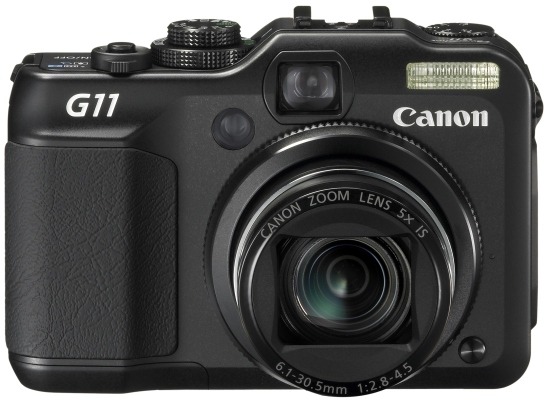
The camera hasn't seen extensive use just yet, so here are a few early impressions. Firstly, there's the matter of size: it's even smaller than the first camera that I ever bought (more than fifteen years ago) and that was a Ricoh 35 mm compact film camera. That comparison is even more striking when you consider the feature sets. The Ricoh was a fixed 35 mm lens affair with things like date and time stamping, ISO choice and a nod towards scenic mode selection. In contrast, the much newer Canon is loaded with the sorts of things that normally are found almost exclusively on SLR's, starting with its effective 28-140 mm focal length range.
Exposure modes such as manual, aperture priority and shutter priority complement scene-based modes and another for movies (not a concern of mine, it has to be said). As if that weren't enough, there's exposure compensation too. It came as a surprise to me to find a form of manual focussing included, though it is not as convenient as turning a focussing ring on a lens. While you can see the inbuilt flash above, there's also a hot shoe and a place to attach a tripod too. Settings like white balance and file format are accessed using the Function/Set button, with the lever underneath the shutter release button controlling the focal length of the lens. In addition, there's also image stabilisation, and that's important when you're using live view to compose a photo. Spot metering and focal point selection are other things that find their way into the package. Some may be excited by other things, but exposure and focussing are essential for any photographic efforts.
An optical viewfinder is included, and it has diopter settings too, but my first impressions are that live view through the rear screen trumps it and I see no need for such things on SLR's. That also flips out from the camera body and can be rotated either for self-portraiture or for folding back in on the camera body for use like a non-articulated screen. Another use is with those occasions when the subject means holding the camera in positions that would be impossible with a conventional screen; holding the camera over your head or down low on the ground are the sorts of situations that come to mind.
Of course, there's more there than those features that I have listed, and the specifications on the Canon website are as good a place to start as any. So far, my only testing has taken the form of cursory checks and to make sure that the thing works properly. Still, this has given me more of a feel for the camera and how it operates. As you'd expect, high ISO settings are noisy, only for a bigger surprise to be that the smallest aperture setting is f/8. Being used to SLR's, I was expecting to get the likes of f/16 on there, but a spot of internet investigation indicated that I should have been taking the size of the sensor into account with my expectations. Any trials so far have been in dull weather, so I'd need to use it in a wider variety of conditions before giving it the sort of wider appraisal that you'd find in the likes of Outdoor Photography (who liked it, it has to be said). For what it's worth, I have found no major criticism so far, though I cannot see it usurping my SLR's not as if that ever was the intention anyway.
Understanding Outlook's 32 KB rule limit: What happens when you upgrade from Outlook 2000 to Outlook 2007
12th January 2010
A move from Outlook 2000 to Outlook 2007 at work before Christmas resulted in deactivated Outlook rules and messages like the following when I tried reactivating them:
One or more rules could not be uploaded to Exchange server and have been deactivated. This could be because some of the parameters are not supported or there is insufficient space to store all your rules.
The cause is a 32 KB size limitation for all rules associated with your Exchange server account before Exchange 2007. With the latter, the default size increases to 64 KB and can be increased further to 256 KB by manual intervention. Though this wouldn't be a big issue if you had the option to store rules locally on your own PC, but that was removed after Outlook 2000, therefore explaining why I first encountered it when I did.
Microsoft has a useful article on their support website containing suggested remedies which aren't all as extreme as deleting some rules either. Consolidation and shortening of rule names are other suggestions, and you should never discount how much space the "run on this machine only" parameter takes up either. Still, Microsoft made an odd design decision that caused this issue, not that it is their first or even last such choice.