ERROR: Invalid value for width specified - width out of range
 8th June 2010
This could be the beginning of a series of error messages from PROC SQL that may appear unclear to a programmer more familiar with Data Step. The cause of my getting the message that heads this posting is that there was a numeric variable with a length less than the default of 8, not the best of situations. Sadly, the message doesn't pinpoint the affected variable, so it took some commenting out of pieces of code before I found the cause of the problem. That's never to say that PROC SQL does not have debugging functionality in the form of FEEDBACK, NOEXEC, _METHOD and _TREE options on the PROC SQL line itself or the validation statement, but neither of these seemed to help in this instance. Still, they're worth keeping in mind for the future, as is SAS Institute's own page on SQL query debugging. Of course, now that I know what might be the cause, a simple PROC SQL report using the dictionary tables should help. The following code should do the needful:
proc sql;
    select memname, name, type, length
        from dictionary.columns
            where libname="DATA" and type="num" and length ne 8;
quit;
A look at Slackware 13.0
5th June 2010
Some curiosity has come upon me and I have been giving a few Linux distros a spin in VirtualBox virtual machines. One was Slackware, which reminds me of a fellow university student using it in the mid/late 1990's. Since then, my exploration took me into Red Hat, SuSE, Mandrake and eventually to Ubuntu, Debian and Fedora. Since all of that bypassed Slackware, it was to give the thing a look.
While the current version is 13.1, it was 13.0 that I had to hand, so I had a go with that. In many ways, the installation was a flashback to the 1990's and I can see it looking intimidating to many computer users with its now old-fashioned installation GUI. If you can see through that, though, the reality is that it isn't too difficult to install.
After all, the DVD was bootable. However, it did leave you at a command prompt and I can see that throwing many. The next step is to use cfdisk to create partitions (at least two are needed, swap and normal). Once that is done, it is time to issue the command setup and things look more graphical again. I picked the item for setting the locale of the keyboard and everything followed from there, but there is a help option too for those who need it. If you have installed Linux before, you'll recognise a lot of what you see. It'll finish off the set-up of disk partitions for you and supports ext4 too; it's best not to let antique impressions fool you. For most of the time, I stuck with the defaults and left it to perform a full installation with KDE as the desktop environment. If there is any real criticism, it is the absence of an overall progress bar to see where it is with package installation.
Once the installation was complete, it was time to restart the virtual machine, and I found myself left at the command prompt. Only the root user was set up during installation, so I needed to add a normal user too. Issuing startx was enough to get me into KDE (along with included alternatives like XFCE, there is a community build using GNOME too) for that, but I wanted to have that loading automatically. To fix that, you need to edit /etc/inittab to change the default run level from 3 to 4 (hint: look for a line with id:3:initdefault: in it near the top of the file and change that; the file is well commented so you can find your way around it easily without having to look for specific esoteric test strings).
After all this, I ended up with a usable Slackware 130.0 installation. Login screens have a pleasing dark theme by default, while the desktop is very blue. There may be no OpenOffice but KOffice is there in its place and Seamonkey is an unusual inclusion along with Firefox. Though it looks as if it'll take a little more time to get to know Slackware, it looks good so far; I may even go about getting 13.1 to see how things might have changed and report my impressions accordingly. Some will complain about the rough edges that I describe here but remarks about using Slackware to learn about Linux persist. Maybe, Linux distributions are like camera film; some are right for you and some aren't. Personally, I wouldn't thrust Slackware upon a new Linux user if they have to install it themselves, but it's not at all bad for that.
If all else fails...
3rd June 2010
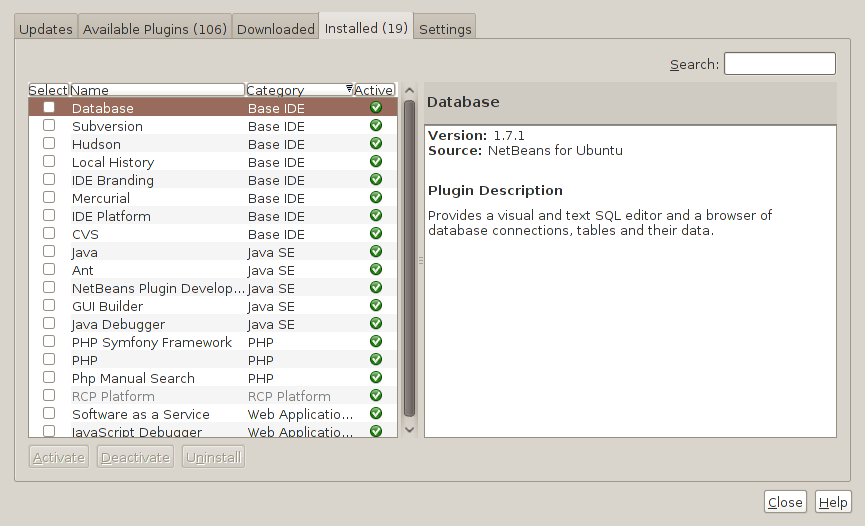
Two problems have come my way that were resolved by removing configuration files and going again. Both affected Linux installations that I have. The Ubuntu installation on my main PC is working well, but I ran into trouble starting up NetBeans 6.8. No GUI would ever appear but taking away the .netbeans folder from my home area allowed a fresh start with the IDE starting up as it should. To date, not all the various projects that I have are restored, but that can be done as I go along. Plugins for PHP development needing reinstatement, but that was another easy thing to achieve; just go to Tools > Plugins on the menus and work with the dialogue box that appears to download and install the needful.
The inspiration for taking the configuration folder from the home area came from needing to address a misadventure with a Debian VM. Perhaps foolishly, I went using gconf-editor on there and messed up the appearance of the terminal window with whatever change I made. Getting rid of the .gconf folder restored order with its recreation by the system. Next time, remembering what changes have been made and reversing them might be the best course of action...
Upgrading to Fedora 13
1st June 2010
After having a spin of Fedora's latest in a VirtualBox virtual machine on my main home PC, I decided to upgrade my Fedora box. First, I needed to battle imperfect Internet speeds to get an ISO image that I could burn to a DVD. Once that was in place, I rebooted the Fedora machine using the DVD and chose the upgrade option to avoid bringing a major upheaval upon myself. You need the full DVD for this because only a full installation is available from Live ISO images and CD's.
Since all was graphical easiness, I got back into Fedora again without a hitch. Along with other bits and pieces, MySQL, PHP and Apache are working as before. If there was any glitch, it was with NetBeans 6.8 because the upgrade from the previous version didn't seem as complete as hoped. However, it was nothing that an update of the open source variant of Java and NetBeans itself couldn't resolve. There may have been untidy poking around before the solution was found, but all has been well since then.
Solving an upgrade hitch en route to Ubuntu 10.04
4th May 2010
After waiting until after a weekend in the Isle of Man, I got to upgrade my main home PC to Ubuntu 10.04. Before the weekend away, I had been updating a 10.04 installation on an old spare PC and that worked fine, so the prospects were good for a similar changeover on the main box. That may have been so, but breaking a computer hardly is the perfect complement to a getaway.
To keep the level of disruption to a minimum, I opted for an in-situ upgrade. The download was left to complete in its own good time, and I returned to attend to installation messages asking me if I wished to retain old logs files for the likes of Apache. When the system asked for reboot at the end of the sequence of package downloading, installation and removal, I was ready to leave it do the needful.
However, I met with a hitch when the machine restarted: it couldn't find the root drive. Live CD's were pressed into service to shed light on what had happened. First up was an old disc for 9.10 before one for 10.04 Beta 1 was used. That identified a difference between the two that was to prove to be the cause of what I was seeing. 10.04 uses /dev/hd*# (/dev/hda1 is an example) nomenclature for everything, including software RAID arrays ("fakeraid"). 9.10 used the /dev/mapper/sil_**************# convention for two of my drives, and I get the impression that the names differ according to the chipset that is used.
During the upgrade process, the one thing that was missed was the changeover from /dev/mapper/sil_**************# to /dev/hd*# in the appropriate places in /boot/grub/menu.lst; look for the lines starting with the word kernel. When I did what the operating system forgot, I was greeted by a screen telling of the progress of checks on one of the system's disks. While that process took a while, a login screen followed, and I had my desktop much as before. The only other thing that I had to do was run gconf-editor from the terminal to send the title bar buttons to the right, where I am accustomed to having them. Since then, I have been working away as before.
Some may decry the lack of change (ImageMagick and UFRaw could do with working together much faster, though) but I'm not complaining; the rough of 9.10 drilled that into me. Nevertheless, I am left wondering how many are getting tripped up by what I encountered, even if it means that Palimpsest (what Ubuntu calls Disk Utility) looks much tidier than it did. Could the same thing be affecting /etc/fstab too? The reason that I don't know the answer to that question is that I changed all hard disk drive references to UUID a while ago, but it's another place to look if the GRUB change isn't fixing things for you. If my memory isn't failing me, I seem to remember seeing /dev/mapper/sil_**************# drive names in there too.
Basic string searching in MySQL table columns
29th April 2010
Last weekend, I ended up doing a spot of file structure reorganisation on the web server for my Assorted Explorations website and needed to correct some file pointers in entries on my outdoors blog. Rather than grabbing a plugin from somewhere, I decided to edit the posts table directly. First, I needed to select the affected observations and this is where I had to pick out the affected rows and edit them in MySQL Query Browser. To accomplish that, I needed basic string searching, so I opened up my MySQL e-book from Apress and constructed something like the following:
select * from posts_table where post_text like '%some_text%';
The % wildcard characters are required to pick out a search string in any part of a piece of text. There may be a more sophisticated method, but this did what I needed in a quick and dirty manner without further ado. Well, it was what I needed.
Shell swapping in Windows: PowerShell and the legacy command prompt
28th April 2010
Until the advent of PowerShell, Windows had been the poor relation when it came to working from the command line when compared with UNIX, Linux and so on. A recent bit of fiddling had me trying to run FTP from the legacy command prompt when I ran into problems with UNC address resolution (it's unsupported by the old technology) and mapping of network drives. It turned out that my error 85 was being caused by an unavailable drive letter that the net use command didn't reveal as being in use. Reassuringly, this wasn't a Vista issue that I couldn't circumvent.
During this spot of debugging, I tried running batch files in PowerShell and discovered that you cannot run them there like you would from the old command prompt. In fact, you need a line like the following:
cmd /c script.bat
In other words, you have to call cmd.exe like perl.exe, wscript.exe and cscript.exe for batch files to execute. If I had time, I might have got to exploring the use ps1 files for setting up PowerShell commandlets, but that is something that needs to wait until another time. What I discovered though is that UNC addressing can be used with PowerShell without the need for drive letter mappings, not a bad development at all. While on the subject of discoveries, I discovered that the following command opens up a command prompt shell from PowerShell without any need to resort to the Start Menu:
cmd /k
Entering the exit command returns you to the PowerShell command line again, and entering cmd /? reveals the available options for the command, so you need never be constrained by your own knowledge or its limitations.
Removing a column from a MySQL data table
19th April 2010
My trying out WordPress 3.0 in advance of its final release has brought me errors on the management page for website links. After a spot of poking around the TRAC, I found that the bug already has been reported and that the cause is an extraneous column in the *_links table called link_category. The change in taxonomy handling over the years seems to have made it redundant, so I removed the said column from the database using a command like the following from both the MySQL command line and MySQL Query Browser:
alter table database.wp_links drop link_category;
That seems to have made those errors go away, and I hope that their upgrade code takes care of this before WordPress 3.0 is let loose of the general blogging public. Taking out the coding brittleness would do too.
Relocating the Apache web server document root directory in Fedora 12
9th April 2010
So as not to deface anything that is available online on the web, I have a tendency to set up an offline Apache server on a home PC to do any tinkering away from the eyes of the unsuspecting public. Though Ubuntu is my mainstay for home computing, I do have a PC with Fedora installed, and I have been trying to get an Apache instance to start automatically on there unsuccessfully for a few months. While I can start it by running the following command as root, I'd rather not have more manual steps than is necessary.
httpd -k start
The command used by the system when it starts is different and, even when manually run as root, it failed with messages saying that it couldn't find the directory while the web server files are stored. Here it is:
service httpd start
The default document root location on any Linux distribution that I have seen is /var/www and all is very well with this, but it isn't a safe place to leave things if ever a re-installation is needed. Having needed to wipe /var after having it on a separate disk or partition for the sake of one installation, it doesn't look so persistent to me. In contrast, you can safeguard /home by having it on another disk or in a dedicated partition, which means that it can be retained even when you change the distro that you're using. Thus, I have got into the habit of having the root of the web server document root folder in my home area, and that is where I have been seeing the problem.
Because of the access message, I tried using chmod and chgrp, but to no avail. The remedy has to do with reassigning the security contexts used by SELinux. In Fedora, Apache will not work with the context user_home_t that is usually associated with home directories, but needs httpd_sys_content_t instead. To find out what contexts are associated with particular folders, issue the following command:
ls -Z
The final solution was to create a user account whose home directory hosts the root of the web server file system, called www in my case. Then, I executed the following command as root to get things going:
chcon -R -h -t httpd_sys_content_t /home/www
It appears that even the root of the home directory has to have an appropriate security context (/home has home_root_t so that might do the needful too). Without that, nothing will work, even if all is well at the next level down. The switches for chcon command translate as follows:
-R : recursive; applies changes to all files and folders within a directory.
-h : changes apply only to symbolic links and not to where they refer in the file system.
-t : alters context type.
It took a while for all of this stuff about SELinux security contexts to percolate through to the point where I was able to solve the problem. A spot of further inspiration was needed too and even guided my search for the information that I needed. It's well worth trying Linux Home Networking if you need further details. Though there are references to an earlier release of Fedora, the content still applies to later versions of Fedora to the current release, if my experience is typical.
Moving application title bar buttons on GNOME desktops
6th March 2010
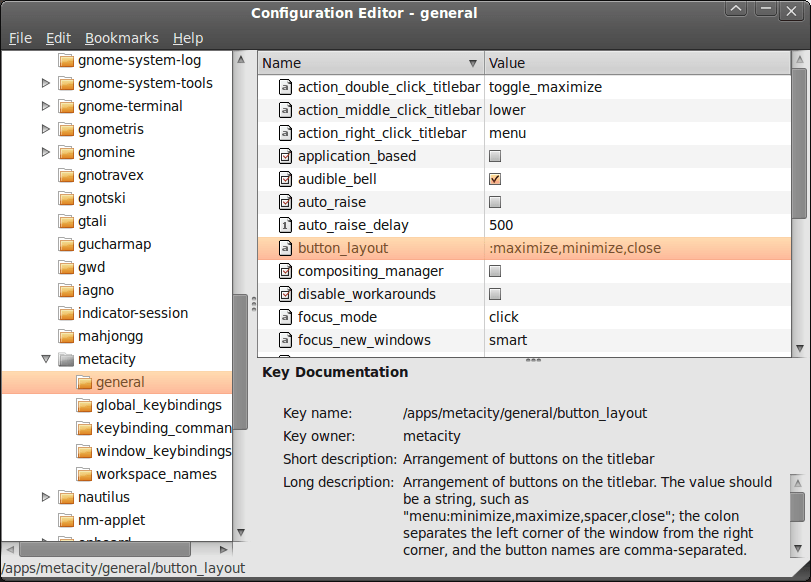
A recent look at how Ubuntu 10.04 development is getting on confronted me with an interface situation to which I am not accustomed: title bar buttons at the left. The usual combination of buttons for maximisation, minimisation and closure were there in their usual order but at the left of the window. While this is the where you find them on OS X, I prefer the Windows convention and placed them to the right again.
To achieve that end, I ran gconf-editor from the command line using my usual user account (not sudo; that doesn't seem to work) and made my way to apps -> metacity -> general. Once there, I sought out the button_layout property and moved the colon in the value from the left to the right. In other words, I started with this:
maximize,minimize,close:
and changed it to this (note the position of the colon in the actual string):
:maximize,minimize,close
If you ever find yourself wanting to change things from the Windows convention to the Apple one, just reverse what I did. As an aside, you also can swap the button order too if you like. After all, it's just a text field that you can edit, and the screen immediately refreshes when you hit the Return key after completing the edit.
As a more general observation, if Ubuntu 10.04 does come out using the OS X convention for title bar button placement, I could see others like wanting it changed back and that's why I am sharing it here. Surprising users in this way, especially after the 9.10 release's attracting some adverse comments, would not be all that advisable. The issue may be easy to address, but that's small comfort when you release how easily users are discouraged.
Nevertheless, 10.04 is an LTS release and what I have seen so far looks polished; there may be no splash screen at boot and shutdown time for what I am running (I am sticking with acquiring upgrades every so often instead of periodic re-installation from a new disk image) but that's a minor matter.
For the sake of not turning over the apple cart, I may have left off VirtualBox Additions, and things look steady enough so far. In fact, I am writing these words using Firefox 3.6 on there. Accompanying that is OpenOffice 3.2, but things do not look so different apart from these, a reassuring observation. While there may be an emphasis on purple in the colour scheme at the time of writing, that could change yet. 9.10's course had plenty of that, so I am willing to be patient. After all, there's more than a month to go yet, before the final cut is available for general use.