TOPIC: WEB DESIGN
position: static?
 12th September 2008
CSS positioning seems to be becoming a nightmare when it comes to IE6 support. While I am aware that the likes of 37signals have stopped making their products work with it, there remain plenty of people who stick or are stuck with the old retainer. I am one of the latter because of the continued use of Windows 2000 at my place of work, though a Windows Vista roll-out has been mooted for a while now. If nothing else, it keeps me in the loop for any inconsistencies that afflict the display of my websites. Positioning of an element within the browser window rather than within its parent element is one of these, and it looks as if specifying a position of relative in a stylesheet is part of this. Apparently, it could be down to its non-triggering of IE's haslayout property. Though it might be a hack, I have found that static positioning has helped. While I'll continue to keep my eye out for a better solution if it exists, the static option seems to have no detrimental effect in IE7, IE8, Firefox, Safari, Chrome or Opera.
New version of my Countrytones plugin
17th July 2008
Now that WordPress 2.6 is out, it is time to introduce a new version of Countrytones to the public. A few CSS tweaks have been needed to the original version after the changes that have been made to the administration interface for 2.6. Those screens still look largely the same with this release as they did before, but for the styling of things like the bubble that alerts you to the availability of plugin upgrades, among other things.
CSS Control of Text Wrapping
11th September 2007
Recently, I spotted a request for a dropdown list like that which you see below. I managed to create it using the CSS, but it only worked for Firefox, so I couldn't suggest it to the requester.
form select, form select option {width: 185px; white-space: normal;}
form select {height: 16px; width: 200px; white-space: normal;}
form {margin: 300px auto 0 auto; width: 300px;}
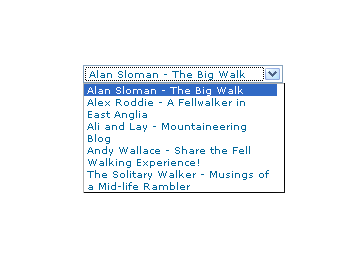
Here's how it looks in Firefox 2:
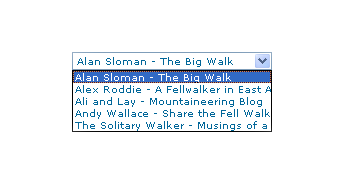
And in IE6:
And in Opera 9:
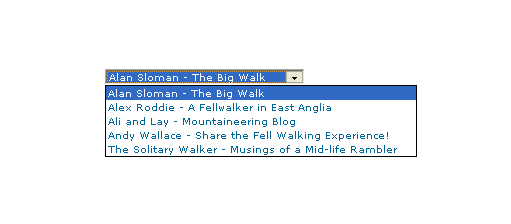
It would be nice if the white-space attribute gave the same result in all three but hey ho... As it happens, the W3C are working up other possible ways of controlling text wrapping in (X)HTML elements, but that's for the future, and I'll be expecting it when I see it.
For menus with wrapped entries, using DHTML menus and DOM scripting seems the best course for now. I suppose that you could always make the entries shorter, which is precisely what I tend to do; I am pragmatic like that. Nevertheless, there's never any harm in attempting to push the boundaries. You just have to come away from the cutting edge at the first sign of bleeding...
Of course, if anyone had other ideas, please let me know.
Are developers and designers overcomplicating their CSS?
11th May 2007
When I have been tweaking the widgets in this blog, the thought crossed my mind that purveyors of open source blogging and CMS's may be overcomplicating matters with the CSS that they are writing. Using inheritance without much thought as to others having to pick it up is one irritation, but bunching styles together can confuse too. For instance, you can draw from two different styles for the same HTML element (it's what's going when you see class="class1 class2" in a tag definition), which is OK if done simply but can confuse matters when customisation is attempted later. Drupal particularly suffers from this bugbear, but it's there on WordPress too, though not to the same extent. Using a hierarchy to define and attach your styles (#id1 .class2 tag1 {style definition...} is the kind of thing that I have in mind), can also confound, even if I admit to finding the approach very useful for myself. I think that I know what's driving this: the need to cut down the bulk of CSS files but using the advanced features that I mentioned above without clear commenting and other documentation hampers later efforts. It would be nice if every developer of a theme to use in blogging or CMS software was forced to document their work extensively and share that documentation with interested users. After all, sharing is the whole purpose of their endeavours...
New theme
31st January 2007
After trying to get WordPress.com to amend the Andreas04 theme and getting nowhere, I decided to jump ship and try the Andreas09 one instead. The permalink titles are more sensible on this one so I'll see what Technorati makes of them. Even though I have had to change theme, the wonders of CSS have allowed me to carry over elements of the colour scheme from the old to the new. If you really want to witness the raw power of CSS, pop over to CSS Zen Garden where the same HTML code is rendered in extraordinarily different ways thanks to CSS. There is even a book written by Dave Shea and Molly Holzschlag to go with the website.