TOPIC: RELATIONAL DATABASE MANAGEMENT SYSTEMS
Some R packages to explore as you find your feet with the language
 24th March 2026
Here are some commonly used R packages and other tools that are pervasive, along with others that I have encountered while getting started with the language, itself becoming pervasive in my line of business. The collection grew organically as my explorations proceeded, and reflects what I was trying out during my acclimatisation.
General
Here are two general packages to get things started, with one of them being unavoidable in the R world. The other is more advanced, possibly offering more to package developers.
You cannot use R without knowing about this collection of packages. In many ways, they form a mini-language of their own, drawing some criticism from those who reckon that base R functionality covers a sufficient gamut anyway. Nevertheless, there is so much here that will get you going with data wrangling and visualisation that it is worth knowing what is possible. The complaints may come from your not needing to use anything else for these purposes.
This R package enables developers to convert existing R functions into web API endpoints by adding roxygen2-like comment annotations to their code. Once annotated, functions can handle HTTP GET and POST requests, accept query string or JSON parameters and return outputs such as plain values or rendered plots. The package is available on CRAN as a stable release, with a development version hosted on GitHub. For deployment, it integrates with DigitalOcean through a companion package called {plumberDeploy}, and also supports Posit Connect, PM2 and Docker as hosting options. Related projects in the same space include OpenCPU, which is designed for hosting R APIs in scientific research contexts, and the now-discontinued jug package, which took a more programmatic approach to API construction.
Data Preparation
You simply cannot avoid working with data during any analysis or reporting work. While there is a learning curve if you are used to other languages, there is little doubt that R is well-endowed when it comes to performing these tasks. Here are some packages that extend base R capabilities and might even add some extra user-friendliness along the way.
The {forcats} package in R provides functions to manage categorical variables by reordering factor levels, collapsing infrequent values and adjusting their sequence based on frequency or other variables. It includes tools such as reordering by another variable, grouping rare categories into 'other' and modifying level order manually, which are useful for data analysis and visualisation workflows. Designed as part of the tidyverse, it integrates with other packages to streamline tasks like counting and plotting categorical data, enhancing clarity and efficiency in handling factors within R.
Around this time last year, I remember completing a LinkedIn course on a set of good practices known as tidy data, where each variable occupies a column, each observation a row and each value a single cell. This package is designed to help users restructure data so it follows those rules. It provides tools for reshaping data between long and wide formats, handling nested lists, splitting or combining columns, managing missing values and layering or flattening grouped data.
Installation options include the {tidyverse} collection, standalone installation, or the development version from GitHub. The package succeeds earlier reshaping tools like {reshape2} and {reshape}, offering a focused approach to tidying data rather than general reshaping or aggregation.
Having a long track record of working with SAS, {haven} with its abilities to read and write data files from statistical software such as SAS, SPSS and Stata, leveraging the ReadStat library, arouses my interest. Handily, it supports a range of file formats, including SAS transport and data files, SPSS system and older portable files and Stata data files up to version 15, converting these into tibbles with enhanced printing capabilities. Value labels are preserved as a labelled class, allowing conversion to factors, while dates and times are transformed into standard R classes.
While there are other approaches to working with databases using R, {RMariaDB} provides a database interface and driver for MariaDB, designed to fully comply with the DBI specification and serve as a replacement for the older {RMySQL} package. It supports connecting to databases using configuration files, executing queries, reading and writing data tables and managing results in chunks. Installation options include binary packages from CRAN or development versions from GitHub, with additional dependencies such as MariaDB Connector/C or libmysqlclient required for Linux and macOS systems. Configuration is typically handled through a MariaDB-specific file, and the package includes acknowledgments for contributions from various developers and organisations.
For many people, the pandemic may be a fading memory, yet it offered its chances for learning R, not least because there was a use case with more than a hint of personal interest about it. Here is a library making it easier to get hold of the data, with some added pre-processing too. Memories of how I needed to wrangle what was published by various sources make me appreciate just how vital it is to have harmonised data for analysis work.
Table Production
While many appear to graphical presentation of results to their tabular display, R does have its options here too. In recent times, the options have improved, particularly of the pharmaverse initiative. Here is a selection of what I found during my explorations.
Part of the {officeverse} along with {officedown}, {Flextable}, {Rvg} and {mschart}, the {officer} R package enables users to create and modify Word and PowerPoint documents directly from R, allowing the insertion of images, tables and formatted content, as well as the import of document content into data frames. It supports the generation of RTF files and integrates with other packages for advanced features such as vector graphics and native office charts. Installation options include CRAN and GitHub, with community resources available for assistance and contributions. The package facilitates the manipulation of document elements like paragraphs, tables and section breaks and provides tools for exporting and importing content between R and office formats, alongside functions for managing slide layouts and embedded objects in presentations.
If you work in clinical research like I do, the need to produce data tabulations is a non-negotiable requirement. That is how this package came to be developed and the pharmaverse of which it is part has numerous other options, should you need to look at using one of those. The flavour of RTF produced here is the Microsoft Word variety, which did not look as well in LibreOffice Writer when I last looked at the results with that open-source alternative. Otherwise, the results look well to many eyes.
Here is a package that enhances data presentation by applying customisable formatting to vectors and data frames, supporting formats such as percentages, currency and accounting. Available on GitHub and CRAN, it integrates with dynamic document tools like {knitr} and {rmarkdown} to produce visually distinct tables, with features including gradient colour scales, conditional styling and icon-based representations. It automatically converts to {htmlwidgets} in interactive environments and is licensed under MIT, enabling flexible use in both static and interactive data displays.
The {reactable} package for R provides interactive data tables built on the React Table library, offering features such as sorting, filtering, pagination, grouping with aggregation, virtual scrolling for large datasets and support for custom rendering through R or JavaScript. It integrates seamlessly into R Markdown documents and Shiny applications, enabling the use of HTML widgets and conditional styling. Installation options include CRAN and GitHub, with examples demonstrating its application across various datasets and scenarios. The package supports major web browsers and is licensed under MIT, designed for developers seeking dynamic data presentation tools within the R ecosystem.
Particularly useful in dynamic web applications like Shiny, the {DT} package in R provides a means of rendering interactive HTML tables by building on the DataTables JavaScript library. It supports features including sorting, searching, pagination and advanced filtering, with numeric, date and time columns using range-based sliders whilst factor and character columns rely on search boxes or dropdowns. Filtering operates on the client side by default, though server-side processing is also available. JavaScript callbacks can be injected after initialisation to manipulate table behaviour, such as enabling automatic page navigation or adding child rows to display additional detail. HTML content is escaped by default as a safeguard against cross-site scripting attacks, with the option to adjust this on a per-column basis. Whilst the package integrates with Shiny applications, attention is needed around scrolling and slider positioning to prevent layout problems. Overall, the package is well suited to exploratory data analysis and the building of interactive dashboards.
The {gt} package in R enables users to create well-structured tables with a variety of formatting options, starting from data frames or tibbles and incorporating elements such as headers, footers and customised column labels. It supports output in HTML, LaTeX and RTF formats and includes example datasets for experimentation. The package prioritises simplicity for common tasks while offering advanced functions for detailed customisation, with installation available via CRAN or GitHub. Users can access resources like documentation, community forums and example projects to explore its capabilities, and it is supported by a range of related packages that extend its functionality.
Enabling users to produce publication-ready outputs with minimal code, the {gtsummary} package offers a streamlined approach to generating analytical and summary tables in R. It automates the summarisation of data frames, regression models and other datasets, identifying variable types and calculating relevant statistics, including measures of data incompleteness. Customisation options allow for formatting, merging and styling tables to suit specific needs, while integration with packages such as {broom} and {gt} facilitates seamless incorporation into R Markdown workflows. The package supports the creation of side-by-side regression tables and provides tools for exporting results as images, HTML, Word, or LaTeX files, enhancing flexibility for reporting and sharing findings.
Here is an R package designed to generate LaTeX and HTML tables with a modern, user-friendly interface, offering extensive control over styling, formatting, alignment and layout. It supports features such as custom borders, padding, background colours and cell spanning across rows or columns, with tables modifiable using standard R subsetting or dplyr functions. Examples demonstrate its use for creating simple tables, applying conditional formatting and producing regression output with statistical details. The package also facilitates quick export to formats like PDF, DOCX, HTML and XLSX. Installation options include CRAN, R-Universe and GitHub, while the name reflects its origins as an enhanced version of the {xtable} package. The logo was generated using the package itself, and the background design draws inspiration from Piet Mondrian’s artwork.
Figure Generation
R has such a reputation for graphical presentations that it is cited as a strong reason to explore what the ecosystem has to offer. While base R itself is not shabby when it comes to creating graphs and charts, these packages will extend things by quite a way. In fact, the first on this list is near enough pervasive.
Though its default formatting does not appeal to me, the myriad of options makes this a very flexible tool, albeit at the expense of some code verbosity. Multi-panel plots are not among its strengths, which may send you elsewhere for that need.
Focusing on features not included in the core library, the {ggforce} package extends {ggplot2} by offering additional tools to enhance data visualisation. Designed to complement the primary role of {ggplot2} in exploratory data analysis, it provides a range of geoms, stats and other components that are well-documented and implemented, aiming to support more complex and custom plot compositions. Available for installation via CRAN or GitHub, the package includes a variety of functionalities described in detail on its associated website, though specific examples are not included here.
Developed by Claus O. Wilke for internal use in his lab, {cowplot} is an R package designed to help with the creation of publication-quality figures built on top of {ggplot2}. It provides a set of themes, tools for aligning and arranging plots into compound figures and functions for annotating plots or combining them with images. The package can be installed directly from CRAN or as a development version via GitHub, and it has seen widespread use in the book Fundamentals of Data Visualisation.
The {sjPlot} package provides a range of tools for visualising data and statistical results commonly used in social science research, including frequency tables, histograms, box plots, regression models, mixed effects models, PCA, correlation matrices and cluster analyses. It supports installation via CRAN for stable releases or through GitHub for development versions, with documentation and examples available online. The package is licensed under GPL-3 and developed by Daniel Lüdecke, offering functions to create visualisations such as scatter plots, Likert scales and interaction effect plots, along with tools for constructing index variables and presenting statistical outputs in tabular formats.
By offering a centralised approach to theming and enabling automatic adaptation of plot styles within Shiny applications, the {thematic} package simplifies the styling of R graphics, including {ggplot2}, {lattice} and base R plots, R Markdown documents and RStudio. It allows users to apply consistent visual themes across different plotting systems, with auto-theming in Shiny and R Markdown relying on CSS and {bslib} themes, respectively. Installation requires specific versions of dependent packages such as {shiny} and {rmarkdown}, while custom fonts benefit from {showtext} or {ragg}. Users can set global defaults for background, foreground and accent colours, as well as fonts, which can be overridden with plot-specific theme adjustments. The package also defines default colour scales for qualitative and sequential data and integrates with tools like bslib to import Google Fonts, enhancing visual consistency across different environments and user interfaces.
Publishing Tools
The R ecosystem goes beyond mere graphical and tabular display production to offer means for taking things much further, often offering platforms for publishing your work. These can be used locally too, so there is no need to entrust everything to a third-party provider. The uses are endless for what is available, and it appears that Posit has used this to help with building documentation and training too.
What you have here is one of those distinguishing facilities of the R ecosystem, particularly for those wanting to share their analysis work with more than a hint of reproducibility. The tool combines narrative text and code to generate various outputs, supporting multiple programming languages and formats such as HTML, PDF and dashboards. It enables users to produce reports, presentations and interactive applications, with options for publishing and scheduling through platforms like RStudio Connect, facilitating collaboration and distribution of results in professional settings.
Distill for R Markdown is a tool designed to streamline the creation of technical documents, offering features such as code folding, syntax highlighting and theming. It builds on existing frameworks like Pandoc, MathJax and D3, enabling the production of dynamic, interactive content. Users can customise the appearance with CSS and incorporate appendices for supplementary information. The tool acknowledges the contributions of developers who created foundational libraries, ensuring accessibility and functionality for a wide audience. Its design prioritises clarity, allowing authors to focus on presenting results rather than underlying code, while maintaining flexibility for those who wish to include detailed explanations.
For a while, this was one of R's unique selling points, and remains as compelling a reason to use the language even when Python has got its own version of the package. Enabling the creation of interactive web applications for data analysis without requiring web development expertise allows users to build interfaces that let others explore data through dynamic visualisations and filters. Here is a simple example: an app that generates scatter plots with adjustable variables, species filters and marginal plots, hosted either on personal servers or through a dedicated hosting service.
The {bslib} R package offers a modern user interface toolkit for Shiny and R Markdown applications, leveraging Bootstrap to enable the creation of customisable dashboards and interactive theming. It supports the use of updated Bootstrap and Bootswatch versions while maintaining compatibility with existing defaults, and provides tools for real-time visual adjustments. Installation is available through CRAN, with example previews demonstrating its capabilities.
Enabling users to manipulate and validate data within a spreadsheet-like interface, the {rhandsontable} package introduces an interactive data grid for R. It supports features such as custom cell rendering, validation rules and integration with Shiny applications. When used in Shiny, the widget requires explicit conversion of data using the hot_to_r function, as updates may not be immediately reflected in reactive contexts. Examples demonstrate its application in various scenarios, including date editing, financial calculations and dynamic visualisations linked to charts. The package also accommodates bookmarks in Shiny apps with specific handling. Users are encouraged to report issues or contribute improvements, with guidance provided for those seeking to expand its functionality. The development team welcomes feedback to refine the tool further, ensuring it aligns with evolving user needs.
{xaringanExtra} offers a range of enhancements and extensions for creating and presenting slides with xaringan, enabling features such as adding an overview tile view, making slides editable, broadcasting in real time, incorporating animations, embedding live video feeds and applying custom styles. It allows users to selectively activate individual tools or load multiple features simultaneously through a single function call, supporting tasks like adding banners, enabling code copying, fitting slides to screen dimensions and integrating utility toolkits. The package is available for installation via CRAN or GitHub, providing flexibility for developers and presenters seeking to expand the functionality of their slides.
Using the LIKE operator in PROC SQL WHERE clauses in SAS
26th November 2025
Recently, I was working in SAS and decided to trying picking out datasets and variables from its dictionary tables, eventually picking out the maximum length of a variable type for assigning the length of a new variable. This could have been done using a long-established technique:
proc sql;
    select distinct memname into :dsns separated by '#'
        from dictionary.tables
            where lowcase(libname) = 'work'
            and index(lowcase(memname), "r_") = 1
            and index(lowcase(memname), "visit") = 0;
quit;
The result is that it creates a macro variable containing a delimited list of work datasets with names beginning with r_ and not containing the string visit. As well as using the index function to find the placing of one string within another, I have seen the count function used for similar purposes, albeit without the placement specificity. Since the =: operator which looks for a search string at the start of a larger is not something that works in SQL (data step is more than fine), you cannot do something like this:
proc print data = sashelp.vmember noobs;
    where lowcase(libname) = 'work'
    and lowcase(memname) =: "r_";
run;
While the contains operator works similarly to the count function when it comes to search text positioning, yet another option is the like operator, and that is shown in the example below:
proc sql;
    select distinct memname into :dsns separated by '#'
        from dictionary.tables
            where lowcase(libname) = 'work'
            and lowcase(memname) like 'r\_%' escape '\'
            and lowcase(memname) not like '%visit%';
quit;
Here, % and _ are placeholder characters, with the first matching zero or more characters and the second matching one character. Thus, the underscore in r_ needs escaping to look for that pattern (otherwise, it will look for the letter r at the start of a string and a single character after it) and a backslash character (\) will cover that duty. To ensure that it does what you want, adding escape '\' after the expression tells SAS what is happening.
Another thing to watch is that the percent (%) character needs a form escaping from the SAS Macro language processor, and placing the search term in single quotes attends to that. That means that %visit% does not cause any errors when you are looking for visit within a dataset name and using negation (the not operator) to exclude that possibility from the search results. However, using _%visit% might be a better pattern for finding visit at the end of a name, though.
Should you wish to play around with the above to see what happens for your own learning, try using something like this to give you a few test datasets:
data r_test r_visit visit;
    set sashelp.class;
run;
Otherwise, feel free to add your own test cases to cement the ideas even further. All too often, we look up something, deploy it and then forget about, especially when AI is involved. Nevertheless, the fastest way to write code can be to use what is embedded in your memory.
An Overview of MCP Servers in Visual Studio Code
29th August 2025
Agent mode in Visual Studio Code now supports an expanding ecosystem of Model Context Protocol servers that equip the editor’s built-in assistant with practical tools. By installing these servers, an agent can connect to databases, invoke APIs and perform automated or specialised operations without leaving the development environment. The result is a more capable workspace where routine tasks are streamlined, and complex ones are broken into more manageable steps. The catalogue spans developer tooling, productivity services, data and analytics, business platforms, and cloud or infrastructure management. If something you rely on is not yet present, there is a route to suggest further additions. Guidance on using MCP tools in agent mode is available in the documentation, and the Command Palette, opened with Ctrl+Shift+P, remains the entry point for many workflows.
The servers in the developer tools category concentrate on everyday software tasks. GitHub integration brings repositories, issues and pull requests into reach through a secure API, so that code review and project coordination can continue without switching context. For teams who use design files as a source of truth, Figma support extracts UI content and can generate code from designs, with the note that using the latest desktop app version is required for full functionality. Browser automation is covered by Playwright from Microsoft, which drives tests and data collection using accessibility trees to interact with the page, a technique that often results in more resilient scripts. The attention to quality and reliability continues with Sentry, where an agent can retrieve and analyse application errors or performance issues directly from Sentry projects to speed up triage and resolution.
The breadth of developer capability extends to machine learning and code understanding. Hugging Face integration provides access to models, datasets and Spaces on the Hugging Face Hub, which is useful for prototyping, evaluation or integrating inference into tools. For source exploration beyond a single repository, DeepWiki by Kevin Kern offers querying and information extraction from GitHub repositories indexed on that service. Converting documents is handled by MarkItDown from Microsoft, which takes common files like PDF, Word, Excel, images or audio and outputs Markdown, unifying content for notes, documentation or review. Finding accurate technical guidance is eased by Microsoft Docs, a Microsoft-provided server that searches Microsoft Learn, Azure documentation and other official technical resources. Complementing this is Context7 from Upstash, which returns up-to-date, version-specific documentation and code examples from any library or framework, an approach that addresses the common problem of answers drifting out of date as software evolves.
Visual assets and code health have their own role. ImageSorcery by Sunrise Apps performs local image processing tasks, including object detection, OCR, editing and other transformations, a capability that supports anything from quick asset tweaks to automated checks in a content pipeline. Codacy completes the developer picture with comprehensive code quality and security analysis. It covers static application security testing, secrets detection, dependency scanning, infrastructure as code security and automated code review, which helps teams maintain standards while moving quickly.
Productivity services focus on planning, tracking and knowledge capture. Notion’s server allows viewing, searching, creating and updating pages and databases, meaning an agent can assemble notes or checklists as it progresses. Linear integration brings the ability to create, update and track issues in Linear’s project management platform, reflecting a growing preference for lightweight, developer-centred planning. Asana support provides task and project management together with comments, allowing multi-team coordination. Atlassian’s server connects to Jira and Confluence for issue tracking and documentation, which suits organisations that rely on established workflows for governance and audit trails. Monday.com adds another project management option, with management of boards, items, users, teams and workspace operations. These capabilities sit alongside automation from Zapier, which can create workflows and execute tasks across more than 30,000 connected apps to remove repetitive steps and bind systems together when native integrations are limited.
Two Model Context Protocol utilities add cognitive structure to how the agent works. Sequential Thinking helps break down complex tasks into manageable steps with transparent tracking, so progress is visible and revisable. Memory provides long-lived context across sessions, allowing an agent to store and retrieve relevant information rather than relying on a single interaction. Together, they address the practicalities of working on multi-stage tasks where recalling decisions, constraints or partial results is as important as executing the next action. Used with the productivity servers, these tools underpin a systematic approach to projects that span hours or days.
The data and analytics group is comprehensive, stretching from lightweight local analysis to cloud-scale services. DuckDB by Kentaro Tanaka enables querying and analysis of DuckDB databases both locally and in the cloud, which suits ad hoc exploration as well as embedded analytics in applications. Neon by neondatabase labs provides access to Postgres with the notable addition of natural language operations for managing and querying databases, which lowers the barrier to occasional administrative tasks. Prisma Postgres from Prisma brings schema management, query execution, migrations and data modelling to the agent, supporting teams who already use Prisma’s ORM in their applications. MongoDB integration supports database operations and management, with the ability to execute queries, manage collections, build aggregation pipelines and perform document operations, allowing front-end and back-end tasks to be coordinated through a single interface.
Observability and product insight are also represented. PostHog offers analytics access for creating annotations and retrieving product usage insights so that changes can be correlated with user behaviour. Microsoft Clarity provides analytics data including heatmaps, session recordings and other user behaviour insights that complement quantitative metrics and highlight usability issues. Web data collection has two strong options. Apify connects the agent with Apify’s Actor ecosystem to extract data from websites and automate broader workflows built on that platform. Firecrawl by Mendable focuses on extracting data from websites using web scraping, crawling and search with structured data extraction, a combination that suits building datasets or feeding search indexes. These tools bridge real-world usage and the development cycle, keeping decision-making grounded in how software is experienced.
The business services category addresses payments, customer engagement and web presence. Stripe integration allows the creation of customers, management of subscriptions and generation of payment links through Stripe APIs, which is often enough to pilot monetisation or administer accounts. PayPal provides the ability to create invoices, process payments and access transaction data, ensuring another widely used channel can be managed without bespoke scripts. Square rounds out payment options with facilities to process payments and manage customers across its API ecosystem. Intercom support brings access to customer conversations and support tickets for data analysis, allowing an agent to summarise themes, surface follow-ups or route issues to the right place. For building and running sites, Wix integration helps with creating and managing sites that include e-commerce, bookings and payment features, while Webflow enables creating and managing websites, collections and content through Webflow’s APIs. Together, these options cover a spectrum of online business needs, from storefronts to content-led marketing.
Cloud and infrastructure operations are often the backbone of modern projects, and the MCP catalogue reflects this. Convex provides access to backend databases and functions for real-time data operations, making it possible to work with stateful server logic directly from agent mode. Azure integration supports management of Azure resources, database queries and access to Azure services so that provisioning, configuration and diagnostics can be performed in context. Azure DevOps extends this to project and release processes with management of projects, work items, repositories, builds, releases and test plans, providing an end-to-end view for teams invested in Microsoft’s tooling. Terraform from HashiCorp introduces infrastructure as code management, including plan, apply and destroy operations, state management and resource inspection. This combination makes it feasible to review and adjust infrastructure, coordinate deployments and correlate changes with code or issue history without switching tools.
These servers are designed to be installed like other VS Code components, visible from the MCP section and accessible in agent mode once configured. Many entries provide a direct route to installation, so setup friction is limited. Some include specific requirements, such as Figma’s need for the latest desktop application, and all operate within the Model Context Protocol so that the agent can call tools predictably. The documentation explains usage patterns for each category, from parameterising database queries to invoking external APIs, and clarifies how capabilities appear inside agent conversations. This is useful for understanding the scope of what an agent can do, as well as for setting boundaries in shared environments.
In day-to-day use, the value comes from combining servers to match a workflow. A developer investigating a production incident might consult Sentry for errors, query Microsoft Docs for guidance, pull related issues from GitHub and draft changes to documentation with MarkItDown after analysing logs held in DuckDB. A product manager could retrieve usage insights from PostHog, review session recordings in Microsoft Clarity, create follow-up tasks in Linear and brief customer support by summarising Intercom conversations, all while keeping a running Memory of key decisions. A data practitioner might gather inputs from Firecrawl or Apify, store intermediates in MongoDB, perform local analysis in DuckDB and publish a report to Notion, building a repeatable chain with Zapier where steps can be automated. In infrastructure scenarios, Terraform changes can be planned and applied while Azure resources are inspected, with release coordination handled through Azure DevOps and updates documented in Confluence via the Atlassian server.
Security and quality concerns are woven through these flows. Codacy can evaluate code for vulnerabilities or antipatterns as changes are proposed, surfacing SAST findings, secrets detection problems or dependency risks before they progress. Stripe, PayPal and Square centralise payment operations to a few well-audited APIs rather than bespoke integrations, which reduces surface area and simplifies auditing. For content and data ingestion, ImageSorcery ensures that image transformations occur locally and MarkItDown produces traceable Markdown outputs from disparate file types, keeping artefacts consistent for reviews or archives. Sequential Thinking helps structure longer tasks, and Memory preserves context so that actions are explainable after the fact, which is helpful for compliance as well as everyday collaboration.
Discoverability and learning resources sit close to the tools themselves. The Visual Studio Code website’s navigation surfaces areas such as Docs, Updates, Blog, API, Extensions, MCP, FAQ and Dev Days, while the Download path remains clear for new installations. The MCP area groups servers by capability and links to documentation that explains how agent mode calls each tool. Outside the product, the project’s presence on GitHub provides a route to raise issues or follow changes. Community activity continues on channels including X, LinkedIn, Bluesky and Reddit, and there are broadcast updates through the VS Code Insiders Podcast, TikTok and YouTube. These outlets provide context for new server additions, changes to the protocol and examples of how teams are putting the pieces together, which can be as useful as the tools themselves when establishing good practices.
It is worth noting that the catalogue is curated but open to expansion. If there is an MCP server that you expect to see, there is a path to suggest it, so gaps can be addressed over time. This flows from the protocol’s design, which encourages clean interfaces to external systems, and from the way agent mode surfaces capabilities. The cumulative effect is that the assistant inside VS Code becomes a practical co-worker that can search documentation, change infrastructure, file issues, analyse data, process payments or summarise customer conversations, all using the same set of controls and the same context. The common protocol keeps these interactions predictable, so adding a new server feels familiar even when the underlying service is new.
As the ecosystem grows, the connection between development work and operations becomes tighter, and the assistant’s job is less about answering questions in isolation than orchestrating tools on the developer’s behalf. The MCP servers outlined here provide a foundation for that shift. They encapsulate the services that many teams already rely on and present them inside agent mode so that work can continue where the code lives. For those getting started, the documentation explains how to enable the tools, the Command Palette offers quick access, and the community channels provide a steady stream of examples and updates. The result is a VS Code experience that is better equipped for modern workflows, with MCP servers supplying the functionality that turns agent mode into a practical extension of everyday work.
Dealing with Error 1064 in MySQL queries
27th April 2023
Recently, I was querying a MySQL database table and got a response like the following:
ERROR 1064 (42000): You have an error in your SQL syntax; check the manual that corresponds to your MySQL server version for the right syntax to use
The cause was that one of the data column columns was named using the MySQL reserved word key. While best practice is not to use reserved words like this at all, this was not something that I could alter. Therefore, I enclosed the offending keyword in backticks (`) to make the query work.
There is more information in the MySQL documentation on Schema Object Names and on Keywords and Reserved Words for dealing with or avoiding this kind of situation. While I realise that things change over time and that every implementation of SQL is a little different, it does look as if not using established keywords should be a minimum expectation when any database tables get created.
Disabling the SSL connection requirement in MySQL Workbench
7th November 2022
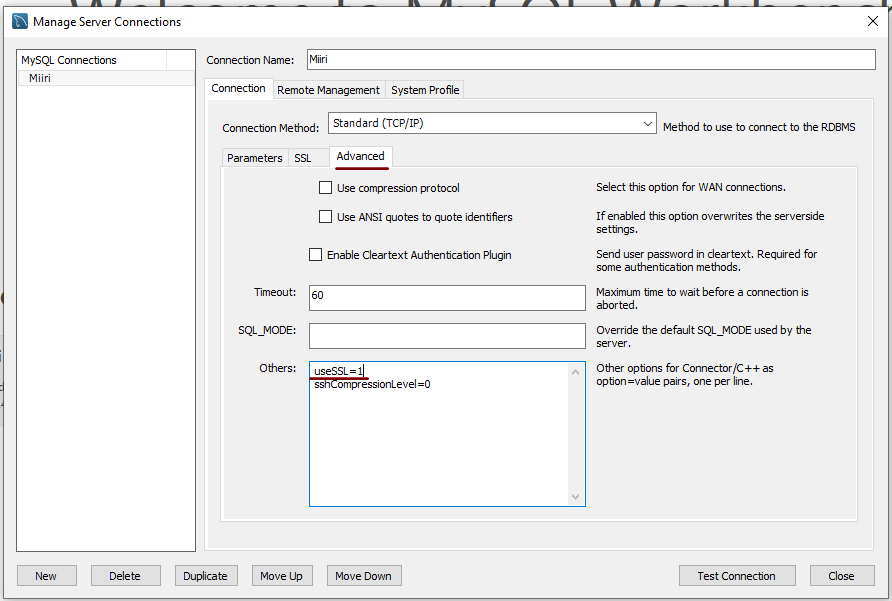
A while ago, I found that MySQL Workbench would only use SSL connections and that was stopping it from connecting to local databases. Thus, I looked for a way to override this: the cure was to go to Database > Manage Connections... in the menus for the application's home tab. In the dialogue box that appeared, I chose the connection of interest and went to the Advanced panel under Connection and removed the line useSSL=1 from the Others field. The screenshot below shows you what things looked like before the change was made. Naturally, the best practice would be to secure a remote database connection using SSL, so this approach is best reserved for remote non-production databases. While it may be that this does not happen now, I thought I would share this in case the problem persists for anyone.
Controlling display of users on the logon screen in Linux Mint 20.3
15th February 2022
Recently, I tried using Commento with a static website that I was developing and this needed PostgreSQL rather than MySQL or MariaDB, which many content management tools use. That meant a learning curve that made me buy a book, as well as the creation of a system account for administering PostgreSQL. These are not the kind of things that you want to be too visible, so I wanted to hide them.
Since Linux Mint uses AccountsService, you cannot use lightdm to do this (the comments in /etc/lightdm/users.conf suggest as much). Instead, you need to go to /var/lib/AccountsService/users and look for a file called after the username. If one exists, all that is needed is for you to add the following line under the [User] section:
SystemAccount=true
If there is no file present for the user in question, then you need to create one with the following lines in there:
[User]
SystemAccount=true
Once the configuration files are set up as needed, AccountsService needs to be restarted and the following command does that deed:
sudo systemctl restart accounts-daemon.service
Logging out should reveal that the user in question is not listed on the logon screen as required.
Setting up MySQL on Sabayon Linux
27th September 2012
For quite a while now, I have offline web servers for doing a spot of tweaking and tinkering away from the gaze of web users that visit what I have on there. Therefore, one of the tests that I apply to any prospective main Linux distro is the ability to set up a web server on there. This is more straightforward for some than for others. For Ubuntu and Linux Mint, it is a matter of installing the required software and doing a small bit of configuration. My experience with Sabayon is that it needs a little more effort than this, so I am sharing it here for the installation of MySQL.
The first step is to install the software using the commands that you find below. The first pops the software onto the system while the second completes the set-up. The --basedir option is need with the latter because it won't find things without it. It specifies the base location on the system, and it's /usr in my case.
sudo equo install dev-db/mysql

sudo /usr/bin/mysql_install_db --basedir=/usr
With the above complete, it's time to start the database server and set the password for the root user. That's what the two following commands achieve. Once your root password is set, you can go about creating databases and adding other users using the MySQL command line
sudo /etc/init.d/mysql start

mysqladmin -u root password 'password'
The last step is to set the database server to start every time you start your Sabayon system. The first command adds an entry for MySQL to the default run level so that this happens. The purpose of the second command is to check that this happened before restarting your computer to discover if it really happens. This procedure also is necessary for having an Apache web server behave in the same way, so the commands are worth having and even may have a use for other services on your system. ProFTP is another that comes to mind, for instance.
sudo rc-update add mysql default

sudo rc-update show | grep mysql
ERROR: Ambiguous reference, column xx is in more than one table.
5th May 2012
Sometimes, SAS messages are not all that they seem, and a number of them are issued from PROC SQL when something goes awry with your code. In fact, I got a message like the above when ordering the results of the join using a variable that didn't exist in either of the datasets that were joined. This type of thing has been around for a while (I have been using SAS since version 6.11, and it was there then) and it amazes me that we haven't seen a better message in more recent versions of SAS; it was SAS 9.2 where I saw it most recently.
proc sql noprint;
    select a.yy, a.yyy, b.zz
        from a left join b
            on a.yy=b.yy
                order by xx;
quit;
ERROR: Invalid value for width specified - width out of range
8th June 2010
This could be the beginning of a series of error messages from PROC SQL that may appear unclear to a programmer more familiar with Data Step. The cause of my getting the message that heads this posting is that there was a numeric variable with a length less than the default of 8, not the best of situations. Sadly, the message doesn't pinpoint the affected variable, so it took some commenting out of pieces of code before I found the cause of the problem. That's never to say that PROC SQL does not have debugging functionality in the form of FEEDBACK, NOEXEC, _METHOD and _TREE options on the PROC SQL line itself or the validation statement, but neither of these seemed to help in this instance. Still, they're worth keeping in mind for the future, as is SAS Institute's own page on SQL query debugging. Of course, now that I know what might be the cause, a simple PROC SQL report using the dictionary tables should help. The following code should do the needful:
proc sql;
    select memname, name, type, length
        from dictionary.columns
            where libname="DATA" and type="num" and length ne 8;
quit;
Further securing MySQL in Fedora
4th December 2009
Ubuntu users must be spoilt because any MySQL installation asks you for a root password, an excellent thing in my opinion. With Fedora, it just pops the thing on there with you needing to set up a service and setting the root password yourself; if I recall correctly, I think that openSUSE does the same thing. For the service management, I needed to grab system-config-services from the repositories because my Live CD installation left off a lot of stuff, OpenOffice and GIMP even. The following command line recipe addressed the service manager omission:
su - # Change to root, entering password when asked

yum -y install system-config-services # Installs the thing without a yes/no prompt

exit # Return to normal user shell
Thereafter, the Services item from the menus at System > Administration was pressed into service and the MySQL service enabled and started. The next step was to lock down the root user, so the following sequence was used:
mysql # Enter MySQL prompt; no need for user or password because it still is unsecured!

UPDATE mysql.user SET Password=PASSWORD('MyNewPass') WHERE User='root';

FLUSH PRIVILEGES;

quit # Exit the mysql prompt, leaving the bare mysql command unusable
For those occasions when password problems keep you out of the MySQL shell, you'll find password resetting advice on the MySQL website, though I didn't need to go the whole hog here. MySQL Administrator might be another option for this type of thing. That thought never struck me while I was using it to set up less privileged users and allowing them access to the system. For a while, I was well stymied in my attempts to access the MySQL using any of those extra accounts until I got the idea of associating them with a host, another thing that is not needed on Ubuntu if my experience is any guide. All in all, Fedora may make you work a little extra to get things like thing done, yet I am not complaining if it makes you understand a little more about what is going on in the background, something that is never a disadvantage.