TOPIC: IBM
Docling, MarkItDown and Textract: Understanding the New Document-Processing Landscape
 3rd June 2026
The growing use of large language models has changed the way many organisations think about documents. Reports, manuals, protocols, spreadsheets, presentations and scanned PDFs are no longer just files to be opened by a person; they are also sources of knowledge that can feed search systems, retrieval-augmented generation workflows and internal knowledge bases.
This shift has brought renewed attention to a practical problem that long predates the current AI boom. Documents are often rich in structure, yet many extraction tools reduce them to plain text, and once headings, tables, figures, captions and reading order are discarded, the resulting output can become difficult for humans to review and even harder for an AI system to use reliably.
Docling, MarkItDown and Textract all sit in this space, but they approach the problem from different directions. Textract is rooted in general-purpose text extraction, MarkItDown focuses on producing Markdown for text-analysis workflows and Docling aims to build a richer understanding of document structure.
Why Document Conversion Matters for AI Systems
A PDF, Word document or spreadsheet may look orderly on screen, yet that order is not always easy to recover programmatically. A human reader can see that a line of text is a heading, that a table belongs to a section or that a caption describes a nearby figure, while a simple text extractor may see only a stream of characters.
That difference matters when documents are used with large language models. If a technical manual, financial report or policy document is flattened into undifferentiated text, a search system may retrieve the wrong passage or miss the relationship between a table and its surrounding explanation. Retrieval-augmented generation depends not only on having the right words in an index, but also on preserving enough context for those words to remain meaningful.
Markdown and structured JSON have therefore become important intermediate formats. Markdown is close to plain text, but it can still represent headings, tables, links and lists in a compact way. JSON can go further by encoding document hierarchy, page-level information and other metadata for downstream processing.
Docling and Document Understanding
Docling is an open-source Python toolkit designed to convert and understand documents for AI-oriented workflows. It was initially developed by IBM's AI for Knowledge team at IBM Research Zurich, open-sourced in July 2024 and is now hosted under the LF AI & Data Foundation (part of the Linux Foundation), following IBM's formal contribution of the project to the foundation on 29th April 2025. Its purpose is not merely to extract text, but to preserve structure and meaning in a form that can be used by search systems, knowledge extraction tools and retrieval-augmented generation pipelines.
A simple way to describe Docling is to place it between raw documents and a language model. Instead of treating a document as a block of text, it attempts to identify headings, document hierarchy, tables, figures, captions, formulas, code blocks, reading order and page layout information. This is particularly important for PDFs, where the visual appearance of a page can hide a complicated underlying structure.
Docling supports parsing for PDF, DOCX, PPTX, XLSX, HTML, WAV, MP3 and image formats, as well as several application-specific XML schemas including USPTO patents, JATS articles and XBRL financial reports, making it relevant well beyond ordinary office files.
The project's outputs are also designed for modern AI pipelines. Docling can export to Markdown, HTML, WebVTT, DocTags and lossless JSON, while its internal DoclingDocument representation provides a unified model of the parsed material. This gives developers a way to move from a PDF or other source file to a structured representation that is easier to chunk, index and query.
Its PDF capabilities are among the main reasons it has drawn attention. The documentation highlights advanced PDF understanding, including page layout, reading order, table structure, code, formulas and image classification. It also includes extensive OCR support for scanned PDFs and images, support for several visual language models under the GraniteDocling name and audio support using automatic speech recognition models.
Docling is also designed to fit into the wider generative AI ecosystem. Its integrations include LangChain, LlamaIndex, CrewAI and Haystack for agentic AI, and it supports local execution for sensitive data and air-gapped environments. The ability to run entirely on local hardware is important where sending files to an external service is not acceptable.
A typical installation begins with pip install docling. A simple conversion in Python uses DocumentConverter from docling.document_converter, then calls converter.convert("study_report.pdf") and exports the result with result.document.export_to_markdown(). The resulting Markdown can then be used in a search index, vector database or language-model workflow.
Textract and Traditional Text Extraction
Textract, in this context, refers to the Python package named textract and not Amazon Textract, which is a separate, cloud-hosted service. Its philosophy is much simpler than Docling's: give it a file and receive extracted text. The package provides both a command-line interface (for example, textract path/to/file.extension) and a Python interface using textract.process("path/to/file.extension").
The Textract documentation describes the problem it addresses as one of recovering useful information from "dark data" embedded in Word documents, PowerPoint presentations, PDFs and other files, providing a single interface across many formats, which has long been useful for natural language processing and textual analysis. Its design is method-agnostic, meaning it wraps different tools and libraries depending on the file type.
Textract supports many formats through a variety of underlying systems. Its documentation mentions CSV, TSV, DOC, DOCX, EML, EPUB, GIF, JPG, JSON, HTML, MP3, MSG, ODT, OGG, PDF, PNG, PPTX, PostScript, RTF, TIFF, TXT, WAV, XLSX and XLS. DOC files may be processed through antiword, DOCX through python-docx2txt, images through tesseract-ocr, PDFs through pdftotext by default (or pdfminer.six) and audio through tools such as sox, SpeechRecognition and pocketsphinx.
This broad format support is useful, but Textract was not designed specifically for the current generation of RAG and LLM systems. Its goal is text extraction rather than document understanding, meaning it may retrieve text effectively from many sources, but it does not build a rich document model and has limited awareness of tables, layout, semantic sections or chunking for retrieval.
That distinction is central when comparing Textract with newer tools. Textract answers the question of what text is present in a file. Docling tries to answer what the document means structurally, which is a more demanding task when tables, appendices, captions and section hierarchies carry much of the meaning.
MarkItDown and the Rise of Markdown-First Conversion
MarkItDown is an open-source Microsoft tool for converting files and office documents to Markdown. It is published under an MIT licence and its stated purpose is to provide a lightweight Python utility for converting various files to Markdown for indexing, text analysis and related purposes. It is therefore closer to Textract than to a full document-understanding framework, but it places much more emphasis on preserving useful structure.
The tool's basic command-line use is straightforward. A document can be converted with a command such as markitdown path-to-file.pdf > document.md, or an output file can be specified with -o. In Python, the usual pattern is to import MarkItDown, create an instance and call md.convert("test.xlsx"), then read the result through result.text_content.
MarkItDown supports PDF, PowerPoint, Word, Excel, images (with EXIF metadata and OCR), audio (with EXIF metadata and speech transcription), HTML and various text-based formats such as CSV, JSON and XML. The exact capabilities depend on optional dependencies, which can be installed all at once with pip install 'markitdown[all]' or more selectively, such as pip install 'markitdown[pdf, docx, pptx]'.
The reason for focusing on Markdown is practical. Markdown is close to plain text, while still allowing structure to be represented through headings, tables, links and other simple conventions. The MarkItDown documentation notes that mainstream large language models such as GPT-4o appear to understand Markdown well and often produce it without being asked to do that, while Markdown conventions are also token-efficient.
MarkItDown is not intended as a high-fidelity document conversion tool for human publishing, and the project documentation makes clear that it is mainly intended for consumption by text-analysis tools. This makes it well suited to smaller knowledge-management projects, indexing workflows and pipelines where clean Markdown is more valuable than visual reproduction.
The project also supports optional integrations and extensions. Plugins are supported but disabled by default, and the documentation points developers to third-party plugins using the #markitdown-plugin tag. The markitdown-ocr plugin adds OCR support to PDF, DOCX, PPTX and XLSX converters by using LLM Vision through the same llm_client and llm_model pattern already used for image descriptions, while falling back to the standard converter if no client is provided.
MarkItDown also integrates with Microsoft cloud services for more advanced cases. Azure Document Intelligence can be used for conversion by providing an endpoint, while Azure Content Understanding offers higher-quality cloud extraction, structured field extraction through YAML front matter and multimodal support for documents, images, audio and video. The documentation notes that these cloud routes involve billable Azure API calls, so users can restrict which file types are sent through Content Understanding.
Its security guidance is also worth noting. MarkItDown performs I/O with the privileges of the current process, similar to open() or requests.get(). The project advises sanitising untrusted inputs and using the narrowest conversion function suitable for the task, such as convert_local(), convert_stream() or convert_response(), rather than the more permissive convert() when tighter control is needed.
Comparing the Three Approaches
The simplest comparison is based on the main question each tool is designed to answer. Textract asks what text is in a file, MarkItDown asks how to turn a file into useful Markdown, and Docling asks how to represent the structure of the document itself. These differences lead to different strengths, even where the tools appear to support similar file types.
For a quick extraction task, Textract remains a practical option. If the requirement is simply to read a DOCX file or pull text from a straightforward PDF, its single API can be convenient, particularly where plain text is enough, and the downstream process does not require reliable headings, tables or layout.
MarkItDown occupies a middle ground. It is lightweight, actively maintained by Microsoft and designed with LLM workflows in mind. It can produce Markdown that preserves more structure than plain text, making it useful for search, summarisation and note-taking systems without requiring the heavier processing associated with a document-understanding framework.
Docling is the strongest fit when the structure of a document is central to its meaning. Complex PDFs, detailed tables, heavily formatted reports, figure captions, formulas and multi-level document hierarchies are undoubtedly the kinds of material that can lose meaning when converted to plain text, and Docling's richer document representation and JSON export make it especially relevant for more demanding AI pipelines.
There is a cost to that additional capability, and Docling is a heavier and more complex tool than Textract. MarkItDown may be easier to adopt for smaller projects where Markdown output is the main requirement, while Docling becomes more attractive when accuracy of structure matters more than simplicity.
Where Document Structure Carries the Meaning
Some document types illustrate more clearly than others why structure matters as much as content. Legal contracts, engineering specifications, academic papers, financial filings and policy documents are all examples of material where meaning is often distributed across headings, tables, footnotes, appendices and cross-references. A plain-text extraction from any of these can be difficult to use reliably because it may blur the boundary between sections and collapse the relationship between a table and the text that explains it.
A Markdown conversion may preserve enough structure for many search and summarisation tasks. A richer representation such as Docling's can be more suitable when table structure, reading order and document hierarchy need to be retained for reliable retrieval or knowledge-base construction.
This does not mean that one tool replaces all others. A lightweight converter may be preferable for routine ingestion of simple office files, while a structured parser may be selected for scanned PDFs, complex reports or multisection reference documents. The appropriate choice depends on the nature of the source material and the level of structure required downstream.
Choosing Between Docling, MarkItDown and Textract
The current landscape reflects a broader shift from text extraction towards document understanding. Textract represents an older but still useful model, where the priority is to get plain text from many file types through a consistent interface. MarkItDown reflects the needs of LLM-era workflows by turning varied content into Markdown that is compact, readable and easier for language models to process.
Docling goes further by treating documents as structured objects rather than text containers. Its support for layout analysis, OCR, tables, reading order, formulas, figures, audio and specialised schemas makes it a more ambitious option for complex pipelines, and its ability to run locally also matters where privacy, security or regulatory constraints limit the use of external services.
For general users, the choice ultimately follows the complexity of the source material and what is expected of the output. Textract handles straightforward extraction well enough, while MarkItDown adds lightweight structure without much overhead, and Docling is the right tool when the document's own organisation needs to survive the conversion intact.
Shaping SAS output using ODS Style Definitions as well as SAS Formats
14th March 2026
Working with SAS output involves two related but distinct concerns: how results look, and how values are displayed. The material here covers both sides of that equation. On one hand, the DEFINE STYLE statement in PROC TEMPLATE provides a way to create and customise ODS styles for destinations that support the STYLE= option. On the other, SAS formats determine how character, numeric, date and time values are written in output. Taken together, these features shape both presentation and readability, which is why it is useful to understand them in the same discussion.
The DEFINE STYLE Statement
The DEFINE STYLE statement is the foundation for creating a stand-alone style. Its syntax allows a style to be stored in a template store and to include inherited behaviour, notes, imported CSS and individual style element definitions. A style definition begins with DEFINE STYLE followed by a style path (or in the special case of Base.Template.Style, it is that name itself), and it must end with an END statement. That final END is not optional, as it is a hard requirement. Within the body of the style, statements such as PARENT=, NOTES, CLASS, IMPORT and STYLE determine how the style behaves and what it contains.
Style Paths and the STORE= Option
The style path identifies where a style is stored. It consists of one or more names separated by periods, with each name representing a directory in a template store. PROC TEMPLATE writes the style to the first writeable template store in the current path unless a STORE= option directs it elsewhere. The STORE=libref.template-store option specifies a particular template store, and if that template store does not already exist, SAS creates it automatically. One important point is that the syntax of the STORE= option does not become part of the compiled template, so it affects where the style is saved rather than the internal definition itself.
Base.Template.Style
A notable special case is Base.Template.Style. This creates a style that becomes the parent of all styles that do not explicitly specify a parent, and once created it is automatically applied to output until it is specifically removed from the item store. That convenience comes with a clear caution: the SAS-supplied Base.Template.Style contains inheritance information relied upon by many styles, and if that inheritance structure is not preserved, some style elements might not appear in output. The safer route is therefore to start from the existing Base.Template.Style, write it to an external file and edit its contents rather than constructing a replacement from scratch. There is also a restriction: if PARENT= is specified, it must refer to a style other than Base.Template.Style.
Inheritance and the PARENT= Statement
Inheritance is central to how ODS styles work. The PARENT= statement specifies the style from which the current style inherits its style elements, style attributes and statements. The style path named in PARENT= is looked up in the first readable template store in the current path, and unless the current style overrides something, everything in the parent style carries through. SAS ships with several styles that can be used as a base, including styles.default, styles.beige, styles.brick, styles.brown, styles.d3d, styles.minimal, styles.printer and styles.statdoc. This inheritance model makes style creation more manageable because most new styles are refinements of existing ones rather than fully independent definitions.
The NOTES Statement
For documentation inside the style itself, the NOTES statement provides a place to store descriptive text. This differs from a SAS comment because the text becomes part of the compiled style template and can be viewed with the SOURCE statement. That makes NOTES useful for recording what a style is for, what it changes, or any implementation detail worth preserving alongside the template. In a shared environment, that sort of embedded documentation can be more durable than comments kept in a separate program file.
The CLASS Statement
The CLASS statement creates a style element from a like-named style element. In practical terms, it duplicates an existing element of the same name and applies modifications. The three statements class fonts;, style fonts from fonts; and style fonts from _self_; are equivalent, making CLASS a convenience form for a common pattern. It takes one or more style element names, optional descriptive text and optional attribute specifications. If the same attribute is specified more than once, the last value given is the one SAS uses, and that rule is worth keeping in mind when reading or maintaining larger templates.
The STYLE Statement
The STYLE statement is more general and is the main mechanism for creating or modifying one or more style elements. It can define new elements, override inherited ones, or absorb attributes from an existing element by using the FROM option. When a new style element overrides one that is a parent of other elements, all of its descendants (including those inherited from parent styles) also inherit the new attributes, which is one of the reasons why small changes can have broad visual effects in output. Style elements within a single STYLE statement must be separated by commas.
The distinction between using FROM and not using it is particularly important. If a like-named style element already exists in the child style, and it is not created with FROM, the child version overrides the parent version entirely. If it is created with FROM, the attributes from the parent style element are absorbed into the child style element. Without FROM, an attribute defined in a like-named style element in the parent is not inherited unless it is explicitly specified again. With FROM, inherited attributes remain in play and can then be modified selectively, and this is the practical difference between replacement and extension.
The _SELF_ keyword is a shorthand within the STYLE statement, specifying that each named style element should inherit from an existing style element of the same name. It is most useful when specifying multiple style elements in one statement. For example, the single statement style data, data1, dataempty from _self_ / color = red backgroundcolor = black; is exactly equivalent to writing separate STYLE statements for data, data1 and dataempty individually. Where the same attribute appears more than once among multiple identical style element names, the last value specified is used. PROC TEMPLATE looks first in the current style for the named style element when resolving a FROM reference, and only looks in the parent style if the element is not found there.
Style Attributes
Style attributes follow the general form style-attribute-name=<|>style-attribute-value. Standard attribute names from the documented list are written without quotation marks, while user-defined attribute names must be enclosed in quotation marks. The vertical bar (|) symbol prevents the style attribute from being inherited by any child style elements, allowing a template author to control precisely how far a change spreads through the inheritance tree. Text associated with a STYLE statement also becomes part of the compiled template (much like NOTES), which can help explain why a specific element is defined in a particular way.
The IMPORT Statement and CSS
The IMPORT statement bridges CSS and ODS styles by importing Cascading Style Sheet information from a file into the style. The file specification can be an external file path, a fileref or a URL, and once imported, SAS converts the CSS code into style attributes and style elements that can be used by PROC TEMPLATE. There are requirements of which you need to be aware: the CSS file must be written in the same type of CSS that the ODS HTML statement produces, and only class names that match ODS style element names are supported, with no IDs and no context-based selectors permitted. If needed, the CSS that ODS creates can be examined with the STYLESHEET= option, or by viewing the HTML source and inspecting the code at the top of the file.
Media types add another layer to the IMPORT statement. The syntax allows up to ten media types to be specified, separated by commas, corresponding to how output will be rendered on screen, paper, with a speech synthesiser or with a braille device, for example. CSS code outside any media block is always included, and the media type option additionally imports the section of a CSS file intended only for a specific media type. If no media type is specified in the ODS statement, but media types exist in the CSS file, ODS uses the Screen media type by default. If multiple media types are specified, all of their style information is applied, though if duplicate style information appears in different media blocks, the styles from the last media block are used.
The REPLACE Statement
One statement that no longer belongs in current practice is REPLACE. The SAS documentation states plainly that it is no longer supported and that STYLE or CLASS should be used instead to create and modify style elements. That is a useful reminder when reading older code, as REPLACE appears in legacy templates and conference papers that predate its deprecation.
The ODS Style Element Catalogue
To make sense of style customisation, it helps to understand the wider catalogue of ODS style elements. These elements are organised by function, and many are abstract, meaning they exist for inheritance purposes rather than direct rendering. Abstract elements are not explicitly used in ODS output and will not appear in destinations that generate a style sheet.
Miscellaneous and Document Elements
A broad abstract element, Container, controls all container-oriented elements and sits near the top of several inheritance chains. Document-related elements such as Document, Body, Frame, Contents and Pages control the overall presentation of output files, including page background and margins, with Body, Frame, Contents and Pages all inheriting from Document. Several further miscellaneous elements handle specific rendering concerns: Continued controls the continued flag when a table breaks across a page (paginated destinations only), ExtendedPage handles the message displayed when a page will not fit (Printer destination only), PageNo controls page numbers for paginated destinations and Parskip controls the space between tables. UserText controls the ODS TEXT= style and inherits from Note. The StartUpFunction and ShutDownFunction elements add JavaScript functions to HTML output that execute on page load and page exit, respectively, and PrePage controls the ODS RTF/MEASURED PREPAGE= style.
Date Elements
Date-related elements include Date (an abstract element controlling how date fields look), BodyDate (which controls the date field in the Contents file and inherits from ContentsDate) and PagesDate (which controls the date field in the Pages file and inherits from Date).
Contents and Pages Elements
Contents and pages files are influenced by a substantial group of elements. IndexItem is an abstract element controlling list items and folders for both files. ContentFolder controls folders in the Contents file, and ByContentFolder controls byline folders there, inheriting from ContentFolder. ContentItem controls items in the Contents file and PagesItem controls items in the Pages file, both inheriting from IndexItem. The abstract element Index covers miscellaneous Contents and Pages components, and from it inherit IndexProcName, ContentProcName, ContentProcLabel, PagesProcName and PagesProcLabel, which handle procedure names and labels in each file. IndexTitle and ContentTitle control the titles of the Contents and Pages files; in styles.default, ContentTitle contains a PRETEXT= attribute that prints the text "Table of Contents". IndexAction and FolderAction determine what happens on mouse-over events for folders and items (HTML only). SysTitleAndFooterContainer controls the container for system page titles and footers, and is generally used to add borders around a title.
Titles, Footers and Related Elements
Titles and footers are handled by the abstract element TitlesAndFooters, which controls system page title and footer text. SystemTitle inherits from it and chains through SystemTitle2 up to SystemTitle10, with each inheriting from the one before. The footer series follows the same pattern from SystemFooter through SystemFooter2 to SystemFooter10. TitleAndNoteContainer controls the container for procedure-defined titles and notes, inheriting from Container. ProcTitle controls procedure title text and inherits from TitlesAndFooters, with ProcTitleFixed handling procedure title text that requests a fixed font.
Bylines
BylineContainer controls the container for the byline (generally used to add borders) and inherits from Container. Byline controls byline text and inherits from TitlesAndFooters.
Notes, Warnings and Errors
Notes, warnings and errors each consist of two pieces: a banner area and a content area. The abstract element Note controls the container for note banners and note contents, and inherits from Container. The banner elements (NoteBanner, WarnBanner, ErrorBanner and FatalBanner) generally use the PRETEXT= attribute to print the banner label. Each has a corresponding content element (NoteContent, WarnContent, ErrorContent and FatalContent), and fixed-font variants exist for note, warning and error content (NoteContentFixed, WarnContentFixed and ErrorContentFixed). All of these elements inherit from Note.
Table Elements
Elements governing table output form a substantial hierarchy. Output is an abstract element that controls basic output forms, including borders (via FRAME=, RULES= and individual border control attributes), cell spacing, cell padding and background colour, inheriting from Container. Table controls overall table style and inherits from Output, as does Batch (which controls batch mode output). Three further abstract elements are specific to RTF output: TableHeaderContainer (which places and controls the box around all column headings), TableFooterContainer (which does the same for column footers) and ColumnGroup (which controls the box around groups of columns).
Data Cell Elements
Cell is an abstract element that controls data, header and footer cells, inheriting from Container. Data cells are controlled by Data (the default style for data cells), DataFixed (for data cells requesting a fixed font), DataEmpty (for empty data cells), DataEmphasis (for emphasised data cells), DataEmphasisFixed (for emphasised data cells requesting a fixed font), DataStrong (for strong, more emphasised data cells) and DataStrongFixed. All inherit from Cell or from one another in a chain.
Header and Footer Cell Elements
Header and footer cells are governed by HeadersAndFooters, an abstract element inheriting from Cell. Headers include Header, HeaderFixed, HeaderEmpty, HeaderEmphasis, HeaderEmphasisFixed, HeaderStrong and HeaderStrongFixed. Row headers follow a parallel set: RowHeader, RowHeaderFixed, RowHeaderEmpty, RowHeaderEmphasis, RowHeaderEmphasisFixed, RowHeaderStrong and RowHeaderStrongFixed. Footers mirror the same pattern through Footer, FooterFixed, FooterEmpty, FooterEmphasis, FooterEmphasisFixed, FooterStrong and FooterStrongFixed, with row footers following suit via RowFooter and its variants. PROC TABULATE captions are separately covered by the abstract element Caption (which inherits from HeadersAndFooters), BeforeCaption and AfterCaption.
SAS Formats
While styles affect appearance, formats affect representation. SAS organises formats into four categories: Character, Date and Time, ISO 8601 and Numeric. Formats that support national languages are documented separately in the SAS National Language Support reference, and storing user-defined formats is an important consideration when those formats are associated with variables in permanent SAS data sets shared with others.
Character Formats
Character formats cover both simple display and conversion tasks. $CHARw. and $w. write standard character data, while $QUOTEw. encloses values in double quotation marks. $UPCASEw. converts character data to uppercase, and $MSGCASEw. writes uppercase output when the MSGCASE system option is in effect. Several formats transform character data into alternative encodings or representations: $ASCIIw. converts to ASCII, $EBCDICw. converts to EBCDIC, $HEXw. converts to hexadecimal, $BINARYw. converts to binary and $OCTALw. converts to octal. Others alter ordering or length handling: $REVERJw. writes character data in reverse order and preserves blanks, $REVERSw. writes it in reverse and left-aligns it, and $VARYINGw. writes character data of varying length. $BASE64Xw. converts character data into ASCII text using Base 64 encoding.
Date and Time Formats
Date and time formats are especially broad. Traditional date formats include DATEw. (writing values as ddmmmyy or ddmmmyyyy), DDMMYYw. and DDMMYYxw. (day-month-year with various separators), MMDDYYw. and MMDDYYxw. (month-day-year), YYMMDDw. and YYMMDDxw. (year-month-day), MONYYw. (month and year), MONNAMEw. (month name), DOWNAMEw. (day of week name), WEEKDATEw. and WEEKDATXw. (day of week and date in different orderings) and WORDDATEw. and WORDDATXw. (month name with day and year in different orderings). Quarter and year formats include QTRw., QTRRw. (Roman numerals), YEARw., YYQw., YYQxw., YYQRw. and YYQRxw.. Week number formats include WEEKUw., WEEKVw. and WEEKWw., each using a different numbering algorithm.
Year-month combination formats include YYMMw., YYMMxw., YYMONw., MMYYw. and MMYYxw.. DAYw. writes the day of the month and WEEKDAYw. writes the day of the week as a number. Time and date time formats include TIMEw.d, TIMEAMPMw.d, TODw.d, HHMMw.d, HOURw.d, MMSSw.d, DATETIMEw.d and DATEAMPMw.d. Formats that take a date time value and write only part of it include DTDATEw., DTMONYYw., DTWKDATXw., DTYEARw. and DTYYQCw.. Julian date formats include JULDAYw. (Julian day of the year), JULIANw. (Julian date in yyddd or yyyyddd), PDJULGw. (packed Julian in hexadecimal yyyydddF for IBM) and PDJULIw. (packed Julian in hexadecimal ccyydddF for IBM).
The $N8601 character formats also appear within the Date and Time category. $N8601Bw.d and $N8601BAw.d both write ISO 8601 duration, date time and interval forms using basic notations. $N8601Ew.d and $N8601EAw.d use extended notations. $N8601EHw.d uses extended notation with a hyphen for omitted components, $N8601EXw.d uses an x in place of each digit of an omitted component, $N8601Hw.d drops omitted components in duration values and uses a hyphen for omitted date time components, and $N8601Xw.d drops omitted duration components and uses an x for each digit of an omitted date time component.
ISO 8601 Formats
The ISO 8601 category covers the same $N8601 character formats listed above, together with the B8601 (basic notation) and E8601 (extended notation) families of numeric formats. Basic formats include B8601DAw. (date as yyyymmdd), B8601DNw. (date from a date time value as yyyymmdd), B8601DTw.d (date time as yyyymmddThhmmssffffff), B8601DZw. (date time in UTC with time zone offset as yyyymmddThhmmss+|-hhmm), B8601LZw. (local time with UTC offset as hhmmss+|-hhmm), B8601TMw.d (time as hhmmssffff) and B8601TZw. (time adjusted to UTC as hhmmss+|-hhmm). Extended formats follow the same structure: E8601DAw. (date as yyyy-mm-dd), E8601DNw., E8601DTw.d, E8601DZw., E8601LZw., E8601TMw.d and E8601TZw.d, each using hyphen and colon delimiters to separate date and time components. These formats are important where standards compliance, machine readability or time zone clarity matter.
Numeric Formats
Numeric formats address general presentation, technical encoding and domain-specific output. BESTw. lets SAS choose the best notation, w.d writes standard numeric data one digit per byte and Zw.d adds leading zeroes. BESTDw.p lines up decimal places for values of similar magnitude and prints integers without decimals. Dw.p does the same over a potentially wider range of values, and Ew. writes values in scientific notation.
Financial and punctuation-sensitive displays are handled by COMMAw.d (comma every three digits, period for decimal), COMMAXw.d (period every three digits, comma for decimal), NUMXw.d (comma in place of the decimal point), DOLLARw.d, DOLLARXw.d, PERCENTw.d, PERCENTNw.d (using a minus sign for negative values) and NEGPARENw.d (negative values in parentheses). Integer and binary formats include IBw.d (native integer binary including negative values), IBRw.d (integer binary in Intel and DEC formats), PIBw.d (positive integer binary), PIBRw.d (positive integer binary in Intel and DEC formats) and RBw.d (real binary floating-point). Floating-point formats include FLOATw.d (native single-precision) and IEEEw.d. FRACTw. converts values to fractions.
Encoding formats include HEXw. (hexadecimal), BINARYw. (binary), OCTALw. (octal), PDw.d (packed decimal), PKw.d (unsigned packed decimal) and ZDw.d (zoned decimal). IBM mainframe formats form their own group: S370FFw.d (standard numeric), S370FIBw.d (integer binary including negative values), S370FIBUw.d (unsigned integer binary), S370FPDw.d (packed decimal), S370FPDUw.d (unsigned packed decimal), S370FPIBw.d (positive integer binary), S370FRBw.d (real binary floating-point), S370FZDw.d (zoned decimal), S370FZDLw.d (zoned decimal leading sign), S370FZDSw.d (zoned decimal separate leading sign), S370FZDTw.d (zoned decimal separate trailing sign) and S370FZDUw.d (unsigned zoned decimal). VAXRBw.d writes real binary data in VMS format and VMSZNw.d generates VMS and OpenText COBOL zoned numeric data.
Readable formats include ROMANw. (Roman numerals), WORDSw. (values as words) and WORDFw. (values as words with fractions shown numerically). The SSNw. format writes Social Security numbers and PVALUEw.d writes p-values.
Combining ODS Styles and Formats for Cleaner SAS Output
The connection between style definitions and formats is straightforward, even if the details are substantial. Styles determine the visual structure of ODS output through inheritance, element definitions and optional CSS imports, while formats determine how the values inside that output are written. A report can therefore be shaped at two levels at once: the appearance of titles, tables, notes and cells through DEFINE STYLE, and the textual form of dates, times, percentages, identifiers and other values through the SAS format system. Understanding both gives a clearer picture of how SAS turns data into output that is both functional and legible.
A snapshot of the current state of AI: Developments from the last few weeks
22nd August 2025
A few unsettled days earlier in the month may have offered a revealing snapshot of where artificial intelligence stands and where it may be heading. OpenAI’s launch of GPT‑5 arrived to high expectations and swift backlash, and the immediate aftermath said as much about people as it did about technology. Capability plainly matters, but character, control and continuity are now shaping adoption just as strongly, with users quick to signal what they value in everyday interactions.
The GPT‑5 debut drew intense scrutiny after technical issues marred day one. An autoswitcher designed to route each query to the most suitable underlying system crashed at launch, making the new model appear far less capable than intended. A live broadcast compounded matters with a chart mishap that Sam Altman called a “mega chart screw‑up”, while lower than expected rate limits irritated early users. Within hours, the mood shifted from breakthrough to disruption of familiar workflows, not least because GPT‑5 initially displaced older options, including the widely used GPT‑4o. The discontent was not purely about performance. Many had grown accustomed to 4o’s conversational tone and perceived emotional intelligence, and there was a sense of losing a known counterpart that had become part of daily routines. Across forums and social channels, people described 4o as a model with which they had formed a rapport that spanned routine work and more personal support, with some comparing the loss to missing a colleague. In communities where AI relationships are discussed, engagement to chatbot companions and the influence of conversational style, memory for context and affective responses on day‑to‑day reliance came to the fore.
OpenAI moved quickly to steady the situation. Altman and colleagues fielded questions on Reddit to explain failure modes, pledged more transparency, and began rolling out fixes. Rate limits for paid tiers doubled, and subsequent changes lifted the weekly allowance for advanced reasoning from 200 “thinking” messages to 3,000. GPT‑4o returned for Plus subscribers after a flood of requests, and a “Show Legacy Models” setting surfaced so that subscribers could select earlier systems, including GPT‑4o and o3, rather than be funnelled exclusively to the newest release. The company clarified that GPT‑5’s thinking mode uses a 196,000‑token context window, addressing confusion caused by a separate 32,000 figure for the non‑reasoning variant, and it explained operational modes (Auto, Fast and Thinking) more clearly. Pricing has fallen since GPT‑4’s debut, routing across multiple internal models should improve reliability, and the system sustains longer, multi‑step work than prior releases. Even so, the opening days highlighted a delicate balance. A large cohort prioritised tone, the length and feel of responses, and the possibility of choice as much as raw performance. Altman hinted at that direction too, saying the real learning is the need for per‑user customisation and model personality, with a personality update promised for GPT‑5. Reinstating 4o underlined that the company had read the room. Test scores are not the only currency that counts; products, even in enterprise settings, become useful through the humans who rely on them, and those humans are making their preferences known.
A separate dinner with reporters extended the view. Altman said he “legitimately just thought we screwed that up” on 4o’s removal, and described GPT‑5 as pursuing warmer responses without being sycophantic. He also said OpenAI has better models it cannot offer yet because of compute constraints, and spoke of spending “trillions” on data centres in the near future. The comments acknowledged parallels with the dot‑com bubble (valuations “insane”, as he put it) while arguing that the underlying technology justifies massive investments. He added that OpenAI would look at a browser acquisition like Chrome if a forced sale ever materialised, and reiterated confidence that the device project with Jony Ive would be “worth the wait” because “you don’t get a new computing paradigm very often.”
While attention centred on one model, the wider tool landscape moved briskly. Anthropic rolled out memory features for Claude that retrieve from prior chats only when explicitly requested, a measured stance compared with systems that build persistent profiles automatically. Alibaba’s Qwen3 shifted to an ultra‑long context of up to one million tokens, opening the door to feeding large corpora directly into a single run, and Anthropic’s Claude Sonnet 4 reached the same million‑token scale on the API. xAI offered Grok 4 to a global audience for a period, pairing it with an image long‑press feature that turns pictures into short videos. OpenAI’s o3 model swept a Kaggle chess tournament against DeepSeek R1, Grok‑4 and Gemini 2.5 Pro, reminding observers that narrowly defined competitions still produce clear signals. Industry reconfigured in other corners too. Microsoft folded GitHub more tightly into its CoreAI group as the platform’s chief executive announced his departure, signalling deeper integration across the stack, and the company introduced Copilot 3D to generate single‑click 3D assets. Roblox released Sentinel, an open model for moderating children’s chat at scale. Elsewhere, Grammarly unveiled a set of AI agents for writing tasks such as citations, grading, proofreading and plagiarism checks, and Microsoft began testing a new COPILOT function in Excel that lets users generate summaries, classify data and create tables using natural language prompts directly in cells, with the caveat that it should not be used in high‑stakes settings yet. Adobe likewise pushed into document automation with Acrobat Studio and “PDF Spaces”, a workspace that allows people to summarise, analyse and chat about sets of documents.
Benchmark results added a different kind of marker. OpenAI’s general‑purpose reasoner achieved a gold‑level score at the 2025 International Olympiad in Informatics, placing sixth among human contestants under standard constraints. Reports also pointed to golds at the International Mathematical Olympiad and at AtCoder, suggesting transfer across structured reasoning tasks without task‑specific fine‑tuning and a doubling of scores year-on-year. Scepticism accompanied the plaudits, with accounts of regressions in everyday coding or algebra reminding observers that competition outcomes, while impressive, are not the same thing as consistent reliability in daily work. A similar duality followed the agentic turn. ChatGPT’s Agent Mode, now more widely available, attempts to shift interactions from conversational turns to goal‑directed sequences. In practice, a system plans and executes multi‑step tasks with access to safe tool chains such as a browser, a code interpreter and pre‑approved connectors, asking for confirmation before taking sensitive actions. Demonstrations showed agents preparing itineraries, assembling sales pipeline reports from mail and CRM sources, and drafting slide decks from collections of documents. Reviewers reported time savings on research, planning and first‑drafting repetitive artefacts, though others described frustrations, from slow progress on dynamic sites to difficulty with login walls and CAPTCHA challenges, occasional misread receipts or awkward format choices, and a tendency to stall or drop out of agent mode under load. The practical reading is direct. For workflows bounded by known data sources and repeatable steps, the approach is usable today provided the persistence of a human in the loop; for brittle, time‑sensitive or authentication‑heavy tasks, oversight remains essential.
As builders considered where to place effort, an architectural debate moved towards integration rather than displacement. Retrieval‑augmented generation remains a mainstay for grounding responses in authoritative content, reducing hallucinations and offering citations. The Model Context Protocol is emerging as a way to give models live, structured access to systems and data without pre‑indexing, with a growing catalogue of MCP servers behaving like interoperable plug‑ins. On top sits a layer of agent‑to‑agent protocols that allow specialised systems to collaborate across boundaries. Long contexts help with single‑shot ingestion of larger materials, retrieval suits source‑of‑truth answers and auditability, MCP handles current data and action primitives, and agents orchestrate steps and approvals. Some developers even describe MCP as an accidental universal adaptor because each connector built for one assistant becomes available to any MCP‑aware tool, a network effect that invites combinations across software.
Research results widened the lens. Meta’s fundamental AI research team took first place in the Algonauts 2025 brain modelling competition with TRIBE, a one‑billion‑parameter network that predicts human brain activity from films by analysing video, audio and dialogue together. Trained on subjects who watched eighty hours of television and cinema, the system correctly predicted more than half of measured activation patterns across a thousand brain regions and performed best where sight, sound and language converge, with accuracy in frontal regions linked with attention, decision‑making and emotional responses standing out. NASA and Google advanced a different type of applied science with the Crew Medical Officer Digital Assistant, an AI system intended to help astronauts diagnose and manage medical issues during deep‑space missions when real‑time contact with Earth may be impossible. Running on Vertex AI and using open‑source models such as Llama 3 and Mistral‑3 Small, early tests reported up to 88 per cent accuracy for certain injury diagnoses, with a roadmap that includes ultrasound imaging, biometrics and space‑specific conditions and implications for remote healthcare on Earth. In drug discovery, researchers at KAIST introduced BInD, a diffusion model that designs both molecules and their binding modes to diseased proteins in a single step, simultaneously optimising for selectivity, safety, stability and manufacturability and reusing successful strategies through a recycling technique that accelerates subsequent designs. In parallel, MIT scientists reported two AI‑designed antibiotics, NG1 and DN1, that showed promise against drug‑resistant gonorrhoea and MRSA in mice after screening tens of millions of theoretical compounds for efficacy and safety, prompting talk of a renewed period for antibiotic discovery. A further collaboration between NASA and IBM produced Surya, an open‑sourced foundation model trained on nine years of solar observations that improves forecasts of solar flares and space weather.
Security stories accompanied the acceleration. Researchers reported that GPT‑5 had been jailbroken shortly after release via task‑in‑prompt attacks that hide malicious intent within ciphered instructions, an approach that also worked against other leading systems, with defences reportedly catching fewer than one in five attempts. Roblox’s decision to open‑source a child‑safety moderation model reads as a complementary move to equip more platforms to filter harmful content, while Tenable announced capabilities to give enterprises visibility into how teams use AI and how internal systems are secured. Observability and reliability remained on the agenda, with predictions from Google and Datadog leaders about how organisations will scale their monitoring and build trust in AI outputs. Separate research from the UK’s AI Security Institute suggested that leading chatbots can shift people’s political views in under ten minutes of conversation, with effects that partially persist a month later, underscoring the importance of safeguards and transparency when systems become persuasive.
Industry manoeuvres were brisk. Former OpenAI researcher Leopold Aschenbrenner assembled more than $1.5 billion for a hedge fund themed around AI’s trajectory and reported a 47 per cent return in the first half of the year, focusing on semiconductor, infrastructure and power companies positioned to benefit from AI demand. A recruitment wave spread through AI labs targeting quantitative researchers from top trading firms, with generous pay offers and equity packages replacing traditional bonus structures. Advocates argue that quants’ expertise in latency, handling unstructured data and disciplined analysis maps well onto AI safety and performance problems; trading firms counter by questioning culture, structure and the depth of talent that startups can secure at speed. Microsoft went on the offensive for Meta’s AI talent, reportedly matching compensation with multi‑million offers using special recruiting teams and fast‑track approvals under the guidance of Mustafa Suleyman and former Meta engineer Jay Parikh. Funding rounds continued, with Cohere announcing $500 million at a $6.8 billion valuation and Cognition, the coding assistant startup, raising $500 million at a $9.8 billion valuation. In a related thread, internal notes at Meta pointed to the company formalising its superintelligence structure with Meta Superintelligence Labs, and subsequent reports suggested that Scale AI cofounder Alexandr Wang would take a leading role over Nat Friedman and Yann LeCun. Further updates added that Meta reorganised its AI division into research, training, products and infrastructure teams under Wang, dissolved its AGI Foundations group, introduced a ‘TBD Lab’ for frontier work, imposed a hiring freeze requiring Wang’s personal approval, and moved for Chief Scientist Yann LeCun to report to him.
The spotlight on superintelligence brightened in parallel. Analysts noted that technology giants are deploying an estimated $344 billion in 2025 alone towards this goal, with individual researcher compensation reported as high as $250 million in extreme cases and Meta assembling a highly paid team with packages in the eight figures. The strategic message to enterprises is clear: leaders have a narrow window to establish partnerships, infrastructure and workforce preparation before superintelligent capabilities reshape competitive dynamics. In that context, Meta announced Meta Superintelligence Labs and a 49 per cent stake in Scale AI for $14.3 billion, bringing founder Alexandr Wang onboard as chief AI officer and complementing widely reported senior hires, backed by infrastructure plans that include an AI supercluster called Prometheus slated for 2026. OpenAI began the year by stating it is confident it knows how to build AGI as traditionally understood, and has turned its attention to superintelligence. On one notable reasoning benchmark, ARC‑AGI‑2, GPT‑5 (High) was reported at 9.9 per cent at about seventy‑three cents per task, while Grok 4 (Thinking) scored closer to 16 per cent at a higher per‑task cost. Google, through DeepMind, adopted a measured but ambitious approach, coupling scientific breakthroughs with product updates such as Veo 3 for advanced video generation and a broader rethinking of search via an AI mode, while Safe Superintelligence reportedly drew a valuation of $32 billion. Timelines compressed in public discourse from decades to years, bringing into focus challenges in long‑context reasoning, safe self‑improvement, alignment and generalisation, and raising the question of whether co‑operation or competition is the safer route at this scale.
Geopolitics and policy remained in view. Reports surfaced that Nvidia and AMD had agreed to remit 15 per cent of their Chinese AI chip revenues to the United States government in exchange for export licences, a measure that could generate around $1 billion a quarter if sales return to prior levels, while Beijing was said to be discouraging use of Nvidia’s H20 processors in government and security‑sensitive contexts. The United States reportedly began secretly placing tracking devices in shipments of advanced AI chips to identify potential reroutings to China. In the United Kingdom, staff at the Alan Turing Institute lodged concerns about governance and strategic direction with the Charity Commission, while the government pressed for a refocusing on national priorities and defence‑linked work. In the private sector, SoftBank acquired Foxconn’s US electric‑vehicle plant as part of plans for a large‑scale data centre complex called Stargate. Tesla confirmed the closure of its Dojo supercomputer team to prioritise chip development, saying that all paths converged to AI6 and leaving a planned Dojo 2 as an evolutionary dead end. Focus shifted to two chips—AI5 manufactured by TSMC for the Full Self‑Driving system, and AI6 made by Samsung for autonomous driving and humanoid robots, with power for large‑scale AI training as well. Rather than splitting resources, Tesla plans to place multiple AI5 and AI6 chips on a single board to reduce cabling complexity and cost, a configuration Elon Musk joked could be considered “Dojo 3”. Dojo was first unveiled in 2019 as a key piece of autonomy ambitions, though attention moved in 2024 to a large training supercluster code-named Cortex, whose status remains unclear. These changes arrive amid falling EV sales, brand challenges, and a limited robotaxi launch in Austin that drew incident reports. Elsewhere, Bloomberg reported further departures from Apple’s foundation models group, with a researcher leaving for Meta.
The public face of AI turned combative as Altman and Musk traded accusations on X. Musk claimed legal action against Apple over alleged App Store favouritism towards OpenAI and suppression of rivals such as Grok. Altman disputed the premise and pointed to outcomes on X that he suggested reflected algorithmic choices; Musk replied with examples and suggested that bot activity was driving engagement patterns. Even automated accounts were drawn in, with Grok’s feed backing Altman’s point about algorithm changes, and a screenshot circulated that showed GPT‑5 ranking Musk as more trustworthy than Altman. In the background, reports emerged that OpenAI’s venture arm plans to lead funding in Merge Labs, a brain–computer interface startup co‑founded by Altman and positioned as a competitor to Musk’s Neuralink, whose goals include implanting twenty thousand people a year by 2031 and generating $1 billion in revenue. Distribution did not escape the theatrics either. Perplexity, which has been pushing an AI‑first browsing experience, reportedly made an unsolicited $34.5 billion bid for Google’s Chrome browser, proposing to keep Google as the default search while continuing support for Chromium. It landed as Google faces antitrust cases in the United States and as observers debated whether regulators might compel divestments. With Chrome’s user base in the billions and estimates of its value running far beyond the bid, the offer read to many as a headline‑seeking gambit rather than a plausible transaction, but it underlined a point repeated throughout the month: as building and copying software becomes easier, distribution is the battleground that matters most.
Product news and practical guidance continued despite the drama. Users can enable access to historical ChatGPT models via a simple setting, restoring earlier options such as GPT‑4o alongside GPT‑5. OpenAI’s new open‑source models under the GPT‑OSS banner can run locally using tools such as Ollama or LM Studio, offering privacy, offline access and zero‑cost inference for those willing to manage a download of around 13 gigabytes for the twenty‑billion‑parameter variant. Tutorials for agent builders described meeting‑prep assistants that scrape calendars, conduct short research runs before calls and draft emails, starting simply and layering integrations as confidence grows. Consumer audio moved with ElevenLabs adding text‑to‑track generation with editable sections and multiple variants, while Google introduced temporary chats and a Personal Context feature for Gemini so that it can reference past conversations and learn preferences, alongside higher rate limits for Deep Think. New releases kept arriving, from Liquid AI’s open‑weight vision–language models designed for speed on consumer devices and Tencent’s Hunyuan‑Vision‑Large appearing near the top of public multimodal leaderboards to Higgsfield AI’s Draw‑to‑Video for steering video output with sketches. Personnel changes continued as Igor Babuschkin left xAI to launch an investment firm and Anthropic acquired the co‑founders and several staff from Humanloop, an enterprise AI evaluation and safety platform.
Google’s own showcase underlined how phones and homes are becoming canvases for AI features. The Pixel 10 line placed Gemini across the range with visual overlays for the camera, a proactive cueing assistant, tools for call translation and message handling, and features such as Pixel Journal. Tensor G5, built by TSMC, brought a reported 60 per cent uplift for on‑device AI processing. Gemini for Home promised more capable domestic assistance, while Fitbit and Pixel Watch 4 introduced conversational health coaching and Pixel Buds added head‑gesture controls. Against that backdrop, Google published details on Gemini’s environmental footprint, claiming the model consumes energy equivalent to watching nine seconds of television per text request and “five drops of water” per query, while saying efficiency improved markedly over the past year. Researchers challenged the framing, arguing that indirect water used by power generation is under‑counted and calling for comparable, third‑party standards. Elsewhere in search and productivity, Google expanded access to an AI mode for conversational search, and agreements emerged to push adoption in public agencies at low unit pricing.
Attention also turned to compact models and devices. Google released Gemma 3 270M, an ultra‑compact open model that can run on smartphones and browsers while eking out notable efficiency, with internal tests reporting that 25 conversations on a Pixel 9 Pro consumed less than one per cent of the battery and quick fine‑tuning enabling offline tasks such as a bedtime story generator. Anthropic broadened access to its Learning Mode, which guides people towards answers rather than simply supplying them, and now includes an explanatory coding mode. On the hardware side, HTC introduced Vive Eagle, AI glasses that allow switching between assistants from OpenAI and Google via a “Hey Vive” command, with on‑device processing for features such as real‑time photo‑based translation across thirteen languages, an ultra‑wide camera, extended battery life and media capture, currently limited to Taiwan.
Behind many deployments sits a familiar requirement: secure, compliant handling of data and a disciplined approach to roll‑out. Case studies from large industrial players point to the bedrock steps that enable scale. Lockheed Martin’s work with IBM on watsonx began with reducing tool sprawl and building a unified data environment capable of serving ten thousand engineers; the result has been faster product teams and a measurable boost in internal answer accuracy. Governance frameworks for AI, including those provided by vendors in security and compliance, are moving from optional extras to prerequisites for enterprise adoption. Organisations exploring agentic systems in particular will need clear approval gates, auditing and defaults that err on the side of caution when sensitive actions are in play.
Broader infrastructure questions loomed over these developments. Analysts projected that AI hyperscalers may spend around $2.9 trillion on data centres through to 2029, with a funding gap of about $1.5 trillion after likely commitments from established technology firms, prompting a rise in debt financing for large projects. Private capital has been active in supplying loans, and Meta recently arranged a large facility reported at $29 billion, most of it debt, to advance data centre expansion. The scale has prompted concerns about overcapacity, energy demand and the risk of rapid obsolescence, reducing returns for owners. In parallel, Google partnered with the Tennessee Valley Authority to buy electricity from Kairos Power’s Hermes 2 molten‑salt reactor in Oak Ridge, Tennessee, targeting operation around 2030. The 50 MW unit is positioned as a step towards 500 MW of new nuclear capacity by 2035 to serve data centres in the region, with clean energy certificates expected through TVA.
Consumer and enterprise services pressed on around the edges. Microsoft prepared lightweight companion apps for Microsoft 365 in the Windows 11 taskbar. Skyrora became the first UK company licensed for rocket launches from SaxaVord Spaceport. VIP Play announced personalised sports audio. Google expanded availability of its Imagen 4 model with higher resolution options. Former Twitter chief executive Parag Agrawal introduced Parallel, a startup offering a web API designed for AI agents. Deutsche Telekom launched an AI phone and tablet integrated with Perplexity’s assistant. Meta faced scrutiny after reports about an internal policy document describing permitted outputs that included romantic conversations with minors, which the company disputed and moved to correct.
Healthcare illustrated both promise and caution. Alongside the space‑medicine assistant, the antibiotics work and NASA’s solar model, a study reported that routine use of AI during colonoscopies may reduce the skill levels of healthcare professionals, a finding that could have wider implications in domains where human judgement is critical and joining a broader conversation about preserving expertise as assistance becomes ubiquitous. Practical guides continued to surface, from instructions for creating realistic AI voices using native speech generation to automating web monitoring with agents that watch for updates and deliver alerts by email. Bill Gates added a funding incentive to the medical side with a $1 million Alzheimer’s Insights AI Prize seeking agents that autonomously analyse decades of research data, with the winner to be made freely available to scientists.
Apple’s plans added a longer‑term note by looking beyond phones and laptops. Reports suggested that the company is pushing for a smart‑home expansion with four AI‑powered devices, including a desktop robot with a motorised arm that can track users and lock onto speakers, a smart display and new security cameras, with launches aimed between 2026 and 2027. A personality‑driven character for a new Siri called Bubbles was described, while engineers are reportedly rebuilding Siri from scratch with AI models under the codename Linwood and testing Anthropic’s Claude as a backup code-named Glenwood. Alongside those ambitions sit nearer‑term updates. Apple has been preparing a significant Siri upgrade based on a new App Intents system that aims to let people run apps entirely by voice, from photo edits to adding items to a basket, with a testing programme under way before a broader release and accuracy concerns prompting a limited initial rollout across selected apps. In the background, Tim Cook pledged to make all iPhone and Apple Watch cover glass in the United States, though much of the production process will remain overseas, and work on iOS 26 and Liquid Glass 1.0 was said to be nearing completion with smoother performance and small design tweaks. Hiring currents persist as Meta continues to recruit from Apple’s models team.
Other platforms and services added their own strands. Google introduced Personal Context for Gemini to remember chat history and preferences and added temporary chats that expire after seventy‑two hours, while confirming a duplicate event feature for Calendar after a public request. Meta’s Threads crossed 400 million monthly active users, building a real‑time text dataset that may prove useful for future training. Funding news continued as Profound raised $35 million to build an AI search platform and Squint raised $40 million to modernise manufacturing with AI. Lighter snippets appeared too, from a claim that beards can provide up to SPF 21 of sun protection to a report on X that an AI coding agent had deleted a production database, a reminder of the need for careful sandboxing of tools. Gaming‑style benchmarks surfaced, with GPT‑5 reportedly earning eight badges in Pokémon Red in 6,000 steps, while DeepSeek’s R2 model was said to be delayed due to training issues with Huawei’s Ascend chips. Senators in the United States called for a probe into Meta’s AI policies following controversy about chatbot outputs, reports suggested that the US government was exploring a stake in Intel, and T‑Mobile’s parent launched devices in Europe featuring Perplexity’s assistant.
Perhaps the most consequential lesson from the period is simple. Progress in capability is rapid, as competition results, research papers and new features attest. Yet adoption is being steered by human factors: the preference for a known voice, the desire for choice and control, and understandable scepticism when new modes do not perform as promised on day one. GPT‑5’s early missteps forced a course correction that restored a familiar option and increased transparency around limits and modes. The agentic turn is showing real value in constrained workflows, but still benefits from patience and supervision. Architecture debates are converging on combinations rather than replacements. And amid bold bids, public quarrels, hefty capital outlays and cautionary studies on enterprise returns, the work of making AI useful, safe and dependable continues, one model update and one workflow at a time.
A bigger screen?
23rd February 2010
A recent bit of thinking has caused me to cast my mind back over all the screens that have sat in front of me while working with computers over the years. Well, things have come a long way from the spare television that I used with a Commodore 64 that I occasionally got to explore the thing. Needless to say, a variety of dedicated CRT screens ensued as I started to make use of Apple and IBM compatible PC's provided in computing labs and other such places before I bought an example of the latter as my first ever PC of my own. That sported a 15" display that stood out a little in times when 14" ones were mainstream, but a 17" Iiyama followed it when its operational quality deteriorated. That Iiyama came south with me from Edinburgh as I moved to where the work was and offered sterling service before it too started to succumb to ageing.
During the time that the Iiyama CRT screen was my mainstay at home, there were changes afoot in the world of computer displays. A weighty 21" Philips screen was what greeted me on my first day at work, only for 21" Eizo LCD monitors were set to replace those behemoths and remain in use as if to prove the longevity of LCD panels and the validity of using what had been sufficient for laptops for a decade or so. In fact, the same remark regarding reliability applies to the screen that now is what I use at home, a 17" Iiyama LCD panel (yes, I stuck with the same brand when I changed technologies longer ago than I like to remember).
However, that hasn't stopped me wondering about my display needs, and it's screen size that is making me think rather than the reliability of the current panel. While that is a reflection on how my home computing needs have changed over time, they also show how my non-computing interests have evolved too. Photography is but one of these and the move to digital capture has brought with a greater deal of image processing, so much that I wonder if I need to make less photos rather than bringing home so many that it can be challenging to pick out the ones that are deserving of a wider viewing. Though that is but one area where a bigger screen would help, there is another that arises from my interest in exploring some countryside on foot or on my bike: digital mapping. When planning outings, it would be nice to have a wider field of view to be able to see more at a larger scale.
None of the above is a showstopper that would be the case if the screen itself was unreliable, so I am going to take my time on this one. The prospect of sharing desktops across two screens is another idea, one that needs some thought about where it all would fit; the room that I have set aside for working at my computer isn't the largest. After the space side of things, then there's the matter of setting up the hardware. Quite how a dual display is going to work with a KVM setup is something to explore, as is the adding of extra video cards to existing machines. After the hardware fiddling, the software side of things is not a concern that I have because of when I used a laptop as my main machine for a while last year. That confirmed that Windows (Vista, but it has been possible since 2000 anyway...) and Ubuntu (other modern Linux distributions should work too...) can cope with desktop sharing out of the box.
Apart from the nice thoughts of having more desktop space, the other tempting side to all of this is what you can get for not much outlay. It isn't impossible to get a 22" display for less than £200 and the prices for 24" ones are tempting too. That's a far cry from paying next to £300 (if my memory serves me correctly) for that 17" Iiyama, and I'd hope that the quality is as good as ever.
It's all very well talking about pricing, but you need to sit down and choose a make and model when you get to deciding on a purchase. There is plenty of choice so that would take a while with magazine reviews coming in handy here. Saying that, last year's computing misadventures have me questioning the sense of going for what a magazine places on its A-list. They also have me thinking of going to a nearby computer shop to make a purchase rather than choosing a supplier on the web; it is easier to take back a faulty unit if you don't have far to go. Speaking of faulty units, last year has left me contemplating waiting until the year is older before making any acquisitions of computer kit. All of that has put the idea of buying a new screen on the low priority list, nice to have but not essential. For now, that is where it stays, but you never know what the attractions of a shiny new thing can do...
Adding a new hard drive to Ubuntu
19th January 2009
While this is a subject that I thought that I had discussed on this blog before, I can't seem to find any reference to it now. Instead, I have discussed the subject of adding hard drives to Windows machines a while back, which might explain what I was thinking. Trusting the searchability of what you find on here, I'll go through the process.
The rate at which digital images were filling my hard disks brought all of this to pass. Because even extra housekeeping could not stop the collection growing, I went and ordered a 1TB Western Digital Caviar Green Power from Misco. City Link did the honours with the delivery, and I can credit their customer service for organising that without my needing to get to the depot to collect the thing; that was a refreshing experience that left me pleasantly surprised.
For the most of the time, hard drives that I have had generally got on with the job. However, there was one experience from a time laden with computing mishaps that has left me wary. Assured by good reviews, I went and got myself an IBM DeskStar and its reliability didn't fill me with confidence. Though the business was acquired by Hitachi equivalents, that means that I am touching their version of the same product line either. Travails with an Asus motherboard put me off that brand around the same time as well; I now blame it for going through a succession of AMD Athlon CPU's on me.
The result of that episode is that I have a tendency to go for brands that I can trust from personal experience. Western Digital falls into this category, as does Gigabyte for motherboards, which explains my latest hard drive purchasing decision. That's not to say that other hard drive makers wouldn't satisfy my needs, since I have had no problems with disks from Maxtor or Samsung. For now though, I am sticking with those makers that I know until they leave me down, something that I hope never happens.
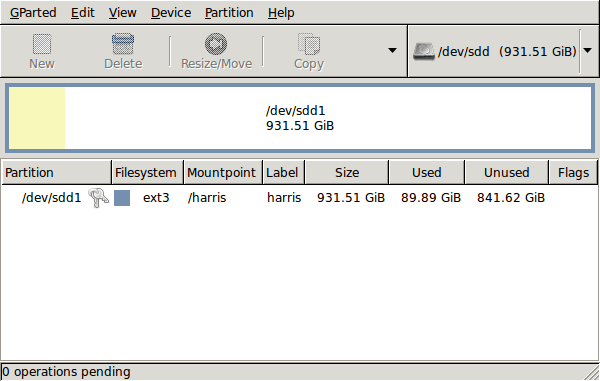
GParted running on Ubuntu
Anyway, let's get back to installing the hard drive. The physical side of the business was the usual shuffle within the PC to add the SATA drive before starting up Ubuntu. From there, it was a matter of firing up GParted (System > Administration > Partition Editor on the menus if you already have it installed). The next step was to find the new empty drive and create a partition table on it. At this point, I selected msdos from the menu before proceeding to set up a single ext3 partition on the drive. You need to select Edit > Apply All Operations from the menus to set things into motion before sitting back and waiting for GParted to do its thing.
After the GParted activities, the next task is to set up automatic mounting for the drive to make it available every time that Ubuntu starts up. The first thing to be done is to create the folder that will be the mount point for your new drive, /newdrive in this example. This involves editing /etc/fstab with superuser access to add a line like the following with the correct UUID for your situation:
UUID="32cf775f-9d3d-4c66-b943-bad96049da53" /newdrive ext3 defaults,noatime,errors=remount-ro
You can also add a comment like "# /dev/sdd1" above that so that you know what's what in the future. To get the actual UUID that you need to add to fstab, issue a command like one of those below, changing /dev/sdd1 to what is right for you:
sudo vol_id /dev/sdd1 | grep "UUID=" /* Older Ubuntu versions */
sudo blkid /dev/sdd1 | grep "UUID=" /* Newer Ubuntu versions *
This is the sort of thing that you get back, and the part beyond the "=" is what you need:
ID_FS_UUID=32cf775f-9d3d-4c66-b943-bad96049da53
Once all of this has been done, a reboot gets done to mount the device. Once that is complete, you then need to set up folder permissions as required before you can use the drive. This part gets me firing up Nautilus, using gksu and adding myself to the user group in the Permissions tab of the Properties dialogue for the mount point (/newdrive, for example). After that, I issued something akin to the following command to set global permissions:
chmod 775 /newdrive
With that, I had completed what I needed to do to get the WD drive going under Ubuntu. After that IBM DeskStar experience, the new drive remains on probation but moving some non-essential things on there has allowed me to free some space elsewhere and carry out a reorganisation. Further consolidation will follow while I hope that the new 931.51 GiB (binary gigabytes or 102410241024 rather the decimal gigabytes (1,000,000,000) preferred by hard disk manufacturers) will keep me going for a good while before I need to add extra space again.