TOPIC: GITHUB
Managing Python projects with Poetry
 4th October 2025
Python Poetry has become a popular choice for managing Python projects because it unifies tasks that once required several tools. Instead of juggling pip for installation, virtualenv for isolation and setuptools for packaging, Poetry brings these strands together and aims to make everyday development feel predictable and tidy. It sits in the same family of all-in-one managers as npm for JavaScript and Cargo for Rust, offering a coherent workflow that spans dependency declaration, environment management and package publishing.
At the heart of Poetry is a simple idea: declare what a project needs in one place and let the tool do the orchestration. Projects describe their dependencies, development tools and metadata in a single configuration file, and Poetry ensures that what is installed on one machine can be replicated on another without nasty surprises. That reliability comes from the presence of a lock file. Once dependencies are resolved, their exact versions are recorded, so future installations repeat the same outcome. The intent here is not only convenience but determinism, helping teams avoid the "works on my machine" refrain that haunts software work.
Core Concepts: Configuration and Lock Files
Two files do the heavy lifting. The pyproject.toml file is where a project announces its name, version and description, as well as the dependencies required to run and to develop it. The poetry.lock file captures the concrete resolution of those requirements at a particular moment. Together, they give you an auditable, repeatable picture of your environment. The structure of TOML keeps the configuration readable, and it spares developers from spreading equivalent settings across setup.cfg, setup.py and requirements.txt. A minimal example shows how this looks in practice.
[tool.poetry]
name = "my_project"
version = "0.1.0"
description = "Example project using Poetry"
authors = ["John <john@example.com>"]

[tool.poetry.dependencies]
python = "^3.10"
requests = "^2.31.0"

[tool.poetry.dev-dependencies]
pytest = "^8.0.0"

[build-system]
requires = ["poetry-core"]
build-backend = "poetry.core.masonry.api"
Essential Commands
Working with Poetry day to day quickly becomes a matter of a few memorable commands. Initialising a project configuration starts with poetry init, which steps through the creation of pyproject.toml interactively. Adding a dependency is handled by poetry add followed by the package name. Installing everything described in the configuration is done with poetry install, which writes or updates the lock file. When it is time to refresh dependencies within permitted version ranges, poetry update re-resolves and updates what's installed. Removing a dependency is poetry remove, followed by the package name. For environment management, poetry shell opens a shell inside the virtual environment managed by Poetry, and poetry run allows execution of commands within that same environment without entering a shell. Building distributions is as simple as poetry build, which produces a wheel and a source archive, and publishing to the Python Package Index is managed by poetry publish with credentials or an API token.
Advantages and Considerations
There are clear advantages to taking this route. The dependency experience is simplified because you do not need to keep updating a requirements.txt file by hand. With a lock file in place, environments are reproducible across developer machines and continuous integration runners, which stabilises builds and testing. Packaging is integrated rather than an extra chore, so producing and publishing a release becomes a repeatable process that sits naturally alongside development. Virtual environments are created and activated on demand, keeping projects isolated from one another with little ceremony. The configuration in TOML has the benefit of being structured and human-readable, which reduces the likelihood of configuration drift.
There are also points to consider before adopting Poetry. Projects that are deeply invested in setup.py or complex legacy build pipelines may need a clean migration to pyproject.toml for avoiding clashes. Developers who prefer manual venv and pip workflows can find Poetry opinionated at first because it expects to be responsible for the environment and dependency resolution. It is also designed with modern Python versions in mind, with examples here using Python 3.10.
Migration from pip and requirements.txt
For teams arriving from pip and requirements.txt, moving to Poetry can be done in measured steps. The starting point is installation. Poetry provides an installer script that sets up the tool for your user account.
curl -sSL https://install.python-poetry.org | python3 -If the installer does not add Poetry to your PATH, adding $HOME/.local/bin to PATH resolves that, after which poetry --version confirms the installation. From the root of your existing project, poetry init creates a new pyproject.toml and invites you to provide metadata and dependencies. If you already maintain requirements.txt files for production and development dependencies, Poetry can ingest those in one sweep. A single file can be imported with poetry add $(cat requirements.txt). Where development dependencies live in a separate file, they can be added into Poetry's dev group with poetry add --group dev $(cat dev-requirements.txt). Once added, Poetry resolves and pins exact versions, leaving a lock file behind to capture the resolution. After verifying that everything installs and tests pass, it becomes safe to retire earlier environment artefacts. Many teams remove requirements.txt entirely if they plan to rely solely on Poetry, deleting any remnants of Pipfile and Pipfile.lock that were left by Pipenv and migrate metadata away from setup.py or setup.cfg in favour of pyproject.toml. With that done, using the environment becomes routine. Opening a shell inside the virtual environment with poetry shell makes commands such as python or pytest use the isolated interpreter. If you prefer to avoid entering a shell, poetry run python script.py or poetry run pytest executes the command in the right context.
Package Publishing
Publishing a package is one of the areas where Poetry streamlines the steps. Accurate metadata in pyproject.toml is important, so name, version, description and other fields should be up-to-date. An example configuration shows commonly used fields.
[tool.poetry]
name = "example-package"
version = "1.0.0"
description = "A simple example package"
authors = ["John <john@example.com>"]
license = "MIT"
readme = "README.md"
homepage = "https://github.com/john/example-package"
repository = "https://github.com/john/example-package"
keywords = ["example", "poetry"]
With metadata set, building the distribution is handled by poetry build, which creates a dist directory containing a .tar.gz source archive and a .whl wheel file. Uploading to the official Python Package Index can be done with username and password, though API tokens are the recommended method because they can be scoped and revoked without affecting account credentials. Configuring a token is done once with poetry config pypi-token.pypi, after which poetry publish will use it to upload. When testing a release before publishing for real, TestPyPI provides a safer target. Poetry supports multiple sources and can be directed to use TestPyPI by declaring it as a repository and then publishing to it.
[[tool.poetry.source]]
name = "testpypi"
url = "https://test.pypi.org/legacy/"
poetry publish -r testpypiOnce uploaded, it is sensible to confirm that the package can be installed in a clean environment using pip install example-package, which verifies that dependencies are correctly declared and wheels are intact.
Continuous Integration with GitHub Actions
Beyond local steps, automation closes the loop. Adding a continuous integration workflow that installs dependencies, runs tests and publishes on a tagged release keeps quality checks and distribution consistent. GitHub Actions provides a hosted environment where Poetry can be installed quickly, dependencies cached and tests executed. A straightforward workflow listens for tags that begin with v, such as v1.0.0, then builds and publishes the package once tests pass. The workflow file sits under .github/workflows and looks like this.
name: Publish to PyPI

on:
  push:
    tags:
      - "v*"

jobs:
  build:
    runs-on: ubuntu-latest

    steps:
      - name: Check out repository
        uses: actions/checkout@v4

      - name: Set up Python
        uses: actions/setup-python@v5
        with:
          python-version: "3.10"

      - name: Install Poetry
        run: |
          curl -sSL https://install.python-poetry.org | python3 -
          echo "$HOME/.local/bin" >> $GITHUB_PATH

      - name: Install dependencies
        run: poetry install --no-interaction --no-root

      - name: Run tests with pytest
        run: poetry run pytest --maxfail=1 --disable-warnings -q

      - name: Build package
        run: poetry build

      - name: Publish to PyPI
        if: startsWith(github.ref, 'refs/tags/v')
        env:
          POETRY_PYPI_TOKEN_PYPI: ${{ secrets.PYPI_TOKEN }}
        run: poetry publish --no-interaction --username __token__ --password $POETRY_PYPI_TOKEN_PYPI
This arrangement checks out the repository, installs a consistent Python version, brings in Poetry, installs dependencies based on the lock file, runs tests, builds distributions and only publishes when the workflow is triggered by a version tag. The API token used for publishing should be stored as a repository secret named PYPI_TOKEN so it is not exposed in the codebase or logs. Creating the tag is done locally with git tag v1.0.0 followed by git push origin v1.0.0, which triggers the workflow and results in a published package, moments later. It is often useful to extend this with a test matrix, so the suite runs across supported Python versions, as well as caching to speed up repeated runs by re-using Poetry and pip caches keyed on the lock file.
Project Structure
Package structure is another place where Poetry encourages clarity. A simple, consistent layout makes maintenance and onboarding easier. A typical library keeps its importable code in a package directory named to match the project name in pyproject.toml, with hyphens translated to underscores. Tests live in a separate tests directory, documentation in docs and examples in a directory of the same name. The repository root contains README.md, a licence file, the lock file and a .gitignore that excludes environment directories and build artefacts. The following tree illustrates a balanced structure for a data-oriented utility library.
data-utils/
├── data_utils/
│   ├── __init__.py
│   ├── core.py
│   ├── io.py
│   ├── analysis.py
│   └── cli.py
├── tests/
│   ├── __init__.py
│   ├── test_core.py
│   └── test_analysis.py
├── docs/
│   ├── index.md
│   └── usage.md
├── examples/
│   └── demo.ipynb
├── README.md
├── LICENSE
├── pyproject.toml
├── poetry.lock
└── .gitignore
Within the package directory, init.py can define a public interface and hide internal details. This allows users of the library to import the essentials without needing to know the module layout.
from .core import clean_data
from .analysis import summarise_data

__all__ = ["clean_data", "summarise_data"]
If the project offers a command-line interface, Poetry makes it simple to declare an entry point, so users can run a console command after installation. The scripts section in pyproject.toml maps a command name to a callable, in this case the main function in a cli module.
[tool.poetry.scripts]
data-utils = "data_utils.cli:main"
A basic CLI might be implemented using Click, passing arguments to internal functions and relaying progress.
import click
from data_utils import core

@click.command()
@click.argument("path")
def main(path):
    """Simple CLI example."""
    print(f"Processing {path}...")
    core.clean_data(path)
    print("Done!")

if __name__ == "__main__":
    main()
Git ignores should filter out files that do not belong in version control. A sensible default for a Poetry project is as follows.
__pycache__/
*.pyc
*.pyo
*.pyd
.env
.venv
dist/
build/
*.egg-info/
.cache/
.coverage
- Testing and Documentation
Testing sits comfortably alongside this. Many projects adopt pytest because it is straightforward to use and integrates well with Poetry. Running tests through poetry run pytest ensures the virtual environment is used, and a simple unit test demonstrates the pattern.
from data_utils.core import clean_data

def test_clean_data_removes_nulls():
    data = [1, None, 2, None, 3]
    cleaned = clean_data(data)
    assert cleaned == [1, 2, 3]
Documentation can be kept in Markdown or built with tools. MkDocs and Sphinx are common choices for generating websites from your docs, and both can be installed as development dependencies using Poetry. Including notebooks in an examples directory is helpful for illustrating usage in richer contexts, especially for data science libraries. The README should present the essentials succinctly, covering what the project does, how to install it, a short usage example and pointers for development setup. A licence file clarifies terms of use; MIT and Apache 2.0 are widely used options in open source. Advanced CI: Quality Checks and Multi-version Testing
Once structure, tests and documentation are in order, quality checks can be expanded in the continuous integration workflow. Adding automated formatting, import sorting and linting tightens consistency across contributions. An enhanced workflow uses Black, isort and Flake8 before running tests and building, and also includes a matrix to test across multiple Python versions. It runs on pull requests as well as on tagged pushes, which means code quality and compatibility are verified before merging changes and again before publishing a release.
name: Lint, Test and Publish

on:
  push:
    tags:
      - "v*"
  pull_request:

jobs:
  build:
    runs-on: ubuntu-latest

    strategy:
      matrix:
        python-version: ["3.9", "3.10", "3.11"]

    steps:
      - name: Check out repository
        uses: actions/checkout@v4

      - name: Set up Python
        uses: actions/setup-python@v5
        with:
          python-version: ${{ matrix.python-version }}

      - name: Install Poetry
        run: |
          curl -sSL https://install.python-poetry.org | python3 -
          echo "$HOME/.local/bin" >> $GITHUB_PATH

      - name: Cache Poetry dependencies
        uses: actions/cache@v4
        with:
          path: |
            ~/.cache/pypoetry
            ~/.cache/pip
          key: poetry-${{ runner.os }}-${{ hashFiles('**/poetry.lock') }}
          restore-keys: |
            poetry-${{ runner.os }}-

      - name: Install dependencies
        run: poetry install --no-interaction --no-root

      - name: Check code formatting with Black
        run: poetry run black --check .

      - name: Check import order with isort
        run: poetry run isort --check-only .

      - name: Run Flake8 linting
        run: poetry run flake8 .

      - name: Run tests with pytest
        run: poetry run pytest --maxfail=1 --disable-warnings -q

      - name: Build package
        run: poetry build

      - name: Publish to PyPI
        if: startsWith(github.ref, 'refs/tags/v')
        env:
          POETRY_PYPI_TOKEN_PYPI: ${{ secrets.PYPI_TOKEN }}
        run: poetry publish --no-interaction --username __token__ --password $POETRY_PYPI_TOKEN_PYPI
This workflow builds on the earlier one by checking style and formatting before tests. If any of those checks fail, the process stops and surfaces the problems in the job logs. Caching based on the lock file reduces the time spent installing dependencies by reusing packages where nothing has changed. The matrix section ensures that the library remains compatible with the declared range of Python versions, which is especially helpful just before a release. It is possible to extend this further with coverage reports using pytest-cov and Codecov, static type checking with mypy, or pre-commit hooks to keep local development consistent with continuous integration. Publishing to TestPyPI in a separate job can help validate packaging without affecting the real index, and once outcomes look good, the main publishing step proceeds when a tag is pushed.
Conclusion
The result of adopting Poetry is a project that states its requirements clearly, installs them reliably and produces distributions without ceremony. For new work, it removes much of the friction that once accompanied Python packaging. For existing projects, the migration path is gentle and reversible, and the gains in determinism often show up quickly in fewer environment-related issues. When paired with a small amount of automation in a continuous integration system, the routine of building, testing and publishing becomes repeatable and visible to everyone on the team. That holds whether the package is destined for internal use on a private index or a public release on PyPI.
Mixing local and cloud capabilities in an AI toolkit
9th September 2025
The landscape of AI development is shifting towards systems that prioritise local control, privacy and efficient resource management whilst maintaining the flexibility to integrate with external services when needed. This guide explores how to build a comprehensive AI toolkit that balances these concerns through seven key principles: local-first architecture, privacy preservation, standardised tool integration, workflow automation, autonomous agent development, efficient resource management and multi-modal knowledge handling.
Local-First Architecture and Control
The foundation of a robust AI toolkit begins with maintaining direct control over core components. Rather than relying entirely on cloud services, a local-first approach provides predictable costs, enhanced privacy and improved reliability whilst still allowing selective use of external resources.
Llama-Swap exemplifies this philosophy as a lightweight proxy that manages multiple language models on a single machine. This tool listens for OpenAI-style API calls, inspects the model field in each request, and ensures that the correct backend handles that call. The proxy intelligently starts or stops local LLM servers so only the required model runs at any given time, making efficient use of limited hardware resources.
Setting up this system requires minimal infrastructure: Python 3, Homebrew on macOS for package management, llama.cpp for hosting GGUF models locally and the Hugging Face CLI for model downloads. The proxy itself is a single binary that can be configured through a simple YAML file, specifying model paths and commands. This approach transforms model switching from a manual process of stopping and starting different servers into a seamless experience where clients can request different models through a single port.
The local-first principle extends beyond model hosting. Obsidian demonstrates this with its markdown-based knowledge management system that stores everything locally whilst providing rich linking capabilities and plugin extensibility. This gives users complete control over their data, whilst maintaining the ability to sync across devices when desired.
Privacy and Data Sovereignty
Privacy considerations permeate every aspect of AI toolkit design. Local processing inherently reduces exposure of sensitive data to external services, but even when cloud services are necessary, careful evaluation of data handling practices becomes crucial.
Voice processing illustrates these concerns clearly. ElevenLabs offers high-quality text-to-speech and voice cloning capabilities but requires careful assessment of consent and security policies when handling voice data. Similarly, services like NoteGPT that process documents and videos must be evaluated against regional regulations such as GDPR, particularly when handling sensitive information.
The principle of data minimisation suggests using local processing wherever feasible and cloud services only when their capabilities significantly outweigh privacy concerns. This might mean running smaller language models locally for routine tasks, whilst reserving larger cloud models for complex reasoning that exceeds local capacity.
Tool Integration and Standardisation
As AI systems become more sophisticated, the ability to integrate diverse tools through standardised protocols becomes essential. The Model Context Protocol (MCP) addresses this need by defining how lightweight servers present databases, file systems and web services to AI models in a secure, auditable manner.
MCP servers act as bridges between AI models and real systems, whilst MCP clients are applications that discover and utilise these servers. This standardisation enables a rich ecosystem of tools that can be mixed and matched according to specific needs.
Several clients demonstrate different approaches to MCP integration. Claude Desktop auto-starts configured servers on launch, making tools immediately available. Cursor AI integrates MCP servers directly into coding environments, allowing function calls to route to custom servers automatically. Continue provides open-source alternatives for VS Code and JetBrains, whilst LibreChat offers a flexible chat interface that can connect to various model providers and MCP servers.
The standardisation extends to development workflows through tools like Claude Code, which integrates with GitHub repositories to automate routine tasks. By creating a Claude GitHub App, developers can use natural language comments to trigger actions like generating Docker configurations, reviewing code or updating documentation.
Workflow Automation and Productivity
Effective AI toolkits streamline repetitive tasks and augment human decision-making, rather than replacing it entirely. This automation spans from simple content generation to complex research workflows that combine multiple tools and services.
A practical research workflow demonstrates this integration. Beginning with a focused question, Perplexity AI can generate citation-backed reports using its deep research capability. These reports, exported as PDFs, can then be uploaded to NotebookLM for interactive exploration. NotebookLM transforms static content into searchable material, generates audio overviews that render complex topics as podcast-style conversations, and builds mind maps to reveal relationships between concepts.
This multi-stage process turns surface reading into grounded understanding by enabling different modes of engagement with the same material. The automation handles the mechanical aspects of research synthesis, whilst preserving human judgement about relevance and interpretation.
Repository management represents another automation frontier. GitHub integrations can handle issue triage, code review, documentation updates and refactoring through natural language instructions. This reduces cognitive overhead for routine maintenance whilst maintaining developer control over significant decisions.
Agentic AI and Autonomous Systems
The evolution from reactive prompt-response systems to goal-oriented agents represents a fundamental shift in AI system design. Agentic systems can plan across multiple steps, initiate actions when conditions warrant, and pursue long-running objectives with minimal supervision.
These systems typically combine several architectural components: a reasoning engine (usually an LLM with structured prompting), memory layers for preserving context, knowledge bases accessible through vector search and tool interfaces that standardise how agents discover and use external capabilities.
Patterns like ReAct interleave reasoning steps with tool calls, creating observe-think-act loops that enable continuous adaptation. Modern AI systems employ planning-first agents that formulate strategies before execution and adapt dynamically, alongside multi-agent architectures that coordinate specialist roles through hierarchical or peer-to-peer protocols.
Practical applications illustrate these concepts clearly. An autonomous research agent might formulate queries, rank sources, synthesise material and draft reports, demonstrating how complex goals can be decomposed into manageable subtasks. A personal productivity assistant could manage calendars, emails and tasks, showing how agents can integrate with external APIs whilst learning user preferences.
Safety and alignment remain paramount concerns. Constraints, approval gates and override mechanisms guard against harmful behaviour, whilst feedback mechanisms help maintain alignment with human intent. The goal is augmentation rather than replacement, with human oversight remaining essential for significant decisions.
Resource Management and Efficiency
Efficient resource utilisation becomes critical when running multiple AI models and services on limited hardware. This involves both technical optimisation and strategic choices about when to use local versus cloud resources.
Llama-Swap's selective concurrency feature exemplifies intelligent resource management. Whilst the default behaviour runs only one model at a time to conserve resources, groups can be configured to allow several smaller models to remain active together whilst maintaining swapping for larger models. This provides predictable resource usage without sacrificing functionality.
Model quantisation represents another efficiency strategy. GGUF variants of models like SmolLM2-135M-Instruct and Qwen2.5-0.5B-Instruct can run effectively on modest hardware whilst still providing distinct capabilities for different tasks. The trade-off between model size and capability can be optimised for specific use cases.
Cloud services complement local resources by handling computationally intensive tasks that exceed local capacity. The key is making these transitions seamless, so users can benefit from both approaches without managing complexity manually.
Multi-Modal Knowledge Management
Modern AI toolkits must handle diverse content types and enable fluid transitions between different modes of interaction. These span text processing, audio generation, visual content analysis and format conversion.
NotebookLM demonstrates sophisticated multi-modal capabilities by accepting various input formats (PDFs, images, tables) and generating different output modes (summaries, audio overviews, mind maps, study guides). This flexibility enables users to engage with information in ways that match their learning preferences and situational constraints.
NoteGPT extends this concept to video and presentation processing, extracting transcripts, segmenting content and producing summaries with translation capabilities. The challenge lies in preserving nuance during automated processing whilst making content more accessible.
Integration between different knowledge management approaches creates additional value. Notion's workspace approach combines notes, tasks, wikis and databases with recent additions like email integration and calendar synchronisation. Evernote focuses on mixed media capture and web clipping with cross-platform synchronisation.
The goal is creating systems that can capture information in its natural format, process it intelligently, and present it in ways that facilitate understanding and action.
Conclusion
Building an effective AI toolkit requires balancing multiple concerns: maintaining control over sensitive data whilst leveraging powerful cloud services, automating routine tasks whilst preserving human judgement, and optimising resource usage whilst maintaining system flexibility. The market demand for these skills is growing rapidly, with companies actively seeking professionals who can implement RAG systems, build reliable agents and manage hybrid AI architectures.
The local-first approach provides a foundation for this balance, giving users control over their data and computational resources whilst enabling selective integration with external services. RAG has evolved from a technical necessity for small context windows to a strategic choice for cost reduction and reliability improvement. Standardised protocols like MCP make it practical to combine diverse tools without vendor lock-in. Workflow automation reduces cognitive overhead for routine tasks, and agentic capabilities enable more sophisticated goal-oriented behaviour.
Success depends on thoughtful integration rather than simply accumulating tools. The most effective systems combine local processing for privacy-sensitive tasks, cloud services for capabilities that exceed local resources, and standardised interfaces that enable experimentation and adaptation as needs evolve. Whether the goal is reducing API costs through efficient RAG implementation or building agents that prevent hallucinations through grounded retrieval, the principles remain consistent: maintain control, optimise resources and preserve human oversight.
This approach creates AI toolkits that are not only adaptable, secure and efficient but also commercially viable and career-relevant in a rapidly evolving landscape where the ability to build reliable, cost-effective AI systems has become a competitive necessity.
An Overview of MCP Servers in Visual Studio Code
29th August 2025
Agent mode in Visual Studio Code now supports an expanding ecosystem of Model Context Protocol servers that equip the editor’s built-in assistant with practical tools. By installing these servers, an agent can connect to databases, invoke APIs and perform automated or specialised operations without leaving the development environment. The result is a more capable workspace where routine tasks are streamlined, and complex ones are broken into more manageable steps. The catalogue spans developer tooling, productivity services, data and analytics, business platforms, and cloud or infrastructure management. If something you rely on is not yet present, there is a route to suggest further additions. Guidance on using MCP tools in agent mode is available in the documentation, and the Command Palette, opened with Ctrl+Shift+P, remains the entry point for many workflows.
The servers in the developer tools category concentrate on everyday software tasks. GitHub integration brings repositories, issues and pull requests into reach through a secure API, so that code review and project coordination can continue without switching context. For teams who use design files as a source of truth, Figma support extracts UI content and can generate code from designs, with the note that using the latest desktop app version is required for full functionality. Browser automation is covered by Playwright from Microsoft, which drives tests and data collection using accessibility trees to interact with the page, a technique that often results in more resilient scripts. The attention to quality and reliability continues with Sentry, where an agent can retrieve and analyse application errors or performance issues directly from Sentry projects to speed up triage and resolution.
The breadth of developer capability extends to machine learning and code understanding. Hugging Face integration provides access to models, datasets and Spaces on the Hugging Face Hub, which is useful for prototyping, evaluation or integrating inference into tools. For source exploration beyond a single repository, DeepWiki by Kevin Kern offers querying and information extraction from GitHub repositories indexed on that service. Converting documents is handled by MarkItDown from Microsoft, which takes common files like PDF, Word, Excel, images or audio and outputs Markdown, unifying content for notes, documentation or review. Finding accurate technical guidance is eased by Microsoft Docs, a Microsoft-provided server that searches Microsoft Learn, Azure documentation and other official technical resources. Complementing this is Context7 from Upstash, which returns up-to-date, version-specific documentation and code examples from any library or framework, an approach that addresses the common problem of answers drifting out of date as software evolves.
Visual assets and code health have their own role. ImageSorcery by Sunrise Apps performs local image processing tasks, including object detection, OCR, editing and other transformations, a capability that supports anything from quick asset tweaks to automated checks in a content pipeline. Codacy completes the developer picture with comprehensive code quality and security analysis. It covers static application security testing, secrets detection, dependency scanning, infrastructure as code security and automated code review, which helps teams maintain standards while moving quickly.
Productivity services focus on planning, tracking and knowledge capture. Notion’s server allows viewing, searching, creating and updating pages and databases, meaning an agent can assemble notes or checklists as it progresses. Linear integration brings the ability to create, update and track issues in Linear’s project management platform, reflecting a growing preference for lightweight, developer-centred planning. Asana support provides task and project management together with comments, allowing multi-team coordination. Atlassian’s server connects to Jira and Confluence for issue tracking and documentation, which suits organisations that rely on established workflows for governance and audit trails. Monday.com adds another project management option, with management of boards, items, users, teams and workspace operations. These capabilities sit alongside automation from Zapier, which can create workflows and execute tasks across more than 30,000 connected apps to remove repetitive steps and bind systems together when native integrations are limited.
Two Model Context Protocol utilities add cognitive structure to how the agent works. Sequential Thinking helps break down complex tasks into manageable steps with transparent tracking, so progress is visible and revisable. Memory provides long-lived context across sessions, allowing an agent to store and retrieve relevant information rather than relying on a single interaction. Together, they address the practicalities of working on multi-stage tasks where recalling decisions, constraints or partial results is as important as executing the next action. Used with the productivity servers, these tools underpin a systematic approach to projects that span hours or days.
The data and analytics group is comprehensive, stretching from lightweight local analysis to cloud-scale services. DuckDB by Kentaro Tanaka enables querying and analysis of DuckDB databases both locally and in the cloud, which suits ad hoc exploration as well as embedded analytics in applications. Neon by neondatabase labs provides access to Postgres with the notable addition of natural language operations for managing and querying databases, which lowers the barrier to occasional administrative tasks. Prisma Postgres from Prisma brings schema management, query execution, migrations and data modelling to the agent, supporting teams who already use Prisma’s ORM in their applications. MongoDB integration supports database operations and management, with the ability to execute queries, manage collections, build aggregation pipelines and perform document operations, allowing front-end and back-end tasks to be coordinated through a single interface.
Observability and product insight are also represented. PostHog offers analytics access for creating annotations and retrieving product usage insights so that changes can be correlated with user behaviour. Microsoft Clarity provides analytics data including heatmaps, session recordings and other user behaviour insights that complement quantitative metrics and highlight usability issues. Web data collection has two strong options. Apify connects the agent with Apify’s Actor ecosystem to extract data from websites and automate broader workflows built on that platform. Firecrawl by Mendable focuses on extracting data from websites using web scraping, crawling and search with structured data extraction, a combination that suits building datasets or feeding search indexes. These tools bridge real-world usage and the development cycle, keeping decision-making grounded in how software is experienced.
The business services category addresses payments, customer engagement and web presence. Stripe integration allows the creation of customers, management of subscriptions and generation of payment links through Stripe APIs, which is often enough to pilot monetisation or administer accounts. PayPal provides the ability to create invoices, process payments and access transaction data, ensuring another widely used channel can be managed without bespoke scripts. Square rounds out payment options with facilities to process payments and manage customers across its API ecosystem. Intercom support brings access to customer conversations and support tickets for data analysis, allowing an agent to summarise themes, surface follow-ups or route issues to the right place. For building and running sites, Wix integration helps with creating and managing sites that include e-commerce, bookings and payment features, while Webflow enables creating and managing websites, collections and content through Webflow’s APIs. Together, these options cover a spectrum of online business needs, from storefronts to content-led marketing.
Cloud and infrastructure operations are often the backbone of modern projects, and the MCP catalogue reflects this. Convex provides access to backend databases and functions for real-time data operations, making it possible to work with stateful server logic directly from agent mode. Azure integration supports management of Azure resources, database queries and access to Azure services so that provisioning, configuration and diagnostics can be performed in context. Azure DevOps extends this to project and release processes with management of projects, work items, repositories, builds, releases and test plans, providing an end-to-end view for teams invested in Microsoft’s tooling. Terraform from HashiCorp introduces infrastructure as code management, including plan, apply and destroy operations, state management and resource inspection. This combination makes it feasible to review and adjust infrastructure, coordinate deployments and correlate changes with code or issue history without switching tools.
These servers are designed to be installed like other VS Code components, visible from the MCP section and accessible in agent mode once configured. Many entries provide a direct route to installation, so setup friction is limited. Some include specific requirements, such as Figma’s need for the latest desktop application, and all operate within the Model Context Protocol so that the agent can call tools predictably. The documentation explains usage patterns for each category, from parameterising database queries to invoking external APIs, and clarifies how capabilities appear inside agent conversations. This is useful for understanding the scope of what an agent can do, as well as for setting boundaries in shared environments.
In day-to-day use, the value comes from combining servers to match a workflow. A developer investigating a production incident might consult Sentry for errors, query Microsoft Docs for guidance, pull related issues from GitHub and draft changes to documentation with MarkItDown after analysing logs held in DuckDB. A product manager could retrieve usage insights from PostHog, review session recordings in Microsoft Clarity, create follow-up tasks in Linear and brief customer support by summarising Intercom conversations, all while keeping a running Memory of key decisions. A data practitioner might gather inputs from Firecrawl or Apify, store intermediates in MongoDB, perform local analysis in DuckDB and publish a report to Notion, building a repeatable chain with Zapier where steps can be automated. In infrastructure scenarios, Terraform changes can be planned and applied while Azure resources are inspected, with release coordination handled through Azure DevOps and updates documented in Confluence via the Atlassian server.
Security and quality concerns are woven through these flows. Codacy can evaluate code for vulnerabilities or antipatterns as changes are proposed, surfacing SAST findings, secrets detection problems or dependency risks before they progress. Stripe, PayPal and Square centralise payment operations to a few well-audited APIs rather than bespoke integrations, which reduces surface area and simplifies auditing. For content and data ingestion, ImageSorcery ensures that image transformations occur locally and MarkItDown produces traceable Markdown outputs from disparate file types, keeping artefacts consistent for reviews or archives. Sequential Thinking helps structure longer tasks, and Memory preserves context so that actions are explainable after the fact, which is helpful for compliance as well as everyday collaboration.
Discoverability and learning resources sit close to the tools themselves. The Visual Studio Code website’s navigation surfaces areas such as Docs, Updates, Blog, API, Extensions, MCP, FAQ and Dev Days, while the Download path remains clear for new installations. The MCP area groups servers by capability and links to documentation that explains how agent mode calls each tool. Outside the product, the project’s presence on GitHub provides a route to raise issues or follow changes. Community activity continues on channels including X, LinkedIn, Bluesky and Reddit, and there are broadcast updates through the VS Code Insiders Podcast, TikTok and YouTube. These outlets provide context for new server additions, changes to the protocol and examples of how teams are putting the pieces together, which can be as useful as the tools themselves when establishing good practices.
It is worth noting that the catalogue is curated but open to expansion. If there is an MCP server that you expect to see, there is a path to suggest it, so gaps can be addressed over time. This flows from the protocol’s design, which encourages clean interfaces to external systems, and from the way agent mode surfaces capabilities. The cumulative effect is that the assistant inside VS Code becomes a practical co-worker that can search documentation, change infrastructure, file issues, analyse data, process payments or summarise customer conversations, all using the same set of controls and the same context. The common protocol keeps these interactions predictable, so adding a new server feels familiar even when the underlying service is new.
As the ecosystem grows, the connection between development work and operations becomes tighter, and the assistant’s job is less about answering questions in isolation than orchestrating tools on the developer’s behalf. The MCP servers outlined here provide a foundation for that shift. They encapsulate the services that many teams already rely on and present them inside agent mode so that work can continue where the code lives. For those getting started, the documentation explains how to enable the tools, the Command Palette offers quick access, and the community channels provide a steady stream of examples and updates. The result is a VS Code experience that is better equipped for modern workflows, with MCP servers supplying the functionality that turns agent mode into a practical extension of everyday work.
From boardroom to code: More options for AI and Data Science education
27th July 2025
The artificial intelligence revolution has created an unprecedented demand for education that spans from executive strategy to technical implementation. Modern professionals face the challenge of navigating a landscape where understanding AI's business implications proves as crucial as mastering its technical foundations. This comprehensive examination explores five distinguished programmes that collectively address this spectrum, offering pathways for business professionals, aspiring data scientists and technical specialists seeking advanced expertise.
Strategic Business Implementation Through Practical AI Tools
LinkedIn Learning's Applying Generative AI as a Business Professional programme represents the entry point for professionals seeking immediate workplace impact. This focused five-hour curriculum across six courses addresses the practical reality that most business professionals need functional AI literacy rather than technical mastery. The programme emphasises hands-on application of contemporary tools including ChatGPT, Claude and Microsoft Copilot, recognising that these platforms have become integral to modern professional workflows.
The curriculum's strength lies in its emphasis on prompt engineering techniques that yield immediate productivity gains. Participants learn to craft effective queries that consistently produce useful outputs, a skill that has rapidly evolved from novelty to necessity across industries. The programme extends beyond basic tool usage to include strategies for creating custom GPTs without programming knowledge, enabling professionals to develop solutions that address specific organisational challenges.
Communication enhancement represents another critical component, as the programme teaches participants to leverage AI for improving written correspondence, presentations and strategic communications. This practical focus acknowledges that AI's greatest business value often emerges through augmenting existing capabilities rather than replacing human expertise. The inclusion of critical thinking frameworks for AI-assisted decision-making ensures that participants develop sophisticated approaches to integrating artificial intelligence into complex business processes.
Academic Rigour Meets Strategic AI Governance
The University of Pennsylvania's AI for Business Specialisation on Coursera elevates business AI education to an academic level whilst maintaining practical relevance. This four-course programme, completed over approximately four weeks, addresses the strategic implementation challenges that organisations face when deploying AI technologies at scale. The curriculum's foundation in Big Data fundamentals provides essential context for understanding the data requirements that underpin successful AI initiatives.
The programme's exploration of machine learning applications in marketing and finance demonstrates how AI transforms traditional business functions. Participants examine customer journey optimisation techniques, fraud prevention methodologies and personalisation technologies that have become competitive necessities rather than optional enhancements. These applications receive thorough treatment that balances technical understanding with strategic implications, enabling participants to make informed decisions about AI investments and implementations.
Particularly valuable is the programme's emphasis on AI-driven people management practices, addressing how artificial intelligence reshapes human resources, talent development and organisational dynamics. This focus acknowledges that successful AI implementation requires more than technological competence; it demands sophisticated understanding of how these tools affect workplace relationships and employee development.
The specialisation's coverage of strategic AI governance frameworks proves especially relevant as organisations grapple with ethical deployment challenges. Participants develop comprehensive approaches to responsible AI implementation that address regulatory compliance, bias mitigation and stakeholder concerns. This academic treatment of AI ethics provides the foundational knowledge necessary for creating sustainable AI programmes that serve both business objectives and societal responsibilities.
Industry-Standard Professional Development
IBM's Data Science Professional Certificate represents a bridge between business understanding and technical proficiency, offering a comprehensive twelve-course programme designed for career transition. This four-month pathway requires no prior experience whilst building industry-ready capabilities that align with contemporary data science roles. The programme's strength lies in its integration of technical skill development with practical application, ensuring graduates possess both theoretical knowledge and hands-on competency.
The curriculum's progression from Python programming fundamentals through advanced machine learning techniques mirrors the learning journey that working data scientists experience. Participants gain proficiency with industry-standard tools including Jupyter notebooks, GitHub and Watson Studio, ensuring familiarity with the collaborative development environments that characterise modern data science practice. This tool proficiency proves essential for workplace integration, as contemporary data science roles require seamless collaboration across technical teams.
The programme's inclusion of generative AI applications reflects IBM's recognition that artificial intelligence has become integral to data science practice rather than a separate discipline. Participants learn to leverage AI tools for data analysis, visualisation and insight generation, developing capabilities that enhance productivity whilst maintaining analytical rigour. This integration prepares trainees for data science roles that increasingly incorporate AI-assisted workflows.
Real-world project development represents a crucial component, as participants build comprehensive portfolios that demonstrate practical proficiency to potential employers. These projects address authentic business challenges using genuine datasets, ensuring that participants can articulate their capabilities through concrete examples.
Advanced Technical Mastery Through Academic Excellence
Andrew Ng's Machine Learning Specialisation on Coursera establishes the technical foundation for advanced AI practice. This three-course programme, completed over approximately two months, provides comprehensive coverage of core machine learning concepts whilst emphasising practical implementation skills. Andrew Ng's reputation as an AI pioneer lends exceptional credibility to this curriculum, ensuring that participants receive instruction that reflects both academic rigour and industry best practices.
The specialisation's treatment of supervised learning encompasses linear and logistic regression, neural networks and decision trees, providing thorough grounding in the algorithms that underpin contemporary machine learning applications. Participants develop practical proficiency with Python, NumPy and scikit-learn, gaining hands-on experience with the tools that professional machine learning practitioners use daily. This implementation focus ensures that theoretical understanding translates into practical capability.
Unsupervised learning includes clustering algorithms, anomaly detection techniques and certain approaches in recommender systems, all of which contribute to powering modern digital experiences. The programme's exploration of reinforcement learning provides exposure to the techniques driving advances in autonomous systems and game-playing AI. This breadth ensures that participants understand the full spectrum of machine learning approaches, rather than developing narrow expertise in specific techniques.
Cutting-Edge Deep Learning Applications
Again available through Coursera, Andrew Ng's Deep Learning Specialisation extends technical education into the neural network architectures that drives contemporary AI. This five-course programme, spanning approximately three months, addresses the advanced techniques that enable computer vision, natural language processing and complex pattern recognition applications. The intermediate-level curriculum assumes foundational machine learning knowledge whilst building expertise in cutting-edge methodologies.
Convolutional neural network coverage provides comprehensive understanding of computer vision applications, from image classification through object detection and facial recognition. Participants develop practical skills with CNN architectures that power visual AI applications across industries. The programme's treatment of recurrent neural networks and LSTMs addresses sequence processing challenges in speech recognition, machine translation and time series analysis.
The specialisation's exploration of transformer architectures proves particularly relevant given their central role in large language models and natural language processing breakthroughs. Participants gain understanding of attention mechanisms, transfer learning techniques and the architectural innovations that enable modern AI capabilities. This coverage ensures they understand the technical foundations underlying contemporary AI advances.
Real-world application development represents a crucial component, as participants work on speech recognition systems, machine translation applications, image recognition tools and chatbot implementations. These projects utilise TensorFlow, a dominant framework for deep learning development, ensuring that graduates possess practical experience with production-ready tools.
Strategic Integration and Future Pathways
These five programmes collectively address the comprehensive skill requirements of the modern AI landscape, from strategic business implementation through advanced technical development. The progression from practical tool usage through academic business strategy to technical mastery reflects the reality that successful AI adoption requires capabilities across multiple domains. Organisations benefit most when business leaders understand AI's strategic implications, whilst technical teams possess sophisticated implementation capabilities.
The integration of business strategy with technical education acknowledges that artificial intelligence's transformative potential emerges through thoughtful application rather than technological sophistication alone. These programmes prepare professionals to contribute meaningfully to AI initiatives regardless of their specific role or technical background, ensuring that organisations can build comprehensive AI capabilities that serve both immediate needs and long-term strategic objectives.
SAS Packages: Revolutionising code sharing in the SAS ecosystem
26th July 2025
In the world of statistical programming, SAS has long been the backbone of data analysis for countless organisations worldwide. Yet, for decades, one of the most significant challenges facing SAS practitioners has been the efficient sharing and reuse of code. Knowledge and expertise have often remained siloed within individual developers or teams, creating inefficiencies and missed opportunities for collaboration. Enter the SAS Packages Framework (SPF), a solution that changes how SAS professionals share, distribute and utilise code across their organisations and the broader community.
The Problem: Fragmented Knowledge and Complex Dependencies
Anyone who has worked extensively with SAS knows the frustration of trying to share complex macros or functions with colleagues. Traditional code sharing in SAS has been plagued by several issues:
- Dependency nightmares: A single macro often relies on dozens of utility macros working behind the scenes, making it nearly impossible to share everything needed for the code to function properly
- Version control chaos: Keeping track of which version of which macro works with which other components becomes an administrative burden
- Platform compatibility issues: Code that works on Windows might fail on Linux systems and vice versa
- Lack of documentation: Without proper documentation and help systems, even the most elegant code becomes unusable to others
- Knowledge concentration: Valuable SAS expertise remains trapped within individuals rather than being shared with the broader community
These challenges have historically meant that SAS developers spend countless hours reinventing the wheel, recreating functionality that already exists elsewhere in their organisation or the wider SAS community.
The Solution: SAS Packages Framework
The SAS Packages Framework, developed by Bartosz Jabłoński, represents a paradigm shift in how SAS code is organised, shared and deployed. At its core, a SAS package is an automatically generated, single, standalone zip file containing organised and ordered code structures, extended with additional metadata and utility files. This solution addresses the fundamental challenges of SAS code sharing by providing:
- Functionality over complexity: Instead of worrying about 73 utility macros working in the background, you simply share one file and tell your colleagues about the main functionality they need to use.
- Complete self-containment: Everything needed for the code to function is bundled into one file, eliminating the "did I remember to include everything?" problem that has plagued SAS developers for years.
- Automatic dependency management: The framework handles the loading order of code components and automatically updates system options like
cmplib=andfmtsearch=for functions and formats. - Cross-platform compatibility: Packages work seamlessly across different operating systems, from Windows to Linux and UNIX environments.
Beyond Macros: A Spectrum of SAS Functionality
One of the most compelling aspects of the SAS Packages Framework is its versatility. While many code-sharing solutions focus solely on macros, SAS packages support a wide range of SAS functionality:
- User-defined functions (both FCMP and CASL)
- IML modules for matrix programming
- PROC PROTO C routines for high-performance computing
- Custom formats and informats
- Libraries and datasets
- PROC DS2 threads and packages
- Data generation code
- Additional content such as documentation PDF files
This comprehensive approach means that virtually any SAS functionality can be packaged and shared, making the framework suitable for everything from simple utility macros to complex analytical frameworks.
Real-World Applications: From Pharmaceutical Research to General Analytics
The adoption of SAS packages has been particularly notable in the pharmaceutical industry, where code quality, validation and sharing are critical concerns. The PharmaForest initiative, led by PHUSE Japan's Open-Source Technology Working Group, exemplifies how the framework is being used to revolutionise pharmaceutical SAS programming. PharmaForest offers a collaborative repository of SAS packages specifically designed for pharmaceutical applications, including:
- OncoPlotter: A comprehensive package for creating figures commonly used in oncology studies
- SAS FAKER: Tools for generating realistic test data while maintaining privacy
- SASLogChecker: Automated log review and validation tools
- rtfCreator: Streamlined RTF output generation
The initiative's philosophy captures perfectly the spirit of the SAS Packages Framework: "Through SAS packages, we want to actively encourage sharing of SAS know-how that has often stayed within individuals. By doing this, we aim to build up collective knowledge, boost productivity, ensure quality through standardisation and energise our community".
The SASPAC Archive: A Growing Ecosystem
The establishment of SASPAC (SAS Packages Archive) represents the maturation of the SAS packages ecosystem. This dedicated repository serves as the official home for SAS packages, with each package maintained as a separate repository complete with version history and documentation. Some notable packages available through SASPAC include:
- BasePlus: Extends BASE SAS with functionality that many developers find themselves wishing was built into SAS itself. With 12 stars on GitHub, it's become one of the most popular packages in the archive.
- MacroArray: Provides macro array functionality that simplifies complex macro programming tasks, addressing a long-standing gap in SAS's macro language capabilities.
- SQLinDS: Enables SQL queries within data steps, bridging the gap between SAS's powerful data step processing and SQL's intuitive query syntax.
- DFA (Dynamic Function Arrays): Offers advanced data structures that extend SAS's analytical capabilities.
- GSM (Generate Secure Macros): Provides tools for protecting proprietary code while still enabling sharing and collaboration.
Getting Started: Surprisingly Simple
Despite the capabilities, getting started with SAS packages is fairly straightforward. The framework can be deployed in multiple ways, depending on your needs. For a quick test or one-time use, you can enable the framework directly from the web:
filename packages "%sysfunc(pathname(work))";

filename SPFinit url "https://raw.githubusercontent.com/yabwon/SAS_PACKAGES/main/SPF/SPFinit.sas";

%include SPFinit;
For permanent installation, you simply create a directory for your packages and install the framework:
filename packages "C:SAS_PACKAGES";

%installPackage(SPFinit)
Once installed, using packages becomes as simple as:
%installPackage(packageName)

%helpPackage(packageName)

%loadPackage(packageName)
Developer Benefits: Quality and Efficiency
For SAS developers, the framework offers numerous advantages that go beyond simple code sharing:
- Enforced organisation: The package development process naturally encourages better code organisation and documentation practices.
- Built-in testing: The framework includes testing capabilities that help ensure code quality and reliability.
- Version management: Packages include metadata such as version numbers and generation timestamps, supporting modern DevOps practices.
- Integrity verification: The framework provides tools to verify package authenticity and integrity, addressing security concerns in enterprise environments.
- Cherry-picking: Users can load only specific components from a package, reducing memory usage and namespace pollution.
The Future of SAS Code Sharing
The growing adoption of SAS packages represents more than just a new tool, it signals a fundamental shift towards a more collaborative and efficient SAS ecosystem. The framework's MIT licensing and 100% open-source nature ensure that it remains accessible to all SAS users, from individual practitioners to large enterprise installations. This democratisation of advanced code-sharing capabilities levels the playing field and enables even small teams to benefit from enterprise-grade development practices.
As the ecosystem continues to grow, with contributions from pharmaceutical companies, academic institutions and individual developers worldwide, the SAS Packages Framework is proving that the future of SAS programming lies not in isolated development, but in collaborative, community-driven innovation.
For SAS practitioners looking to modernise their development practices, improve code quality and tap into the collective knowledge of the global SAS community, exploring SAS packages isn't just an option, it's becoming an essential step towards more efficient and effective statistical programming.
The critical differences between Generative AI, AI Agents, and Agentic Systems
9th April 2025
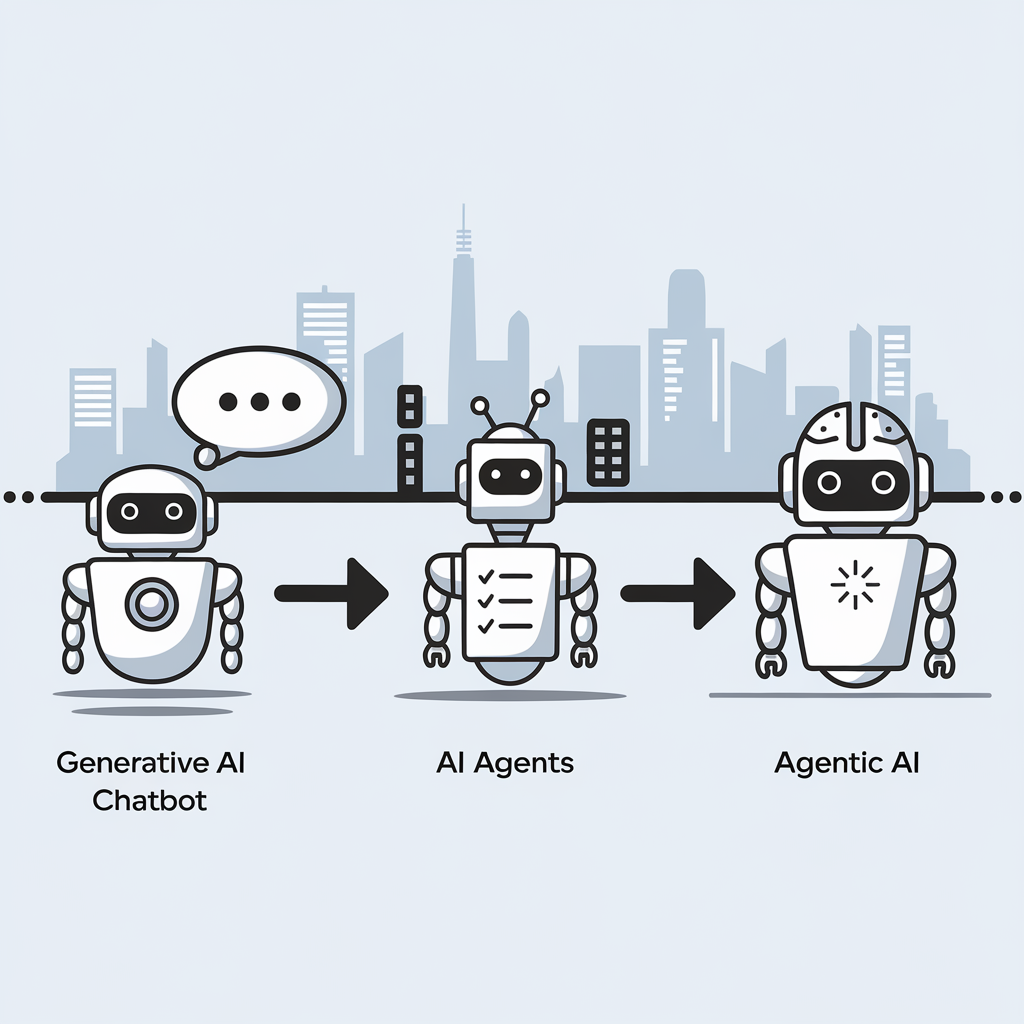
The distinction between three key artificial intelligence concepts can be explained without technical jargon. Here then are the descriptions:
- Generative AI functions as a responsive assistant that creates content when prompted but lacks initiative, memory or goals. Examples include ChatGPT, Claude and GitHub Copilot.
- AI Agents represent a step forward, actively completing tasks by planning, using tools, interacting with APIs and working through processes independently with minimal supervision, similar to a junior colleague.
- Agentic AI represents the most sophisticated approach, possessing goals and memory while adapting to changing circumstances; it operates as a thinking system rather than a simple chatbot, capable of collaboration, self-improvement and autonomous operation.
This evolution marks a significant shift from building applications to designing autonomous workflows, with various frameworks currently being developed in this rapidly advancing field.
Finding human balance in an age of AI code generation
12th March 2025
Recently, I was asked about how I felt about AI. Given that the other person was not an enthusiast, I picked on something that happened to me, not so long ago. It involved both Perplexity and Google Gemini when I was trying to debug something: both produced too much code. The experience almost inspired a LinkedIn post, only for some of the thinking to go online here for now. A spot of brainstorming using an LLM sounds like a useful exercise.
Going back to the original question, it happened during a meeting about potential freelance work. Thus, I tapped into experiences with code generators over several decades. The first one involved a metadata-driven tool that I developed; users reported that there was too much imperfect code to debug with the added complexity that dealing with clinical study data brings. That challenge resurfaced with another bespoke tool that someone else developed, and I opted to make things simpler: produce some boilerplate code and let users take things from there. Later, someone else again decided to have another go, seemingly with more success.
It is even more challenging when you are insufficiently familiar with the code that is being produced. That happened to me with shell scripting code from Google Gemini that was peppered with some Awk code. There was no alternative but to learn a bit more about the language from Tutorials Point and seek out an online book elsewhere. That did get me up to speed, and I will return to these when I am in need again.
Then, there was the time when I was trying to get a Julia script to deal with Google Drive needing permissions to be set. This started Google Gemini into adding more and more error checking code with try catch blocks. Since I did not have the issue at that point, I opted to halt and wait for its recurrence. When it did, I opted for a simpler approach, especially with the gdrive CLI tool starting up a web server for completing the process of reactivation. While there are times when shell scripting is better than Julia for these things, I added extra robustness and user-friendliness anyway.
During that second task, I was using VS Code with the GitHub Copilot plugin. There is a need to be careful, yet that can save time when it adds suggestions for you to include or reject. The latter may apply when it adds conditional logic that needs more checking, while simple code outputting useful text to the console can be approved. While that certainly is how I approach things for now, it brings up an increasingly relevant question for me.
How do we deal with all this code production? In an environment with myriads of unit tests and a great deal of automation, there may be more capacity for handling the output than mere human inspection and review, which can overwhelm the limitations of a human context window. A quick search revealed that there are automated tools for just this purpose, possibly with their own learning curves; otherwise, manual working could be a better option in some cases.
After all, we need to do our own thinking too. That was brought home to me during the Julia script editing. To come up with a solution, I had to step away from LLM output and think creatively to come up with something simpler. There was a tension between the two needs during the exercise, which highlighted how important it is to learn not to be distracted by all the new technology. Being an introvert in the first place, I need that solo space, only to have to step away from technology to get that when it was a refuge in the first place.
For anyone with a programming hobby, they have to limit all this input to avoid being overwhelmed; learning a programming language could involve stripping out AI extensions from a code editor, for instance, LLM output has its place, yet it has to be at a human scale too. That perhaps is the genius of a chat interface, and we now have Agentic AI too. It is as if the technology curve never slackens, at least not until the current boom ends, possibly when things break because they go too far beyond us. All this acceleration is fine until we need to catch up with what is happening.
Avoiding errors caused by missing Julia packages when running code on different computers
15th September 2024
As part of an ongoing move to multi-location working, I am sharing scripts and other artefacts via GitHub. This includes Julia programs that I have. That has led me to realise that a bit of added automation would help iron out any package dependencies that arise. Setting up things as projects could help, yet that feels a little too much effort for what I have. Thus, I have gone for adding extra code to check on and install any missing packages instead of having failures.
For adding those extra packages, I instate the Pkg package as follows:
import Pkg
While it is a bit hackish, I then declare a single array that lists the packages to be checked:
pkglits =["HTTP", "JSON3", "DataFrames", "Dates", "XLSX"]
After that, there is a function that uses a try catch construct to find whether a package exists or not, using the inbuilt eval macro to try a using declaration:
tryusing(pkgsym) = try

@eval using $pkgsym

return true

catch e

return false

end
The above function is called in a loop that both tests the existence of a package and, if missing, installs it:
for i in 1:length(pkglits)

rslt = tryusing(Symbol(pkglits[i]))

if rslt == false

Pkg.add(pkglits[i])

end

end
Once that has completed, using the following line to instate the packages required by later processing becomes error free, which is what I sought:
using HTTP, JSON3, DataFrames, Dates, XLSX
What to do when a GPG signature becomes invalid for a package repository on Linux Mint
12th September 2024
During a package update on my main Linux system, I encountered the following kind of error message:
An error occurred during the signature verification. The repository is not updated and the previous index files will be used. GPG error: https://cli.github.com/packages stable InRelease: The following signatures were invalid: EXPKEYSIG <GPG Key> GitHub CLI
The message indicated a problem with the GPG signature verification for the GitHub CLI repository. The cause was that the signature for the repository was invalid, preventing the package manager from updating the repository's index files. The first step then was to remove the invalid GPG key using the following command:
sudo apt-key del <GPG Key>
With the invalid GPG key removed, the next step is to add the new GPG key for the GitHub CLI repository by issuing the following command:
curl -fsSL https://cli.github.com/packages/githubcli-archive-keyring.gpg | sudo tee /usr/share/keyrings/githubcli-archive-keyring.gpg > /dev/null
Once I had the new GPG key, I was able to use my usual system update process without any problem. The error message was gone, and updates and upgrades proceeded as intended.
Version control of large files on GitHub
27th August 2024
When you try pushing large files to a GitHub repository, you may find that you breach its 100 MB limit. When you do, you either need to buy a data pack or exclude the file from being tracked. In my case, I decided that the monthly fee for 50 GB was not overly onerous, so I added that. Excluding such files using the .gitignore functionality makes a lot of sense, too.
If you decide to proceed as I did, you will need to install git-lfs. Since that may vary by operating system, I am leaving to you to look for those details on the website that I have linked to earlier. Activating it for your user account needs the following:
git lfs install
Following that, you need to flag the file or type of file using a command like the following:
git lfs track "[file path with name or search pattern]"
Executing the above adds the file path including the file name or the search pattern (normal operating system wildcards like * work here) to a file named .gitattributes in the root of the repository folder hierarchy. If that file no longer exists, it will get created the first time that this is done. It will also need to be added to the repository using git add like any other file. A general command like the following will also do it anyway, since it covers everything in the relevant folder:
git add .
After making a commit, the next step is to push the contents into GitHub. At this stage, the large file or files will be recognised and sent to large file storage with only a text link in the main area. Everything else will be handled as normal.
While on this subject, I need to add a few words of warning. Pushing a large file to GitHub without doing things up front will cause the operation to fail. That may make the transition over to large file storage all the more tricky, since things will be out of order. Moving everything to a temporary folder and again cloning the repository was how I got out of this impasse when it happened to me. Then, I could get the large file handling set up before getting going again. It is better to sort things like this out at the start of the process, rather than attempting to remedy things part way through the process.