TOPIC: DEB
You always can install things yourself...
 26th November 2009
With Linux distributions offering you everything on a plate, there is a temptation to stick with what they offer rather than taking things into your own hands. For example, Debian's infrequent stable releases and the fact that they don't seem to change software versions throughout the lifetime of such a release means that things such as browser versions are fixed for the purposes of stability; Lenny has stuck with Firefox 3.06 and called it IceWeasel for some unknown reason. However, I soon got to grab a tarball for 3.5 and popped its contents into /opt where the self-contained package worked without a hitch. The same modus operandi was used to add Eclipse PDT and that applied to Ubuntu too until buttons stopped working, forcing a jumping of ship to NetBeans.
Of course, you could make a mess when veering away from what is in a distribution, but that should be good enough reason not to get carried away with software additions. With the availability of DEB packages for things like Adobe Reader, RealPlayer, VirtualBox, Google Chrome and Opera, keeping things clean isn't so hard. While your mileage may vary when it comes to how well things work out for you, I have only ever had the occasional problem anyway.
What reminded me of this was a recent irritation with the OpenOffice package included in Ubuntu 9.10 whereby spell checking wasn't working. While there were thoughts about in situ fixes like additional dictionary installations, I ended up plumping for what could be called the lazy option: grabbing a tarball full of DEB packages from the OpenOffice website and extracting its contents into /tmp and, once the URE package was in place, installing from there using the command:
dpkg -i o*
To get application shortcuts added to the main menu, it was a matter of diving into the appropriate subfolder and installing from the GNOME desktop extension package. Of course, Ubuntu's OpenOffice variant was removed as part of all this but, if you wanted to live a little more dangerously, the external installation goes into /opt which means that there shouldn't be too much of a conflict anyway. In any case, the DIY route got me the spell checking in OpenOffice Writer that I needed, so all was well and another Ubuntu rough edge eradicated from my life, for now anyway.
Adding Microsoft core fonts to Debian
18th June 2009
When setting up Ubuntu, I usually add in Microsoft's core fonts by installing the msttcorefonts package using either Synaptic or apt-get. Though I am not sure why I didn't try doing the same thing for Debian until now, it's equally feasible. Just pop over to System > Administration > Software Sources and ensure that the check-boxes for the contrib and non-free categories are checked like you see below.
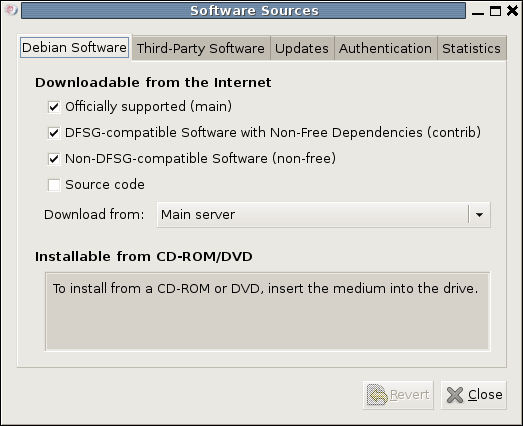
You could also achieve the same end by editing /etc/apt/sources.list and adding the non-free and contrib keywords to make lines look like these before issuing the command apt-get update as root:
deb http://ftp.debian.org/debian/ lenny main non-free contrib

deb-src http://ftp.debian.org/debian/ lenny main non-free contrib
All that you are doing with the manual editing route is performing the same operations that the more friendly front end would do for you anyway. After that, it's a case of going with the installation method of your choice and restarting Firefox or IceWeasel to see the results.
Forcing Ubuntu (and Debian) to upgrade to a newer distribution version
8th October 2008
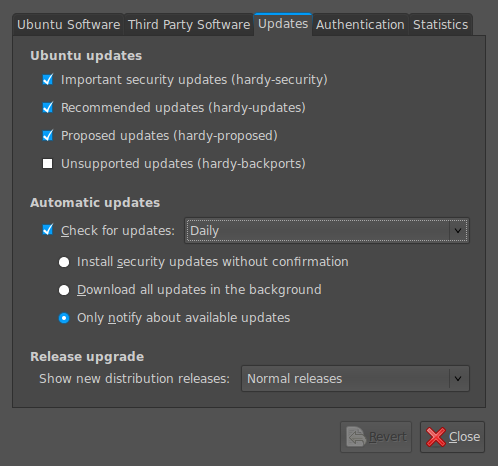
Ubuntu is usually good at highlighting the existence of a new version of the distribution through its Update Manager. That means that 8.10 should be made available to you at the end of the month, so long as you have sorted the relevant setting for 8.04 to realise what has happened. That lives in System > Administration > Software Sources > Updates. If you haven't done that, then 8.04 will continue regardless, since it is a long term supported release.
Otherwise, it's over to the command line to sort you out. One of the ones below will do, with the first just carrying out a check for a new stable version of Ubuntu and the second going all the way:
sudo update-manager -c
sudo update-manager -p
if you are feeling more adventurous, you can always try the development version and this checks for one of those (I successfully used this to try out the beta release of Intrepid Ibex from within a Wubi instance on my laptop):
sudo update-manager -d
Neither of the above are available on Debian, so they seem to be Ubuntu enhancements. That is not to imply that you cannot force the issue with Debian; it's just that the more generic variant is used and, unless, you have gone fiddling with visudo, you will need to run this as root (it works in Ubuntu too):
update-manager --dist-upgrade
A quick way to do an update
8th August 2008
Here's a quick way to get the latest updates on your PC using the command line if you are using Ubuntu or Debian:
sudo apt-get update && sudo apt-get upgrade
Of course, you can split these commands up if you prefer to look before you leap. At the very least, it's so much slicker than the GUI route.
What? No DNG?
9th January 2008
Since Google's Picasa is now available for Linux, I decided to give it a spin. The availability of downloadable DEB packages made installation a piece of cake. It has been ported using WINE, which means that the look and feel is very much of the Windows world. The functionality is similar too, which means that it can seek out image files on your PC. However, it didn't find any DNG files for me, a surprise when DNG could become the standard raw camera format for digital imaging. In contrast, the lack of support for proprietary formats like Canon's CRW might be understandable. Because I like to review the raw image files before committing to editing them, Picasa will not suffice for this purpose, leading me to stick with what I already use.