TOPIC: CHARACTER ENCODING
Resolving a Linux Mint and Windows keyboard shortcut conflict encountered when using SAS Enterprise Guide in a remote Citrix session
 20th February 2026
Here is a gotcha, slight though it is, that caught me when working in SAS Enterprise Guide on a Windows system to which I was connecting from Linux via Citrix. What I wanted to do was use the keyboard shortcut CTRL + SHIFT + U to convert text to upper case in the program editor, only for it to produce a black square and nothing else.
What I was encountering was a clash in keyboard shortcut assignments. On Linux Mint, CTRL + SHIFT + U activates Unicode character input mode. The black square was there for me to enter a hexadecimal code to add a character that my keyboard would not facilitate in normal circumstances. While the facility clearly has its uses, it was getting in my way and a solution had to be found.
Taking the simple route, I changed the keyboard shortcut to avoid the clash. Though others may want to go further than this, that was enough for me. At the command line, I issued the following command so that I could accomplish this:
ibus-setup
In the application screen that appeared, I navigated to the Emoji tab. To the right of the Unicode code point box, I clicked on the button with four dots. That led me to another dialogue box where I could change the modifier keys. Thus, I unchecked the box for SHIFT and ticked the one for SUPER (the Windows key on many keyboards these days) instead, before clicking on the OK button to confirm the setting. With that completed, I closed the IBus Preferences screen.
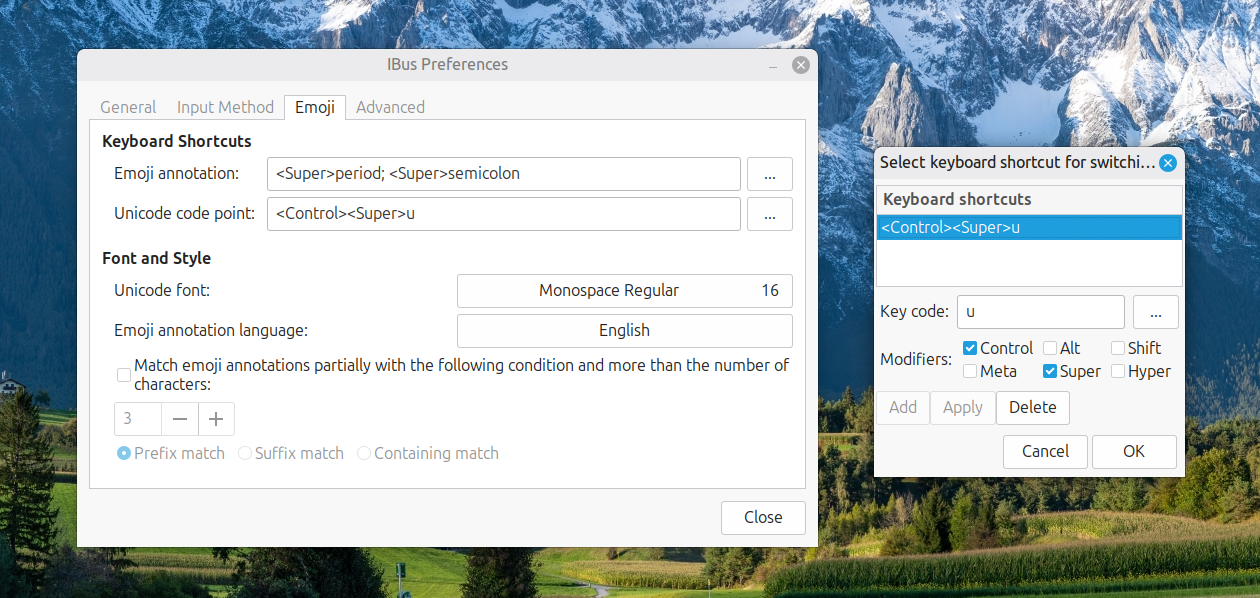
Now, I had CTRL + SUPER + U instead of CTRL + SHIFT + U. This meant that the CTRL + SHIFT + U in Enterprise Guide worked exactly as I expected it to do. A baffling situation had been resolved to leave me working without intrusion.
Safe file copying methods for cross platform SAS programming
9th February 2026
Not so long ago, I needed to copy a file within a SAS program, only to find that an X command would not accomplish the operation. That cast my mind back to file operations using SAS in order to be platform-independent. Thus, I fell upon statements within a data step.
Before going that far, you need to define filename statements for the source and target locations like this:
filename src "<location of source file or files>" lrecl=32767 encoding="utf-8";

filename dst "<target location for copies>" lrecl=32767 encoding="utf-8";
Above, I also specified logical record length (LRECL) and UTF-8 encoding. The latter is safer in these globalised times, when the ASCII character set does not suffice for everyday needs.
Once you have defined filename statements, you can move to the data step itself, which does not output any data set because of the data _null_ statement:
data _null_;
    length rc msg $ 300;
    rc = fcopy('src','dst');
    if rc ne 0 then do;
        msg = sysmsg();
        putlog "ERROR: FCOPY failed rc=" rc " " msg;
    end;
    else putlog "NOTE: Copied OK.";
run;
The main engine here is the fcopy function, which outputs a return code (rc). Other statements like putlog are there to communication outcomes and error messages when the file copying operation fails. The text of the error message (msg) comes from the sysmsg function. After file copying has completed, it is time to unset the filename statements as follows:
filename src clear;

filename dst clear;
One thing that needs to be pointed out here is that this is an approach best reserved for text files like what I was copying when doing this. When I attempted the same kind of operation with an XLSX file, the copy would not open in Excel afterwards. Along the way, it had got scrambled. Once you realise that an XLSX file is essentially a zip archive of XML files, you might see how that could go awry.
Using the LIKE operator in PROC SQL WHERE clauses in SAS
26th November 2025
Recently, I was working in SAS and decided to trying picking out datasets and variables from its dictionary tables, eventually picking out the maximum length of a variable type for assigning the length of a new variable. This could have been done using a long-established technique:
proc sql;
    select distinct memname into :dsns separated by '#'
        from dictionary.tables
            where lowcase(libname) = 'work'
            and index(lowcase(memname), "r_") = 1
            and index(lowcase(memname), "visit") = 0;
quit;
The result is that it creates a macro variable containing a delimited list of work datasets with names beginning with r_ and not containing the string visit. As well as using the index function to find the placing of one string within another, I have seen the count function used for similar purposes, albeit without the placement specificity. Since the =: operator which looks for a search string at the start of a larger is not something that works in SQL (data step is more than fine), you cannot do something like this:
proc print data = sashelp.vmember noobs;
    where lowcase(libname) = 'work'
    and lowcase(memname) =: "r_";
run;
While the contains operator works similarly to the count function when it comes to search text positioning, yet another option is the like operator, and that is shown in the example below:
proc sql;
    select distinct memname into :dsns separated by '#'
        from dictionary.tables
            where lowcase(libname) = 'work'
            and lowcase(memname) like 'r\_%' escape '\'
            and lowcase(memname) not like '%visit%';
quit;
Here, % and _ are placeholder characters, with the first matching zero or more characters and the second matching one character. Thus, the underscore in r_ needs escaping to look for that pattern (otherwise, it will look for the letter r at the start of a string and a single character after it) and a backslash character (\) will cover that duty. To ensure that it does what you want, adding escape '\' after the expression tells SAS what is happening.
Another thing to watch is that the percent (%) character needs a form escaping from the SAS Macro language processor, and placing the search term in single quotes attends to that. That means that %visit% does not cause any errors when you are looking for visit within a dataset name and using negation (the not operator) to exclude that possibility from the search results. However, using _%visit% might be a better pattern for finding visit at the end of a name, though.
Should you wish to play around with the above to see what happens for your own learning, try using something like this to give you a few test datasets:
data r_test r_visit visit;
    set sashelp.class;
run;
Otherwise, feel free to add your own test cases to cement the ideas even further. All too often, we look up something, deploy it and then forget about, especially when AI is involved. Nevertheless, the fastest way to write code can be to use what is embedded in your memory.
Resolving Python UnicodeEncodeError messages issued while executing scripts using the Windows Command Line
14th March 2025
Recently, I got caught out by this message when summarising some text using Python and Open AI's API while working within VS Code:
UnicodeEncodeError: 'charmap' codec can't encode characters in position 56-57: character maps to <undefined>
There was no problem on Linux or macOS, but it was triggered on the Windows command line from within VS Code. Unlike the Julia or R REPL's, everything in Python gets executed in the console like this:
& "C:/Program Files/Python313/python.exe" script.py
The Windows command line shell operated with cp1252 character encoding, and that was tripping up the code like the following:
with open("out.txt", "w") as file:
    file.write(new_text)
The cure was to specify the encoding of the output text as utf-8:
with open("out.txt", "w", encoding='utf-8') as file:
    file.write(new_text)
After that, all was well and text was written to a file like in the other operating systems. One other thing to note is that the use of backslashes in file paths is another gotcha. Adding an r before the quotes gets around this to escape the contents, like using double backslashes. Using forward slashes is another option.
with open(r"c:\temp\out.txt", "w", encoding='utf-8') as file:
    file.write(new_text)
Something to watch with the SYSODSESCAPECHAR automatic SAS macro variable
10th October 2021
Recently, a client of mine updated one of their systems from SAS 9.4 M5 to SAS 9.4 M7. Despite performing due diligence regarding changes between the maintenance release, a change in behaviour of the SYSODSESCAPECHAR automatic macro variable surprised them. The macro variable captures the assignment of the ODS escape character used to prefix RTF codes for page numbering and other things. That setting is made using an ODS ESCAPECHAR statement like the following:
ods escapechar="~";
In the M5 release, the tilde character in this example was output by the automatic macro variable, but that changed in the M7 release to 7E, the hexadecimal code for the same and this tripped up one of their validated macro programs used in output production. The adopted solution was to use the escape sequence (ESC) that gave the same outcome that was there before the change. That was less verbose than alternative code changing the hexadecimal code into the expected ASCII character that follows.
data _null_;
    call symput("new",byte(input("&sysodsescapechar.",hex.)));
run;
The above supplies a hexadecimal code to the BYTE function for correct rendering, with the SYMPUT routine assigning the resulting value to a macro variable named new. Just using the escape sequence is far more succinct, though there is now an added validation need once user pilot testing has completed. In my line of business, the updating of code is the quickest part of many such changes; documentation and testing always take longer.
SAS functions for character and string validation
22nd January 2010
There is a whole pile of SAS functions for testing text strings that hadn't come to my attention until this week. Until then, I'd have gone about using functions like INDEX and PRXMATCH functions for the same sort of ends, but it's never any load to have a few different ways of doing things and to use the right one for the job. Here's a quick list of my recent discoveries:
ANYALNUM: First position of any alphanumeric character, returns 0 if absent
ANYALPHA: First position of any alphabetic character (letter of the alphabet), returns 0 if absent
ANYCNTRL: First position of any control character, returns 0 if absent
ANYDIGIT: First position of any numeric character, returns 0 if absent
ANYFIRST: First position of any character that can be used as the start of a SAS variable name when VALIDVARNAME is set to V7, returns 0 if absent
ANYGRAPH: First position of any printable character that isn't white space, returns 0 if absent
ANYLOWER: First position of any lowercase letter, returns 0 if absent
ANYNAME: First position of any character that can be used in a SAS variable name when VALIDVARNAME is set to V7, returns 0 if absent
ANYPRINT: First position of any printable character, returns 0 if absent
ANYPUNCT: First position of any punctuation character, returns 0 if absent
ANYSPACE: First position of any whitespace character (tabs, carriage returns and the like), returns 0 if absent
ANYUPPER: First position of any uppercase letter, returns 0 if absent
ANYXDIGIT: First position of any hexadecimal character, returns 0 if absent
NOTALNUM: First position of any non-alphanumeric character, returns 0 if absent
NOTALPHA: First position of any non-alphabetic character, returns 0 if absent
NOTCNTRL: First position of anything that isn't a control character, returns 0 if absent
NOTDIGIT: First position of any non-numeric character, returns 0 if absent
NOTFIRST: First position of any character that cannot be used as the start of a SAS variable name when VALIDVARNAME is set to V7, returns 0 if absent
NOTGRAPH: First position of anything that isn't a printable character that isn't white space, returns 0 if absent
NOTLOWER: First position of anything that isn't a lowercase letter, returns 0 if absent
NOTNAME: First position of any character that cannot be used in a SAS variable name when VALIDVARNAME is set to V7, returns 0 if absent
NOTPRINT: First position of any non-printable character, returns 0 if absent
NOTPUNCT: First position of anything that isn't a punctuation character, returns 0 if absent
NOTSPACE: First position of anything that isn't a whitespace character, returns 0 if absent
NOTUPPER: First position of anything that isn't an uppercase letter, returns 0 if absent
NOTXDIGIT: First position of anything that isn't a hexadecimal character, returns 0 if absent
Apart from simpler cases where other techniques would work well with a similar amount of effort, there are others that would need some investigation if you were to program them without using one of the above functions. For that reason, I'll be keeping them in mind for when I might meet one of those more complex scenarios.