15th February 2007
There are things in the Vista EULA that gave me a shock when I first saw them. In fact, one provision set off something of a storm across the web in the latter part of 2006. Microsoft in its wisdom went and made everything more explicit and raised cane in doing so. It was their clarification of the one machine, one licence understanding that was at the heart of the whole furore. The new wording made it crystal clear that you were only allowed to move your licence between machines once and once only. After howls of protest, the XP wording reappeared and things calmed down again.
Around the same time, Paul Thurrott published his take on the Vista EULA on his Windows SuperSite. He takes the view that the new EULA only clarified what in the one XP, and that enthusiast PC builders are but a small proportion of the software market. Another interesting point that he makes is that there is no need to license the home user editions of Vista for use in virtual machines because those users would not be doing that kind of thing. The logical conclusion of this argument is that only technical business users and enthusiasts would ever want to do such a thing; I am both. On the same site, Koroush Ghazi of TweakGuides.com offers an alternate view, at Thurrrott’s invitation, from the enthusiast’s side. That view takes note of the restrictions of both the licensing and all the DRM technology that Microsoft has piled into Vista. Another point made is that enthusiasts add a lot to the coffers of both hardware and software producers.
Bit-tech.net got the Microsoft view on the numbers of activations possible with a copy of retail Vista before further action is required. The number comes in at 10, and it seems a little low. However, Vista will differ from XP in that it thankfully will not need reactivation as often. In fact, it will take changing a hard drive and one other component to do it. That’s less stringent than needing reactivation after changing three components from a wider list in a set period, like it is in XP. While I cannot remember the exact duration of the period in question, 60 days seems to ring a bell.
OEM Vista is more restrictive than this: one reactivation and no more. I learned that from the current issue of PC Plus, the trigger of my concern regarding Windows licensing. Nevertheless, so long as no hard drive changes go on, you should be fine. That said, I do wonder what happens if you add or remove an external hard drive. On this basis at least, it seems OEM is not such a bargain then and Microsoft will not support you anyway.
However, there are cracks appearing in the whole licensing edifice and the whole thing is beginning to look a bit of a mess. Brian Livingston of Windows Secrets has pointed out that you could do a clean installation using only the upgrade edition(s) of Vista by installing it twice. The Vista upgrade will upgrade over itself, allowing you access to the activation process. Of course, he recommends that you only do this when you are in already in possession of an XP licence, and it does mean that your XP licence isn’t put out of its misery, apparently a surprising consequence of the upgrade process if I have understood it correctly.
However, this is not all. Jeff Atwood has shared on his blog Coding Horror that the 30 grace activation period can be extended in three increments to 120 days. Another revelation was that all Windows editions are on the DVD, and it is only the licence key that you have in your possession that will determine the version that you install. In fact, you can install any version for 30 days without entering a licence key at all. Therefore, you can experience 32-bit or 64-bit versions and any edition from Home Basic, Home Premium, Business or Ultimate. The only catch is that once the grace period is up, you have to license the version that is installed at that time.
There is no cracking required for any of the above (a quick Google search digs loads of references to cracking of the Windows activation process). Though it sounds surprising, it is none other than Microsoft itself who has made these possibilities available, albeit in an undocumented fashion. And the reason is not commercial benevolence but the need to keep their technical support costs under control, apparently.
That said, an unintended consequence of the activation period extensibility is that PC hardware enthusiasts, the types who rebuild their machines every few months (in contrast, I regard my main PC as a workhouse and I have no wish to cause undue disruption to my life with this sort of behaviour but each to their own… anyway, it’s not as if they are doing anyone else any harm), would not ever have to activate their copies of Vista, thus avoiding any issues with the activation limit of 1 or 10: an interesting workaround for the limitations in the first place. And all of this is available without (illegally, no doubt) using a fake Windows activation server, as has been reported.
With all of these back doors inserted into the activation process by Microsoft itself, it makes some of the more scary provisions look not only over the top but also plain silly: a bit like using a sledgehammer to crack a nut. For instance, there is a provision that Microsoft could kill your Windows licence if it deems that you breached the terms of that licence. It looks as if it’s meant to cover the loss in functionality at the end of the activation grace period, but it does rather give the appearance that your £370 Vista Ultimate is as ephemeral as a puff of smoke: overdoing that reminder is an almost guaranteed method of encouraging power users jump ship to Linux or another UNIX. And the idea of Windows Genuine Advantage continually phoning home doesn’t provide any great reassurance either. However, it does seem that Microsoft has reactivated XP licences over the phone when reasonable grounds are given: irredeemable loss of system, for example. That ease and cost of technical support returns again. There is a corollary to this: make life easy for Microsoft, and they won’t bother you very much, if at all. Incidentally, if they ever did do a remote control kill of your system, the whole action would be akin to skating on legal thin ice. And I suspect that they may not like making trouble for themselves.
I think I’ll let the dust settle and stay on my XP planet while in a Vista universe. As it happens, Paul Thurrott has a good article on that subject too.
12th February 2007
Over the weekend, I have been updating the theme on my other blog, HennessyBlog. It has been a task that projected me onto a learning curve with the WordPress 2.1 codebase. Thus, I have collected what I encountered, so I know that it’s out there on the web for you (and I) to use and peruse. It took some digging to get to know some of what you find below. Since any function used to power WordPress takes some finding, I need to find one place on the web where the code for WordPress is more fully documented. The sites presenting tutorials on how to use WordPress are more often than not geared towards non-techies rather than code cutters like myself. Then again, they might be waiting for someone to do it for them…
The changes made are as follows:
Tweaks to the interface
These are subtle, with the addition of navigation controls to the sidebar and the change in location of the post metadata being the most obvious enhancements. “Decoration” with solid and dashed lines (using CSS border attributes rather than the deprecated hr tagset) and standards compliance links.
Standards compliance
Adding standards compliance links does mean that you’d better check that all is in order; it was then that I discovered that there was work to be done. There is an issue with the WordPress wpautop function (it lives in the formatting.php file) in that it sometimes doesn’t add closing tags. Finding out that it was this function that is implicated took a trip to the WordPress.org website; while a good rummage in the wp-includes folder does a lot, it can’t achieve everything.
Like many things in the WordPress code, the wpautop function isn’t half buried. The the_content function (see template-functions-post.php) used to output blog entries calls the get_content function (also in template-functions-post.php) to extract the data from MySQL. The add_filter function (in plugin.php) associates the wpautop function and others with the get_the_content function to add the p tags to the output.
To return to the non-ideal behaviour that caused me to start out on the above quest, an example is where you have an img tag enclosed by div tags. The required substitution involves the use of regular expressions that work most of the time but get confused here. So adding a hack to the wpautop function was needed to change the code so that the p end tag got inserted. I’ll be keeping an eye out for any more scenarios like this that slip through the net and for any side effects. Otherwise, compliance is just making sure that all those img tags have their alt attributes completed.
Tweaks to navigation code
Most of my time has been spent on tweaking of the PHP code supporting the navigation. Because different functions were being called in different places, I wanted to harmonise things. To accomplish this, I created new functions in the functions.php for my theme and needed to resolve a number of issues along the way. Not least among these were regular expressions used for subsetting with the preg_match function; these were not Perl-compliant to my eyes, as would be implied by the choice of function. Now that I have found that PCRE’s in PHP use a more pragmatic syntax, there appeared to be issues with the expressions that were being used. These seemed to behave OK in their native environment but fell out of favour within the environs of my theme. Being acquainted with Perl, I went for a more familiar expression style and the issue has been resolved.
Along the way, I broke the RSS feed. This was on my off-line test blog so no one, apart from myself, that is, would have noticed. After a bit of searching, I realised that some stray white-space from the end of a PHP file (wp-config.php being a favourite culprit), after the PHP end tag in the script file as it happens, was finding its way into the feed and causing things to fall over. Feed readers don’t take too kindly to the idea of the XML declaration not making an appearance on the first line of the file. Some confusion was caused by the refusal of Firefox to refresh things as it should before I realised that a forced refresh of the feed display was needed. Sometimes, it takes a while for an addled brain to think of these kinds of things.
9th February 2007

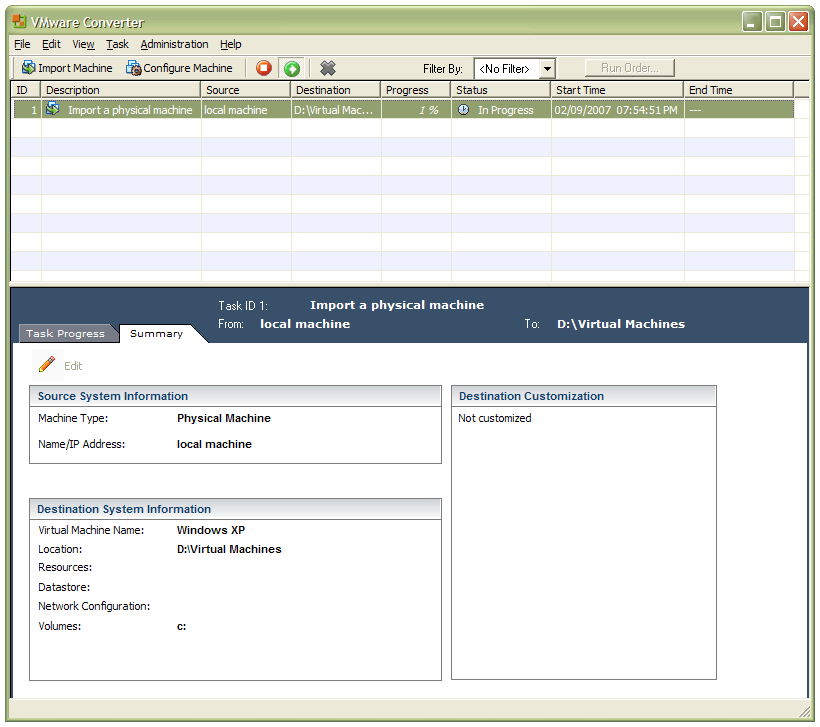
In a previous entry, I mused over a move from Windows to Linux, a suggestion being that Fedora Core Linux would be my base operating system with Windows installed in a Xen virtual machine. That, of course, led me to wonder how I would swap my current situation about: Linux in VM, Windows as host. Meantime, I discovered something that makes the whole process a little easier: VMware Convertor.
The Starter version can be downloaded free of charge, while the Enterprise edition comes with VirtualCenter Management Server for corporate use. What it does is to make a virtual version of a real computer, a process that takes drive imaging much, much further. I have given it a whirl and the conversion seems to go well; the only thing left is for me to fire it up in VMware Workstation - I believe that Player and Server will also run the VM that is created and, like Convertor Starter, they also can be downloaded free of charge; Workstation does everything for me, so I haven't looked beyond it, even though it did cost me money all those moons ago - and get through licence activation issues without leaving me with no authorised Windows installation.
9th February 2007
I have just discovered that if you have a number with a leading zero, such as 08, it is assumed to be an octal number, that is, one of base 8. The upshot of this is that you get errors when you have numbers like 08 and 09 in your arithmetical expressions; they are illegal in octal: 08 should be 10 and 09 should be 11. Of course, as luck would have it, you get exactly these expressions when date/time processing. Luckily, you can force things to be base 10 by having something like 10#08 or, when extracting the minute from a date-time value, 10#$(date +%M). Strange as it might appear, this behaviour is all by design. It is dictated in the POSIX standard that governs UNIX. That said, I'd rather it if 08 was interpreted as an 8 and 09 as a 9 rather than triggering the errors that we see, but that could have been seen as muddying the simplicity of the standard.
8th February 2007
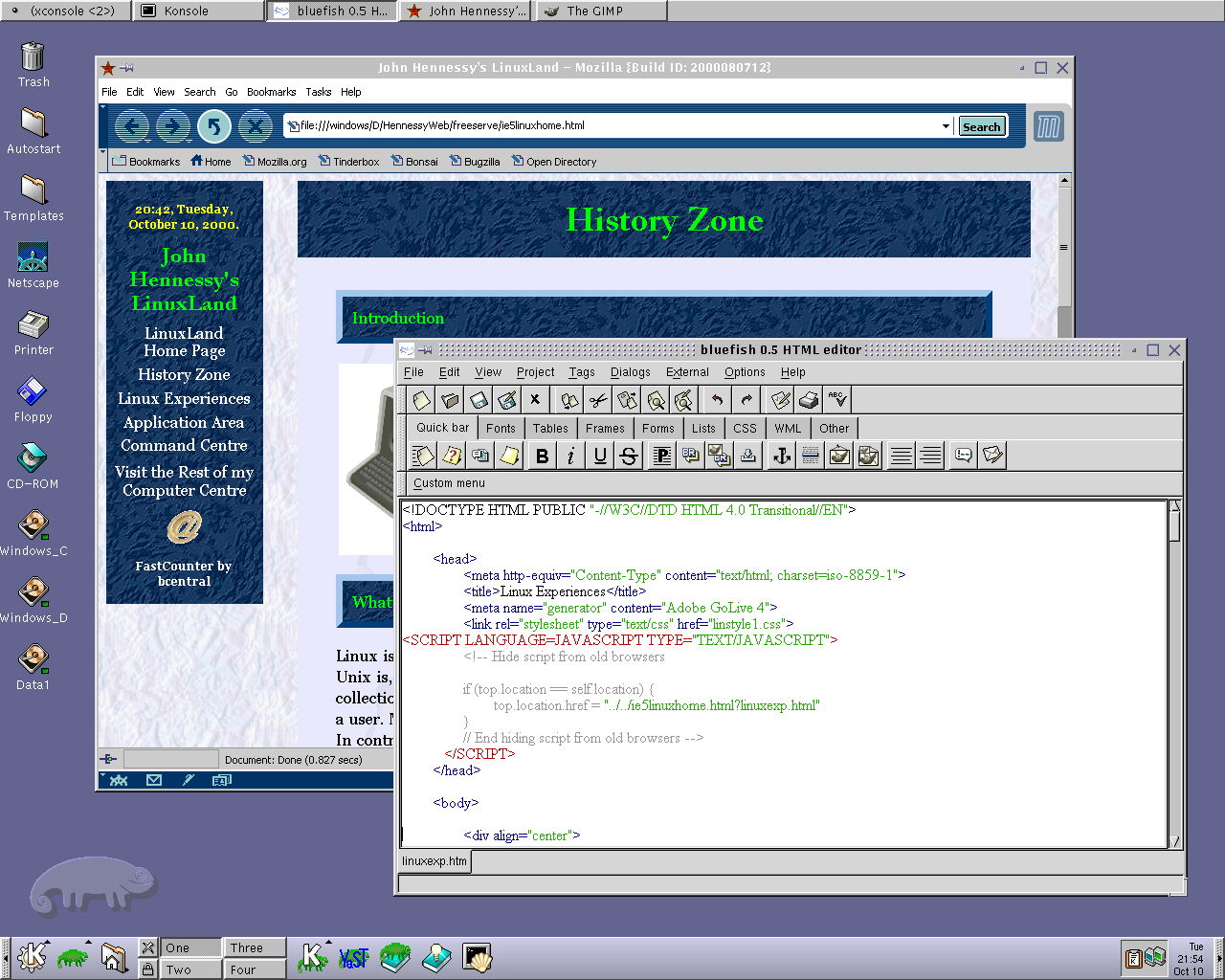
Recently, I have revisited an old website that I used to have online in and around 2000 that has since been retired for a while. One thing that it had in common with this blog was its focus on computer technology. While I don’t remember blogging being bandied about as a term back then, a weblog would have fulfilled the site’s much better. One of the sections of this old world website was dedicated to Linux and UNIX; this was where I collected and shared experienced my experiences of these. These days, unless it is held in some cache somewhere (rather unlikely, I think), the only place that it is found is what I bundled together in a tar.gz file for transfer to Linux. Irony strikes…
Back then, my choice of Linux was SuSE 6.2, followed by 6.4 from PC Plus DVD. It was the first, and only, Linux distro that I bought after exploring a selection of distros from cover-mounted CD’s in books and magazines. While I did like it, it wasn’t enough to tempt me away from Windows. I had issues with hardware, and they got in the way of a move. Apart from what some might judge to be clunkiness, there were fewer impediments on the software side.
I am a DIY system builder and there were issues with Linux support of my hardware, particularly my modem. Rather than being in possession of all the electronic wherewithal that a full modem would need, it got the operating system to do some of the work. The trouble was that this locked you into using Windows, hence its Winmodem moniker. Besides this, my Zip drive was vital to me and SuSE didn’t support it out of the box: a kernel recompilation was in order and could involve losing any extensions that SuSE had actually added. Another foible was non-support of a now obsolete UDMA 66 expansion card.
But improvements in hardware support were coming on the scene. Support for printing with CUPS, scanning with SANE and audio with ALSA was coming along nicely and has matured nicely. Apart from cases where vendors refuse to help the Open-Source community and bleeding-edge hardware that needs drivers to recoded according to the demands of GPL, things have come a long, long way.
Software-wise, the only thing holding me from migrating to Linux was my use of Microcal (now OriginLab) Origin, a scientific data visualisation and analysis package that was invaluable for my work. Even then, that could be run using WINE, the Windows API library for Linux. OpenOffice could easily have replaced MS Office for my purposes, unless formula editing was a feature outstanding from the specification. GIMP, once I had ascended the learning curve, would have coped with my graphics processing needs. After committing myself to non-visual web development, Bluefish and Quanta+ would have fulfilled my web development needs. Web technologies such as Perl, PHP, Apache and SQL have always been very much at home on Linux, so no issue there. At that stage, experimenting with these was very much in my future. Surprisingly, web browsing wasn’t that strong in Linux then. Mozilla was still in the alpha/beta development phase and needed many rough ends sorting, while the dreadful Netscape 4 was in full swing with offerings like nautilus coming on stream. Typography support was another area of development at the time, which fed through into how browsers rendered web pages. Downloading and compiling xfstt did resolve the situation.

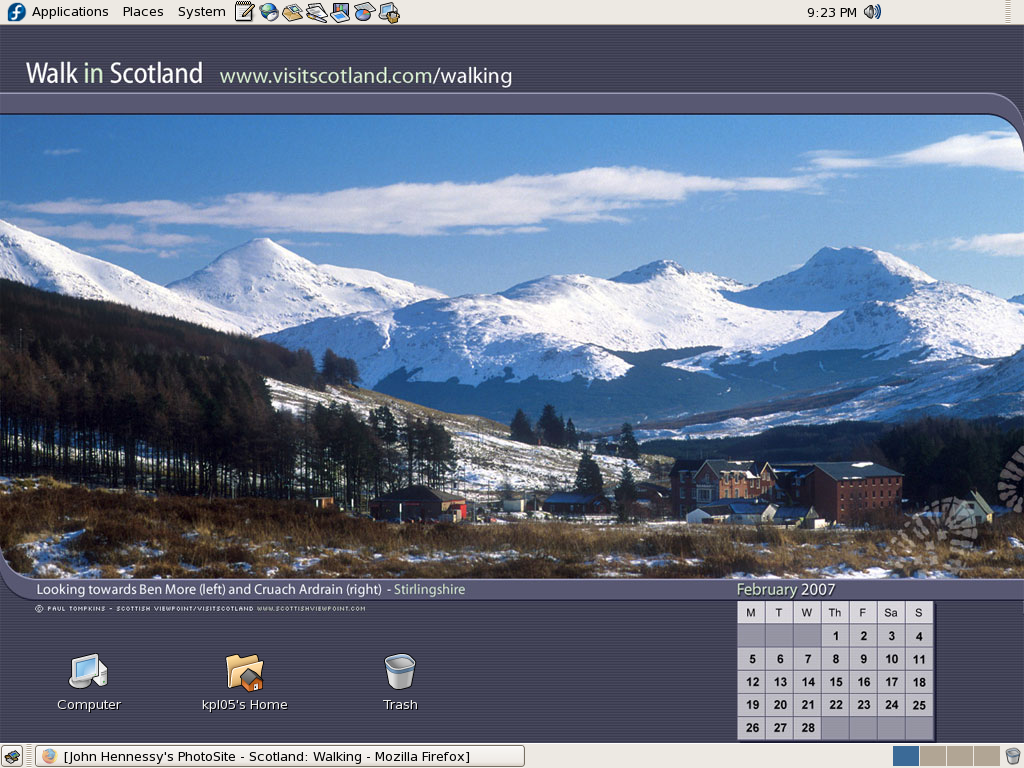
These days, I have virtual machines set up for Ubuntu, Fedora Core and Mandriva while openSUSE is another option. I spent Saturday night poking around in Fedora (I know, I should have better things to be doing…) and it feels very slick, a world away from where Red Hat was a decade ago. The same applies to Ubuntu, which is leagues ahead of Debian, on which it is based. With both of these, you get applications for updating the packages in the distribution; not something that you might have seen a few years ago. Support for audio and printing comes straight out of the box. I assume that scanner and digital camera support are the same; they need to be. Fedora includes the virtual machine engine that is Xen. I am intrigued by this but running a VM within a VM does seem peculiar. Nevertheless, if that comes off, it might be that Fedora goes onto my spare PC with Windows loaded onto one or more virtual machines. It’s an intriguing idea and having Fedora installed on a real PC might even allow me to see workspaces changed onscreen as if they were the sides of a cube, very nice. Mandriva also offers the same visual treat, but is not a distro that I have been using a lot. The desktop environment may be KDE rather than Gnome as it is in the others, but all the same features are on board. The irony though is that, after starting out my Linux voyage on KDE, I am now more familiar with Gnome these days and, aesthetically speaking, it does look that little better to my eye.
So, would I move to Linux these days? Well, it is supported by a more persuasive case than ever it has been, and I would have to say that it is only logistics and the avoidance of upheaval that is stopping me now. If I were to move to Linux, then it would be by reversing the current situation: going from Linux running in a VM on Windows to Windows running in a VM on Linux. Having Windows around would be good for my personal education and ease the upheaval caused by the migration. Then, it would be a matter of watching what hardware gets installed.

7th February 2007
With a good amount of snow forecast for parts of the U.K., one’s mind does turn to weather matters. Interestingly, AccuWeather is now powering browser plug-ins for all the major PC browsers and not just Firefox: Internet Explorer and Opera also get a look in. I have already tried out ForecastFox, the offering for Firefox, and had a brief look at the others. The IE add-on, I tested it with IE7, slots in neatly into the browser’s toolbar. Unlike ForecastFox, only the current weather and the forecast for the next day are shown for the selected location, with a link to AccuWeather for a 15-day forecast. The Opera widget is not docked with any toolbar, a bit of an irritation to put it mildly, but it does offer similar information.
These gizmos do highlight differences in the units used for weather information around the world. The U.S. is very much old school in its use of Fahrenheit (means next to nothing for me, I have to say) for temperature and miles per hour for wind speed. Other parts of the world measure temperature in Celsius (also called Centigrade) with wind speed measured in either metres per second or kilometres per hour. I find m/s strange for wind speed, but mph or kph are fine; while I think in terms of miles, my hillwalking is causing me to become more and more conversant in kilometres.
6th February 2007
Windows Vista is only out a week and the incompatibilities are already rolling in. Yesterday, it was iTunes that hit the headlines, with Apple making an announcement on its website. More importantly for the likes of me, dues to its effects on my work, SAS has announced that Vista compatibility will not be assured until it launches SAS 9.2. This is not exactly a surprise because they have been advising against using Internet Explorer 7 with their products as they have not carried out their validation. Given that this company is cautious about operating system support anyway, it may be that SAS 9.1.3 runs on Vista without their having validated it to the standards that a large enterprise user would expect. Now, the BBC’s Robert Peston writes an open letter to Bill Gates in his blog following a lost weekend with a laptop running Vista. His problems were hardware related.
There is one surprising thing about all of this: test versions of Vista have been out since last summer, with OEM ones available since November or thereabouts. Why have other software and hardware vendors not being looking ahead for this sort of thing? SAS’s advice regarding IE7 is in the same vein and even more surprising. Though I realise that there is only so much that can be done with a non-final version or, for that matter, in two months, some forward-thinking surely could have been employed. While I know that full legacy compatibility is a big job, it does look as if someone sat on their laurels. Or else, they are not allowing the release of Vista to upset their development and launch schedules and, given that Microsoft’s offering is evolutionary rather than revolutionary, they might well have a point. I think I’ll sit on the fence for a while longer…
3rd February 2007
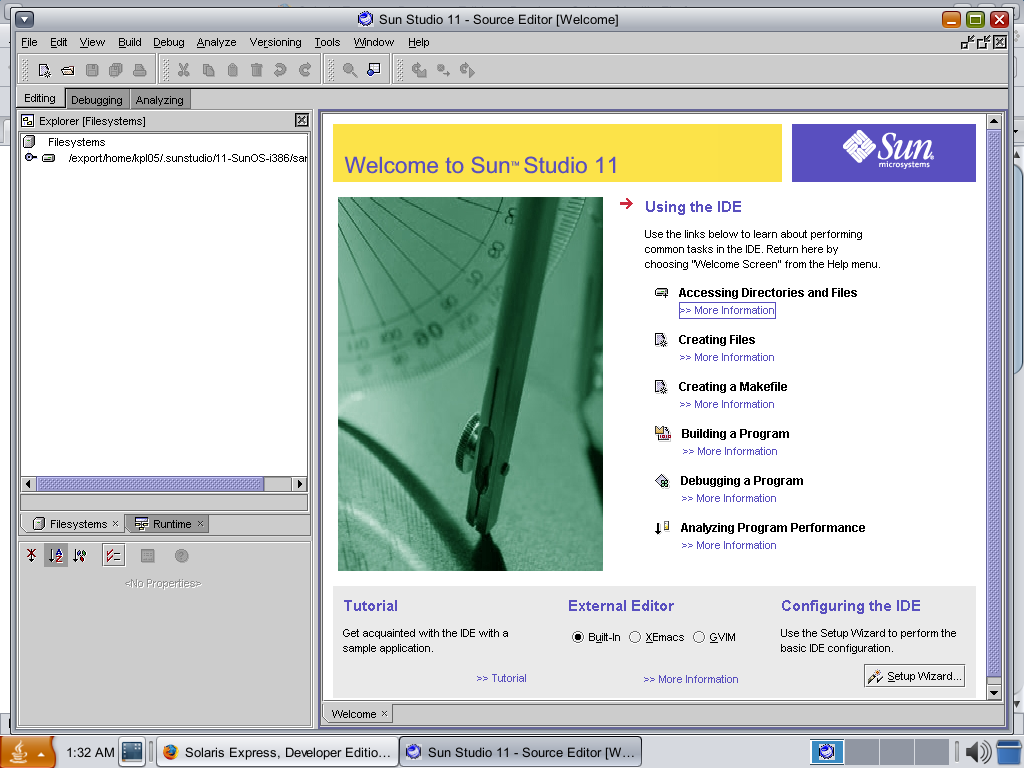
Having done a reinstallation, I have now got OpenSolaris going again in VMware and cloned the VM in case I go on a wrecking spree once more. I am going to leave VMware tools uninstalled for now so that I don't encounter the display problems I previously experienced. Speaking of how it looks, I uploaded a screenshot here; the difference between how it looks and the appearance of its ancestor is enormous. Having sorted the VMware/ZoneAlarm clash, networking not works as it should, and I can access the web through Firefox. Now that everything is all set, the real explorations can begin.
2nd February 2007
Brain Livingston has described an intriguing way to go using the retail Upgrade editions of Vista to do a fresh installation without having either Windows 2000 or XP installed in the latest edition (free – there is a paid version, but I veer away from information overload) of the Windows Secrets email newsletter: install it twice! After the first time around, it cannot be activated because there is no previous version of Windows installed, yet it is possible to do a Vista to Vista "upgrade", the second installation, and that can be activated. While it is strange behaviour, I suppose that it placates those who think that the full retail packages are far too expensive. They even think that in the U.S.; but "rip off" Britain is getting a lot worse deal because we are not seeing the benefits of the low dollar at all. If all was right, we should be getting Vista at half of the price that we are paying for it. It's enough to drive you to going the OEM option or not upgrading at all, especially since XP will be supported until 2011 (I have seen 2014 mentioned in some places). Livingston will cover the whole OEM discussion in the next edition of Windows Secrets, and I, for one, will be genuinely interested to see what he has to say.
2nd February 2007
Having been programming (mostly in SAS as it happens) on Sun's venerable Solaris operating system platform at work since the start of this year, the chance to try OpenSolaris x86 edition in a VMware virtual machine seemed a good opportunity for advancing my skills.
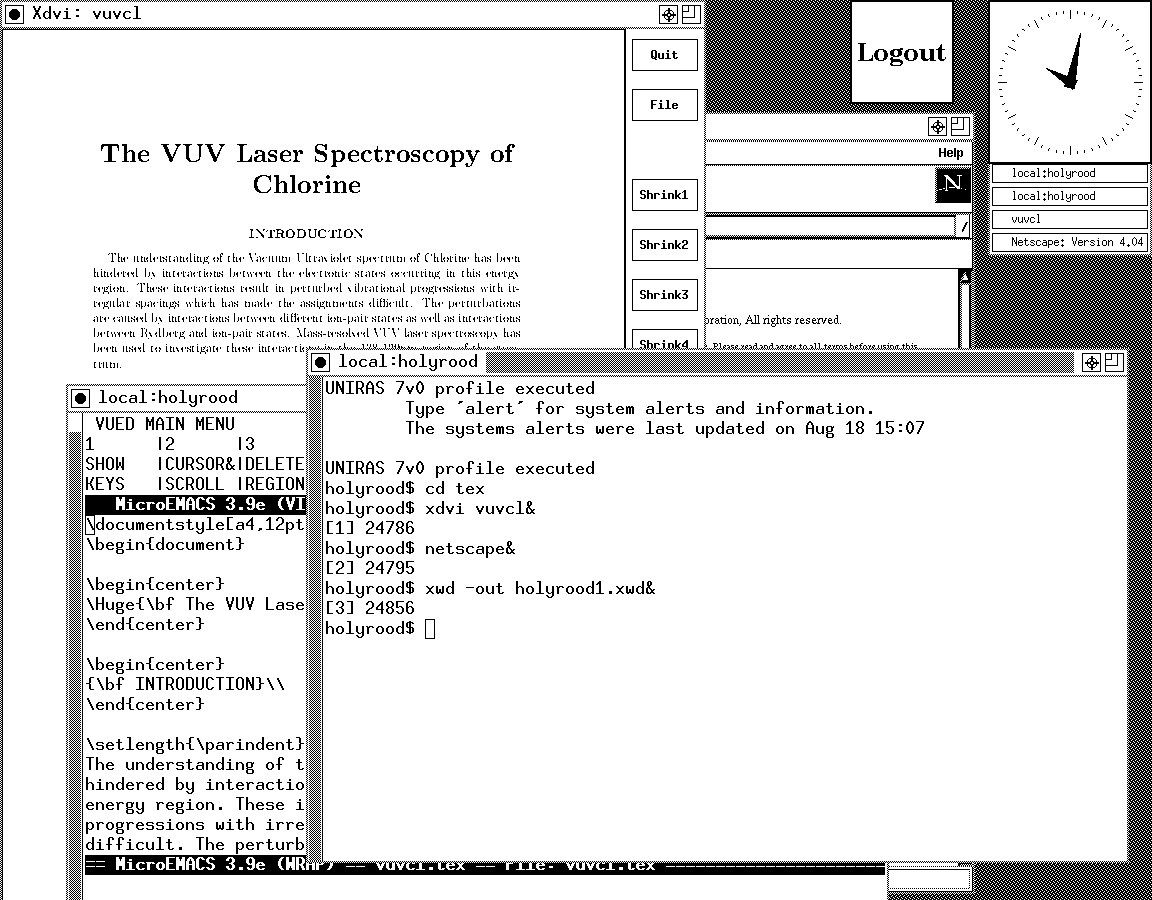
Before this, my exposure to Solaris was when I was at university and things have moved on a bit since then, not least on the technology side but also in terms of my own skills. In those days, my mindset was fixed by exposure to macOS and Windows with their point-and-click functionality; the fact that the terminals that we were using were ancient didn't make for a positive impression. You can see below what I mean. And the concept of tackling a command line, even one as powerful as that in UNIX, armed with a good book was somehow foreign to me.

Mind you, in those pre-Safari days, getting your hands on books not in the university library was an expensive outing for the student finances. Armed with years of programming and web development experience, the UNIX command line now looks like a powerful tool to be used to the greatest advantage. Years of exposure to Perl and Linux have made the tool a less daunting one for me. Also, the availability of shell scripting makes the Windows batch file language look positively archaic. The default ksh shell (I believe that it is ksh88) in Solaris is not as friendly as it could be, but bash is available on demand, so life isn't that uncomfortable on the command line.
To date, my experience of OpenSolaris has been brief because I wrecked the installation while trying to sort out an annoying graphics issue that appeared after installing VMware Tools (drivers for various pseudo-devices) on OpenSolaris; I have yet to put things back. The installation procedure is pretty painless for what is a technical operating system. The Community: Tools section of the OpenSolaris website has articles on installation and installation under VMware is discussed on Developer's Quarterdeck Log.
As regards a desktop environment, you have a choice between the ubiquitous Gnome and Sun's own CDE, of which I have seen plenty at work. As it happened, I installed the developer edition, but there are the usual Linux mainstays on the desktop: StarOffice (in place of OpenOffice), GIMP, Mozilla Firefox, etc. One thing that I wasn't able to sort out was the internet connection, and that may be because ZoneAlarm was blacklisting VMware at the time of installation. All in all, it looked like a far friendlier environment for users than that which I encountered during my early years on UNIX. I must get it back in action and take things on from here…