Technology Tales

Notes drawn from experiences in consumer and enterprise technology

How publishing trends can shape which photo editing software we actually learn

14th March 2007

If you ever go into a bricks and mortar newsagent and peruse its shelves with an eye out for references to data imaging software, you might find Adobe’s Photoshop as predominant there as it is in the digital imaging world. And the same trend seems to continue in to the bricks and mortar bookshops as well. Online, especially within the vaults of Amazon, it is not as much a matter of what gets stocked as what gets published, and my impression is that the bias, if that’s the right word, continues there. That said, I didn’t realise until recently that Elsevier’s Focal Press has been covering Paint Shop Pro, once branded the poor man’s Photoshop, from at least version 7. That discovery, if it had come earlier, may have made a big difference to how I have been using PSP. Saying that, I have seen some opinions that PSP is easy to use and that may explain the lack of attention from publishers. While Future Publishing did put out a monthly guide to PSP, that seems to have disappeared from the shelves, which it does lend weight to that argument. Or it could have been Corel’s purchase of JASC that changed things…

Of course, without books and magazines, it is not as easy to see the possibilities, and it is here where Photoshop really scores. The digital photography revolution has ensured the software’s escape from the world of computing and the digital arts into photography magazines and beyond. These days, even conventional photography titles feature Photoshop how-to articles. In fact, such is the level of digital content in titles such as Photography Monthly, Practical Photography and Outdoor Photography that you hardly need to pursue the specialist digital photography titles at all.

Speaking of photography, this is and has been my main use of digital imaging technology, be it the scanner that I use for digitising the output of my efforts in film photography or processing RAW files from my digital SLR. I have been using scanners since 1998 and am on my second, a CanoScan 5000F. The colour rendition in the output from its predecessor, a UMAX 1212U, deteriorated to the point where a replacement needed to be sought. As it happened, the Canon turned out to be light years ahead of the UMAX, even with the latter operating properly. Incidentally, my first scanning outing was in the then current version of Photoshop (I booked some time on a scanner at the graphics centre of the university I was attending at the time and sneaked in the scanning of a photo with the journal graphic that I needed to do) - a limited affair, it has to be said - but I then reverted to things like Corel PhotoPaint and Paint Shop Pro. And PSP was what I was using in the main, even after encountering the copy of Photoshop Elements 2 bundled with my EOS 10D. Though Elements’ cloning capabilities did tempt me though, and I did acquire a Focal Press volume on the application, I somehow never took it further.

At the end of last year, Corel and Adobe launch new versions of PSP and Elements, respectively. That got me tempted by the idea of giving the whole business another look, this time in detail. My look at PSP XI regrettably suffered from the lack of time that I could devote to it and seeing what a book on it might have to say. I had more of a chance with Photoshop Elements and came away impressed with the way that it worked. Since then, I have been making my way through Scott Kelby’s latest Elements book and the ideas are building up. At the same time, I have been making good use of a Photoshop CS2 try-out, and I am on the horns of a dilemma: do I splash out on CS2, do I get Elements 5 or do I await the now imminent CS3? You’ll notice that PSP doesn’t feature here; the amount of literature pertaining to Photoshop simply is too much to ignore, and I have loads more to learn.
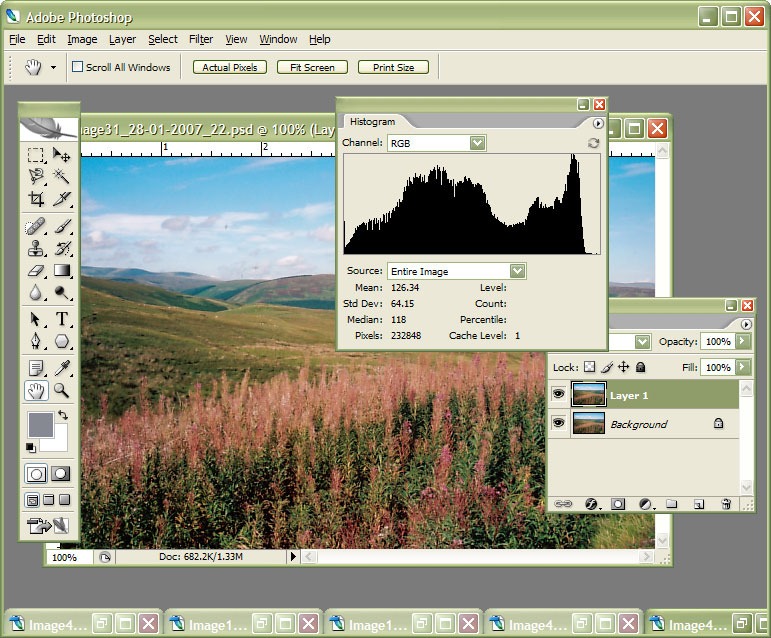
Putting Photoshop CS2 through its paces with some real photo editing work

8th March 2007

Adobe Photoshop CS2

Currently, I am in the process of adding new photos to my online photo gallery, and the exercise is giving my Photoshop CS2 trial version a good amount of use. And the experience also adding a few strings to my bow in graphics editing terms, something that is being helped along by the useful volume that is The Focal Easy Guide to Photoshop CS2.

The most significant change that has happened is that to my workflow. Previously, it took the following form:

  • Acquire image from scanner/camera
  • For a camera image, do some exposure compensation
  • Create copy of image in software’s own native file format (PSPIMAGE/PSP for Paint Shop Pro and PSD/PSB for Photoshop)
  • Clean up image with clone stamp tool: removes scanner artefacts or sensor dust from camera images; I really must get my EOS 10D cleaned (the forecast for the coming weekend is hardly brilliant, so I might try sending it away).
  • Save a new version of the image following clean-up.
  • Reduce the size of the digital camera image to 600×400 and create a new file.
  • Boost colours of original image with hue/saturation/lightness control; save new version of file.
  • Sharpen the image and save another version.
  • For web images, save a new file with a descriptive name
  • Create JPEG version
  • Copy JPEG to Apache web server folders
  • Create thumbnail from original JPEG

The new workflow is based upon this:

  • Acquire image from scanner/camera
  • For a camera image, do some exposure compensation; there is a lot of pre-processing that you can do in Camera Raw
  • Create a copy of image in software’s own native file format
  • Clean up the image with the clone stamp tool and create a new file with _cleaned as its filename suffix. I tried the spot healing brush but didn’t seem to have that much success with it. Maybe I need to try again…
  • Add adjustment layer for level correction and save file with _level suffix in its name.
  • Add adjustment layer for curves correction
  • Add adjustment layer for boosting colours with hue/saturation/lightness control
  • Flatten layers and save new image with _flatten suffix in its name
  • Sharpen flattened image and create a new version with _sharpened suffix in its name
  • For web images, save a new file with a descriptive name
  • Create JPEG versions in Apache web server folders; carry out any resizing using bi-cubic sharpening at this point.

Some improvements remain. For instance, separation of raw, intermediate and final photos by storing them in different directories is perhaps one possibility that I should consider. But there are other editing tricks that I have yet to use as well: merged and blended layers. Bi-cubic smoothing for expanding images is another possibility, but it is one that requires a certain amount of caution. And I am certain that I will encounter others as I make my way through my reading.

The scurge of comment spam

7th March 2007

My other blog is experiencing what feels like a deluge of comment spam. All that I can say is thank goodness for Askimet. And that is with visitors having to subscribe in order to post comments. It seems that a way has been found around that. I did have a spurious user with obdolbin.com as their website address and got rid of them but the flow still continues. Blogger does seem to have a way around this: entering the letters from an image to stop bots from doing their thing. Maybe we'll see WordPress doing the same?

Update: It seems that the torrent has now slowed to a trickle. Maybe getting rid of the spurious user has worked after all and it just took a while for the effect to kick in.

Hard drive cooling

5th March 2007

Having had my main PC's case hot to the touch last summer, I was wondering what was causing it. Components like CPU's and graphics cards would need to generate a lot of heat to manage that. However, my main suspects are the hard drives in the machine: they do run hot after all and sit in a drive cradle connected directly to the case framework. As it happens, I was in Manchester's branch of PC World yesterday and spotted Akasa hard drive coolers in stock for just £7.99 each. These dual fan units screw onto the base of your hard drive and their power connector can couple between a PATA power socket and a PSU power cable so that they can draw the power that they need without adding clutter. I bought two of the things and installed them; I'll now see how they get on.

Some Photoshop book choices

28th February 2007

Having exhausted the trial time on Photoshop Elements 5, I am now having a look at its big brother, Photoshop CS2. That has got me thinking about Photoshop books so that I become more of the possibilities and how to use them.

Having a Safari subscription as I do, that naturally became my first port of call, and I seemed to find two that answered my needs: both are by Scott Kelby; they now lie on my Safari bookshelf: The Photoshop Elements 5 Book for Digital Photographers and The Photoshop CS2 Book for Digital Photographers.

Even so, I am tempted to get a dead tree version of one of them and that presents a chicken-and-egg dilemma: the books could help choose which software to buy and the software dictates which of them will be the more useful. That said, I suspect price and features will swing it the way of Elements 5; paying over £400 for software whose capabilities I may never need does not sound financially sensible.

Update March 5th, 2007: Now, I have got my hands on the dead tree edition of Scott Kelby's The Photoshop Elements 5 Book for Digital Photographers as well as Brad Hinkel's Focal Easy Guide to Photoshop CS2. Now for some reading...

Wonders of the middle mouse button

26th February 2007

My installation of Firefox seems to have stopped listening to the target attribute of hyperlinks. Thankfully, the middle mouse button comes to the rescue. Clicking on a link with the middle button opens it the destination page up in a new window or tab, depending on how you set your defaults. The behaviour goes even further than this: the trusty middle mouse button does the same for bookmarks and the Google search bar; all very useful. And it is not just a Firefox thing, either. IE7 does the same thing for web page hyperlinks and bookmarks while in Opera, it is limited to links on web pages.

New Firefox, new ForecastFox

25th February 2007

Firefox 2.0.0.2 has made its appearance and the CPU usage bug seems to have gone away. We'll see how it goes... Also, a new version of the Accuweather.com powered ForecastFox plug-in has come out. It was when I was using it that I noticed heavy CPU usage, but the behaviour has yet to make its reappearance and I hope it never will. Now, I can get back to enjoying this very useful widget.

Extra WordPress editor options

24th February 2007

Solo Technology has posted about a nice extra available in the Visual Editor in WordPress 2.1. Hit ALT+SHIFT+V in Firefox and ALT+V in IE, gets you an extra row of buttons adding more editing options. He is currently trying to add a button to the main bar for doing the toggling.

P.S. While on the subject of blog post management, I have been playing around with w.bloggar, and I have to say that it works well; with a spot of persuasion, it even edits WordPress blog pages. The only things attempting to spoil the experience are the odd instances where odd characters get added to blog posts or characters in posts get misinterpreted. I'll try to add more in time.

Balancing research and regular updates

20th February 2007

If you have been here before, you may have noticed my posting frequency has gone down recently. Part of the reason for this is my taking on two big Vista-related issues that have attracted a lot of attention, and wading through the various articles on the web has taken a lot of time. Finding out as much as possible about Vista licensing was certainly a challenge, thanks in no small part to Microsoft's legalese, but it has been the DRM/HDCP issue that has really swallowed time on me; a passion-stirring topic that raises tempers is almost guaranteed to generate much discussion. Add to this the need to take care when considering such an impassioned subject, and time really does fly by...

Addressing contentious issues that attract comments has got me thinking about my blogging habits, particularly given that blogging is a hobby of mine and I have plenty of other things to be doing. As a result, the post rate slowed down. If I wanted to continue like that, I could post more detailed entries once or twice a week and leave it at that. Or I could keep things short and frequent, say one post per day. Another idea is to have one long entry per week and shorter ones at one per day for other days in the week. Now, that sounds like a good way to go.

Is Vista’s DRM a step too far?

16th February 2007

If it isn’t enough that Vista’s licensing legalese has being causing raised blood pressure, its use of DRM technology is arousing passionate outbursts and outpourings of FUD. The fact that DRM has been part of the Windows has been included in Windows since the 1990’s does nothing to quell the storm. One thing that needs to be pointed out is that the whole furore entails the delivery of protected content to consumers. Microsoft would no doubt approve of the line that if there was no protected content, then there would be no need to worry. However, there is a sizeable number of people who do not trust Microsoft to keep to its word and are making their feelings known.

The embodiment of the issue is Microsoft’s incorporation of HDCP into 64-bit Vista. It is an Intel standard that is on the market, with users already having bad experiences with it. The problems surround the need to ensure that protected video is not intercepted while a movie is being played, and this involves the hardware as much as the software. The result is that you need a compatible monitor that will have the correct inputs so that DRM can be employed. Some also suggest that this is not the end of the matter as regards hardware compatibility and the list can grow long enough that a whole new PC looks like a good idea.

At the heart of this debate is a paper written by Peter Gutmann of the University of Auckland, in which the consequences of Microsoft’s implementation are examined. The idea of a system with an alternative agenda to that which you have is hardly enthralling: neither using CPU time to monitor DRM and the locking down hardware are particularly attractive. Such is the exposure that this article has received that even Microsoft has had to respond to it. The point that they try to make is that decoding of protected content occurs in a sandbox and does not affect anything else that might be going on in the system. Unfortunately for them, many of those adding comments to the piece take the chance to launch a broadside on the company; some of the vitriol is certainly successful when it comes to trying to put me off Vista. To Microsoft’s credit, the negative comments remain, but it far from helps their attempted rebuttal of Gutmann.

Though the main fuel for the negativity is not Gutmann’s paper per se but a lack of trust in Microsoft itself, all of this despite its Trustworthy Computing initiative. The question goes like this: if the company uses DRM for video and audio, where else could it use the technology? The whole licensing debate also furthers this, and it is at this point that the fear, uncertainty and doubt really goes into overdrive, no matter how much effort is expended by people like Ed Bott on debunking any myths. Users generally do not like software taking on itself to decide what can and cannot be done. Personally, I have experience of Word’s habits of this nature in the past, and they were maddening: trying to produce my doctoral thesis with it went OK until I tried pulling the whole thing together using a master document; I backtracked and made PRN files for each chapter so that it wouldn’t change; LaTeX would never have done this….

What is the point of all of this DRM? It looks as if Microsoft clearly feels that it is necessary to pitch the PC as an entertainment content delivery device to continue growing their revenues in the home users market. Some would take this idea even further: that it is control of the entertainment industry that Microsoft wants. However, to do so, they have gone with strong DRM when there exists a growing backlash against the technology. And then there’s the spectre of the technology getting cracked. In fact, Alex Ionescu has found a potential way to fool the Protected Media Path (called Protected Video Path in a ComputerWorld Security article) into working with unsigned device drivers. Needless to say given the furore that has been generated, but there are others who are more than willing to take the idea of cracking Vista DRM even further. A recent remark from a senior Microsoft executive will only encourage this.

I must admit that I remain unconvinced by the premise of using a PC as my only multimedia entertainment device. Having in the past had problems playing DVD’s on my PC, I nowadays stick to using a standalone DVD player to do the honours. And I suspect that I’ll do the same with HD video should I decide to do watch it; it’s not that high on my list of priorities. In fact, I would be happier if Microsoft made a version of Vista with and without protected HD capability, and they do: 32-bit Vista will not play protected HD video. And it avoids all the hackles that have caused so much controversy too, allowing an easier upgrade in the process. The downsides are that the security model isn’t as tough as it is in the 64-bit world and that maximum memory is limited to 4 GB, not an issue right now, it more than likely will become one. If you are keen on Vista, the 32-bit option does give you time to see how the arguments about the 64-bit world run. And if hardware catches up. As for me, I’ll stick with XP for now.

  • The content, images, and materials on this website are protected by copyright law and may not be reproduced, distributed, transmitted, displayed, or published in any form without the prior written permission of the copyright holder. All trademarks, logos, and brand names mentioned on this website are the property of their respective owners. Unauthorised use or duplication of these materials may violate copyright, trademark and other applicable laws, and could result in criminal or civil penalties.

  • All comments on this website are moderated and should contribute meaningfully to the discussion. We welcome diverse viewpoints expressed respectfully, but reserve the right to remove any comments containing hate speech, profanity, personal attacks, spam, promotional content or other inappropriate material without notice. Please note that comment moderation may take up to 24 hours, and that repeatedly violating these guidelines may result in being banned from future participation.

  • By submitting a comment, you grant us the right to publish and edit it as needed, whilst retaining your ownership of the content. Your email address will never be published or shared, though it is required for moderation purposes.