It isn’t all iTunes in the UK
 8th December 2007
The iTunes store was a breath of fresh air following an experience of several OD2 offerings; broken downloads were a regular nuisance, but that may have been down to my not having a broadband connection at the time. Its seamless mix of purchasing, downloading and playing impressed me so much that I used no other media player for my music in the days when I almost exclusively used Windows.
Now that I have jumped ship to Linux, having to fire up a Windows VM to hear my music is starting to feel a little over the top. The result is that I am keen to use DRM-free digital music when I can. Because I like to stay legal, it means that I would like to buy DRM-free files on the web. Here, iTunes leaves me down a little, since most of what they offer is locked down, and I have to burn a CD and extract from it to release music from its iTunes-only shackles.
So when I saw on an article on Tech.co.uk that made mention of 7Digital and that they purveyed unlocked music, my interest perked up. The file formats on offer are WMA, MP3 and AAC and there are high quality 320K variants of the latter two of these about too. Only the WMA files have any DRM associated with them. Previewing whole albums is a simple matter of clicking on a single button, a trick that iTunes would do well to learn. Payment using PayPal augments the usual credit card options and any purchases seem to be available for download more than once; pottering over to the My Locker part of your account provides you with access to your purchases, another of its trump cards over iTunes. Downloading is on a file by file basis, though, and it is here that I notice an area usually addressed by a player like iTunes: the ability to download whole albums at once and background directory creation. Not having to have player has one advantage, though: platform independence. Anyway, a spot of shell scripting would resolve any file management gaps. Overall, there's a lot to commend 7Digital, and I wouldn't be surprised if I were to return some time again. It might even usurp iTunes as my digital music store of choice...
A case of bad behaviour?
6th December 2007
On my blogs, I use the Bad Behaviour plugin to keep spammers at bay. It usually works very well, so imagine my surprise when it started kicking me out when I tried logging into the system. I started to wonder what happened to my IP address...
It now turns out that the repository being used by the plugin got moved by its author, and that was the cause of my predicament (and his: he locked himself out of his own blog too!). A new version was duly released to resolve the issue and all is well again. It is a tale that emphasises the importance of regression testing to check that you don't change anything that you shouldn't.
US, not us?
5th December 2007
As of the time of writing, Amazon MP3 is only available to customers in the U.S. of A., so any enthusiasm for its provision of DRM-free digital music offerings has to be tempered by that limitation on its availability. Apple's iTunes store offers some, but locked down tracks are its mainstay. Amazon's restrictions aren't the first in the digital audio world, and they are unlikely to be the last, too. Pandora have done it in the world of internet radio, and I seem to remember that iTunes might have done it too in their time.
There may be other reasons, but licensing and royalties might need to be negotiated country by country, slowing the rolling out of new products across the world. The iPhone faced an equivalent situation, though that involved mobile telephony providers. Commercial considerations pervade too, and I suppose that a worldwide launch of the iPhone might have been too complex a feat for Apple to manage; they probably wanted to nurture a sense of anticipation among customers in any case.
It appears that things are still following the pattern that at least used to be endemic in the motion picture industry: the U.S. gets to see a film first, and then everywhere else thereafter. Being able to reuse the movie film reels used in American cinemas has been the studios' advantage from the staggered releases. Because cinema releases have been staggered, video and DVD releases were staggered too, so it's both intriguing and frustrating to see American companies using a similar launching strategy in wholly different market sectors. It's astonishing how old habits die hard...
A pleasant surprise…
4th December 2007
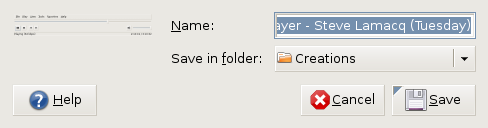
Yesterday, when taking the screen grab for my post on Quanta Plus, I did the Alt + Print Screen shuffle as usual. However, when I did so, I was greeted with a dialogue box asking me where I wanted to store the PNG file that was to be produced and what I wanted to call it. The operation was as swish as that. On Windows, the screenshot gets stuffed into the clipboard for you to extricate it with your graphics editor of choice, so this was an interesting surprise. It's the sort of thing that can make a good impression, and it is striking that Linux seems to be ahead of Windows on this one. Who said Linux was less than user-friendly?
Setting up Quanta Plus to edit files on your web server
3rd December 2007
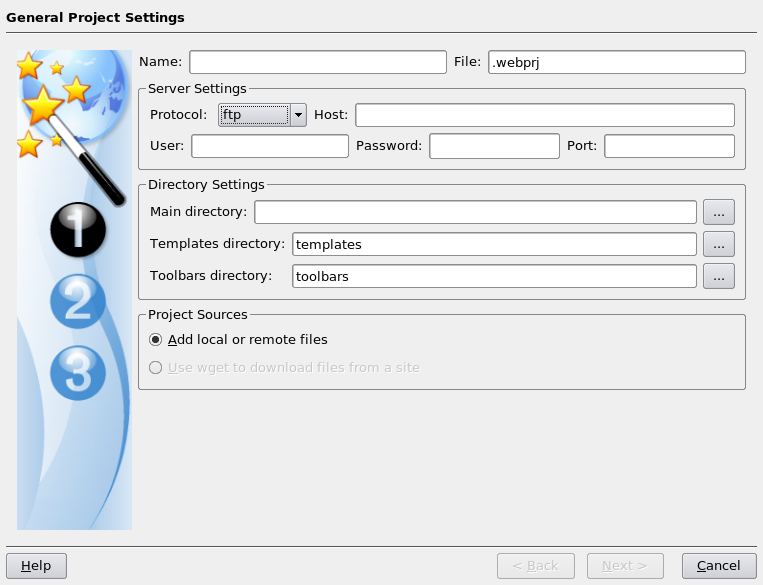
On Saturday, my hillwalking and photo gallery website suffered an outage thanks to Fasthosts, the site's hosting provider, having a security breach and deciding to change all my passwords. While I won't bore you with the details here, I had to change the password for my MySQL database from their unmemorable suggestion and hence the configuration file for the hillwalking blog. To accomplish this, I set up Quanta Plus to edit the requisite file on the server itself. That was achieved by creating a new project, setting the protocol as FTP and completing the details in the wizard, all relatively straightforward stuff. Since I have a habit of doing this from Dreamweaver, it's nice to see that an open source alternative provides the same sort of functionality.
Why I will be keeping Windows close to hand for a while to come after a switch to Linux
2nd December 2007
Even though I have moved to Linux, and it has been fulfilling nearly all of my home computing needs, I do and plan to continue to retain access to Windows courtesy of virtualisation technology. Thought keeping current with the world of the ever pervasive Windows is one motivation, there are others. In fact, now that Windows is more of a sideline, I may even get my hands on Vista at some point to take a further in-depth look at it, hopefully without having to suffer the consequences of my curiosity.
Talking of other reasons for hanging onto Windows, listening to music secured by DRM does come to mind. DRM is seen in a negative light by many in the open-source world, so Linux remains unencumbered by the beast. That isn't necessarily a bad thing, and the whole furore about Vista and DRM earlier this year had me wondering about a Linux future. However, I have been known to buy music from iTunes and would like to continue doing so. Though WINE might be one way to achieve this, retaining Windows seems a sounder option. That way, I am saved from having to convert my protected music files into either Ogg Vorbis or FLAC; the latter involves a lossless compression unlike the former, so the files are bigger with the additional quality that an audiophile would seek. MP3 is another option, yet there are those in the Linux world who frown upon anything patented. That makes getting MP3 support an additional task for those of us wanting it.
In my wisdom, I have succumbed to the delights of expensive web development tools like Altova's XMLSpy and Adobe's Dreamweaver. While I have found a way to get Quanta Plus to edit files on the web server directly and code hacking is my main way to improve my websites, I still will be having a bimble into Dreamweaver from time to time. I have yet to see XMLSpy's grid view replicated in the open-source world, so that should remain a key tool in my arsenal. While I haven't been looking too hard at open-source XML editors recently, there remains unexplored functionality in XMLSpy that I should really explore to see if it could be harnessed.
While I have included implicit references to this already, it needs saying that keeping Windows around also allows you to continue using familiar software. For some, this might be Microsoft Office, but OpenOffice and Evolution have usurped this in my case. Photoshop Elements is a better example for me. Digital transfers from scanners and DSLR's will stay in the world of Linux, while virtualisation allows me to process the images in whatever way I want. For now, I might just stick with the familiar before jumping ship to GIMP at some point in the future. With all that is written on Photoshop, having it there for learning new things seems a very sensible idea.
While open-source software can conceivably address every possible, there are bound to be niches that remain outside its reach. I use mapping software from Anquet when planning hillwalking excursions. It seems very much to be a Windows only offering and I have already downloaded a good amount of mapping, so Windows has to stay if I need to use this and the routes that I have plotted out before now. Another piece of software that finds its way into this bracket is my copy of SAS Learning Edition; there are times when a spot of learning at home goes a long way at work.
So, in summary, my reasons for keeping Windows around are as follows:
- Learning new things about the thing, since I am unlikely to escape its influence in the world of work
- Using iTunes to download new music and to continue to listen to what I have already
- Using and learning about industry standard web development tools like Dreamweaver and XMLSpy
- Easing the transition, by continuing to use Photoshop Elements, for example
- Using niche software like Anquet mapping
Though I suppose that many will relate to the above, Linux still has plenty to take over some of the above. In time, DRM may disappear from the music scene and not before time; accountants and shareholders may need to learn to trust customers. NVu and Quanta Plus could yet usurp Dreamweaver, and there may be an open-source alternative to XMLSpy like there is for so many other areas. The Photoshop versus GIMP choice will continue to prevent itself and all that is written about the former makes it seem silly to throw it away, however good the latter is. Even with changing over Linux equivalents of applications fulfilling standard needs, it still leaves niche applications like hillwalking mapping and that, together with the need to know what Windows might offer in the enterprise space, could be the enduring reasons for keeping it near to hand. That said, I can now go through whole days without firing up a Windows VM, a big change from how it was a few months ago. Still, I suppose that it's all too easy to stick with using one operating system at a time, which is Linux for me these days.
Setting up automatic Firefox updates on Ubuntu with Ubuntuzilla
1st December 2007
No sooner had we received Firefox 2.0.0.10 than they have already started talking about 2.0.0.11. Apparently, the latest update broke support for a tag that I have never used: canvas. This is stuff that makes you wonder about their quality control.
Because the 2.0.0.10 was a security update, Ubuntu volunteered it to me without any effort on my part. However, I am using Ubuntuzilla, so I didn't get the update coming through to my browsing world without further intervention. Launching Firefox using the gksu command allowed me to update the thing like I have been doing on Windows: Help > Check for Updates... Now, I have got a more permanent check set up, thanks to my issuing the following command:
ubuntuzilla.py -a installupdater -p firefox
Controlling what the wpgm command calls in Windows SAS
30th November 2007
Recently, I was setting up a key mapping in SAS 8.1 such that the log and output windows are cleared and a SAS program run in the most recently used program editor window. The idea was that debugging would be easier, and the command was what you see below:
log; clear; output; clear; wpgm; submit
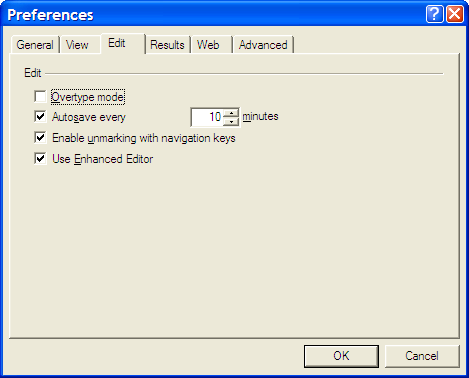
However, I was having trouble getting SAS to pick up the most recently used Enhanced Editor window, and it was opening up an old style Program Editor window in its place. If I had wanted to use that, I would have used pgm and not wpgm. What was conspiring against me was a pesky system option. Pottering over to Tools > Options > Preferences and navigating to the Edit tab brought me to the cause of the problem: the Use Enhanced Editor check box was in the clear, and fixing that set me on my way. SAS 9 could also be afflicted by the same irritation and that is where I got the screenshot that you see below where everything is hunky-dory.
Correcting or updating blog posts
29th November 2007
Recently, I have grown to notice that certain bloggers are not removing old content from a blog, only striking it through using something like CSS. Though there is a place for this, it does strike me as overkill sometimes and can look untidy. Sometimes, that lack of neatness is a trade-off, since the highlighting of a correction itself conveys a message. While I have been known to tweak posts immediately after publishing without leaving the previous content on view, my changes generally are readability improvements more than anything else. Typos and spelling mistakes also get corrected like this; nobody needs them highlighted for all to see. I am not trying to fool anyone and, if I want to update the content, I either add another post or use another tactic that I have seen others use: updates at the bottom of the post that are denoted as such. It's another transparent approach that preserves the authenticity of the piece.
Using SAS FILE statements with the MOD option to append output to plain text files
25th November 2007
SAS can generate many types of output: plain text, XML, PDF, RTF, Excel, etc. With all of these and the SAS procedures like PROC REPORT, PROC TABULATE and so on, it might seem surprising for me to say that I have been generating output with data step PUT and FILE statements. There was, of course, a reason for this: creating text files for loading into a new database-driven software application. At one stage, I also did some data interleaving at the output stage and that's when I discovered that the default behaviour for SAS FILE statements is to completely overwrite a file unless the MOD option was specified. Adding that switches on APPEND behaviour. The code below adds a header in one step, while adding data below it in another. While I know that there are better ways to achieve this, like setting up your data as you want it or using _N_ to ensure that something only appears once, here's another way. As per the Perl, there's often more than one way to do something with SAS.
data _null_;
    file ds_data;
    put "fieldtype;datasetname;datasetlabel;datasetlayout;datasetclass;datasetstandardversion";
run;
data _null_;
set ds_ispec;
file ds_data mod;
line="datasetstandard;"||trim(memname)||";"||trim(memlabel)||";;;"||trim(memver);
put line;
run;