New FileZilla
 14th October 2007
First, I must admit that the release of FileZilla 3 passed me by until recently. From the user interface point of view, the changes don't look too radical, but it is now cross-platform, a bonus for Linux and Mac users. It can also co-exist with FileZilla 2 for those Windows users needing features from that offering that aren't yet available in FileZilla 3. That does pose the question: why upgrade when that which you have works just as well? It is just as well that transferring settings is as easy as importing the FileZilla 2 settings into its successor is as easy as importing an XML file: in version 3, go to Edit > Import... on the menus and pick up the FileZilla.xml file from the installation directory for version 2. Though you might get some warnings and I certainly did, the FTP sites that I had set up already came over intact.
LVHA…
12th October 2007
On my web design journey, I have learned the wisdom that CSS styles for hyperlinks should be defined like the following:
a:link {...}
a:visited {...}
a:hover {...}
a:active {...}
List out the names of the pseudoselectors, and you'll soon work out where they got LVHA: Link, Visited, Hover and Active. However, I have recently spotted the following being used:
a {...}
a:hover {...}
The trick here is to define your style globally and only define specifics for the relevant pseudoselector, hover in this example. It works well in the likes of Mozilla and Opera, but Internet Explorer is another story. Even IE7 needs the LVHA treatment. I spotted this when I observed unexpected changes in the appearance of link text after visiting the link: visited links starts to change colour. While I know that the likes of Jakob Nielsen frown upon non-changing link colour, I choose to ignore this and keep it constant, so following the LVHA approach is needed to keep things as I would like them.
Is Apple ditching Windows 2000?
11th October 2007
Having had a brainwave of using my Windows 2000 VM to play music without impacting the rest of my PC's working, I made the discovery that a bit of digging was required to find a version of iTunes and QuickTime that work with Win2K. Google delivered the goods, so here are the links:
It all reminds me of a post that I wrote a few months back, but iTunes is now working and, thanks to VMware's Shared Folders functionality, using the host PC's digital music collection. I'll be seeing how the ring-fencing goes...
How to access host files in VMware Virtual Machines using Shared Folders
9th October 2007
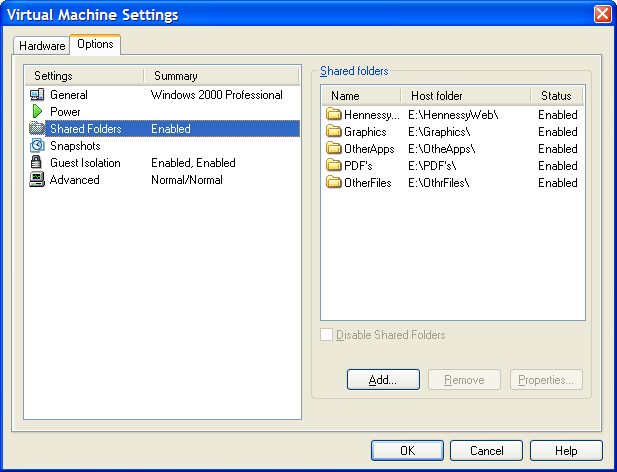
I am very surprised at myself for not realising until recently that there is a way to make host data visible to a guest operating system installed in a VMware virtual machine other than resorting to using flash drives, CD's, DVD's and the like. Though you can copy and paste from the host into the VM, I have found that to be hit-and-miss at times. It was a revelation to find VMware's Shared Folders function. My suspicion is that you need VMware Tools installed in the guest operating system to make it work, which may not be trivial for some Linux distributions or UNIX. However, I was using it with a Windows 2000 guest and a Windows XP host, and it worked like a dream.
What you see below are the shared folder settings in the host's VMware interface for that virtual machine. Just clicking on the Add... button brings up a wizard that will set up the shared folder for you; it's all very user-friendly. Look for the Edit virtual machine settings link on the VM configuration page, click that and pop over to the Options tab and this what you can get.
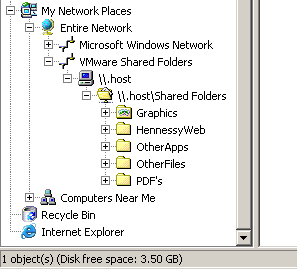
The result of the above spot of configuration appears in Windows Explorer like it does below. Not only are the shared folders accessible in this way, but you can also map drive letters as if they were network resources, a very nice feature. It is definitely more accessible than working out Windows networking and getting things to happen that way.
Missing borders in Internet Explorer
8th October 2007
It's quite difficult to describe this observation in a title so here goes with a longer description in a post. One thing that I spotted with the Prosumer theme used on this blog is that the links on the horizontal navigation bar underneath the mast head were not appearing as they should. The links have been formatted using CSS to appear in boxes with borders that are more apparent when you hover over them. In IE, the top and bottom borders were missing. After a spot of digging, I came up with the line-height property being the cause, and I was right: the extremities of the boxes surrounding the text were being cut off because they exceeded the allotted space. As if to emphasise that IE7 isn't as major a leap forward from IE6 as we would have liked, the problem affected that browser as well.
Aside: Link text colours weren't being honoured by IE7 like they are by IE6, Firefox and Opera, so another tweak to the CSS was needed.
What about a book on WordPress development?
7th October 2007
Here's something that I would really appreciate: a book on code cutting for WordPress customisation and extensions. Having the Codex is all very fine, but having a dead tree compendium that you can peruse at your leisure is a definite bonus. If there was a way to get the Codex on PDF and print it all off for easier reading, that would be progress. Though I believe that a publisher did plan to bring to the market something like what I want, the author and publisher parted company, a pity. It would be great to see something like Apress' Pro Drupal Development for WordPress. What about it, Automattic folks?
On Blogrolling.com
6th October 2007
I was ambling around the web and came across a website that, while it appeared to be a blog, isn't one in the vein of that to which we are accustomed. It does, however, have a blogroll and that is where Blogrolling.com comes into this piece. Blogrolls are very much a feature of the blogging (WordPress calls them that anyway) world and act as a repository of useful links relevant to the subject of the blog. I also use them as a bookmarking station for myself and a way to return the favour when someone links to my blog. For a blogroll, you generally need a database sitting behind in the background, or you end up creating a list of links in (X)HTML.
Blogrolling.com offers another option: placing your links at an external website and including them on your webpages, using a piece of code to pull in the information. RSS, JavaScript and PHP are among the methods on offer from Blogrolling.com; I used PHP when I gave the service a whirl on one of my offline blogs and that really does give you a lot of customising power over and above using CSS. That's not to say that there aren't customisation functions on offer from Blogrolling.com, I found a few of these distinctly useful: ordering of links in a blogroll is just one. When it comes to categorising your links, you don't get the category option, but you do get to create as many blogrolls as you want, so there is a workaround; moving links from one blogroll to another is mouse intensive but straightforward. Also, because you are reading each blogroll in turn, you can order the categories as you want them. With WordPress' category approach, ordering categories involves widgets and plugins or getting your hands dirty with some code cutting. All in all, Blogrolling.com seems to offer an intriguing and useful service.
Checking up on SAS system option settings
5th October 2007
The usual way to check up on your SAS system option settings is to do one of the following:
- Through the menus: Tools>Options>System...
- Entering
optionsat the command line PROC OPTIONS
There is another way, and that is to look at the relevant dictionary table, SASHELP.VOPTION (you can also call it DICTIONARY.OPTIONS in SQL). That has the added advantage that you check the values programmatically and extract them into macro variables, a useful functionality when you need to change and reset values. Yes, options resetting can be done with a bare OPTIONS statement (OPTIONS;) but there are times when it's like using a sledgehammer to crack a nut. Code using the dictionary table allows a much finer level of control and does not reset all the options to their defaults like the OPTIONS statement. Setting all options back to their default values is clearly not desirable where specific options need to be retained; I remember line and page size settings changing because of this, so the dictionary table approach has a lot going for it.
A throwback to the past: an appearance of MACROGEN
4th October 2007
Recently, I was reviewing a log of a program being run by SAS 9.1.3 on a Solaris system and spotted lines like the following:
MACROGEN(MACRO1): OPTIONS NOMPRINT NOMPRINTNEST
NOTE: PROCEDURE DISPLAY used (Total process time):

real time           0.73 seconds

cpu time            0.50 seconds
MPRINT(MACRO1): SOURCE SOURCE2 NOTES;
The appearance of the word MACROGEN made me wonder if there was another system option that I had missed. A quick search of the SAS website threw up a support note that shed some light on the situation. Apparently, MACROGEN is the SAS v5 forbear of today's MPRINT, MLOGIC, and SYMBOLGEN options and would seem to be obsolete in these days. Having started programming SAS in the days of version 6, I had missed out on MACROGEN and so used its replacements instead, hence my never coming across the option. Quite what it's doing showing up in a SAS 9 log is another story: and there I was thinking that SAS 9 was the result of a full rewrite... Now, I am not so sure, but at least I know what MACROGEN is if someone ever takes the time to ask me.
Terminology for larger and larger disk drive data volumes
3rd October 2007
When I started into the world of computing at university, 200-300 MB hard drives were the norm for PC's. My own first PC had what was then thought a sizeable 1.6 GB disk, only for things to increase in size since then. Now, I have access to several hundred gigabytes of storage at home, while we are now seeing 1TB offerings for the PC market.
Terabyte storage has been the preserve of the server market, but given the disk sizes that are available now, even larger units are needed to describe the sizes of data volumes, ones that I haven't seen before. So here goes:
|
Unit |
Number of bytes |
Number of bytes |
Number of bytes |
|
petabyte |
1024 TB |
2**50 |
10**15 |
|
exabyte |
1024 PB |
2**60 |
10**18 |
|
zettabyte |
1024 EB |
2**70 |
10**21 |
|
yottabyte |
1024 ZB |
2**80 |
10**24 |
* Binary measurements are used by operating systems like Windows and Linux, while decimal ones are used by hard drive manufacturers
While I know that the above strays into the realms of esoterica, the way that things have been going may mean that we are talking about petabytes before very long. As it so happens, HP recently mentioned zettabytes when talking about its range of UNIX servers and I needed to go looking up what it meant...