Better font display in Firefox 3 on Ubuntu
 Published on 12th June 2008
 Estimated Reading Time: 1 minute
Now that all bar one of the Firefox plugins that I use have been updated to work with it, I have finally jumped ship to 3 from 2.0.x. The move wasn't without its travails, though. For one thing, Google Toolbar stopped working, and I resorted to Googlebar Lite instead for my needs. Apart from that, the only other irritation has been the appearance of fonts in the new version.
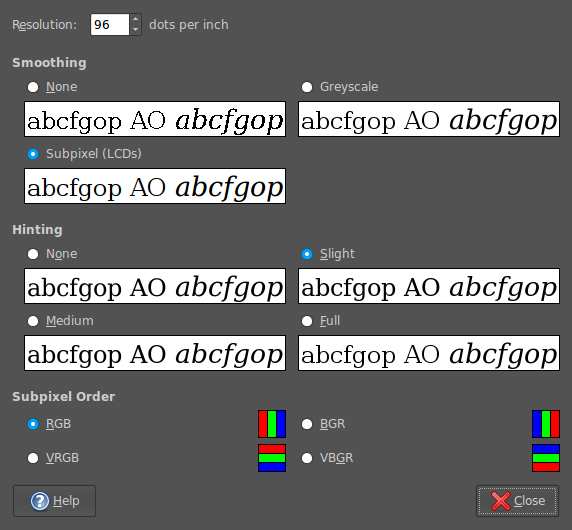
In Firefox 2, it would seem that I was getting away without tweaking my system settings to be their most optimum. With 3, I could do that no longer because of an irritating and pervasive fuzziness that particularly afflicted k's and w's. The way out of this turned out to involve changing my Appearance Preferences (Preferences > Appearance from the System menu). The required attention was focussed on the Fonts tab, whereupon the Details button was brought into use.
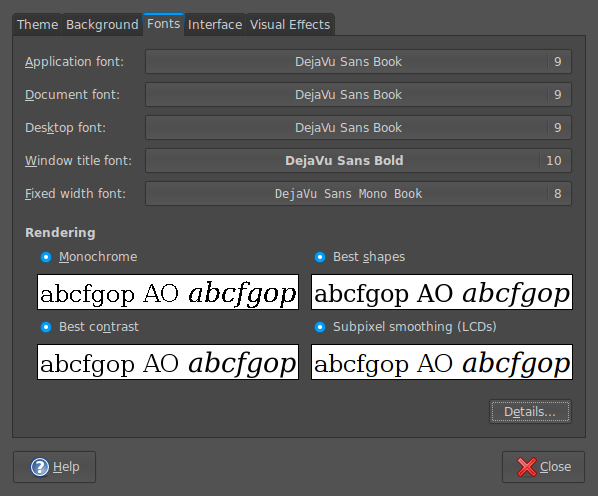
In the resulting dialogue box, smoothing was set to "Subpixel (LCDs)" and hinting to "Slight". Closing down everything after making the required selections and a restart of Firefox was all that was needed to improve matters and more completely make myself at home with Firefox 3.