TOPIC: VIRTUAL MACHINE
Disk corruption can be virtual too
 16th July 2008
It's the sort of sight that causes you to fear the worst, an unchanging black screen with a flashing cursor. That was what started to greet me recently when I tried to fire up a Windows XP guest in VMware Workstation. The cause was the corruption of a virtual disk, an ominous thing that affected a supplemental virtual hard drive that I had added to the virtual machine rather than its main one. Though there might have been some data on there, it was nothing that I didn't have elsewhere anyway. Removing the broken disk from the XP VM returned the situation to fuller health, and I simply tried creating a new one again. So far, this seems to be working fine, yet I'll be keeping a watchful eye on things.
So far, I have no idea why the corruption happened, but the broken disk files were created without a VMDK extension, which might indicate that something was amiss with the process that created them. While it would be better if VMware highlighted the state of its virtual disks, it was when I tried opening the trashed disk with VirtualBox that a warning was given and VMware did the same when I tried it with that afterwards (opening VMware virtual disks with VirtualBox is possible, but you need to ensure that no attempt at importation is made, or you could end up with a breakage). While I may have discovered the fault in a roundabout manner, it's better to know what's gone wrong than not to know at all.
From real to virtual…
9th February 2007
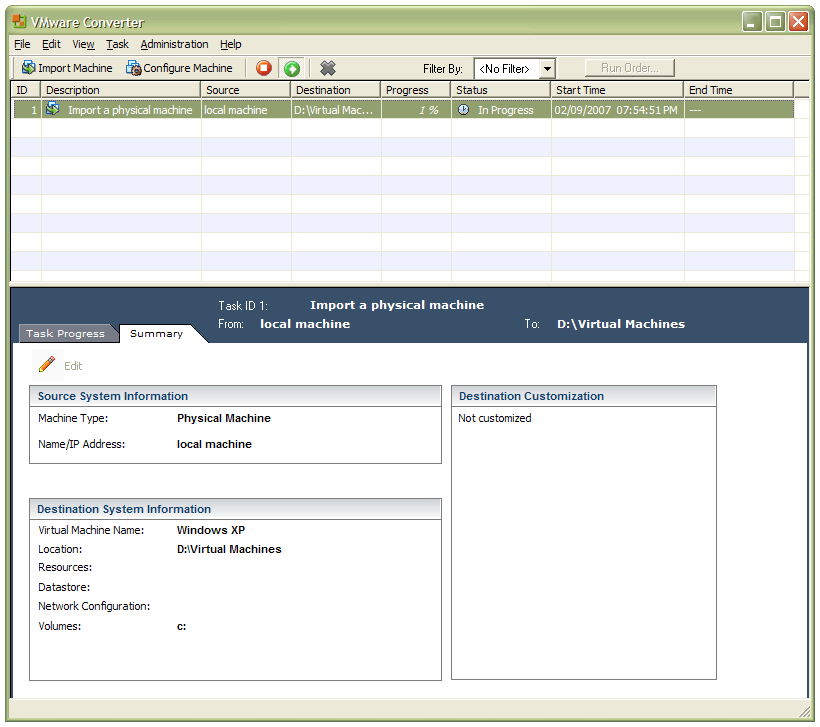
In a previous entry, I mused over a move from Windows to Linux, a suggestion being that Fedora Core Linux would be my base operating system with Windows installed in a Xen virtual machine. That, of course, led me to wonder how I would swap my current situation about: Linux in VM, Windows as host. Meantime, I discovered something that makes the whole process a little easier: VMware Convertor.
The Starter version can be downloaded free of charge, while the Enterprise edition comes with VirtualCenter Management Server for corporate use. What it does is to make a virtual version of a real computer, a process that takes drive imaging much, much further. I have given it a whirl and the conversion seems to go well; the only thing left is for me to fire it up in VMware Workstation - I believe that Player and Server will also run the VM that is created and, like Convertor Starter, they also can be downloaded free of charge; Workstation does everything for me, so I haven't looked beyond it, even though it did cost me money all those moons ago - and get through licence activation issues without leaving me with no authorised Windows installation.