TOPIC: UBUNTU
Ubuntu 9.04 and Tracker
 30th April 2009
Shortly after it was released, I did the upgrade shuffle very painlessly, and it didn't take up so much time either. There was only one issue: Tracker falling over, complaining about corrupted indices. That got it removed from my system using apt-get remove (apt-get purge is another option, especially if you need to rid yourself of nefarious configuration files). After having a bit of a dig around the web, I found that I wasn't the only one seeing the problem. To me, it looks as if the upgrade to 9.04 doesn't work so well when it comes to Tracker, and it needs to be removed and reinstalled to ensure that all required dependencies are correctly set in place. Since I restored it on my system, all is working without complaint. Other than the Tracker issue, it has been a case of another uneventful upgrade. Though the evolutionary path that Ubuntu is following may disappoint anyone looking for excitement, no one would upgrade every six months if they knew that disruptive damage or upheaval might be caused. While I may do a clean installation at some point, that is well down the priority list right now.
/sbin/mount.vboxsf: mounting failed with the error: Protocol error
19th April 2009
These days, my virtualisation needs are being well served by VirtualBox 2.2. Though it may be the closed source variant, I have no complaints about it. Along with a number of Windows VM's, I also have one running Ubuntu 9.04 and, for the first time, I seem to have VirtualBox's Guest Additions playing with a Linux guest as they should. Even the Shared Folders functionality is working.
However, I did get one problem when I tried out the last feature for the first time. The procedure is to issue a command like the following in a terminal session after creating the requisite directory in the file system and adding a host directory as a shared folder:
sudo mount -t vboxsf Music /mnt/host_music/
Above, Music is the name of the folder in the VirtualBox manager and /mnt/host_music in the directory in the guest file system. However, this returned the message at the head of this post at that first attempt:
/sbin/mount.vboxsf: mounting failed with the error: Protocol error
The solution thankfully turns out to be an easy one: reinstalling the Guest Additions, which certainly did the trick for me. The cause would appear to have been an update to Ubuntu, and 9.04 is understandably in a state of flux at the moment (I suspect kernel upgrades because of my previous experiences). Regardless of this, it is good to know that it's a problem with a simple fix, and I am seeing the niceties of a larger virtual screen system together with automatic grabbing and releasing of the mouse cursor too. While there may be a chance to explore the availability of these sorts of features to other Linux guests, I have other things that I should be doing and there's sunshine outside to be enjoyed.
Ubuntu upgrades: do a clean installation or use Update Manager?
9th April 2009
Part of some recent "fooling" brought on by the investigation of what turned out to be a duff DVD writer was a fresh installation of Ubuntu 8.10 on my main home PC. It might have brought on a certain amount of upheaval, but it was nowhere near as severe as that following the same sort of thing with a Windows system. While a few hours was all that was needed, whether it is better to perform just an upgrade every time a new Ubuntu release is unleashed on the world or to go for a complete virgin installation instead. With Ubuntu 9.04 in the offing, that question takes on a more immediate significance than it otherwise might do.
Various tricks make the whole reinstallation idea more palatable. For instance, many years of Windows usage have taught me the benefits of separating system and user files. The result is that my home directory lives on a different disk to my operating system files. Add to that the experience of being able to reuse that home drive across different Linux distros, and even swapping from one distro to another becomes feasible. From various changes to my secondary machine, I can vouch that this works for Ubuntu, Fedora and Debian; the latter is what currently powers the said PC. Though you might have to use superuser powers to attend to ownership and access issues, the portability is certainly there, and it applies to anything kept on other disks too.
Naturally, there's always the possibility of losing programs that you have had installed, but losing the clutter can be liberating too. However, assembling a script made up of one or more apt-get install commands can allow you to get many things back at a stroke. For example, I have a test web server (Apache/MySQL/PHP/Perl) set up, so this would be how I'd get everything back in place before beginning further configuration. It might be no bad idea to back up your collection of software sources, either; I have yet to add all the ones that I have been using back into Synaptic. Then there are closed source packages such as VirtualBox (yes, I know that there is an open-source edition) and Adobe Reader. After reinstating the former, all my virtual machines were available for me to use again, without further ado. Restoring the latter allowed me to grab version 9.1 (probably more secure anyway) and it inveigles itself into Firefox now too so the number of times that I need to go through the download shuffle before seeing the contents of a PDF are much reduced, though not eliminated by the Windows-like ability to see a PDF loaded in a browser tab. Moving from software to hardware for a moment, it looks like any bespoke actions such as my activating an Epson Perfection 4490 Photo scanner need to be repeated, but that was all that I had to do. Getting things back into order is not so bad, even if you have to allow a modicum of time for this.
What I have discussed so far are what might be categorised as the common or garden aspects of a clean installation, yet I have seen some behaviours that make me wonder if the usual Ubuntu upgrade path is sufficiently complete in its refresh of your system. The counterpoint to all of this is that I may not have been looking for some of these things before now. That may apply to my noticing that DSLR support seems to be better with my Canon and Pentax cameras both being picked up and mounted for me as soon as they are connected to a PC, the caveat being that they are themselves powered on for this to happen. Another surprise that may be new is that the BBC iPlayer's Listen Again works without further work from the user, a very useful development. It obviously wasn't that way before I carried out the invasive means. My previous tweaking might have prevented the in situ upgrade from doing its thing, but I do see the point of not upsetting people's systems with an overly aggressive update process, even if it means that some advances do not make themselves known.
So what's my answer regarding which way to go once Ubuntu Jaunty Jackalope appears? For the sake of avoiding initial disruption, I'd be inclined to go down the Update Manager route first, while reserving the right to do a fresh installation later on. All in all, I am left with the gut feeling is that the jury is still out on this one.
Trying out Songbird
2nd March 2009
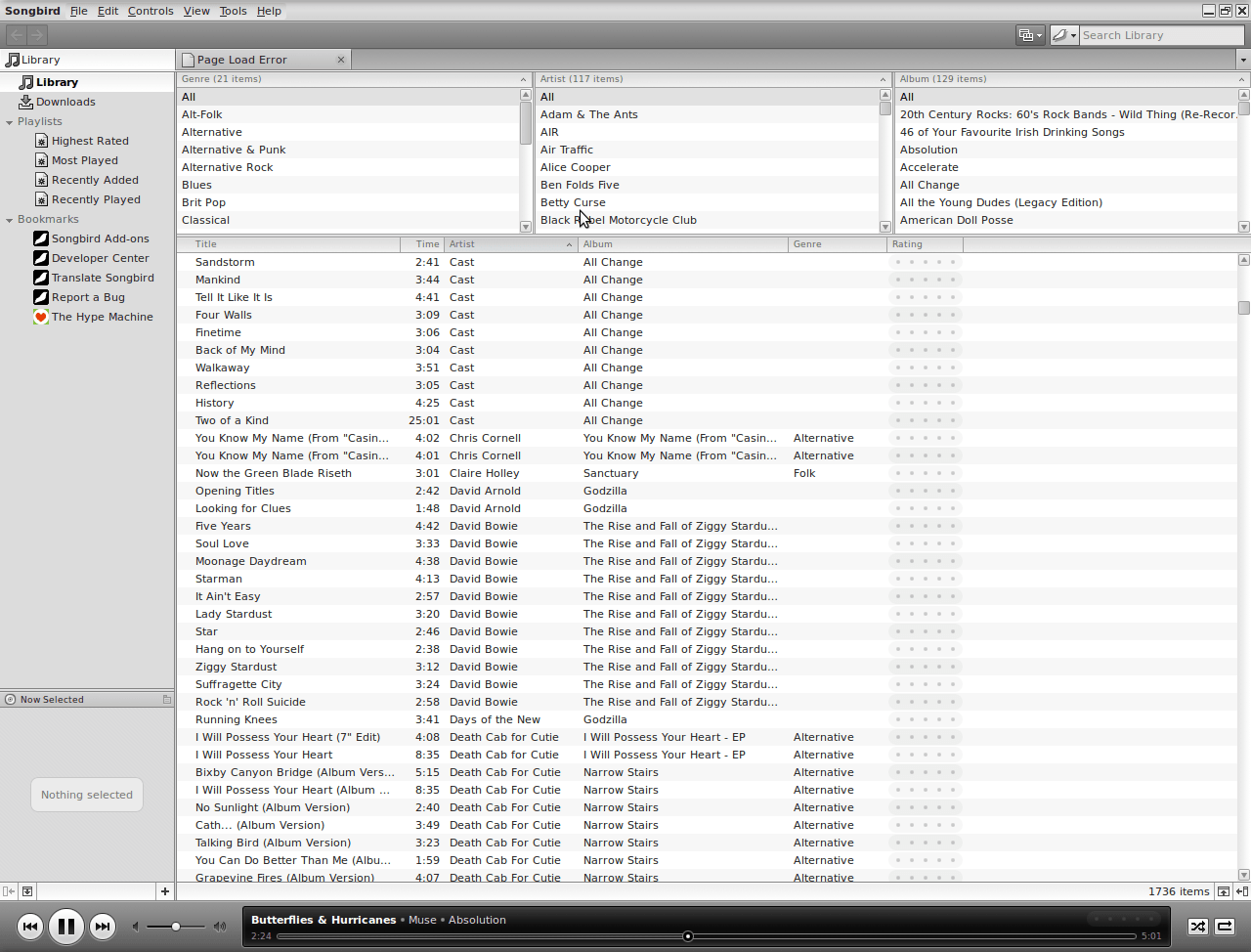
It's remarkable what can be done with a code base: the Gecko core of Firefox has been morphed into a music player called Songbird. On my Ubuntu machine, Rhythmbox has been my audio player of choice, yet the newcomer could be set to replace it. There might have been other things going on my system, but Rhythmbox playback was becoming jumpy and that allowed me a free hand to look at an alternative.
A trip to the Ubuntu repositories using Synaptic was all that was required to get Songbird installed. I suspect that I could have gone for an independent installation, but the one that was available through the official channel sufficed for me. It found every piece of music in the relevant folder, even those that it was unable to play because of iTunes DRM, and it was easy to set it such that it simply moved on when it met such a file rather than issuing a dialogue box to complain. That means that I weed out the incompatible entries in the course of time, rather than having to do it straight away. I cannot claim to be an audiophile, but the quality of the playback seems more than acceptable to me and there seem to be no jumps so long as a file hasn't been corrupted in any way. All in all, Rhythmbox could get usurped.
A hog removed
11th February 2009
Even though my main home PC runs Ubuntu, I still keep a finger in the Windows world using VirtualBox virtual machines. I have one such VM running XP, and this became nigh on unusable due to the amount of background processing going on. Booting into safe mode and using msconfig to clear out extraneous services and programs running from system start time did help, yet I went one step further. Norton 360 (version 2 as it happened) was installed on their and inspection of Process Explorer revealed its hoggish inclinations and the fact that it locked down all of its processes to defend itself from the attentions of malware was no help either (I am never a fan of anything that takes control away from me). Removal turned out to be a lengthy process with some cancelling of processes to help it along, but all was much quieter following a reboot; the fidgeting had stopped. ZoneAlarm Pro (the free version that was gifted to users for one day only towards the end of 2008). Windows continues to complain about the lack of an antivirus application that it recognises, so resolving that is next on the to-do list.
Whither Fedora?
10th January 2009
There is a reason why things have got a little quieter on this blog: my main inspiration for many posts that make their way on here, Ubuntu, is just working away without much complaint. Since BBC iPlayer isn't working so well for me at the moment, I need to have a look at my setup. Otherwise, everything is continuing quietly. In some respects, that's no bad thing and allows me to spend my time doing other things like engaging in hill walking, photography and other such things. While I suppose that the calm is also a reflection of the fact that Ubuntu has matured, there is a sense that some changes may be on the horizon. For one thing, there are the opinions of a certain Mark Shuttleworth, though the competition is progressing too.
That latter point brings me to Linux Format's recently published verdict that Fedora has overtaken Ubuntu. I do have a machine with Fedora that performs what I ask of it without any trouble. However, I have never been on it trying all the sorts of things that I ask of Ubuntu, so my impressions are not in-depth ones. Going deeper into the subject mightn't be such a bad use of a few hours. What I am not planning to do is convert my main Ubuntu machine to Fedora. I moved from Windows because of constant upheavals and I have no intention to bring those upon me without good reason, something that's just not there at the moment.
Speaking of upheavals, one thought that is entering my mind is that of upgrading that main machine. Since its last rebuild was over three years ago, computer technology has moved on a bit since then, with dual and quad-core CPU's from Intel and AMD coming into the fray. Of course, the cost of all of this needs to be considered too, which is never more true than in these troubled economic times. If you asked me about the prospect of a system upgrade a few weeks ago, I would have ruled it out of hand.
What has got me wondering is my continued used of virtualisation and the resources that it needs. Mad notions like running more than one VM at once will put any CPU or memory through their paces. Another attractive idea would be getting a new and bigger screen, particularly with what you can get for around £100 these days. However, my 17" Iiyama is doing well enough to consign this one to the wish list for now. None of the changes that I have described are imminent, even if I have noticed how fast I am filling disks up with digital images to make an expansion of hard disk capacity a higher priority.
If I ever get to do a full system rebuild with a new CPU, memory and motherboard (I am not so sure about graphics since I am no gamer), the idea of moving into the world of 64-bit computing comes about. Since the maximum amount of memory usable by 32-bit software is 4 GB, 64-bit software is a must if I decide to go beyond this limit. That all sounds very fine, aside from the possibility of problems arising with support for legacy hardware. It sounds like another bridge to be assessed before its crossing, even if two upheavals can be made into one.
Besides system breakages, the sort of hardware and software changes over which I have been musing here are optional and can be done in my own time. That's probably just as well in a downturn like we are experiencing now. Being careful with money becomes more important at times like these, which means that it's fortunate that free software not only offers freedom of choice and usage but also a way to leave the closed commercial software acquisition treadmill with all of its cost implications, leaving money for much more important things.
An early glimpse of Ubuntu 9.04
27th November 2008
Ubuntu development is so gradual these days that there's almost no point getting too excited about new versions. Its maturity means that updates aren't that much of an upheaval, and I must admit to liking it that way. Having a look at the first alpha release of Ubuntu 9.04, otherwise known as "Jaunty Jackalope", it appears that there isn't a change to that gradual, some may call it glacial, approach. The most significant change that I noted was the addition of an encrypted private area to your home user area. In the times in which we live, I can certainly see that coming in useful, though it may not set pulses racing in some quarters. OpenOffice is still at 2.4 and things don't appear very different on the surface at all. Of course, things like kernel changes and such like could be going on under the bonnet without many of us noticing it. Saying that, it played well with VirtualBox and I seem to remember virtual machine trouble with early builds of 8.10 so that can be taken as a plus point. I suppose that it is a case of wait and see before there is anything more obviously defining about 9.04. Anyway, they've got until April next year...
No disruption here
12th November 2008
It was just over a year ago that I gave Linux a go after Windows XP gave me a torrid time of it. Since then, I have been able to work more than happily with it and have picked a few new and useful tricks along the way too. All in all, it has been a good experience and I have been able to resolve most of the issues that I have seen. The various Ubuntu upgrades along the way have been taken in their stride, too. Version 7.04 was the first one, with version 7.10 coming immediately afterwards. 8.04 went in equally seamlessly as did 8.10. Some may decry what they might perceive as the glacial nature of any changes, but the flip-side is that change can cause disruption, so my vote is for the more gradual approach, whatever others might think. In line with this, I haven't noticed too many changes in Ubuntu's latest release, and any that I have seen have been of the pleasant kind. Saying that, it's so much better than the contortions surrounding Windows upgrades. All in all, Linux is being kind to me and I hope that it stays that way.
Photoshop Elements 7 first impressions and technical issues
10th November 2008
Lately, I have been playing around with Photoshop Elements 7, doing the same sort of things that I have been doing with Elements 5. Reassuringly, I can still find my way around, even if the screen furniture has been moved about a little. My Pentax K10D is recognised, and I am able to set the white balance to get sensible results. On the images that I was testing, things started to look too warm in the Cloudy and Shade settings, but that's all part and parcel of processing photos taken in early November. The results of my exertions look decent enough, and you can see them in a post on my hillwalking blog.
While I realise that Adobe has been promoting the ability to easily airbrush unwanted objects from images and enhance blue skies, there's no point having all of that if functionality available in previous versions does not work as expected. Thankfully, this is largely the case, albeit with a few niggles.
Since I have been working with the new Elements on a Windows XP SP3 virtual machine running in VirtualBox 2.04 on Ubuntu 8.10, I wonder if that contributed in any way to what I encountered. One gigabyte of memory is allocated to the VM. The files were stored in the Ubuntu file system and accessed using VirtualBox's functionality for connecting through to the host file system. File access was fine, apart from the inability to directly open a file for full editing from the Organiser, something that I have doing very happily with Elements 5.
In addition, I noted a certain instability in the application and using the hand tool to get to the top left-hand corner of an image sent the thing into a loop, again something that Elements 5 never does. Otherwise, things work as they should, even if I saw points to the need for an update to correct any glitches like these, and I hope that there is one. For now, I will persevere and see if I can make use of any additional functionality along the way.
Fixing Alt-Click problems in Ubuntu-hosted VirtualBox Windows guests
24th October 2008
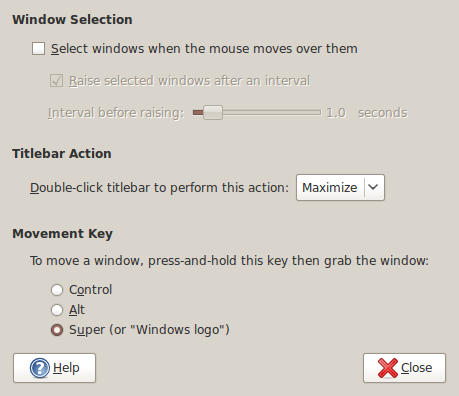
The Alt-Click keyboard-mouse combination is a very common way of working with various flavours of Adobe Photoshop. So, it was with some frustration that I couldn't use it while working in Photoshop Elements (still on version 5, by the way; the temptation of newer versions has not struck) on a Windows XP guest in VirtualBox on my main Ubuntu system.
A quick google later and a proposed solution was for me a surprising one: going to System -> Preferences -> Windows on the host OS and changing the setting of the Movement Key from Alt to Super (Windows key on many keyboards). That was enough to set all in order. It appears that a setting on the host operating system was preventing a piece of software running on the guest from behaving as expected. That's all in the past now that I have got my clone brush functionality back and can work as normal again.