 15th March 2007
If you ever potter over to Adobe's online software store, a curious anomaly awaits you: electronic download editions of their software are never cheaper than the equivalent boxed versions. In fact, there are cases where the electronic version costs more than the boxed one. One would have thought that ditching the box, the disc(s) and whatever accompanies them would save Adobe money, and they would pass this onto you, yet it does not seem to make its way into the pricing for some reason. Another thing is that selling direct should allow Adobe to undercut retailers and make more money from their software, but it is the likes of Amazon that have the better prices. Whatever way you look at it, you have to admit that this pricing model doesn't make a lot of sense.
14th March 2007
If you ever go into a bricks and mortar newsagent and peruse its shelves with an eye out for references to data imaging software, you might find Adobe’s Photoshop as predominant there as it is in the digital imaging world. And the same trend seems to continue in to the bricks and mortar bookshops as well. Online, especially within the vaults of Amazon, it is not as much a matter of what gets stocked as what gets published, and my impression is that the bias, if that’s the right word, continues there. That said, I didn’t realise until recently that Elsevier’s Focal Press has been covering Paint Shop Pro, once branded the poor man’s Photoshop, from at least version 7. That discovery, if it had come earlier, may have made a big difference to how I have been using PSP. Saying that, I have seen some opinions that PSP is easy to use and that may explain the lack of attention from publishers. While Future Publishing did put out a monthly guide to PSP, that seems to have disappeared from the shelves, which it does lend weight to that argument. Or it could have been Corel’s purchase of JASC that changed things…
Of course, without books and magazines, it is not as easy to see the possibilities, and it is here where Photoshop really scores. The digital photography revolution has ensured the software’s escape from the world of computing and the digital arts into photography magazines and beyond. These days, even conventional photography titles feature Photoshop how-to articles. In fact, such is the level of digital content in titles such as Photography Monthly, Practical Photography and Outdoor Photography that you hardly need to pursue the specialist digital photography titles at all.
Speaking of photography, this is and has been my main use of digital imaging technology, be it the scanner that I use for digitising the output of my efforts in film photography or processing RAW files from my digital SLR. I have been using scanners since 1998 and am on my second, a CanoScan 5000F. The colour rendition in the output from its predecessor, a UMAX 1212U, deteriorated to the point where a replacement needed to be sought. As it happened, the Canon turned out to be light years ahead of the UMAX, even with the latter operating properly. Incidentally, my first scanning outing was in the then current version of Photoshop (I booked some time on a scanner at the graphics centre of the university I was attending at the time and sneaked in the scanning of a photo with the journal graphic that I needed to do) - a limited affair, it has to be said - but I then reverted to things like Corel PhotoPaint and Paint Shop Pro. And PSP was what I was using in the main, even after encountering the copy of Photoshop Elements 2 bundled with my EOS 10D. Though Elements’ cloning capabilities did tempt me though, and I did acquire a Focal Press volume on the application, I somehow never took it further.
At the end of last year, Corel and Adobe launch new versions of PSP and Elements, respectively. That got me tempted by the idea of giving the whole business another look, this time in detail. My look at PSP XI regrettably suffered from the lack of time that I could devote to it and seeing what a book on it might have to say. I had more of a chance with Photoshop Elements and came away impressed with the way that it worked. Since then, I have been making my way through Scott Kelby’s latest Elements book and the ideas are building up. At the same time, I have been making good use of a Photoshop CS2 try-out, and I am on the horns of a dilemma: do I splash out on CS2, do I get Elements 5 or do I await the now imminent CS3? You’ll notice that PSP doesn’t feature here; the amount of literature pertaining to Photoshop simply is too much to ignore, and I have loads more to learn.
29th January 2007
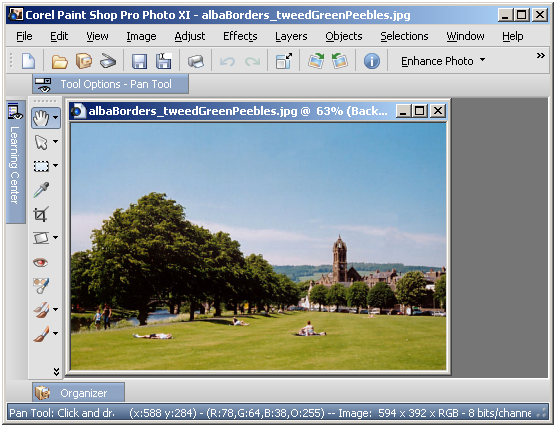
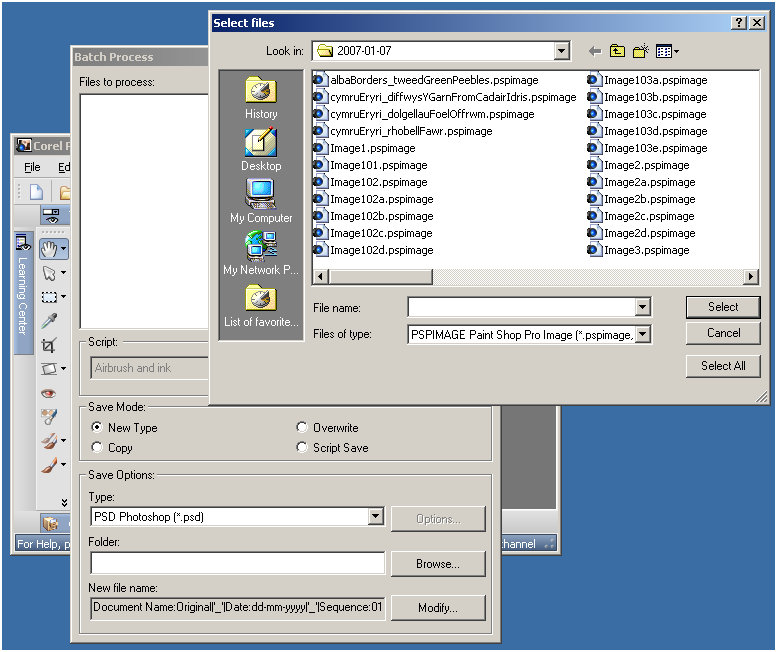
Having completed my evaluation of Corel's Paint Shop Pro (a.k.a. PSP) Photo XI, I dutifully uninstalled it from my system. However, on catching up with some files that I had acquired through the application, I found that I could not open them with its forbear PSP 9. From this, I would have to conclude that Corel made a change to PSP's native PSPIMAGE file format along the way. Having had Windows 2000 installed in a VMware virtual machine, I got back PSP XI to batch convert the files into PSD (Photoshop's own file format) and TIFF files for the future. Carrying out the conversion was easy enough thanks to being able to select files according to their file type, something that Adobe could do with bringing into Photoshop Elements; it's not there even in the latest version.
23rd January 2007
With its imminent launch and having had a quick at one of its beta releases, I decided to give Office 2007 a longer look after it reached its final guise. This is courtesy of the demonstration version that can be downloaded from Microsoft’s website; I snagged Office Standard which contains Word, Excel, PowerPoint and Outlook. Very generously, the trial version that I am using gives me until the end of March to come to my final decision.
And what are my impressions? Outlook, the application from the suite that I most use, has changed dramatically since Outlook 2002, the version that I have been using. Unless you open up an email in full screen mode, the ribbon interface so prevalent in other members of the Office family doesn’t make much of an appearance here. The three-paned interface taken forward from Outlook 2003 is easy to get around. I especially like the ability to collapse/expand a list of emails from a particular sender: it really cuts down on clutter. The ZoneAlarm anti-spam plug-in on my system was accepted without any complaint, as were all of my PST files. One thing that needed redoing was the IMAP connection to my FastMail webmail account, but that was driven more by Outlook warning messages than by necessity from a user experience point of view. Though I have still to get my Hotmail account going, I lost that connection when still using Outlook 2002, and after I upgraded to IE7.
What do I make of the ribbon interface? As I have said above, Outlook is not pervaded by the new interface paradigm until you open up an email. Nevertheless, I have had a brief encounter with Word 2007 and am convinced that the new interface works well. It didn’t take me long to find my way around at all. In fact, I think that they have done an impressive job with the new main menu triggered by the Office Button (as Microsoft call it) and got all sorts of things in there; the list includes Word options, expanded options for saving files (including the new DOCX file format, of course, but the doc format has not been discarded either) and a publishing capability that includes popular blogs (WordPress.com, for instance) together with document management servers. Additionally, the new zoom control on the bottom right-hand corner is much nicer than the old dropdown menu. As regards the “ribbon”, this is an extension of the tabbed interfaces seen in other applications like Adobe HomeSite and Adobe Dreamweaver, the difference being that the tabs are the only place where any function is found because there is no menu back up. There is an Add-ins tab that captures plug-ins to things like Adobe Distiller for PDF creation. Macromedia in its pre-Adobe days offered FlashPaper for doing the same thing, and this seems to function without a hitch in Word 2007. Right-clicking on any word in your document not only gives you suggested corrections to misspellings but also synonyms (no more Shift-F7 for the thesaurus, though it is still there is you need it) and enhanced on-the-spot formatting options. A miniature formatting menu even appears beside the expected context menu; I must admit that I found that a little annoying at the beginning, but I suppose that I will learn to get used to it.
My use of Outlook and Word will continue, the latter’s blogging feature is very nice, but I haven’t had reason to look at Excel or PowerPoint in detail thus far. From what I have seen, the ribbon interface pervades in those applications too. Even so, my impressions of the latest Office are very favourable. The interface overhaul may be radical, yet it does work. Though their changing the file formats is a more subtle change, it does mean that users of previous Office versions will need the converter tool in order for document sharing to continue. Office 97 was the last time when we had to cope with that, and it didn’t seem to cause the world to grind to a halt.
Will I upgrade? I have to say that it is very likely given what is available in Office Home and Student edition. While that version misses out on having Outlook, the prices mean that even buying Outlook standalone to compliment what it offers remains a sensible financial option. Having a look at the retail prices on dabs.com confirms the point:
Office Home and Student Edition: £94.61
Office Standard Edition: £285.50
Office Standard Edition Upgrade: £175.96
Outlook 2007: £77.98
Having full version software for the price of an upgrade appeals to me, and it is likely to be the route that I take, if I replace the Office XP Standard Edition installation that has been my mainstay over the last few years. Having been on a Windows 95 > Windows 98 > Windows 98 SE > Windows ME upgrade treadmill and endured the hell raised when reinstallation becomes unavoidable, the full product approach to getting the latest software appeals to me over the upgrade pathway. In fact, I bought Windows XP Professional as the full product to start afresh after moving on from Windows 9x.