Exploring the mobile web
 16th July 2010
With a change of job ahead of me, I decided to make my web usage a little more mobile. The result was the purchase of a Blackberry 8520 Curve on a T-Mobile pay-as-you-go tariff to complement my existing phone. The attraction included mobile email access and some web browsing capability. Though GPRS provides slow web browsing, it works adequately whilst highlighting the value of mobile-optimised websites. It's just as well that this website that you're reading has a mobile version.
Hooking the Blackberry up to GMail was no problem once I had paid my dues and the necessary set up was done for me; it was only then that the required option was available through the set-up screens. While RIM's own web browser may be no slouch when it comes to rendering websites, I put Opera Mini in place as well for those times when the default option could be bettered and they exist too. Speaking of RIM applications, there's one for Twitter too, though I added Übertwitter for the sake of greater flexibility (it can handle more than one account at a time, for example). In addition, I have instated applications for WordPress and LinkedIn too, and it was then that I stopped myself spending too much time in Blackberry App World. If I was of the Facebook persuasion, I might be interested in the default offering for that as well, but I have learnt to contain myself.
Of course, there are limitations to the device's capabilities regarding email and web on the move. Long emails still need desktop access (messages can get truncated) and mobile unfriendly websites will take an age to load and explore; a small screen means much more finger work. After all, this is a small device, so the observations aren't astounding; it's just that I encounter the reality of life on a small screen now. Nevertheless, useful sites like those from Google and the Met Office have a mobile variant, though I'd like to see the latter including its rain radar as part of the package.
Speaking of life on a smaller scale, there's the size of the keyboard to consider too. So far, I haven't had much practice with it, but I am unsure as how some craft longer blog entries with the tiny keys. Then, there's the ever-present threat of arm discomfort and RSI that you have to watch. For that reason, I'll stick with use for an hour at a time rather than going mad altogether. Navigating around the screen using the tiny trackpad is something to which I am adjusting, and it works well enough too, so long as you're not looking through long web pages or emails.
To bring this piece to a close, the new gadget has been finding uses and I don't intend to leave it idle after paying over £150 for it. Apart from acting as an expensive calculator, it has already travelled abroad with me with roaming not being a problem; while I may have failed to make it work with hotel broadband, there was EDGE availability to keep things connected. All in all, the device is earning its keep and teaching me a few things about mobile handheld computing with my main website in process of being made more mobile compatible with the front page and the photo gallery gaining versions for handheld devices after the same was done for the outdoors blog earlier this year (might make the design look more like the rest of the site though). Without something on which to do some real testing, that idea may not have become reality as it is. It may be no desktop substitute, but that's never to say that these devices may never get near that situation. After all, there was a time when no one could imagine the same for laptop PC's, and we all know what has happened to them.
A tendency for overexposure?
14th July 2010
A recent trip to Sweden saw my Canon PowerShot G11 being put to rather more use than was expected. If I had known what might have been coming my way, I may even have eschewed the principle of lightweight packing to bring along my Pentax DSLR. Nevertheless, the little Canon did whatever was asked of it when light was plentiful.
Once thing that I have noticed in comparison with the Pentax is the Canon's tendency to overexpose a scene. To a point, this can be explained by the former having proper spot-metering and the latter having the less specific partial metering. In fact, that might explain why a Canon EOS 10D SLR in my possession has the same tendency. Maybe it's time to make more use of the Sekonic light meter that I have, but that adds bulk that doesn't fit in with the idea of carrying a compact camera around with you.
That leaves getting more practice with exposure corrections at processing time (I do capture all my photos in raw format). Going further, I am finding that the same consideration appears to apply to image sharpening too. It's almost as if you need to develop a feeling for the results produced by a camera before satisfaction with any acquired photos will follow. Having decent lighting at capture time and not having muck on the sensor helps too, as I have discovered with the photos made used my Pentax K10D on a recent visit to Arran and Argyll. The state of the sensor needs sorting (even if it has an anti-dust system on board) but I sometimes wonder if my judgement of lighting is what it used to be or whether my aspirations have gone too high. Maybe I need to slow down a little to set aside time for working on getting better results and with the right light, a quantity that should come with autumn and winter. Meanwhile, I'll stick with making the best of the British summer.
A wider view
12th July 2010
After playing with the idea for a while, I finally have succumbed to the charms of buying a new and bigger screen. While I questioned the wisdom of replacing a 17" screen that worked without fail, what is sitting in front of me as I write these words is a 24" Iiyama ProLite B2409HDS and very nice it is too. This is my third Iiyama and I stayed local when it came to acquiring the thing. Mind you, bringing back a 7.7 kg box by public transport takes its toll when trying to carry it using the handle on its top.
Once the thing was home, its installation was a straightforward matter of attaching the base, releasing the pin from the back to raise the screen higher and attaching it to a PC. The screen can be raised to a good height that stops slouching and should promote decent posture. Though there is a DVI socket on the back of the monitor, I am using the D-SUB connection because that is what is on the back of my main home PC, even if adding a graphics card would allow the use of the DVI option; that's something that will have to wait for now. What will continue to await use are the speakers that are included because I never used those on the old panel either, mostly because I have a set of standalone speakers for that job.
Out of curiosity, I attached the new screen to a running PC. However, I soon found that any adjustments to the resolution produced disturbing flickering on the screen, but these were banished by a system reboot. Then, I upped the resolution to the maximum of 1920x1080 and the result is more than workable with no discomfort. So far, I have put the extra display real estate to use for perusing digital maps and processing of digital photos. Limitations on the length of a line of on-screen text should be, for the sake of readability, mean that a larger screen is not so advantageous for web browsing. Considering those width restrictions, it might be time to move away from my habit of maximising application windows to fill the screen to have more of them open on the same desktop at once. While that's another option for exploring later, it's good to have them too.
Now, I have to think up a use for the old Iiyama ProLite E431S that has served so well over the last few years. Various thoughts like spreading a display over more than one screen or using it when I have two PC's going at once have come to into my head, but I'm not rushing anything. One thing that I don't intend to do is retiring the thing just yet. Things have moved on from CRT monitors that start to ail after a few years of use, with their LCD successors showing more resilience and cutting down on the cost of computing in the process. Seeing piles of CRT's awaiting dumping is a distressing sight that both can and should be consigned to history in these more environmentally aware days. Thoughts like that have the effect of curtailing any spending on gadgets for me and I have no intention of building up a collection of LCD panels, so what I have will need to do me for a good few years. On the evidence of the screens that I have been using, there's good reason to expect plenty of longevity and good service to follow.
Bringing Virtual Desktops to Windows with VirtuaWin
1st July 2010
One of the nice things about working with Linux/UNIX is that you can organise your open applications so that they are open in different workspaces or virtual desktops. When I return to working on Windows, having everything open on the same desktop is something that I find less tidy. However, there is an open-source application that adds virtual desktops to Windows and very useful it is too.
It is called VirtuaWin, and it adds an icon to the taskbar for switching between workspaces when it is running; there might be a bit of tweaking to be done for it to stay visible all the time, though. You can have it as a startup application in the same way that you have your security software, and I have been using it smoothly on both Windows XP and Windows 7 running in VirtualBox virtual machines. Insofar as I have seen it, you can have as many workspaces as you want and switching from one to another is achievable using keyboard shortcuts. Using CTRL, ALT and one of the arrow keys does it for me, but you can set up your own. All in all, it's a small download that brings a little sense of Windows desktop computing.
ERROR 22-322: Syntax error, expecting one of the following: a name, *.
14th June 2010
This is one of the classic SAS errors that you can get from PROC SQL, and it can be thrown by a number of things. Missing out a comma in a list of variables in a SELECT statement is one situation that will do it, as will be having an extraneous one. As I discovered recently, an ill-defined SAS function nesting like LEFT(TRIM(PERIOD,BEST.)) will have the same effect; notice the missing PUT function in the example. The latter surprised me because I might have expected something more descriptive for this, as would be the case in data step code. In the event, it took some looking before the problem hit me because it's remarkable how blind you can become to things that are staring you in the face. Familiarity really can make you pay less attention.
ERROR: Invalid value for width specified - width out of range
8th June 2010
This could be the beginning of a series of error messages from PROC SQL that may appear unclear to a programmer more familiar with Data Step. The cause of my getting the message that heads this posting is that there was a numeric variable with a length less than the default of 8, not the best of situations. Sadly, the message doesn't pinpoint the affected variable, so it took some commenting out of pieces of code before I found the cause of the problem. That's never to say that PROC SQL does not have debugging functionality in the form of FEEDBACK, NOEXEC, _METHOD and _TREE options on the PROC SQL line itself or the validation statement, but neither of these seemed to help in this instance. Still, they're worth keeping in mind for the future, as is SAS Institute's own page on SQL query debugging. Of course, now that I know what might be the cause, a simple PROC SQL report using the dictionary tables should help. The following code should do the needful:
proc sql;
    select memname, name, type, length
        from dictionary.columns
            where libname="DATA" and type="num" and length ne 8;
quit;
A look at Slackware 13.0
5th June 2010
Some curiosity has come upon me and I have been giving a few Linux distros a spin in VirtualBox virtual machines. One was Slackware, which reminds me of a fellow university student using it in the mid/late 1990's. Since then, my exploration took me into Red Hat, SuSE, Mandrake and eventually to Ubuntu, Debian and Fedora. Since all of that bypassed Slackware, it was to give the thing a look.
While the current version is 13.1, it was 13.0 that I had to hand, so I had a go with that. In many ways, the installation was a flashback to the 1990's and I can see it looking intimidating to many computer users with its now old-fashioned installation GUI. If you can see through that, though, the reality is that it isn't too difficult to install.
After all, the DVD was bootable. However, it did leave you at a command prompt and I can see that throwing many. The next step is to use cfdisk to create partitions (at least two are needed, swap and normal). Once that is done, it is time to issue the command setup and things look more graphical again. I picked the item for setting the locale of the keyboard and everything followed from there, but there is a help option too for those who need it. If you have installed Linux before, you'll recognise a lot of what you see. It'll finish off the set-up of disk partitions for you and supports ext4 too; it's best not to let antique impressions fool you. For most of the time, I stuck with the defaults and left it to perform a full installation with KDE as the desktop environment. If there is any real criticism, it is the absence of an overall progress bar to see where it is with package installation.
Once the installation was complete, it was time to restart the virtual machine, and I found myself left at the command prompt. Only the root user was set up during installation, so I needed to add a normal user too. Issuing startx was enough to get me into KDE (along with included alternatives like XFCE, there is a community build using GNOME too) for that, but I wanted to have that loading automatically. To fix that, you need to edit /etc/inittab to change the default run level from 3 to 4 (hint: look for a line with id:3:initdefault: in it near the top of the file and change that; the file is well commented so you can find your way around it easily without having to look for specific esoteric test strings).
After all this, I ended up with a usable Slackware 130.0 installation. Login screens have a pleasing dark theme by default, while the desktop is very blue. There may be no OpenOffice but KOffice is there in its place and Seamonkey is an unusual inclusion along with Firefox. Though it looks as if it'll take a little more time to get to know Slackware, it looks good so far; I may even go about getting 13.1 to see how things might have changed and report my impressions accordingly. Some will complain about the rough edges that I describe here but remarks about using Slackware to learn about Linux persist. Maybe, Linux distributions are like camera film; some are right for you and some aren't. Personally, I wouldn't thrust Slackware upon a new Linux user if they have to install it themselves, but it's not at all bad for that.
If all else fails...
3rd June 2010
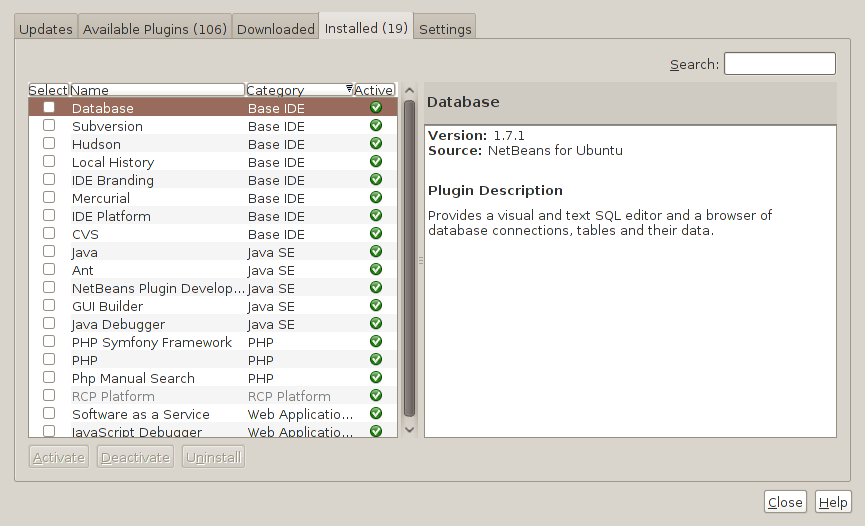
Two problems have come my way that were resolved by removing configuration files and going again. Both affected Linux installations that I have. The Ubuntu installation on my main PC is working well, but I ran into trouble starting up NetBeans 6.8. No GUI would ever appear but taking away the .netbeans folder from my home area allowed a fresh start with the IDE starting up as it should. To date, not all the various projects that I have are restored, but that can be done as I go along. Plugins for PHP development needing reinstatement, but that was another easy thing to achieve; just go to Tools > Plugins on the menus and work with the dialogue box that appears to download and install the needful.
The inspiration for taking the configuration folder from the home area came from needing to address a misadventure with a Debian VM. Perhaps foolishly, I went using gconf-editor on there and messed up the appearance of the terminal window with whatever change I made. Getting rid of the .gconf folder restored order with its recreation by the system. Next time, remembering what changes have been made and reversing them might be the best course of action...
Upgrading to Fedora 13
1st June 2010
After having a spin of Fedora's latest in a VirtualBox virtual machine on my main home PC, I decided to upgrade my Fedora box. First, I needed to battle imperfect Internet speeds to get an ISO image that I could burn to a DVD. Once that was in place, I rebooted the Fedora machine using the DVD and chose the upgrade option to avoid bringing a major upheaval upon myself. You need the full DVD for this because only a full installation is available from Live ISO images and CD's.
Since all was graphical easiness, I got back into Fedora again without a hitch. Along with other bits and pieces, MySQL, PHP and Apache are working as before. If there was any glitch, it was with NetBeans 6.8 because the upgrade from the previous version didn't seem as complete as hoped. However, it was nothing that an update of the open source variant of Java and NetBeans itself couldn't resolve. There may have been untidy poking around before the solution was found, but all has been well since then.
Solving an upgrade hitch en route to Ubuntu 10.04
4th May 2010
After waiting until after a weekend in the Isle of Man, I got to upgrade my main home PC to Ubuntu 10.04. Before the weekend away, I had been updating a 10.04 installation on an old spare PC and that worked fine, so the prospects were good for a similar changeover on the main box. That may have been so, but breaking a computer hardly is the perfect complement to a getaway.
To keep the level of disruption to a minimum, I opted for an in-situ upgrade. The download was left to complete in its own good time, and I returned to attend to installation messages asking me if I wished to retain old logs files for the likes of Apache. When the system asked for reboot at the end of the sequence of package downloading, installation and removal, I was ready to leave it do the needful.
However, I met with a hitch when the machine restarted: it couldn't find the root drive. Live CD's were pressed into service to shed light on what had happened. First up was an old disc for 9.10 before one for 10.04 Beta 1 was used. That identified a difference between the two that was to prove to be the cause of what I was seeing. 10.04 uses /dev/hd*# (/dev/hda1 is an example) nomenclature for everything, including software RAID arrays ("fakeraid"). 9.10 used the /dev/mapper/sil_**************# convention for two of my drives, and I get the impression that the names differ according to the chipset that is used.
During the upgrade process, the one thing that was missed was the changeover from /dev/mapper/sil_**************# to /dev/hd*# in the appropriate places in /boot/grub/menu.lst; look for the lines starting with the word kernel. When I did what the operating system forgot, I was greeted by a screen telling of the progress of checks on one of the system's disks. While that process took a while, a login screen followed, and I had my desktop much as before. The only other thing that I had to do was run gconf-editor from the terminal to send the title bar buttons to the right, where I am accustomed to having them. Since then, I have been working away as before.
Some may decry the lack of change (ImageMagick and UFRaw could do with working together much faster, though) but I'm not complaining; the rough of 9.10 drilled that into me. Nevertheless, I am left wondering how many are getting tripped up by what I encountered, even if it means that Palimpsest (what Ubuntu calls Disk Utility) looks much tidier than it did. Could the same thing be affecting /etc/fstab too? The reason that I don't know the answer to that question is that I changed all hard disk drive references to UUID a while ago, but it's another place to look if the GRUB change isn't fixing things for you. If my memory isn't failing me, I seem to remember seeing /dev/mapper/sil_**************# drive names in there too.