Fixing Alt-Click problems in Ubuntu-hosted VirtualBox Windows guests
 24th October 2008
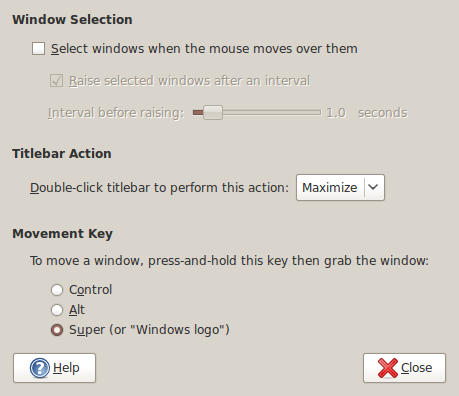
The Alt-Click keyboard-mouse combination is a very common way of working with various flavours of Adobe Photoshop. So, it was with some frustration that I couldn't use it while working in Photoshop Elements (still on version 5, by the way; the temptation of newer versions has not struck) on a Windows XP guest in VirtualBox on my main Ubuntu system.
A quick google later and a proposed solution was for me a surprising one: going to System -> Preferences -> Windows on the host OS and changing the setting of the Movement Key from Alt to Super (Windows key on many keyboards). That was enough to set all in order. It appears that a setting on the host operating system was preventing a piece of software running on the guest from behaving as expected. That's all in the past now that I have got my clone brush functionality back and can work as normal again.
Another way to control line breaks in (X)HTML
22nd October 2008
While you can use <br /> tags, there is another way to achieve similar results: the or non-breaking space entity. Put one of them between two words, and you stop them getting separated by a line break; I have been using this in the latest design tweaks that I made to my online photo gallery. Turning this on its head, if you see two words together acting without regard to normal wrapping conventions, then you can suspect that a non-breaking space could be a cause. There might be CSS options too, but their effectiveness in different browsers may limit their usefulness.
Copying only updated and new files
20th October 2008
With Linux/UNIX, the command line remains ever useful and allows you to do all manner of things, including file copying that only adds new files to a destination. Here's a command that accomplishes this on Linux:
cp -urv [source] [destination]
The u switch does the update while r ensures recursion (by default, cp only copies files from a source directory and not anything sitting in subfolders) and v tells the command to tell the user what is happening.
Though buried and hardly promoted, Windows also has its command line and here's what accomplishes a similar result:
xcopy /d /u [source] [destination]
Anything's better than having to approve or reject every instance where source and destination files are the same or, even worse, to overwrite a file when it is not wanted.
Getting VirtualBox 2.02 working on Ubuntu 8.04
10th October 2008
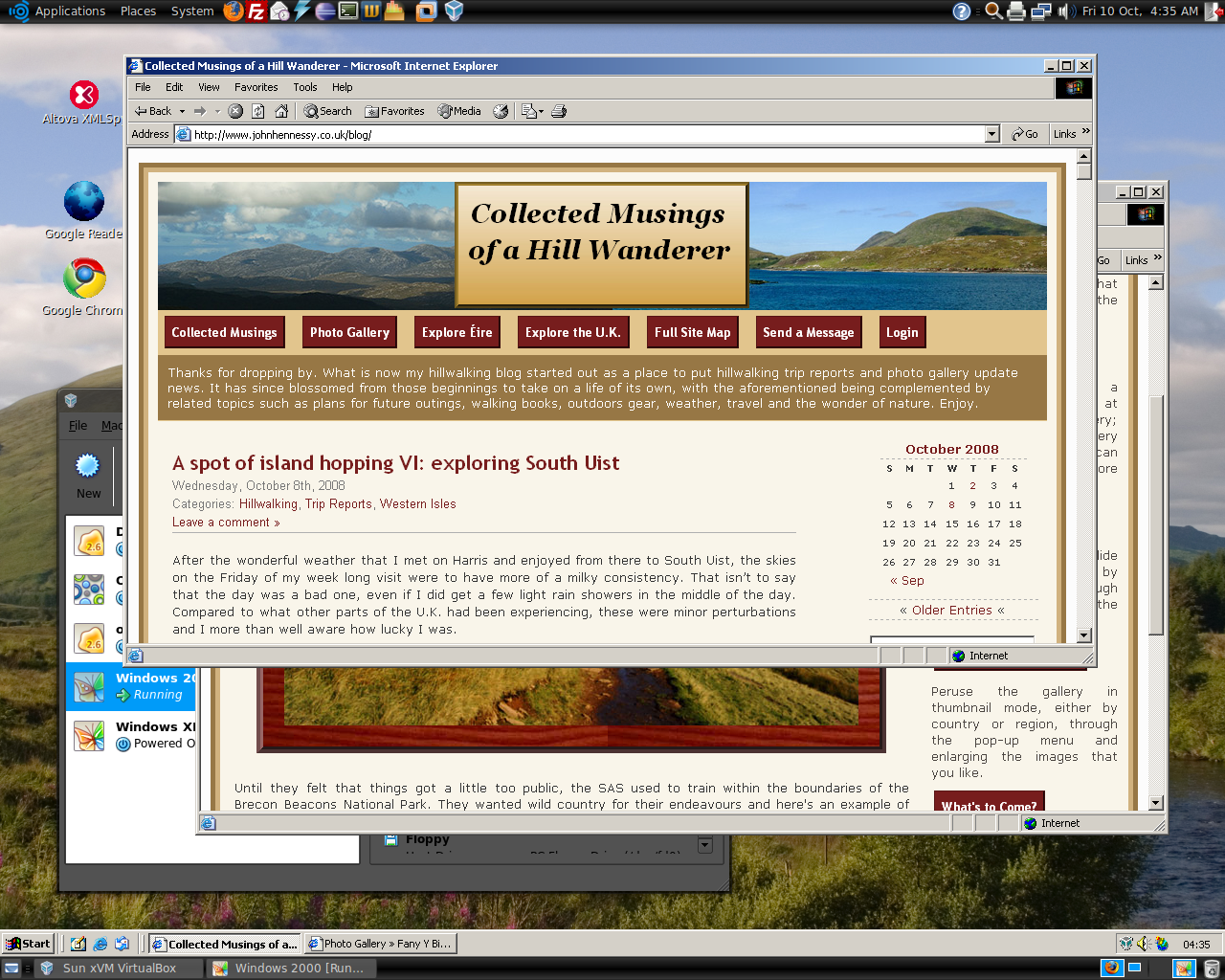
Having run VirtualBox OSE (1.5.6) for a while now, I succumbed to the idea of grabbing the latest version from the VirtualBox website and putting it on my main Linux box. The idea of having 64-bit support proved irresistible, and I did get OpenSolaris to start, even if its installation on a VMware VM meant that it stalled along the way.
To accomplish this, I needed to rid my system of all traces of the old version before 2.02 would install, with a system reboot being needed before the process of installation fully completed. Then, I fired up a Windows XP virtual machine, only for it to completely freeze. The hint as to the cause came when I opened up the VM's settings for the following message to greet me:
Could not load the Host USB Proxy Service (VERR_FILE_NOT_FOUND). The service might be not installed on the host computer.
While it didn't stop things in their tracks when it came to accessing and changing those settings, it was a vital hint for working out what was happening. It now seems that a problem with USB port support was the cause. The fact that issuing the following command got things going for me appeared to confirm the prognosis.
sudo mount -t usbfs /sys/bus/usb /proc/bus/usb/
Of course, not wanting to have to issue the same command over and over again, I was after a more permanent solution. That involved adding the following lines to /etc/fstab:
#usbfs
none /proc/bus/usb usbfs devgid=46,devmode=664 0 0
A reboot later, that change apparently was enough to settle the matter, and I am now able to run VM's as before. Seamless application mode is going well (the host key - right Ctrl by default - + L key combination is sufficient to toggle the setting on and off), even if it has a few quirks. Two that I have spotted include the usual Ubuntu screen furniture disappearing when maximised windows are displayed, and the Windows taskbar appearing when two or more applications are running. That last one may be just as well because individual applications don't get an Ubuntu taskbar icon each, which is perhaps an idea for a future enhancement. Updating Guest Additions in a VM's doesn't seem to change the behaviour, but any imperfections are curiosities rather than complaints given how well things run anyway, unless you decide to confound matters by closing and minimising windows, but resolving that is just a toggle away. It's all looking good so far...
Forcing Ubuntu (and Debian) to upgrade to a newer distribution version
8th October 2008
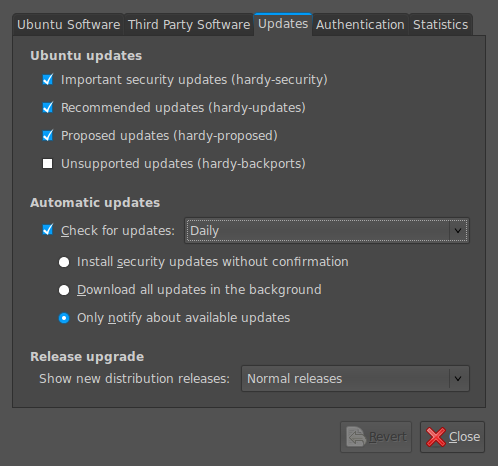
Ubuntu is usually good at highlighting the existence of a new version of the distribution through its Update Manager. That means that 8.10 should be made available to you at the end of the month, so long as you have sorted the relevant setting for 8.04 to realise what has happened. That lives in System > Administration > Software Sources > Updates. If you haven't done that, then 8.04 will continue regardless, since it is a long term supported release.
Otherwise, it's over to the command line to sort you out. One of the ones below will do, with the first just carrying out a check for a new stable version of Ubuntu and the second going all the way:
sudo update-manager -c
sudo update-manager -p
if you are feeling more adventurous, you can always try the development version and this checks for one of those (I successfully used this to try out the beta release of Intrepid Ibex from within a Wubi instance on my laptop):
sudo update-manager -d
Neither of the above are available on Debian, so they seem to be Ubuntu enhancements. That is not to imply that you cannot force the issue with Debian; it's just that the more generic variant is used and, unless, you have gone fiddling with visudo, you will need to run this as root (it works in Ubuntu too):
update-manager --dist-upgrade
Ghostscript: **** Unable to open the initial device, quitting.
6th October 2008
The above error message has been greeting me when creating PDF's with Ghostscript on a Solaris box and does need some translation. If you are directing output to a real printer, I suppose that it is sensible enough: nothing will happen unless you can connect to it. It gets a little less obvious when associated with PDF creation and seems to mean that the pdfwrite virtual device is unable to create the specified output file. A first port of call would be to check that you can write to the directory where you are putting the new PDF file. In my case, there appears to be another cause, so I'll have to keep looking for a solution.
Update: I have since discovered the cause of this: a now defunct TEMP assignment in the .profile file for my user account. Removing that piece of code resolved the problem.
Combining bookmarked PDF files using Ghostscript
4th October 2008
My latest adventure in the world of computing has led me into the world of automated PDF generation. When my first approach didn't prove to be completely trouble-free, I decided to look at the idea of going part of the way with it and finishing off the job with the open-source utility Ghostscript. It is that which got me thinking about combining bookmarked PDF files and I can say that Ghostscript is capable of producing what I need as long it doesn't generate any errors along the way. Here's the command that does the trick:
gs -dBATCH -dNOPAUSE -q -sDEVICE=pdfwrite -sOutputFile=final.pdf source_file1.pdf source_file2.pdf
The various switches of the gs command have very useful roles with dBATCH ensuring that Ghostscript shuts down when all is done, dNOPAUSE removing any prompts that would otherwise be given, q for quiet mode, sDEVICE using Ghostscript's own PDF creation functionality and sOutputFile creates the output file, stopping Ghostscript from sending it to its default stream. All of this applies to Windows Ghostscript too, though the name of the executable is gswin32c for 32-bit Windows instead of gs.
When it comes to any debugging, it is useful to consider that Ghostscript is case-sensitive with its command line switches, something that I have seen to trip up others. I am getting initial device initialisation, so it strikes me that dropping some of the ones that reduce the number of messages might help me work out what's going on. It's a useful idea that I have yet to try.
There is also online documentation if you fancy learning more, and Linux.com has an article that considers other possible PDF combination tools as well. All in all, it's nice to have command line tools to do these sorts of things rather than having to use GUI applications all the time.
Interrogating Solaris hardware for installed CPU and memory resources
2nd October 2008
There are times when working with a Solaris server that you need to know a little more about the hardware configuration. Knowing how much memory that you have and how many processors there are can be very useful to know if you are not to hog such resources.
The command for revealing how much memory has been installed is:
prtconf -v
Since memory is often allocated to individual CPU's, then knowing how many are on the system is a must. This command will give you the bare number:
psrinfo -p
The following variant provides the full detail that you see below it:
psrinfo -v
Output:
Status of virtual processor 0 as of: 10/06/2008 16:47:54

on-line since 09/13/2008 14:47:52.

The sparcv9 processor operates at 1503 MHz,

and has a sparcv9 floating point processor.

Status of virtual processor 1 as of: 10/06/2008 16:47:54

on-line since 09/13/2008 14:47:49.

The sparcv9 processor operates at 1503 MHz,

and has a sparcv9 floating point processor.
For a level intermediate between both extremes, try this to get what you see below it:
psrinfo -vp
Output:
The physical processor has 1 virtual processor (0)

UltraSPARC-IIIi (portid 0 impl 0x16 ver 0x34 clock 1503 MHz)

The physical processor has 1 virtual processor (1)

UltraSPARC-IIIi (portid 1 impl 0x16 ver 0x34 clock 1503 MHz)
position: static?
12th September 2008
CSS positioning seems to be becoming a nightmare when it comes to IE6 support. While I am aware that the likes of 37signals have stopped making their products work with it, there remain plenty of people who stick or are stuck with the old retainer. I am one of the latter because of the continued use of Windows 2000 at my place of work, though a Windows Vista roll-out has been mooted for a while now. If nothing else, it keeps me in the loop for any inconsistencies that afflict the display of my websites. Positioning of an element within the browser window rather than within its parent element is one of these, and it looks as if specifying a position of relative in a stylesheet is part of this. Apparently, it could be down to its non-triggering of IE's haslayout property. Though it might be a hack, I have found that static positioning has helped. While I'll continue to keep my eye out for a better solution if it exists, the static option seems to have no detrimental effect in IE7, IE8, Firefox, Safari, Chrome or Opera.
Dean's FCKEditor for WordPress plugin, a wish list
8th September 2008
Admittedly, I have a liking for FCKEditor over and above what comes as standard with WordPress. Here, the FCKEditor for WordPress plugin has been addressing my preference for a while now. However, its most recent release dates from last April and its integration with WordPress 2.6.x has been leaving a lot to be desired. In that vein, I have decided to collect a few of them here:
- Automatic saves: the idea behind this feature of WordPress is that you aren't hitting the save button that often at all. In fact, given that hitting save creates a revision and an extra record in your database, it really isn't something that you should be doing very often anyway. Unless, you don't mind a bloated database, it's probably best to avoid that habit of saving every few minutes like I do when using Word.
- Word count: this doesn't update without saving a revision, while it should update periodically in a manner akin to the automatic saves.
- Insertion of media such as images: this is just broken, and it takes away the possibility of having galleries and captions without manual work.
What I have above are the major inconsistencies, but there have always been annoyances like the adding unwanted entities allover the place, probably a habit of FCKEditor itself anyway. Nevertheless, it's the integration work that really shows the lack of attention. Maybe, it's time to move Dean Lee's labour of love over to a fully community-maintained course of development. While I know that it's difficult to see your "baby" leave you and take flight, I am inclined that it's the best way forward when you consider how rapidly WordPress has been changing over the last year. Though some moves have been made towards this, they really do need to go further.