Taking the sudo command beyond Ubuntu
 27th October 2010
Though some may call it introducing a security risk, being able to execute administrator commands on Ubuntu using sudo and gksu by default is handy. It's not the only Linux distribution with the facility, though, since the /etc/sudoers file is found in Debian and I plan to have a look into Fedora. The thing that needs to be done is to add the following line to the aforementioned file (you will need to do this as root):
[your user name] ALL=(ALL) ALL
One that is done, you are all set. Just make sure that you're using a secure password, though, and removing the sudo/gksu permissions is as simple as reversing the change.
Update on 2011-12-03: The very same can be done for both Arch Linux and Fedora, The same file locations apply too.
Turning off the admin bar in WordPress 3.1
25th October 2010
Work on WordPress 3.1 is in full swing at the moment, though I initially thought that they were taking a little break after 3.0. From what I can see, many refinements are being made to the multi-blog functionality and behind-the-scenes work is ongoing on the administration screens too.
Another under-the-bonnet change has been to make WordPress less tied to MySQL, since the possibility of dropping in support for an alternative such as PostgreSQL is now a reality even if it isn't part of the default package. For now, it looks as if this will be plugin territory rather than default multi-database support, though that may become a sensible development in the light of Oracle's acquisition of MySQL and its sabre-rattling regarding Java patents. So far, the change to WordPress has affected my use of its database engine to power an offline version of my online photo gallery, but a quick spot of code editing sorted that issue.
One more obvious alteration will be the addition of a WordPress.com style administration bar to the top of all content and administration screens for a user who is logged into the system. Though it will be turned on by default, there will be the option of turning it off for those among who prefer things that way. All that will be needed for this is to add the following line near the top of wp-config.php:
define( "WP_SHOW_ADMIN_BAR", false);
The chance to see new additions like those above and be ready for is my main reason for following WordPress development. It's best to be ready instead of being surprised, though it has to be said that the blogging or CMS platform is a very polished one these days.
One reason why you cannot merge cells in Excel
23rd October 2010
One handy thing that I didn't realise that you could do with Excel until the last few months was the ability to share an open workbook between users and collate any changes that are made (it seems that a form of version control is behind this). From what I have seen, Excel seems to manage changes to shared spreadsheets rather well. When you save yours, it adds updates from other users and warns if any edits collide with one another. To activate it in Excel 2003, all that needs doing is for you to go to the Share Workbook entry on the Tools and tick the appropriate checkbox in the resulting dialogue box. In 2007 and 2010, look for the Share Workbook icon in the Review tab on the ribbon to get the same dialogue box popping up.
That's not to say that it doesn't have its restrictions, though. For example, I have found that the merging of cells is made unavailable, but that can be sorted by unsharing and resharing the workbook when no one else is using it. As to why cell merger is switched off by sharing, I have a few ideas. Maybe, they couldn't make it work reliably (can happen with large software development projects like the creation of a new version of Excel) or decided that it would have consequences for other users that are too inconvenient. Either way, we cannot merge cells in shared workbooks, and that's the way that things are for now. Some may not worry about this though, since they reckon that cell merging is undesirable anyway; well, don't go doing it in any spreadsheet that is likely to be read in by another program, or you could cause trouble.
Why go elsewhere when you can get it at Argos?
21st October 2010
It is perhaps a sign of the technological times in which we live that even mainstream stores like Argos stock computing equipment these days. For instance, last weekend, I bought a Seagate Expansion 2 GB external hard drive in there for backing up my digital photo collection and never got to a local independent computer shop like I had planned to do. Maybe, it was the convenience and lack of fuss with a catalogue shop that swung it for me. In this case, the largest size at the other place was 1 GB according to its website anyway.
Other items bought from the pervasive chain have included a BlackBerry, a Vodafone mobile broadband dongle and an Asus Eee PC. All have done what I have asked of them and without any trouble, yet it does make me wonder about the threat to the specialist PC stores from their more mainstream competitors, and it isn't just Argos either. Tesco also tempts folk into their stores with technological goods, so I must own up to having a cheap DVD player from there.
In former times, I might have been lured into purchasing at online stores until the reality of dealing with inflexible delivery services took away the shine after a few years. After all, I'd prefer not to burden neighbours with taking delivery of any purchases. My current job offers the possibility of some home working so that might be an option for those things that do need delivering, but there remains a certain immediacy to going into a real shop for what you need and then to take it away on the day (having paid for it, of course) that is difficult to beat.
While I tend to decide what to get using my mind after doing some research, others may prefer the idea of getting some advice in a shop, which is where the specialists score. In fact, it may be the only way that they are going to cope with the onslaught from megastores like Argos and Tesco. All this reminds me that going to a local independent shop next time is in order because they cannot be doing brilliantly in these cash-straightened times.
Portable computing with the Asus Eee PC 1001 HA
7th October 2010
Having had an Asus Eee PC 1001 HA for a few weeks now, I thought that it might be opportune to share a few words about the thing on here. The first thing that struck me when I got it was the size of the box in which it came. Being accustomed to things coming in large boxes meant the relatively diminutive size of the package was hard not to notice. Within that small box was the netbook itself, along with the requisite power cable and not much else apart from warranty and quick-start guides; so that's how they kept things small.
Though I was well aware of the size of a netbook from previous bouts of window shopping, the small size of something with a 10" screen hadn't embedded itself into my consciousness. Despite that, it came with more items that reflect desktop computing than might be expected. First, there's a 160 GB hard disk and 1 GB of memory, neither of which is disgraceful and the memory module sits behind a panel opened by loosening a screw, which leaves me wondering about adding more. Sockets for network and VGA cables are included, along with three USB ports and sockets for a set of headphones and for a microphone. Portability starts to come to the fore with the inclusion of an Intel Atom CPU and a socket for an SD card. Unusual inclusions come in the form of an onboard webcam and microphone, both of which I intend to leave in the off position for the sake of privacy. Wi-Fi is another networking option, so you're not short of features. The keyboard is not too compromised either, and the mouse trackpad is the sort of thing that you'd find on full-size laptops. With the latter, you can use gestures too, so I need to learn what ones are available.
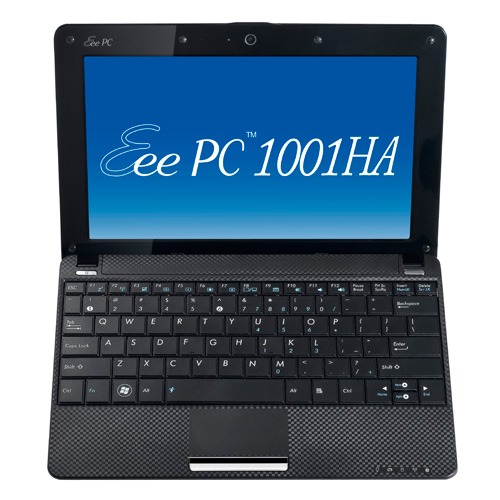
The operating system that comes with the machine is Windows XP, and there are some extras bundled with it. These include a trial of Trend Micro as an initial security software option, as well as Microsoft Works and a trial of Microsoft Office 2007. Then, there are some Asus utilities too, though they are not so useful to me. All in all, none of these burden the processing power too much and IE8 comes installed too. Being a tinkerer, I have put some of the sorts of things that I'd have on a full-size PC on there. Examples include Mozilla Firefox, Google Chrome, Adobe Reader and Adobe Digital Editions. Pushing the boat out further, I used Wubi to get Ubuntu 10.04 on there in the same way as I have done with my 15" Toshiba laptop. So far, nothing seems to overwhelm the available processing power, though I am left wondering about battery life.
The mention of battery life brings me to mulling over how well the machine operates. So far, I am finding that the battery lasts around three hours, much longer than on my Toshiba but nothing startling either. Nevertheless, it does preserve things by going into sleep mode when you leave it unattended for long enough. Still, I'd be inclined to find a socket if I was undertaking a long train journey.
According to the specifications, it is supposed to weigh around 1.4 kg and that seems not to be a weight that has been a burden to carry so far and the smaller size makes it easy to pop into any bag. It also seems sufficiently robust to allow its carrying by bicycle, though I wouldn't be inclined to carry it over too many rough roads. In fact, the manufacturer advises against carrying it anywhere (by bike or otherwise) without switching it off first, but that's a common-sense precaution.
Start-up times are respectable, though you feel the time going by when you're on a bus for a forty-minute journey, and shutdown needs some time set aside near the end. The screen resolution can be increased to 1024x600 and the shallowness can be noticed, reminding you that you are using a portable machine. For that reason, there have been times when I hit the F11 key to get a full-screen web browser session. Coupled with the Vodafone mobile broadband dongle that I have, it has done some useful things for me while on the move so long as there is sufficient signal strength (seeing the type of connection change between 3G, EDGE and GPRS is instructive). All in all, it's not a chore to use, as long as Internet connections aren't temperamental.