AND & OR, a cautionary tale
 27th March 2009
The inspiration for this post is a situation where having the string "OR" or "AND" as an input to a piece of SAS Macro code, breaking a program that I had written. Here is a simplified example of what I was doing:
%macro test;
    %let doms=GE GT NE LT LE AND OR;
    %let lv_count=1;
    %do %while (%scan(&doms,&lv_count,' ') ne );
        %put &lv_count;
        %let lv_count=%eval(&lv_count+1);
    %end;
%mend test;
%test;
The loop proceeds well until the string "AND" is met and "OR" has the same effect. The result is the following message appears in the log:
ERROR: A character operand was found in the %EVAL function or %IF condition where a numeric operand is required. The condition was: %scan(&doms,&lv_count,' ') ne

ERROR: The condition in the %DO %WHILE loop, , yielded an invalid or missing value, . The macro will stop executing.

ERROR: The macro TEST will stop executing.
Both AND & OR (case doesn't matter, but I am sticking with upper case for sake of clarity) seem to be reserved words in a macro DO WHILE loop, while equality mnemonics like GE cause no problem. Perhaps, the fact that and equality operator is already in the expression helps. Regardless, the fix is simple:
%macro test;
    %let doms=GE GT NE LT LE AND OR;
    %let lv_count=1;
    %do %while ("%scan(&doms,&lv_count,' ')" ne "");
        %put &lv_count;
        %let lv_count=%eval(&lv_count+1);
    %end;
%mend test;
%test;
Now none of the strings extracted from the macro variable &DOMS will appear as bare words and confuse the SAS Macro processor, but you do have to make sure that you are testing for the null string ("" or '') or you'll send your program into an infinite loop, always a potential problem with DO WHILE loops so they need to be used with care. All in all, an odd-looking message gets an easy solution without recourse to macro quoting functions like %NRSTR or %SUPERQ.
No autofocus?
25th March 2009
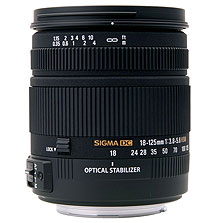
Recently, I recently treated myself to a Sigma 18-125 mm f/3.8-5.6 DC HSM zoom lens for my Pentax K10D. There was a wait for the item to appear, only then for me to find that the lens' autofocus facility wasn't compatible with the body when it arrived. Standard wisdom would have it that I sent the thing back and ask for a replacement or a refund.
Perhaps inexplicably, I did neither. In fact, I came to the conclusion, that since I make photos of landscapes anyway, that been slowed down by the lack of autofocus was no bad thing except perhaps when appealing light makes fleeting appearances. While it is true to say that a used Pentax manual focus lens would have been cheaper, I did what I did.
The camera's autofocus indicator still works and the 18-55 mm zoom that came with the camera wasn't impressive anyway, so taking matters into my own hands was something that happened a lot. Now, I have better quality glass in front of the sensor and with a metal mount and longer range too. The lens comes with a petal hood too, though I keep that for when I really need it rather than keeping it on the lens and stopping myself focussing the thing.
Speaking of zooming and focussing, the controls work well and smoothly without being at all loose. The AF setting gets used to lock the focus and the zoom can be locked at the wide end so that the lens doesn't get into the habit of zooming under the influence of gravity, not a bad thing. For future lens purchases, I might be more inclined to ask about compatibility next time around (I may have been spoiled by the Canons that I used to use) but I remain content for now.
All in all, it feels like a quality item, so it's a pity that Pentax saw fit to make the changes that they made, or that Sigma didn't seem to have kept up with them. Saying that, my photographic subjects usually don't run off so being slowed down is no bad thing at all, especially if it makes me create better photos.
Navigation shortcuts
12th March 2009
Though I may have been slow off the mark on this, I recently discovered keyboard equivalents to browser back and forward buttons. They are: Alt+[Let Arrow] for back and Alt+[Right Arrow] for forward. While I may have first discovered their existence in Firefox, they seem to be more widely available than that, with the same trickery working in Chrome and Internet Explorer having them too. The existence of these keyboard shortcuts might provide some pause for thought too for those web application developers who intend to disable the Back and Forward functionality in browsers, but being able to save mouse mileage with some keyboard action can't be bad.
Investigating Textpattern
9th March 2009
With the profusion of Content Management Systems out there, open source and otherwise, my curiosity has been aroused for a while now. In fact, Automattic's aspirations for WordPress (the engine powering this blog) now seem to go beyond blogging and include wider CMS-style usage. Though some may even have put the thing to those kinds of uses, I believe that it has a way to go before it can put itself on a par with the likes of Drupal and Joomla!.
Speaking of Drupal, I decided to give it a go a while back and came away with the impression that it's a platform for an entire website. At the time, I was attracted by the idea of having one part of a website on Drupal and another using WordPress, but the complexity of the CSS in the Drupal template thwarted my efforts and I desisted. The heavy connection between template and back end cut down on the level of flexibility too. Though that mix of different platforms might seem odd in architectural terms, my main website also had a custom PHP/MySQL-driven photo gallery too and migrating everything into Drupal wasn't going to be something that I was planning. Since I might have been trying to get Drupal to perform a role for which it was never meant, I am not holding its non-fulfillment of my requirements against it. While Drupal may have changed since I last looked at it, I decided to give an alternative a go regardless.
Towards the end of last year, I began to look at Textpattern (otherwise known as Txp) in the same vein, and it worked well enough after a little effort that I was able to replace what was once a visitor dossier with a set of travel jottings. In some respects, Though Textpattern might feel less polished when you start to compare it with alternatives like WordPress or Drupal, the inherent flexibility of its design leaves a positive impression. In short, I was happy to see that it allowed me to achieve what I wanted to do.
If I recall correctly, Textpattern's default configuration is that of a blog, which means that it can be used for that purpose. So, I got in some content and started to morph the thing into what I had in mind. Because my ideas weren't entirely developed, some of that was going on while I went about bending Txp to my will. Most of that involved tinkering in the Presentation part of the Txp interface, though. It differs from WordPress in that the design information like (X)HTML templates and CSS are stored in the database rather than in the file system à la WP. Txp also has its own tag language called Textile and, though it contains conditional tags, I find that encasing PHP in <txp:php></txp:php> tags is a more succinct way of doing things; only pure PHP code can be used in this way and not a mixture of such in <?php ?> tags and (X)HTML. A look at the tool's documentation together with a perusal of Apress' Textpattern Solutions got me going in this new world (it was thus for me, anyway). The mainstay of the template system is the Page, while each Section can use a different Page. Each Page can share components and, in Txp, these get called Forms. These are included in a Page using Textile tags of the form <txp:output_form form="form1" />. Style information is edited in another section and you can have several style sheets too.
The Txp Presentation system is made up of Sections, Pages, Forms and Styles. The first of these might appear in the wrong place when being under the Content tab would seem more appropriate but the ability to attach different page templates to different sections places their configuration where you find it in Textpattern and the ability to show or hide sections might have something to do with it too. As it happens, I have used the same template for all bar the front page of the site and got it to display single or multiple articles as appropriate using the Category system. Though it may be a hack, it appears to work well in practice. Being able to make a page template work in the way that you require really offers a considerable amount of flexibility; it allowed me to go with one sidebar rather than two as found in the default set up.
Txp also has the facility to add plugins (look in the Admin section of the UI) and this is very different from WordPress in that installation involves the loading of an encoded text file, probably for the sake of maintaining the security and integrity of your installation. I added the navigation facility for my sidebar and breadcrumb links in this manner, with back end stuff like Tiny MCE editor and Akismet coming as plugins too. While there may not be as many of these for Textpattern, the ones that I found were enough to fulfil my needs. If there are plugin configuration pages in the administration interface, you will find these under the Extensions tab.
To get the content in, I went with the more laborious copy, paste and amend route. Given that I was coming from the plain PHP/XHTML way of doing things, the import functionality was never going to do much for me with its focus on Movable Type, WordPress, Blogger and b2. The fact that you only import content into a particular section may displease some, too. Peculiarly, there is no easy facility for performing a Textpattern to Textpattern migration apart from doing a MySQL database copy. While some alternatives to this were suggested, none seemed to work as well as the basic MySQL route. Tiny MCE made editing easier once I went and turned off Textile processing of the article text. This was done on a case by case basis because I didn't want to have to deal with any unintended consequences arising from turning it off at a global level.
While on the subject of content, this is also the part of the interface where you manage files and graphics along with administering things like comments, categories and links (like a blog roll on WordPress). Of these, it is the comment or link facilities that I don't use, allowing me to turn comments off in the Txp preferences. So far, I am using categories to bundle together similar articles for appearance on the same page, while also getting to use the image and file management side of things as time goes on.
All in all, it seems to work well, even if I wouldn't recommend it to the sort of audience to whom WordPress might be geared. My reason for saying that is because it is a technical tool that is used best if you are prepared to your hands dirtier from code cutting than other alternatives. I, for one, don't mind that at all because working in that manner might actually suit me. Nevertheless, not all users of the system need to have the same level of knowledge or access; usefully, it is possible to set up users with different permissions to limit their exposure to the innards of the administration. In line with Textpattern's being a publishing tool, you get roles such as Publisher (administrator in other platforms), Managing Editor, Copy Editor, Staff Writer, Freelancer, Designer and None. Those names may mean more to others, but I have yet to check out what those access levels entail because I use it on a single user basis.
Txp may lack certain features, such as graphical visitor statistics instead of the current text listings. While, its administration interface could benefit from refinement, it fulfils my core requirements. The more streamlined approach makes it more practical in my opinion, which is demonstrated by my creation of A Wanderer's Miscellany. Consider exploring it yourself to see what's possible, since I am certain that I have only scratched the surface of Textpattern's capabilities.
Suffering from neglect?
6th March 2009
There have been several recorded instances of Google acquiring something and then not developing it to its full potential. FeedBurner is yet another acquisition where this sort of thing has been suspected. Changeovers by monolithic edict and lack of responsiveness from support forums are the sorts of things that breed resentment in some that share opinions on the web. Within the last month, I found that my FeedBurner feeds were not being updated as they should have been, and it would not accept a new blog feed when I tried adding it. The result of both these was that I deactivated the FeedBurner FeedSmith plugin to take FeedBurner out of the way for my feed subscribers; those regulars on my hillwalking blog were greeted by a splurge of activity following something of a hiatus. There are alternatives such as RapidFeed and Pheedo, but I will stay away from the likes of these for a little while and take advantage of the newly added FeedStats plugin to keep tabs on how many come to see the feeds. The downside to this is that IE6 users will see the pure XML rather than a version with a more friendly formatting.
Trying out Songbird
2nd March 2009
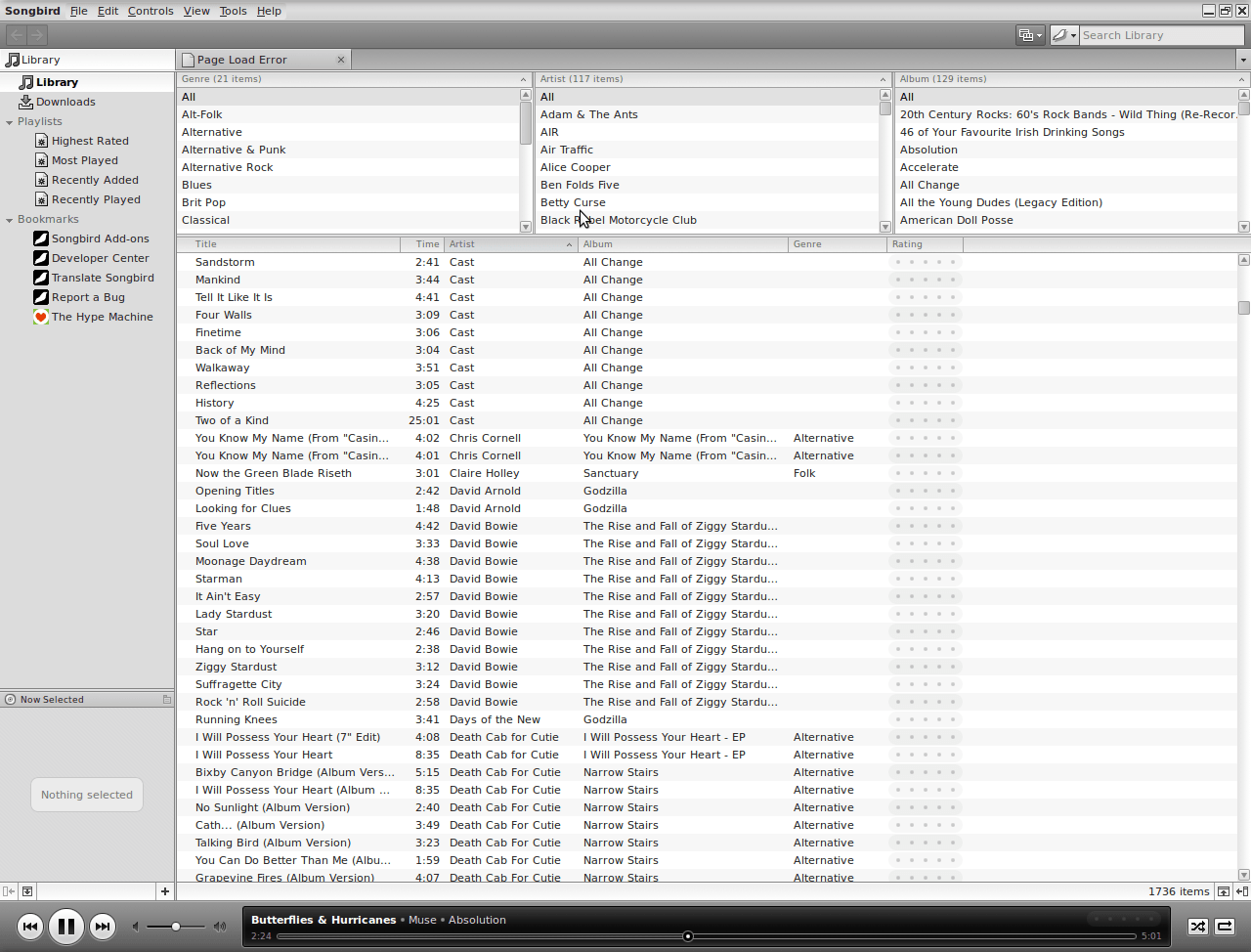
It's remarkable what can be done with a code base: the Gecko core of Firefox has been morphed into a music player called Songbird. On my Ubuntu machine, Rhythmbox has been my audio player of choice, yet the newcomer could be set to replace it. There might have been other things going on my system, but Rhythmbox playback was becoming jumpy and that allowed me a free hand to look at an alternative.
A trip to the Ubuntu repositories using Synaptic was all that was required to get Songbird installed. I suspect that I could have gone for an independent installation, but the one that was available through the official channel sufficed for me. It found every piece of music in the relevant folder, even those that it was unable to play because of iTunes DRM, and it was easy to set it such that it simply moved on when it met such a file rather than issuing a dialogue box to complain. That means that I weed out the incompatible entries in the course of time, rather than having to do it straight away. I cannot claim to be an audiophile, but the quality of the playback seems more than acceptable to me and there seem to be no jumps so long as a file hasn't been corrupted in any way. All in all, Rhythmbox could get usurped.