Adding a new hard drive to Ubuntu
 19th January 2009
While this is a subject that I thought that I had discussed on this blog before, I can't seem to find any reference to it now. Instead, I have discussed the subject of adding hard drives to Windows machines a while back, which might explain what I was thinking. Trusting the searchability of what you find on here, I'll go through the process.
The rate at which digital images were filling my hard disks brought all of this to pass. Because even extra housekeeping could not stop the collection growing, I went and ordered a 1TB Western Digital Caviar Green Power from Misco. City Link did the honours with the delivery, and I can credit their customer service for organising that without my needing to get to the depot to collect the thing; that was a refreshing experience that left me pleasantly surprised.
For the most of the time, hard drives that I have had generally got on with the job. However, there was one experience from a time laden with computing mishaps that has left me wary. Assured by good reviews, I went and got myself an IBM DeskStar and its reliability didn't fill me with confidence. Though the business was acquired by Hitachi equivalents, that means that I am touching their version of the same product line either. Travails with an Asus motherboard put me off that brand around the same time as well; I now blame it for going through a succession of AMD Athlon CPU's on me.
The result of that episode is that I have a tendency to go for brands that I can trust from personal experience. Western Digital falls into this category, as does Gigabyte for motherboards, which explains my latest hard drive purchasing decision. That's not to say that other hard drive makers wouldn't satisfy my needs, since I have had no problems with disks from Maxtor or Samsung. For now though, I am sticking with those makers that I know until they leave me down, something that I hope never happens.
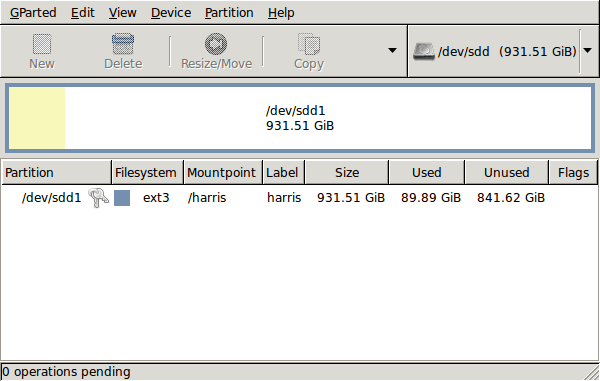
GParted running on Ubuntu
Anyway, let's get back to installing the hard drive. The physical side of the business was the usual shuffle within the PC to add the SATA drive before starting up Ubuntu. From there, it was a matter of firing up GParted (System > Administration > Partition Editor on the menus if you already have it installed). The next step was to find the new empty drive and create a partition table on it. At this point, I selected msdos from the menu before proceeding to set up a single ext3 partition on the drive. You need to select Edit > Apply All Operations from the menus to set things into motion before sitting back and waiting for GParted to do its thing.
After the GParted activities, the next task is to set up automatic mounting for the drive to make it available every time that Ubuntu starts up. The first thing to be done is to create the folder that will be the mount point for your new drive, /newdrive in this example. This involves editing /etc/fstab with superuser access to add a line like the following with the correct UUID for your situation:
UUID="32cf775f-9d3d-4c66-b943-bad96049da53" /newdrive ext3 defaults,noatime,errors=remount-ro
You can also add a comment like "# /dev/sdd1" above that so that you know what's what in the future. To get the actual UUID that you need to add to fstab, issue a command like one of those below, changing /dev/sdd1 to what is right for you:
sudo vol_id /dev/sdd1 | grep "UUID=" /* Older Ubuntu versions */
sudo blkid /dev/sdd1 | grep "UUID=" /* Newer Ubuntu versions *
This is the sort of thing that you get back, and the part beyond the "=" is what you need:
ID_FS_UUID=32cf775f-9d3d-4c66-b943-bad96049da53
Once all of this has been done, a reboot gets done to mount the device. Once that is complete, you then need to set up folder permissions as required before you can use the drive. This part gets me firing up Nautilus, using gksu and adding myself to the user group in the Permissions tab of the Properties dialogue for the mount point (/newdrive, for example). After that, I issued something akin to the following command to set global permissions:
chmod 775 /newdrive
With that, I had completed what I needed to do to get the WD drive going under Ubuntu. After that IBM DeskStar experience, the new drive remains on probation but moving some non-essential things on there has allowed me to free some space elsewhere and carry out a reorganisation. Further consolidation will follow while I hope that the new 931.51 GiB (binary gigabytes or 102410241024 rather the decimal gigabytes (1,000,000,000) preferred by hard disk manufacturers) will keep me going for a good while before I need to add extra space again.
Some things that I'd miss on moving from Linux to Windows
17th January 2009
The latest buzz surrounding Windows 7 has caused one observer to suggest that it's about to blast Linux from the desktop. While my experiences might be positive, there are still things that I like about Linux that make me reluctant to consider switching back. Here are a few in no particular order:
Virtual Desktops (or Workspaces)
I find these very handy for keeping things organised when I have a few applications open at the same time. While I think that someone has come with a way of adding the same functionality to Windows, I'd need to go looking for that. Having everything cluttering up a single taskbar would feel a bit limiting.
Symbolic Links
If you have not come across these before, they are a little difficult to explain, but it's great to have the ability to make the contents of a folder appear in more than one place at a time without filling up your hard drive. While it's true to say that Windows 7 gets Libraries, I have a soft spot for the way that Linux does it so simply.
Lack of (intrusive) fidgeting
One of Windows' biggest problems is that it's such a massive target for attacks by the less desirable elements of the web community. The result is a multitude of security software vendors wanting to get their wares onto your PC; it's when they get there that all the fidgeting starts. The cause is the constant need for system monitoring that eats up resources that could be used for other things. Though I know some packages are less intrusive than others, I do like the idea of feeling as if I am in full control of my PC rather someone else taking decisions for me (unavoidable in the world of work, I know). An example of this is Norton's not allowing me to shut it down when it goes rogue, even when acting as Administrator. While I can see the reason for this in that it's trying to hamper the attentions of nefarious malware, it ends up making me feel less than empowered and I also like to feel trusted too. Another thing that I like is the idea of something awaiting my input rather than going away and trying to guess what I need and getting it wrong, an experience that seems typical of Microsoft software.
Command Line
Though this is less of a miss than it used to be, there is now a learning curve with PowerShell's inclusion with Windows 7, and it's not something that I want to foist on myself without my having the time to learn its ins and outs. Though it's not a bad skill to have listed on the proverbial CV, I now know my way around bash and its ilk while knowing where to look when I intend to take things further.
After these, there are other personal reasons for my sticking with Linux, like memories of bad experiences with Windows XP and the way that Linux just seems to get on with the job. Its being free of charge is another bonus, and the freedom to have things as you want makes you feel that you have a safer haven in this ever-changing digital world. While I am not sure if I'd acquire the final version of Windows 7, I am certain that it will not be replacing Linux as my main home computing platform, something that should come as no surprise given what I have said above.
Episodes of poor performance
15th January 2009
Over the last few days, I have been noticing from various that this blog isn't performing as I would want it. The first hint was a comment on a tuxmachines.org mention for a recent entry (thanks for the support, by the way) that the link wasn't working as it should have been. Add to this various emails from Are My Sites Up? saying that the site seemed to be down. By all accounts, this free service that I found through Lifehacker would appear to be doing its job and without the annoying advertising emails that Internetseer used to send me in addition to its weekly report when I used its free service. In fact, that you get alert emails several times a day is a factor in favour of the newcomer.
With one exception, these problems would appear to be intermittent. The exception was when I went using the WP Super Cache WordPress plugin. When it seemed to result in breakage of the site, it got disabled, even if it is meant to be helpful during episodes of heavy load. Otherwise, the outages would seem to be general flakiness of the service provided by my hosting provider. I have a site with them on an older server, and that seems to fare far better than the one playing host to this blog. This sort of thing does make me wonder if we are getting real progress, or whether it's a case of one step forward and two steps back. Nevertheless, I'll continue keeping an eye on things and, if there is too much deterioration, a move might be in order, but that's a good bit away yet.
Running Windows 7 within VirtualBox
12th January 2009
With all the fanfare that surrounded the public beta release of Windows 7, I suppose that the opportunity to give it a whirl was too good to miss. Admittedly, Microsoft bodged the roll-out by underestimating the level of interest and corralling everyone into a 24-hour time slot, with one exacerbating the other. In the event, they did eventually get their act together and even removed the 2.5 million licence limit. Thus, I suppose that they really needed to get 7 right after the unloved offering that was Vista, so they probably worked out that the more testers that they get, the better. After, it might be observed that the cynical view that the era of making people pay to "test" your products might be behind us and that users just want things to work well if not entirely faultlessly these days.
After several abortive raids, I eventually managed to snag myself a licence and started downloading the behemoth using the supplied download manager. I foresaw it taking a long time and so stuck with the 32-bit variant so as not to leave open the possibility of that part of the process using up any more of my time. As it happened, the download did take quite a few hours to complete, but this part of the process was without any incident or fuss.
Once the DVD image was downloaded, it was onto the familiar process of building myself a VirtualBox VM as a sandbox to explore the forthcoming incarnation of Windows. After setting up the ISO file as a virtual DVD, installation itself was an uneventful process, yet subsequent activities weren't without their blemishes. The biggest hurdle to be overcome was to get the virtual network adapter set up and recognised by Windows 7. The trick is to update the driver using the VirtualBox virtual CD as the source because Windows 7 will not recognise it using its own driver repository. Installing the other VirtualBox tools is a matter of going to Compatibility page in the Properties for the relevant executable, the one with x86 in the file name in my case, and setting XP as the Windows version (though Vista apparently works just as well, I played safe and depended on my own experience). While I was at it, I allowed the file to run under the administrator account, too. Right-clicking on executable files will bring you to the compatibility troubleshooter that achieves much the same ends but by a different route. With the Tools installed, all was workable rather than completely satisfactory. Shared folders have not worked for, but that might need a new version of the VirtualBox software or getting to know any changes to networking that come with Windows 7. I plan to stick with using USB drives for file transfer for the moment. Though stretching the screen to fit the VirtualBox window was another thing that would not happen, that's a much more minor irritation.
With those matters out of the way, I added security software from the list offered by Windows with AVG, Norton and Kaspersky being the options on offer. I initially chose the last of these but changed my mind after seeing the screen becoming so corrupted as to make it unusable. That set me to rebuilding the VM and choosing Norton 360 after the second Windows installation had finished. That is working much better, and I plan to continue my tinkering beyond this. I have noticed the inclusion of PowerShell and an IDE for the same, so that could be something that beckons. All in all, there is a certain solidity about Windows 7, though I am not so convinced of the claim of speedy startups at this stage. Time will tell and, being a beta release, it's bound to be full of debugging code that will not make it into the final version that is unleashed on the wider public.
Whither Fedora?
10th January 2009
There is a reason why things have got a little quieter on this blog: my main inspiration for many posts that make their way on here, Ubuntu, is just working away without much complaint. Since BBC iPlayer isn't working so well for me at the moment, I need to have a look at my setup. Otherwise, everything is continuing quietly. In some respects, that's no bad thing and allows me to spend my time doing other things like engaging in hill walking, photography and other such things. While I suppose that the calm is also a reflection of the fact that Ubuntu has matured, there is a sense that some changes may be on the horizon. For one thing, there are the opinions of a certain Mark Shuttleworth, though the competition is progressing too.
That latter point brings me to Linux Format's recently published verdict that Fedora has overtaken Ubuntu. I do have a machine with Fedora that performs what I ask of it without any trouble. However, I have never been on it trying all the sorts of things that I ask of Ubuntu, so my impressions are not in-depth ones. Going deeper into the subject mightn't be such a bad use of a few hours. What I am not planning to do is convert my main Ubuntu machine to Fedora. I moved from Windows because of constant upheavals and I have no intention to bring those upon me without good reason, something that's just not there at the moment.
Speaking of upheavals, one thought that is entering my mind is that of upgrading that main machine. Since its last rebuild was over three years ago, computer technology has moved on a bit since then, with dual and quad-core CPU's from Intel and AMD coming into the fray. Of course, the cost of all of this needs to be considered too, which is never more true than in these troubled economic times. If you asked me about the prospect of a system upgrade a few weeks ago, I would have ruled it out of hand.
What has got me wondering is my continued used of virtualisation and the resources that it needs. Mad notions like running more than one VM at once will put any CPU or memory through their paces. Another attractive idea would be getting a new and bigger screen, particularly with what you can get for around £100 these days. However, my 17" Iiyama is doing well enough to consign this one to the wish list for now. None of the changes that I have described are imminent, even if I have noticed how fast I am filling disks up with digital images to make an expansion of hard disk capacity a higher priority.
If I ever get to do a full system rebuild with a new CPU, memory and motherboard (I am not so sure about graphics since I am no gamer), the idea of moving into the world of 64-bit computing comes about. Since the maximum amount of memory usable by 32-bit software is 4 GB, 64-bit software is a must if I decide to go beyond this limit. That all sounds very fine, aside from the possibility of problems arising with support for legacy hardware. It sounds like another bridge to be assessed before its crossing, even if two upheavals can be made into one.
Besides system breakages, the sort of hardware and software changes over which I have been musing here are optional and can be done in my own time. That's probably just as well in a downturn like we are experiencing now. Being careful with money becomes more important at times like these, which means that it's fortunate that free software not only offers freedom of choice and usage but also a way to leave the closed commercial software acquisition treadmill with all of its cost implications, leaving money for much more important things.