Fixing Alt-Click problems in Ubuntu-hosted VirtualBox Windows guests
 Published on 24th October 2008
 Estimated Reading Time: 1 minute
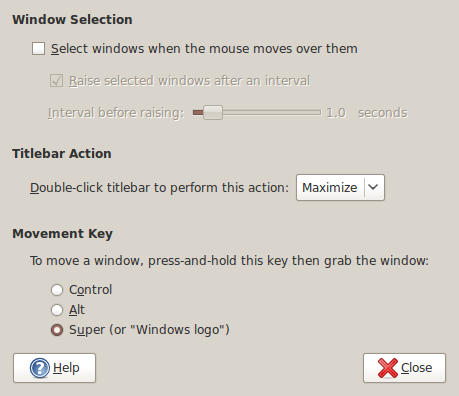
The Alt-Click keyboard-mouse combination is a very common way of working with various flavours of Adobe Photoshop. So, it was with some frustration that I couldn't use it while working in Photoshop Elements (still on version 5, by the way; the temptation of newer versions has not struck) on a Windows XP guest in VirtualBox on my main Ubuntu system.
A quick google later and a proposed solution was for me a surprising one: going to System -> Preferences -> Windows on the host OS and changing the setting of the Movement Key from Alt to Super (Windows key on many keyboards). That was enough to set all in order. It appears that a setting on the host operating system was preventing a piece of software running on the guest from behaving as expected. That's all in the past now that I have got my clone brush functionality back and can work as normal again.
Thank u)) i had that problem, tried to search that combination in preferences -> keyboard shortcuts =)
i am having the same problem on mac anyone know how to fix this problem on a mac ?