A radical new look on the way for WordPress' administration area
 31st August 2008
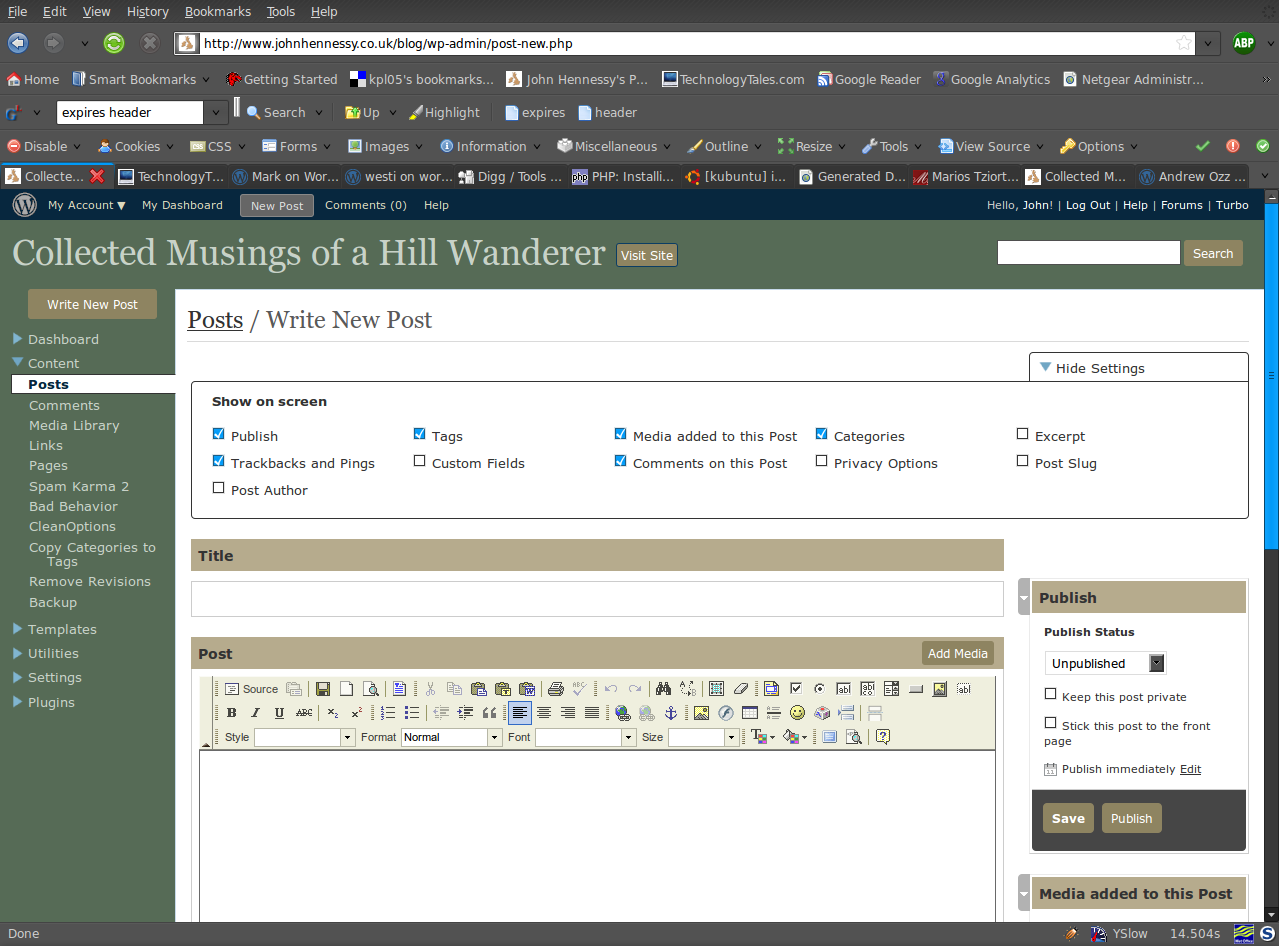
One thing that you can never say about Automattic is that it stands still for very long. That may generate adverse commentary from some, yet it's bad to leave things stagnate, too. In fact, resting on laurels also generates flak, so you can't please everyone all the time.
Earlier on this year, the WordPress administration screens went through something of an overall for version 2.5. In hindsight, it wasn't terribly dramatic, but the prospect had me checking out what was happening with the development version and contributing to the project in my own small way. Now, it appears that a bigger upheaval is in prospect with wireframes and what not being brought into play on the design side.
The first change that anyone will notice is that the navigation has moved from the top to the side, and that some things have been moved around and renamed. Another thing that you'll see soon enough is that there is a QuickPress section added to the dashboard screen for those quick and short postings. Sticking with the subject of content creation, alterations to post and page editing screens and the link creation screen are obvious too. The thing that really comes to mind here is the level of customisation on offer, so you can make yourself feel right at home: some of the screen furniture can be moved about, and you can remove what you feel is nothing but useless clutter. Content generates comments, so the addition of keyboard shortcuts for comment moderation should be a boon for those with very active readers.
Some functionality currently added by plugins is getting incorporated in the main application. An example is automatic upgrades of WordPress itself. In the development version, it installs the latest nightly build, but I am certain that it can be made to point to the latest stable release. That makes it more convenient for keeping a backseat eye on things rather than getting stuck into the hurly-burly of checking on what's in Subversion.
There are some pieces that remain incompletely functional at present, such as the Inbox and Media added to this post pieces, but I have seen nothing that used to work to be broken. So, while the development version of WordPress is more of a work in progress than I have seen for a while, it will do what you need it to do. Since you always need to be cautious, I'd advise you to keep away until it's ready for the big time, unless you have the knowledge to put things back should the undesirable befall your blog. I had an automatic WordPress update kick in maintenance mode without turning it off again. Nothing happened to the database, so a manual re-installation was all that was required to restore order. Otherwise, the development installation remains relatively stable, though there are display problems in IE6 that do not afflict either Firefox, Opera or even IE8 Beta2.
All in all, these changes will make the next major WordPress release a substantial one, and I have little doubt that the new administration interface will make for many comments. While I must admit that I wasn't too taken with it when I first glimpsed it in the crazyhorse branch, it now seems to be growing on me. The most significant change on the aesthetic front is that there's a lot less whitespace, about which may or may not float your boat. In any event, you can always change the colours like I have to make things more amenable.
Even so, I reckon that WordPress 2.7 will be a major step forward when it comes, one that I might like. Saying that, I reckon that the release date is a good while away for now, and the fact that 2.6.2 is being readied for release is telling in itself. Leaving plenty of time to remove any roughness is never a bad thing, especially so when you see the changes that are being made. Meanwhile, I am certain that most people can wait.
Another way to look through WordPress code
10th August 2008
At times in the past, I have complained about there not being sufficient documentation of the actual code used on WordPress itself. True, there is the venerable Codex, but that can be incomplete, and any extra help is always useful. Peter Westwood (a.k.a. westi) has generated documentation from the code itself and put it up on the web for all to peruse. While we are on the subject of information on the more advanced aspects of WordPress, blogs by Mark Jaquith and Andrew Ozz are also worth a look. As the cliché goes, every little helps...
A quick way to do an update
8th August 2008
Here's a quick way to get the latest updates on your PC using the command line if you are using Ubuntu or Debian:
sudo apt-get update && sudo apt-get upgrade
Of course, you can split these commands up if you prefer to look before you leap. At the very least, it's so much slicker than the GUI route.
Recursive FTP with the command line
6th August 2008
Here's a piece of Linux/UNIX shell scripting code that will do a recursive FTP refresh of a website for you:
lftp <<~/Tmp/log_file.tmp 2>>~/Tmp/log_file.tmp
open ${HOSTNAME}
user ${USER} ${PSSWD}
mirror -R -vvv "${REP_SRC}" "${REP_DEST}"
EndFTP
When my normal FTP scripting approach left me with a broken WordPress installation and an invalid ticket in the project's TRAC system that I had to close, I turned to looking for a more robust way of achieving the website updates and that's what led me to seek out the options available for FTP transfers that explicitly involve directory recursion. The key pieces in the code above are the use of lftp in place of ftp, my more usual tool for the job, and the invocation of the mirror command that comes with lftp. The -R switch ensures that file transfer is from local to remote (vice versa is the default) and -vvv turns on maximum verbosity, a very useful thing when you find that it takes longer than more usual means. It's all much slicker than writing your own script to do the back-work of ploughing through the directory structure and ensuring that the recursive transfers take place. Saying that, it is possible to have a one line variant of the above, but the way that I have set things up might be more familiar to users of ftp.
An alternative use for Woopra
4th August 2008
While the once a day reporting cycle of Google Analytics is all very fine, the availability of real time data does have its advantages. WordPress.com's Stats plugin goes some way to serving the need, only for Woopra to trump it in every way apart from a possible overkill in the amount of information that it makes available. The software remains extremely useful despite being in the beta phase and occasionally crashing.
One of its uses is seeing if there are people visiting your website at a time when you might be thinking of making a change like upgrading WordPress. Timing such activities to avoid a clash is a win-win situation: a better experience from your visitors and more reliable updates for you. After all, it's effortless to make a poor impression and an unreliable site will do that faster than anything else, so it's paramount that your visitors do not get on the receiving end of updates, even if they are all for the better.