Controlling what the wpgm command calls in Windows SAS
 30th November 2007
Recently, I was setting up a key mapping in SAS 8.1 such that the log and output windows are cleared and a SAS program run in the most recently used program editor window. The idea was that debugging would be easier, and the command was what you see below:
log; clear; output; clear; wpgm; submit
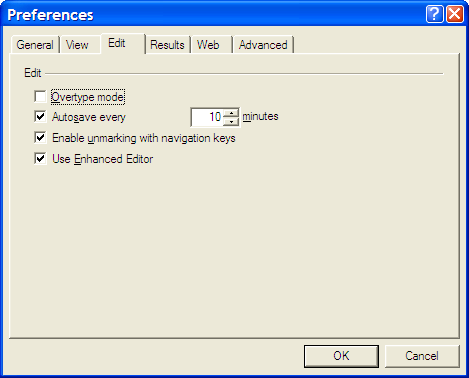
However, I was having trouble getting SAS to pick up the most recently used Enhanced Editor window, and it was opening up an old style Program Editor window in its place. If I had wanted to use that, I would have used pgm and not wpgm. What was conspiring against me was a pesky system option. Pottering over to Tools > Options > Preferences and navigating to the Edit tab brought me to the cause of the problem: the Use Enhanced Editor check box was in the clear, and fixing that set me on my way. SAS 9 could also be afflicted by the same irritation and that is where I got the screenshot that you see below where everything is hunky-dory.
Correcting or updating blog posts
29th November 2007
Recently, I have grown to notice that certain bloggers are not removing old content from a blog, only striking it through using something like CSS. Though there is a place for this, it does strike me as overkill sometimes and can look untidy. Sometimes, that lack of neatness is a trade-off, since the highlighting of a correction itself conveys a message. While I have been known to tweak posts immediately after publishing without leaving the previous content on view, my changes generally are readability improvements more than anything else. Typos and spelling mistakes also get corrected like this; nobody needs them highlighted for all to see. I am not trying to fool anyone and, if I want to update the content, I either add another post or use another tactic that I have seen others use: updates at the bottom of the post that are denoted as such. It's another transparent approach that preserves the authenticity of the piece.
Using SAS FILE statements with the MOD option to append output to plain text files
25th November 2007
SAS can generate many types of output: plain text, XML, PDF, RTF, Excel, etc. With all of these and the SAS procedures like PROC REPORT, PROC TABULATE and so on, it might seem surprising for me to say that I have been generating output with data step PUT and FILE statements. There was, of course, a reason for this: creating text files for loading into a new database-driven software application. At one stage, I also did some data interleaving at the output stage and that's when I discovered that the default behaviour for SAS FILE statements is to completely overwrite a file unless the MOD option was specified. Adding that switches on APPEND behaviour. The code below adds a header in one step, while adding data below it in another. While I know that there are better ways to achieve this, like setting up your data as you want it or using _N_ to ensure that something only appears once, here's another way. As per the Perl, there's often more than one way to do something with SAS.
data _null_;
    file ds_data;
    put "fieldtype;datasetname;datasetlabel;datasetlayout;datasetclass;datasetstandardversion";
run;
data _null_;
set ds_ispec;
file ds_data mod;
line="datasetstandard;"||trim(memname)||";"||trim(memlabel)||";;;"||trim(memver);
put line;
run;The irritation of a 4 GB file size limitation
20th November 2007
Recently, I got myself a 500GB Western Digital My Book, an external hard drive in other words. Bizarrely, the thing is formatted using the FAT32 file system. While I appreciate that backward compatibility for Windows 9x might seem desirable, using NTFS would be more understandable, particularly given that the last of the 9x line, Windows ME, is now eight years old (there cannot be anybody who still uses that, can there?). The result is that I got core dump messages from cp commands issued from the terminal on my Ubuntu system to copy files of size exceeding 4GB last night. It surprised me at first, but it now seems to be a FAT32 limitation. The idea of formatting the drive as NTFS did occur to me, only for GParted not to do that, at least not with my current configuration. While the ext3 file system is an option, I have a spare PC with Windows 2000 so that will be a step too far for now, unless I take the plunge and bring that into the Linux universe too.
Other than the 4GB irritation, the new drive works well and was picked up and supported by Ubuntu without any hassle beyond getting it out of the box, finding a place for it on my desk and plugging in a few cables. While needing judiciousness about file sizes, it played an important role while I converted a 320 GB internal WD drive from NTFS to ext3 and may yet be vital if my Windows 2000 box gets a migration to Linux. In the interim, 500 GB is a lot of space, and having an external drive that size is a bonus these days. That is especially the case when you consider that the 1 terabyte threshold is on the verge of getting crossed. It certainly makes DVD's, flash drives and other multi-gigabyte media less impressive than they otherwise might appear.
Do I still need serial numbers?
19th November 2007
My spot of bad luck with Windows in August highlighted the importance of hanging on to serial numbers for software that I had purchased over the internet and downloaded. Though I could get at the ones that I needed, they were retained in a motley mix of text files and emails; one even was rediscovered by pottering back to the website of the purveyor. While the security of the installation files themselves was another matter of some concern, I was rather more organised in that regard. Both of these are things that need checking before Windows falls to pieces on you and needs to be reinstalled. Of course, human nature, being what it is, means that we often find ourselves picking up the pieces after a calamity has struck when a spot of planning would have made things that bit easier.
Linux does make life easier on this front: commercial applications are anything but the dominant force that they are in the world of Windows. That means that serial numbers are few and far between, and I only need the one for VMware Workstation. The mention of VMware brings me to my retention of Windows, so knowing where serial numbers are located remains a good idea. Even so, I cloned my Windows VM so that any Windows restoration following a destructive crash should be a quicker affair. Now that I am a Linux user, Windows crashes should not encroach as much on my home computing any more and Linux should be more stable anyway...
A different Firefox II: cross-platform font display issues
18th November 2007
One of the things that I have been sorting out on this blog is how the fonts appear in Firefox running on Ubuntu. Even with the same fonts and the same browser, serif fonts were being displayed smaller and appeared more fuzzy in Linux than on Windows. And that's even with the font sharpening that comes with turning on Ubuntu's visual effects. So, there was a spot of swapping between Ubuntu and Windows (running on VMware) while I was increasing font sizes to improve legibility on the Linux side without things going all Blue Peter on Windows. Along the way, I added a mention of the Ubuntu font ae_AlArabiya in the CSS to further spruce up things. In my earlier web building efforts, I was having to make serif fonts bigger because of those serifs. From the on-screen legibility point of view, there's a lot to be said for sans serif fonts and I may yet alter this blog's theme to use them instead, but I'll ponder the idea a bit more before taking the plunge.
A different Firefox…
17th November 2007
On Ubuntu, I made a move to using Ubuntuzilla's deployment of Firefox. Because Firefox's Gecko engine is used by other parts of Ubuntu, any Firefox updates issued by Mozilla don't come through straight away. The idea of using Ubuntuzilla is that you get Mozilla's latest, be it Firefox, Thunderbird or Seamonkey, without having an impact on the rest of the Linux installation; while Ubuntu's Firefox is left in place, you are now presented with the vanilla Firefox for all your web surfing needs. Visually, there's not much change but for the built-in Firefox application fonts coming through in the new instance, a strange sight when you see Ubuntu's more subtle alternatives everywhere else. I tried the new tack to see if picked up RealPlayer in place of Xine, but that sadly has not been the case. Nevertheless, I now have 2.0.0.9 and the latest improvements this side of version 3.
Navigating multiple workspaces: A Linux and UNIX advantage over Windows?
16th November 2007
One of the nice things about the world of Linux and UNIX is the availability of multiple workspaces. In Window, you only ever get one, and the likes of me can easily fill up that task bar. So the idea of parcelling off different applications to different screens is useful from a housekeeping point of view so long as icons only appear in the task bar for the open workspace; Ubuntu respects this but openSUSE doesn't, a possible source of irritation.
However, a case can be made that UNIX/Linux needs workspaces more than Windows because of the multi-window interfaces of some of the software applications. The trouble with each of these sub-windows is that an entry appears in the task bar for each of this, rapidly creating a mess. And it can also be an issue working out which window closes the lot.
Examples of the above that come to my mind include GIMP, XSane and SAS. The Windows version of the latter's DMS is confined to a single application window while the UNIX incarnation is composed of a window each for individual components like program editor, log, output, etc. Typing "bye" in the command line of the program editor is enough to dispatch the GUI. With GIMP, Ctrl+Q will close it down in any window, apart from the "Tip of the Day" one that pops up when GIMP is started. The same sort of behaviour also seems to dispatch XSane too.
Switching from one workspace to another is as easy as clicking the relevant icon in the task bar in all the UNIX variants that I have used. Switching an application from one workspace to another has another common thread: finding the required entry in the application window menu.
On Ubuntu, I have seen other ways of working with workspaces. In the interface with visual effects turned off, hovering over the workspace icons in the task bar allows you to move from one to another with the wheel of your mouse. Moving an application between workspaces can be done as simply as dragging boxes from one task bar icon to another. Turning on the visual effects changes things, though. It might appear that the original functionality still works, but that seems not to be the case: a matter for Canonical to resolve, perhaps?
The visual effects do provide other ways around this, though. Keeping all your application windows minimised means that you can run through workspaces themselves with your wheel mouse. Moving applications between workspaces becomes as simple as grabbing the title bar and pulling the window left or right until it changes workspace. Be careful that you do the job fully, though, or you could have an application sitting astride two workspaces. It would appear that ideas from the sharing of a desktop across multiple monitors have percolated through to workspace behaviour.
Aside (regarding Ubuntu visual effects): I don't know who came up with the idea of having windows wobble when they're being moved around, but it certainly is unusual, as is seeing what happens when you try prising a docked window from its mooring (particularly when you're pulling it up from the bottom task bar). The sharper font display and bevelled screen furniture make more sense to me, though; they certainly make a UI more appealing and modern.
A UNIX shell running on Windows
15th November 2007
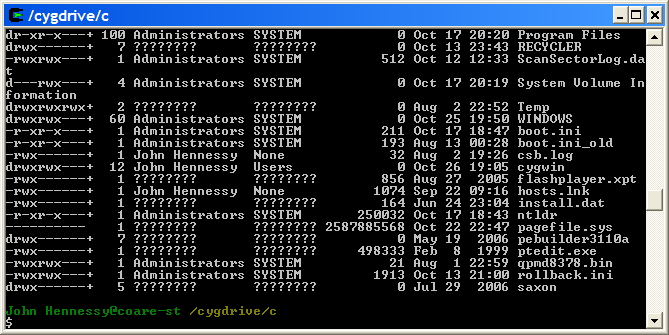
Here's an idea that I got for a post before I spent that torrid weekend with Windows that caused me to jump ship to Linux. The idea of having a UNIX command line while still remaining on Windows did appeal to me at the time, and Cygwin seems to provide an intriguing way to do this. At its most basic, it is a set of DLL's that allow you to run standard UNIX commands in a shell like what you see below. However, it is extensible with a good number of packages that you can choose to install. NEdit is just one that gets included, and I think that I spied Apache too. The standard installation is a web-based affair, with your downloading only the components that you need; it's worth trawling through the possibilities while you're at it.
Now that I am firmly ensconced in the world of Linux, this may be one possibility that I will park, for a while anyway. After all, I now do have the full power of the UNIX command line...
Escaping brackets in SAS macro language
14th November 2007
Rendering opening and closing brackets as pieces in SAS macro language programming caused me a bit of grief until I got it sorted a few months back. All the usual suspects for macro quoting (or escaping in other computer languages) let me down: even the likes of %SUPERQ or %NRBQUOTE didn't do the trick. The honours were left to %NRQUOTE(%(), which performed what was required very respectably indeed. The second % escapes the bracket for %NRQUOTE to do the rest.