My type of blogging
 31st August 2007
A recent article by Lorelle VanFossen on The Blog Herald got me thinking about my blogging journey and what I have learned about myself. My brush with reactive blogging has taught a number of lessons. The first of these is that I just cannot keep up with others; someone always gets there first. Another lesson is that taking on a topic of the day takes up loads of time when it lies outside my area of expertise, and I spend a lot of that time researching the topic. What follows from this is that if the post doesn't flow from me, it either takes up a lot of time or it doesn't happen at all. Yes, I have been known to bin stillborn posts due to loss of interest or where things just wouldn't come together at all.
Following all of this, I have come to the conclusion that I am a proactive blogger. That said, I still need to get some bursts of inspiration from somewhere. For instance, my hillwalking blog always experiences a burst of activity after I have been trekking in the outdoors; such encounters never fail to produce something that is worth sharing. In the same vein, anything you find here is likely to influenced by what I have encountered in the technology world. Yes, news items do provide ideas for posts, but it is in a more leisurely way rather than the frenzied approach of some. And like the hillwalking world, such inspiration does have its peaks and troughs.
A rake of new cameras
30th August 2007
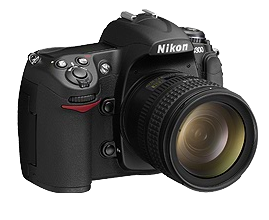 The websites of Amateur Photographer and Tech.co.uk are good places to find out what is happening in the world of digital cameras, which is just as well given the recent camera launching frenzy. It all seemed to start off with Canon's EOS D40 and EOS 1Ds Mark III.
Even if the former seemed to be a case of playing catch up, I still think that Canon should have used the opportunity to pull ahead, at least in the megapixel stakes; Sony is working on a 12 megapixel offering and could be about cause of 12 megapixel sensors becoming the norm for consumer digital SLR's like they did with the 10 megapixel level. While I realise that megapixels aren't everything, it has seemed to go like that thus far. Playing catch up doesn't apply to the 1Ds Mark III given its having a monster sensor resolution of 21 megapixels and, needless to say, the improvements to the favoured DSLR of landscape photographers don't stop there.
Nikon were also in the fray with new 12 MP offerings: D300 for the enthusiast and D3 for the professional. The sensor in the latter interestingly features a sensor that sits between full frame and the more usual APS-C sizes. Panasonic has also announced a new DSLR, while a number of manufacturers have new digital compacts on the market too. All the previous makers have something, as does Olympus. It was astonishing to see this all happening at once, yet I suppose that's how it goes. Though IFA has been on over the last week, some launches preceded this; it's usually something big like Photokina that results in this sort of thing...
Update: I have discovered since the Nikon's D3 has a sensor sized in the full frame domain. It might be 36mmx23.9mm rather than 36mmx24mm, but the FX format comes extremely close and the advent of full frame DSLR's being purveyed by a number of manufacturers may be upon us.
Keep a hold on those serial numbers…
3rd August 2007
In the times when all software was bought boxed, there were fewer issues with finding serial numbers, activation codes and the like. If you were tidy and retained the packaging and documentation while knowing where to find them, you were away. However, in these days of software distribution over the web, things are a little less clear-cut. The said codes tend to reside in emails sent following the purchase and, if you are like me, they tend to be scattered around the place; it is not a good thing when you need to get your software reinstalled after a system meltdown, like what I am needing to do. Another trap is that expensive software could disappear all of a sudden if your hard drive crashes, not an enticing thought. A spot of backup of both the installer and product key seems very much in order.
Troubleshooting missing HAL.DLL and boot configuration issues in Windows XP
2nd August 2007
My PC is very poorly at the moment and Windows XP re-installation is the prescribed course of action. However, I have getting errors reporting missing or damaged HAL.DLL at the first reboot of the system during installation. Because I thought that there might be hard disk confusion, I unplugged all but the Windows boot drive. That only gave me an error about hard drives not being set up properly. Thankfully, a quick outing on Google turned up a few ideas. However, I should really have started with Microsoft, since they have an article on the problem. About.com has also got something to offer on the subject and seems to be a good resource on installing XP to boot: I had forgotten how to do a repair installation and couldn't find the place in the installation menus. In any event, a complete refresh should be a good thing in the long run, even if it will be a very disruptive process. While I did consider moving to Vista at that point, bringing XP back online seemed the quickest route to getting things back together again. Strangely, I feel like a fish out of water right now, but that'll soon change...
Update: It was, in fact, my boot.ini that was causing this and replacement of the existing contents with defaults resolved the problem...
iTunes: a resource hog?
1st August 2007
When I started to use iTunes, it very much played well with other software applications running. Then, a few versions later, the playback began to suffer with iTunes running in any way other than on its own. A solution that I have is to fire up the Windows Task Manager, go to the Processes tab and find iTunes.exe in the list. The next thing is to right-click on this, select the Set Priority and change the setting to Above Normal. Windows will warn you about what you are doing, even if it usually doesn't cause any other problems. Yes, it sounds a bit extreme, yet it always solves the playback problem.
So long as iTunes is merely playing music, all is well. However, when it starts ripping CD's, it's a wholly different matter. That is a CPU intensive operation, and setting the process priority to Low is an excellent idea. I recently got caught out by a default setting of ripping any music CD inserted into the PC and, at Above Normal priority, the PC got locked up. Eventually, I got things back under control and lowered the priority. Needless to say, iTunes will just list the contents of an inserted CD from now on. I have learnt my lesson; keeping the command line open to get at command line process tools would be a superb idea for the future, especially as I know where to find these on the web.