Sending emails with PHP
 27th July 2007
Recently, I got the idea that I'd upgrade a feedback form that I have on my photo gallery so that it would email me comments left by visitors, rather than just storing them on the web server for later perusal. I opened up my copy of PHP Unleashed (John Coggeshall, SAMS), turned to the relevant chapter, when it all started to look rather daunting. Then, another suggestion popped into my head: potter over to PEAR and see what they have there. In the light of my reading, I knew what I wanted and downloaded the Mail and Mime-Mail packages. Another spot of perusal led me to some sample code that I could use with these, and I modified that to suit. Within 30 minutes, the results of my labours were in place, which all works very nicely too. Nevertheless, I still need to learn more about the code that I am using.
FCKEditor for WordPress
26th July 2007
Because the standard WordPress post editor got broken on this blog, my mind turned to replacing it, especially when I spied plugins for adding FCKEditor to the thing. Dean Lee's is the one that I am using, and it seems to work well so far too. As this is FCKEditor, there are more editing options than those offered by the WordPress standard and that's even with the advanced options made visible with the Alt+V/Alt+Shift+V keyboard shortcuts; the former is for IE and the latter for Firefox. We'll see how it goes from here...
Field testing my new Pentax K10D while out hillwalking
24th July 2007
On Saturday, I happened to be in a branch of Jessops only to overhear a salesman emphatically state that you don't buy a camera for its specifications but for the photos that it produces. While his tone of voice was a touch condescending, and he seemed to be putting down a DSLR, he was essentially right. Nevertheless, the specifications do help you get the images, so they have to be seen in that light.
For instance, having on-board sensor cleaning may save you from having either to clean the thing yourself or send the camera away for the professionals to do what is needed, a much safer option in my view. And there may be occasions where image stabilisation is very useful, low light wildlife photography for instance. Yes, there are features that I consider surplus to requirements, like live viewing and movie capture, and that is very much due to my buying cameras to make photos. The salesman in question would surely have agreed...
Off to the Lakeland Fells
Sunday saw me head to the Lakeland Fells for some walking and a spot of testing of my new Pentax K10D. The details of the walk itself are not for here but for my hillwalking blog and that is where you will find them. While making my way from Crewe to Windermere, I perused the manual looking particularly for information pertaining to functions that I actually use, I should really have done this beforehand, but distractions meant that I hadn't got around to it. I had to wade through something designed for a new SLR user before I got to what I consider the important stuff. Though this may be a bit irritating, I can understand and accept why they do it this way; we were all new users once, and they are hardly likely to want to know about things like aperture priority, raw file capture, ISO control and such like straight away.
First Impressions of the Pentax K10D
What do I think of it then? Let's start with first impressions. It is definitely smaller than the Canon EOS 10D it accompanies in my possession. That said, it is not too small and there is a decent grip hosting the shutter release button and the camera on/off switch. It also feels well-assembled and reassuringly weighty, an important consideration given that it will see the outdoors a lot. A discussion of the features most relevant to me follows.
Power Management and Response Time
On the subject of switching on and off, the camera is set to go into a sleep mode after a second of inactivity, but it reawakens quickly when needed, the trigger being half-depression of the shutter release button. In fact, the camera does reawaken much faster than my Canon as it happens and where the delay is a constant source of some irritation.
Key Controls and Features
Even if it might sound strange, the on/off switch is also used to activate the depth of field preview, something that no SLR should not have. The location may be unusual, but maybe the designers thought that having shutter release and depth of field preview next to each was a logical way to do it. From a camera operation point of view, there is certainly something to that way of thinking.
Behind the shutter release, you'll find a screen that is a reminder of film SLR's. This conveys information such as battery life, number of exposures remaining on the card and exposure details (aperture & shutter speed).
Display and Menu System
Staying on the subject of screens, the one on the back of the camera is larger than that on the Canon. As is customary for these, it allows replay of photos taken and access to the various menus required to control the camera's operation. In comparison to the Canon, which is essentially a one menu affair with a thumb wheel controlling scrolling and an OK button at its centre to perform operations, the Pentax has a more elaborate system of submenus: one each for recording, playback and set-up.
The playback menu is where I found the setting that makes the camera highlight areas of underexposure and overexposure during image playback. This is something that I missed regarding the Canon until I happened upon it. Camera cleaning is located on the set-up menu, and the camera is now set to clean the sensor every time that it is turned on. Why this is not enabled by default is a little beyond me, but the designers might have thought that a vibration from the camera on turning it on could have resulted in a load of support calls. The same submenu also hosts memory card formatting.
File Format and Navigation Options
The recording submenu is where I set the camera to deliver RAW DNG files, an Adobe innovation, rather than the default JPEG's. There are other options like RAW PEF files, Pentax's own format, or RAW and JPEG simultaneously, but my choice reflects my workflow in Photoshop Elements; I have yet to stop the said software editing the DNG files, however.
With all these options, it is fortunate that there is a navigation wheel whose operation uses arrow buttons to get about. While on the subject of the back screen, there are further settings that are accessed with the FN button rather than the Menu one. These include ISO, white balance, shooting mode (single, continuous, timed and so on) and flash. The only setting that I changed out of this lot was to set the ISO to 400; I prefer to feel that I am in control.
Exposure Modes and Controls
Returning to the camera's top plate, the exposure mode dial is on the left-hand side, which is no hardship to me as this is in the same place as on the Canon. There are no scene modes, but the available exposure modes are more than sufficient: fully automatic, program, sensitivity priority, shutter priority, aperture priority, shutter and aperture priority, manual, bulb and external flash synchronisation.
A few of these need a spot of explaining. Sensitivity priority is a new one on me, but it is a consequence of the ability of DSLR's to offer a range of ISO settings; the aperture and the shutter speed are varied according to the ISO setting. Shutter and aperture priority is like manual exposure and is the inverse of sensitivity priority: set both aperture and shutter speed, and the camera will vary the ISO setting. Both of the foregoing assume that you let the camera set the ISO, but my setting the thing myself may have put paid to these functions.
Shutter priority and aperture priority are, as far as I can tell, their usual selves. For all exposure modes, the thumb wheels at the front and back of the shutter release handgrip set apertures and shutter speeds where appropriate, and this arrangement works well.
Metering Options
The focussing mode selector is found on the left of the body, next to the lens coupling. I am used to having this on the lenses themselves, so this is a new arrangement for me and one to which I can easily become accustomed. In fact, it is easy to find it while composing a picture. The modes themselves are manual focus, one-time autofocus and continuous autofocus; the last of these is for focussing on moving objects.
While I could go further, perhaps overboard, with a discussion of the features of this camera, I draw a line at what's here. Yes, it is useful to set the focussing point and activate image stabilisation, but the above are what matter to me and its performance in the photo making department is the most important aspect.
Performance in the Field
That neatly brings me to my appraisal of how it performs. With inspection of the first few images on the review screen, I was a little disappointed to see how dark the foreground was in comparison to the sky. When I brought everything home, as I always do, I found that things weren't necessarily as they appeared in the field. The Pentax more usefully offers histogram review and highlighting of any areas that are either underexposed or overexposed. It is these functions that I will be using in reshooting decisions while out and about with the Pentax, and the same can be said for how I currently use the Canon.
In fast changing lighting, the AE lock technique was a bit irritating, yet I am certain that I will get better at it. The autofocus doesn't always lock onto the subject, especially in tricky lighting, so manual focussing is a definite necessity and is more useful more for landscape photography, in fact. Nevertheless, the autofocus did do well most of the time, and my Sigma lenses have done worse things on me.
Conclusion
Overall, I'm satisfied with the K10D and plan to continue using it. My recent excursion yielded some quality photographs, which, as the Jessops salesperson would agree, is the ultimate purpose of any camera.
SAS9 SQL Constraints
23rd July 2007
With SAS 9, SAS Institute has introduced the sort of integrity constraints that have been bread and butter for relational database SQL programs, but some SAS programmers may find them more restrictive than they might like. The main one that comes to my mind is the following:
proc sql noprint;
    create table a as select a.*,b.var from a left join b on a.index=b.index;
quit;
Before SAS 9, that worked merrily with nary a comment, only for you now to see a warning like this:
WARNING: This CREATE TABLE statement recursively references the target table. A consequence of this is a possible data integrity problem.
In the data step, the following still runs without a complaint:
data a;
    merge a b(keep=index var);
    by index;
run;
On the surface of it, this does look inconsistent. From a database programmer's point of view having to use different source and target datasets is no hardship but seems a little surplus to requirements for a SAS programmer trained to keep down the number of temporary datasets to reduce I/O and keep things tidy, an academic concept perhaps in these days of high processing power and large disks. While adding UNDO_POLICY=NONE to the PROC SQL line does make everything consistent again, I see this as being anathema to a database programming type. Though I do admit to indulging in the override for personal quick and dirty purposes, abiding by the constraint is how I do things for formal purposes like inclusion in an application to a regulatory authority like FDA.
Login Logger plugin
20th July 2007
The Login Logger WordPress plugin sounds like a great idea and works fine with standard situations. However, go beyond these and things start to go awry. An example is where you have to use unique database table prefixes because you use shared hosting. This is certainly something that I do and it breaks Login Logger. Thankfully, the fix for this is easy enough: just amend the database query on line 22 in the manage.php file as follows:
Before:
$query = "SELECT distinct wp_users.user_login,".$table_name.".username FROM wp_users LEFT OUTER JOIN ".$table_name." ON wp_users.user_login = ".$table_name.".username WHERE ".$table_name.".username IS NULL";
After:
$query = "SELECT distinct " . $table_prefix . "users.user_login,".$table_name.".username FROM " . $table_prefix . "users LEFT OUTER JOIN ".$table_name." ON " . $table_prefix . "users.user_login = ".$table_name.".username WHERE ".$table_name.".username IS NULL";
The issue was caused by hard-coding of the table prefix for the user table, and using the prefix that you yourself have set is the way out of this. What is less easy to resolve is a conflict between the Login Logger and Themed Login plugins. That will take further investigation before I come up with a fix.
What Amateur Photographer recently reviewed
19th July 2007
Amateur Photographer seems to have had a run of reviews recently. First off were the Olympus E-410 and E-510 that they seemed to like. Then, they moved onto the Ricoh Caplio GX100, which they seemed to like that too, though they did say that the quality wasn't up to SLR standards. But then again, it is a compact and that might be expecting a bit too much.
This week, Paint Shop Pro comes under the spotlight, as does Epson's V350 scanner. While I have yet to read these, I have been engaging in a spot of equipment acquisition anyway. My CanoScan 5000F scanner has been usurped by Epson's Perfection Photo 4490 and delighted I am with it too. The quality of the scans that I have been doing of prints has been good, and the presence of an on/off switch is a creditable one. When none of the other scanners that I have had possessed it, having to plug something in and out from the power socket is inconvenient to say the least.
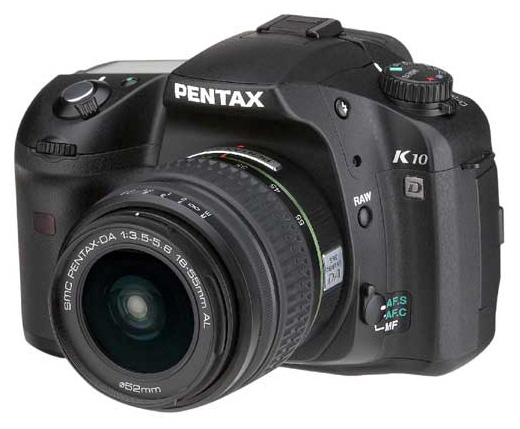
In addition, I have also gone and got myself a new DSLR. Seeing Pentax's K10D going with an 18-55 mm lens for £499 at Jessop's overrode my better reasoning, putting paid to ideas of purchasing any other electronic goods for the rest of this year. It's an award-winning gadget, and Photography Monthly's Will Cheung seemed to get on fine with it. While Which Digital Camera said it was heavy, it has to stand up to use in the great outdoors.
Though the sensor may be a 10 megapixel affair, this will be an upgrade to my Canon EOS 10D; that has a sensor in need of clean right now (I plan to get it done by the professionals) and every time that I want to use an image that it has made, Photoshop's healing brush has to be pressed into service. Pentax does boast about all the seals that it has added to the K10D, a good thing if they cut down on the dust entering the camera. And if dust does get in, the sensor cleaning feature will hopefully see it off from the photos.
Image stabilisation, another value adding feature, is also there and may prove interesting. Strangely, there's some video capture as well, and I hope that it doesn't get the EU coming after me to collect retrospective camcorder duty. In any case, it's not a feature that I really need, with the Live View functions on the equivalent Olympus offerings falling into the same category. It'll be interesting to see how the K10D performs, given that it's a change from the Canon/Nikon hegemony that seems to dominate digital photography these days.
Update: I have since perused the current issue of Amateur Photographer and seen that Paint Shop Pro suffered from performance issues on computers that worked fine with Photoshop. Otherwise, it compared well with Adobe's offerings, even if the interface wasn't seen to be as slick. Epson's V350 was well received, though it was apparent that spending more got you a better scanner; that's always the way with these things.
The power of pipes
12th July 2007
One of the great features of the UNIX shell is that you can send the output from one command to another for further processing. Take the following example for instance:
ls -l | grep "Jul 12"
This takes the long directory file listing output and sends it to grep for subsetting (all files created today in this example) before it is returned to the screen. The | character is the pipe trigger, and you can have as many pipes in your command as you want, though readability may dictate how far you want to go.
When JavaScript table generation becomes a performance bottleneck
3rd July 2007
Recently, I have seen a web application that displays thousands of records in a scrollable table (please bear with me, there is a decent reason for this). From the appearance of the table, it would be reasonable to assume that the table is generated by the server and output directly to the screen, but this isn't the case. What actually happens is that the server more or less outputs JavaScript code that is then executed.
This takes the form of large arrays that are slotted into the DOM as the contents of the required table by a JavaScript function. With the large amounts of data involved, this means that the browser fully loads the client CPU while the JavaScript processing takes place, something that takes up to a minute to complete.
Admittedly, the browser is IE6, but this was all on a PC with a 2.53 GHz Pentium 4 and 512 MB of memory. Getting the server to deliver standards-compliant (X)HTML for what is needed in the first place seems a much, much better approach to me.