Windows Sysinternals
 5th June 2007
In an earlier post, I wondered about command line management of Windows processes. Well, I have since located the sort of tools that I was after as part of the Windows Sysinternals toolkit. It began as an independent endeavour and continued as such until Microsoft acquired them in 2006. You can find out more about the process utilities here, and the whole Sysinternals suite can be downloaded in a single package.
Using alternative editors for SAS programming
5th June 2007
When it comes to writing SAS programs, most use the tools that SAS gives us, be it Enterprise Guide, the Enhanced Editor or the Program Editor. While Enterprise Guide can work with UNIX SAS as the processing engine, it is very much a Windows tool and the Enhanced Editor functionality is provided through Windows-only programming (ActiveX, I seem to recall). However, that means that creature comforts are left behind you if you turn to writing SAS code using UNIX SAS; you have only got the good old-fashioned Program Editor supplied by SAS itself. However, there is a trick that you can use to make life more comfortable: SAS does allow you to submit the contents of your paste buffer (or clipboard) using the command SUBMIT BUFFER=DEFAULT and this can be assigned to a function key for ease of use (I use the same key to clear the log and output screens at the same time). In the Windows, you may need to explicitly copy the code to do this but, in UNIX, merely highlighting a section of code with an editor like NEdit will do the trick and, given that NEdit is reasonably pleasant tool for code cutting (the ability to define its macros with a spot of scripting is a definite plus point), this makes life more comfortable again.
Selecting SAS code in the Program Editor on UNIX
5th June 2007
Here's a possible bugbear with programming using the SAS Display Manager in UNIX, selecting sections of code and running them. In the installations that I have encountered, the mouse selection is not retained, so the code selection cannot be run. There is a fix for this that is not the most obvious. Going to the Preferences dialogue box (Tools > Options > Preferences... from the menu bar) and selecting the Editing tab brings up the screen below:
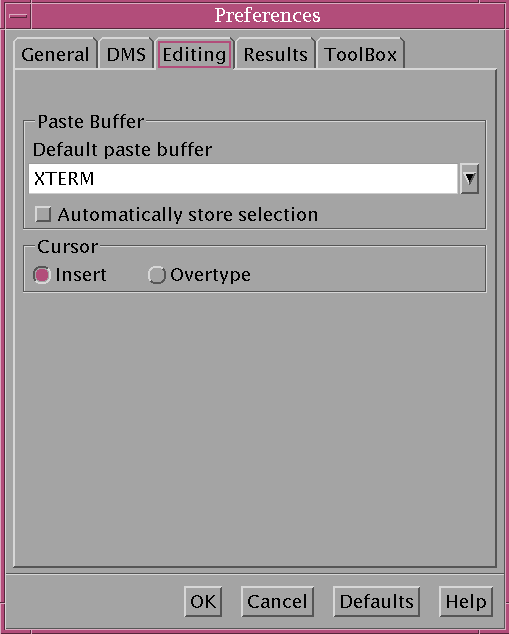
Ensuring that "Automatically store selection" is switched off, as shown above, will allow one to select and submit sections of code from a SAS program like what is normal practice with Windows SAS. Though it isn't an obvious solution, it does the trick for me.