Ditching PC Plus?
 28th June 2007
When I start to lose interest in the features in a magazine that I regularly buy, then it's a matter of time before I stop buying the magazine altogether. Such a predicament is facing PC Plus, a magazine that I have been buying every month over the last ten years. The fate has already befallen titles like Web Designer, Amateur Photographer and Trail, all of which I now buy sporadically.
Returning to PC Plus, I get the impression that it feels more of a lightweight these days. Over the last decade, Future Publishing has been adding titles to its portfolio that take actually from its long-established stalwart. Both Linux Format and .Net are two that come to mind, while there are titles covering Windows Vista and computer music as well. In short, there may be sense in having just a single title for all things computing.
Being a sucker for punishment, I did pick up this month's PC Plus, only for the issue to be as good an example of the malaise as any. Reviews, once a mainstay of the title, are now less prominent than they were. In place of comparison tests, we now find discussions of topics like hardware acceleration, with some reviews mixed in. Topics such as robotics and artificial intelligence do rear their heads in feature articles, when I cannot say that I have a great deal of time for such futurology. The section containing tutorials remains, even if it has been hived off into a separate mini-magazine, and seemingly fails to escape the lightweight revolution.
All this is leading me to dump PC Plus in favour of PC Pro from Dennis Publishing. This feels reassuringly more heavyweight and, while the basic format has remained unchanged over the years, it still managed to remain fresh. Reviews, of both software and hardware, are very much in evidence while it manages to have those value-adding feature articles; this month, digital photography and rip-off Britain come under the spotlight. Add the Real Word Computing section, and it all makes a good read in these times of behemoths like Microsoft, Apple and Adobe delivering new things on the technology front. While I don't know if I have changed, PC Pro does seem better than PC Plus these days.
Another Olympus E-system review
27th June 2007
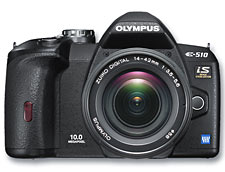
I don't buy Amateur Photographer much these days, but sight of a review of Olympus' E-410 and E-510 SLR's got a copy into my possession. Amateur Photographer review features are usually comprehensive and this was no exception; there was none of the vitriol directed towards the Live View feature by Practical Photography, a defining feature of what I consider a lop-sided and none too useful review. The verdict was positive in the main, with the E-510 getting the nod over the E-410 because it fared better on the usability side of things. Image quality, my major concern, was said to be impressive with only dynamic range counting against the results. The Live View feature didn't attract the harsh commentary devoted to it by Practical Photography. Following this review, I have to say that the E-510 does tempt me with its combination of good image quality, dust removal and image stabilisation.
Trouble with my Canon CanoScan 5000F
26th June 2007
Having had my Canon CanoScan 5000F scanner for nearly four years now, it has performed faultlessly until yesterday. However, it has now developed a fault that may hasten its replacement, and I have to say that my eye is on Epson's Perfection V350 Photo. Looking on the web, I did find scanners hidden away and that the selection available wasn't what I might have expected it to be. Maybe, the digital photography revolution has made the humble scanner a less essential item. And the fault? Scan results are featuring an unacceptably strong magenta cast. In fact, the first scans result in nothing except pitch black, though allowing things to stay on for a while does improve things. That suggests a hardware fault to me. I have raised the issue with Canon and will await their reply, even though it is stopping me from adding any new photos to my online photo gallery. If Canon comes back to me with the "uneconomical to repair" response, I will be ready to go out and buy the Epson. Time will tell with this one...
Update 1: A spot of further exploration has left me wondering if it is the lamp that's on the way out. If that's replaceable at a reasonable price, then the CanoScan might live on after a spot of repair.
Update 2: Canon's advice included reinstalling the scanner driver and, surprisingly given the symptoms, that seems to have helped. While I'll continue to keep an eye on things, it looks like I'll be hanging onto my money for now.
More on mod_rewrite
25th June 2007
Today, I caught sight of an article on anti-plagiarism tools at The Blog Herald, and among the tricks was to use mod-rewrite to stop people "borrowing" both your images and your bandwidth. The gist is that you set up one or more conditions that exclude websites from the application of a rule forbidding access to images; the logic is that if the website referencing an image is not one of the websites listed in the conditions, then it doesn't get to display any of your images.
RewriteCond %{HTTP_REFERER} !^http://(www\.)?awebsite.com(/)?.*$ [NC]
RewriteRule .*\.(gif|jpe?g|png|bmp)$ [F,NC]
The wonders of mod_rewrite
24th June 2007
When I wrote about tidying dynamic URL's a little while back, I had no inkling that that would be a second part to the tale. My discovery of mod_rewrite, an Apache module that facilitates URL translation. The effect is that one URL is presented to the user in the browser address bar, and the very same URL is also seen by search engines, while another is passed to the server for processing. Though it might sound like subterfuge, it works very well once you manage to get it set up properly. While the web host for my hillwalking blog/photo gallery has everything configured such that it is ready to go, the same did not apply to the offline Apache 2.2.x server that I have going on my own Windows XP box. There were two parts to getting it working there:
- Activating mod-rewrite on the server: this is as easy as uncommenting a line in the
httpd.conffile for the site (the line in question is:LoadModule rewrite_module modules/mod_rewrite.so). - Ensuring that the
.htaccessfile in the root of the web server directory is active. You need to set the values of theAllowOverridedirectives for the server root and CGI directories toAllso that.htaccessis active. Not doing it for the latter will result in an error beginning with the following:Options FollowSymLinks or SymLinksIfOwnerMatch is off which implies that. HavingRewriteRuledirective is forbiddenAllow from Allset for the required directories is another option to consider when you see errors like that.
Once you have got the above sorted, add this line to .htaccess: RewriteEngine On. Preceding it with an Options directive to ensure that FollowSymLinks and SymLinksIfOwnerMatch are switched on does no harm at all and may even be needed to get things running. That done, you can set about putting mod_write to work with lines like this:
RewriteRule ^pages/(.*)/?$ pages.php?query=$1
The effect of this is to take http://www.website.com/pages/input and convert it into a form for action by the server; in this case, that is http://www.website.com/pages.php?query=input. Anything contained by a bracket is assigned to the value of a system-named variable. If you have several bracketed sections, they are assigned to sequentially numbered variables as follows: $1 for the first, $2 for the second and so on. It's all good stuff when you get it going, and not only does it make things look much neater, but it also possesses an advantage when it comes to future-proofing too. Web addresses can be kept constant over time, even if things change behind the scenes. It means that any returning visitors will find what they saw the last time that they visited and surely must ensure good karma in the eyes of those all important search engines.
Forcing FAVICON.ICO to appear on the browser address bar
23rd June 2007
Here's a piece of code that should really be unnecessary when you put the favico.ico into the root of your website directory:
<link rel="shortcut icon" href="/favicon.ico" type="image/x-icon" />
The favico.ico should automatically appear there and in your browser bookmarks (favourites in IE) but there are occasions when the above has to sit in the header section of your web pages. I know because I am doing it for this blog.
IE6 and JavaScript performance
22nd June 2007
Having been exposed to an application at work that uses a lot of JavaScript, I fully appreciate what some mean when they discuss IE6's inefficient handling of JavaScript. After seeing a web page taking an age to reload and your CPU taking a hammering because of JavaScript processing, the penny does tend to drop...
Needless to say, this very much impacts the world of AJAX-driven web applications with their heavy dependence on client-side JavaScript. While IE7 does come to the rescue, there remain plenty of IE6 users still out there, and this is reflected in website statistics. This demonstrates a certain level of inertia in the browser market that not only afflicts the uptake of IE7 but also the likes of Mozilla, Opera and Safari. It also means that anyone developing AJAX applications very much needs to continue testing in IE6, especially if the product of their labours is for wider public use.
An example of such an application is Zimbra, an open-source web application for messaging and collaboration, and the people behind it have generously shared the results of their browser performance benchmarking. They did comparisons of IE6 vs. IE7 and Firefox 2 vs. IE7. IE6 easily came out as the worst of these, while Firefox 2 was the best.
The next question to be asked could centre around the type of code that is processed inefficiently by IE6. While I wouldn't be at all surprised if a list emerged, here's one: using Microsoft's proprietary innerHTML object to update the DOM for a web page format. Having a quick trawl on Google, this came up for mention as a cause of memory leaks. It is also a Microsoft innovation that never got taken up by those overseeing web standards, hardly a surprise since a spot of DOM scripting achieves the same end. It may be faster to code than any alternatives, and it does have some support from other browsers, but it does seem to have got a bad name, so it should be avoided if possible. That said, it would be interesting to see a performance comparison between innerHTML and DOM methods in IE6.
Two reviews of the Olympus E-410 tell very different stories
21st June 2007

Recently, I encountered two very different reviews of the newly launched Olympus E-410 DSLR, in Which Digital Camera and Practical Photography, respectively. The review in the former was a positive affair, though it was a first look at the camera, but the impression formed by the latter reviewer was lukewarm in nature.
The camera features a live electronic viewer on its back, a carry-over from digital compacts and a feature that I may never use. While that might be the unique selling point for the camera, good image quality and the fact that it possesses a cleaning mechanism for its sensor are of much more interest to me.
Ironically, the Practical Photography review spent most of its time talking about the very feature of the camera that interests me the least, with only a scant mention of quality; to be frank, I didn't find it a very useful appraisal even if the electronic viewfinder may not be all that it's cracked up to be, and it's picture quality and camera handling that ultimately matter to the photography enthusiast.
In contrast, Which Digital Camera seemed to give a more rounded view and proved to be of more interest, and I'd be interested to see what the likes of Photography Monthly and Amateur Photographer might have to say. Incidentally, I also shall be awaiting the Which Digital Camera appraisal of Ricoh's Caplio GX100 in their next issue.
WARNING: The quoted string currently being processed has become more than 262 characters long…
20th June 2007
This is a SAS error that can be seen from time to time:
WARNING: The quoted string currently being processed has become more than 262 characters long. You may have unbalanced quotation marks.
In the days before SAS version 8, this was something that needed to be immediately corrected. In these days of SAS character variables extending beyond 200 characters in length, it becomes a potential millstone around a SAS programmer's neck. If you run a piece of code like this:
data _null_;
    x="aaaaaaaaaaaaaaaaaaaaaaaaaaaaaaaaaaaaaaaaaaaaaaaaaaaaaaaaaaaaaaaaaaaaaaaaaaaaaaaaaaaaaaaaaaaaaaaaaaaaaaaaaaaaaaaaaaaaaaaaaaaaaaaaaaaaaaaaaaaaaaaaaaaaaaaaaaaaaaaaaaaaaaaaaaaaaaaaaaaaaaaaaaaaaaaaaaaaaaaaaaaaaaaaaaaaaaaaaaaaaaaaaaaaaaaaaaaaaaaaaaaaaaaaaaaaaaaaaaaaaaaa";
run;
What you get back is the warning message at the heart of the matter. While the code is legitimate and works fine, the spurious error is returned because SAS hasn't found a closing quote by the required position and the 262-character limit is a hard constraint that cannot be extended. There is another way, though: the new QUOTELENMAX option in SAS9. Setting it as follows removes the messages in most situations (yes, I did find one where it didn't play ball):
options noquotelenmax;
This does, however, beg the question as to how you check for unbalanced quotes in SAS logs these days; clearly, looking for a closing quote is an outmoded approach. Thanks to code highlighting, it is far easier to pick them out before the code gets submitted. The other question that arises is why you would cause this to happen anyway, but there are occasions where you assign the value of a macro variable to a data set one and the string is longer than the limit set by SAS. Here's some example code:
data _null_;
    length y $400;
    y=repeat("f",400);
    call symput("y",y)
run;
data _null_;
x="&y";
run;My own weakness is where I use PROC SQL to combine strings into a macro variable, a lazy man's method of combining all distinct values for a variable into a delimited list like this:
proc sql noprint;
    select distinct compress(string_var) into :vals separated by " " from dataset;
quit;
Of course, creating a long delimited string using the CATX (new to SAS9) function avoids the whole situation and there are other means, but there may be occasions, like the use of system macro variables, where it is unavoidable and NOQUOTELENMAX makes a much better impression when these arise.
Now, I know why my site layout changed on WordPress.com…
19th June 2007
One of the caveats of using themes authored by others is that you don't quite know how things are set up. The reason that this has come home to roost for me is that I was trying to change the title of a widget last night and was wondering why it wasn't filtering through to the blog pages. When I went for a spot of googling, as you do, it dawned on me what might be going on. The plug-ins used by the Andreas09 theme are defined in its functions.php file, and I was being scuppered by a naughty piece of hard-coding in there. If it was using the standard widget from widgets.php in the wp-includes directory, then everything would have worked as expected. A quick spot of code porting resolved the issue and all was well again.
What this has to do with WordPress.com is that they seem to have encountered the same problem and fixed it using what could be viewed as a more ham-fisted approach: deleting the widget functions from functions.php for Andreas09. This would have meant that the default widgets shone through, thus explaining the changes that I had seen and why my nice categories listing now grabbed less attention. I reckon that my more surgical approach is the better one: at least, I still have my categories looking how I want them...