Archive for April, 2007

SAS/Access and Oracle Timestamp format

Until SAS 9.2, SAS/Access will not support the Oracle timestamp format. There still is no word on when 9.2 might appear so it’s over to the SQL pass-through facility…

Uses for symbolic links

UNIX (and Linux) does a wonderful trick with its file and folder shortcuts; it effectively treats them as file and folder transporters that transfer associate a file or folder that exists in one folder hierarchy with another and it is treated as if it exists in that hierarchy too. For example, the images folder under /www/htdocs/blog can have a link under /www/htdocs/ that makes it appear that its contents exist in both places without any file duplication. For instance, the pwd command cannot tell a folder from a folder shortcut. To achieve this, I use what are called symbolic links and the following command achieves the outcome in the example:

ln -s /www/htdocs/blog/images /www/htdocs/images

The first file path is the destination for the link while the second one is that for the link itself. I had a problem with Google Reader not showing up images in its feed displays so symbolic links rode to the rescue as they did for resolve a similar conundrum that I was encountering when editing posts in my hillwalking blog.

Checking existence of files and directories on UNIX using shell scripting

Having had a UNIX shell script attempt to copy a non-existent file, I decided to take another look for ways to test the existence of a file. For directory existence checking, I was testing for the return code from the cd command and I suppose that the ls command might help for files. However, I did find a better way:

if [ -f $filename ]

then

echo "This filename [$filename] exists"

elif [ -d $dirname ]

then

echo "This dirname [$dirname] exists"

else

echo "Neither [$dirname] or [$filename] exist"

fi

The -d and -f flags within the evaluation expressions test for existence of directories and files, respectively. One gotcha is that those spaces within the brackets are important too but it is a very way of doing what I wanted.

Google Reader

Going through the stats for my other blog, I noticed some activity from Google Reader and decided to investigate. what I discovered was a very capable feed reader, much better than Technorati’s equivalent. The interface feels a little like an email client with a different entry of the sidebar for each feed. It also gives you full text and pictures for each blog article that it picks up, though it messes with my hillwalking blog for some reason… As a feed aggregator, it performs very well and makes my blog surveying a lot more effortless. I know that Outlook 2007 has aggregation functionality too but the portability of Google’s little online offering makes it worth taking further, especially as you wouldn’t need to pay for it anyway.

Update: Google Reader also allows you to share items from your feeds; you can find what I am sharing here.

Inexpensive hosting

On a recent blog hopping excursion, I spotted a mention for no frills hosting by Streamline.net by a satisfied customer. I’ll stick with Fasthosts for now because I have what I need from them in terms of features and uptime, even though I am paying a bit more. the Streamline package looks interesting though…

Learning about Oracle

My work in the last week has put me on something of a learning about Oracle. This is down my needing to add file metadata to database as part of an application that I am developing. The application is written in SAS but I am using SAS/Access for Oracle to update the database using SQL pass-through statements written in Oracle SQL. I am used to SAS SQL and there is commonality between it and Oracle’s implementation, which is a big help. Nevertheless, there of course are things specific to the Oracle world about which I have needed to learn. My experiences have introduced me to concepts like triggers, sequences, constraints, primary keys, foreign keys and the like. In addition, I have also seen the results of database normalisation at first hand.

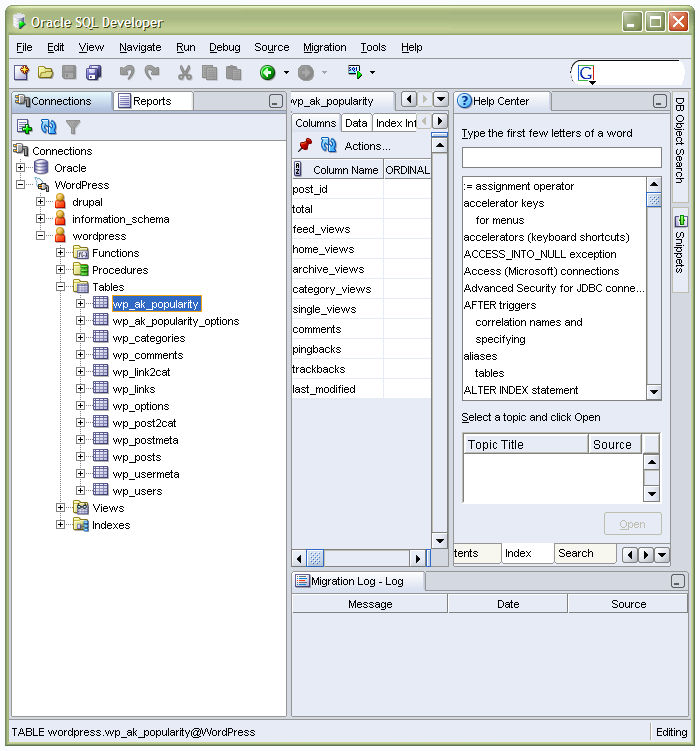
Using Oracle’s SQL Developer has been a great help in my endeavours thanks to its online help and the way that you can view database objects in an easy to use manner. It also runs SQL scripts, giving you a feel for how Oracle works, and anyone can download it for free upon registration on the Oracle website. Also useful is the Express edition of the Oracle 10g database that I now have at home for personal learning purposes. That is another free download from Oracle’s website.

My Safari bookshelf has been another invaluable resource, providing access to O’ Reilly’s Oracle books. Of these, Mastering Oracle SQL has proved particularly useful and I made a journey to Manchester after work this evening (Waterstone’s on Deansgate is open until 21:00 on weekdays) to see if I could acquire a copy. That quest was to prove fruitless but I now have got the doorstop that is Oracle Database 10g: The Complete Reference from The Oracle Press, an imprint of Osborne and McGraw Hill. I needed a broader grounding in all things Oracle so this should help and it also covers SQL but the aforementioned O’ Reilly volume could return to the wish list if that provision is insufficient.
Private
  • As is commonly the case with places like these, all the views that you find expressed on here in postings and articles are mine alone and not those of any organisation with which I have any association, through work or otherwise. With regards to any comments left on the site, I reserve the right to reject any that are inappropriate. Otherwise, whatever is said is the sole responsibility of whoever is leaving the comment.