SQL Developer Java error
 6th June 2007
Last night, I tried starting up Oracle's SQL Developer so that I could add a listing of my hillwalking blog posts to my website's site map with a spot of PHP scripting. However, all that I got was something like that which you see below:
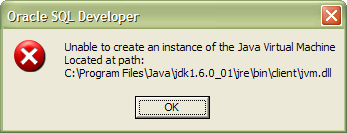
I must confess that this one threw me. The solution, though challenging to find (they often are, even with the abilities of Google) was to use a batch file called sqldeveloper.bat that you can find in the [installation directory]\sqldeveloper\bin directory. It does start the thing when all else seems to fail and got me up and running again. I did get that blog post listing added to the site map after all; Having more visibility of the MySQL tables was a definite plus point.
Windows Sysinternals
5th June 2007
In an earlier post, I wondered about command line management of Windows processes. Well, I have since located the sort of tools that I was after as part of the Windows Sysinternals toolkit. It began as an independent endeavour and continued as such until Microsoft acquired them in 2006. You can find out more about the process utilities here, and the whole Sysinternals suite can be downloaded in a single package.
Using alternative editors for SAS programming
5th June 2007
When it comes to writing SAS programs, most use the tools that SAS gives us, be it Enterprise Guide, the Enhanced Editor or the Program Editor. While Enterprise Guide can work with UNIX SAS as the processing engine, it is very much a Windows tool and the Enhanced Editor functionality is provided through Windows-only programming (ActiveX, I seem to recall). However, that means that creature comforts are left behind you if you turn to writing SAS code using UNIX SAS; you have only got the good old-fashioned Program Editor supplied by SAS itself. However, there is a trick that you can use to make life more comfortable: SAS does allow you to submit the contents of your paste buffer (or clipboard) using the command SUBMIT BUFFER=DEFAULT and this can be assigned to a function key for ease of use (I use the same key to clear the log and output screens at the same time). In the Windows, you may need to explicitly copy the code to do this but, in UNIX, merely highlighting a section of code with an editor like NEdit will do the trick and, given that NEdit is reasonably pleasant tool for code cutting (the ability to define its macros with a spot of scripting is a definite plus point), this makes life more comfortable again.
Selecting SAS code in the Program Editor on UNIX
5th June 2007
Here's a possible bugbear with programming using the SAS Display Manager in UNIX, selecting sections of code and running them. In the installations that I have encountered, the mouse selection is not retained, so the code selection cannot be run. There is a fix for this that is not the most obvious. Going to the Preferences dialogue box (Tools > Options > Preferences... from the menu bar) and selecting the Editing tab brings up the screen below:
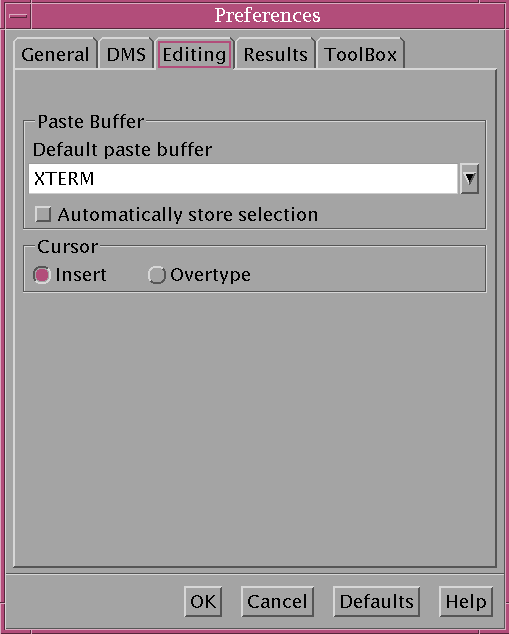
Ensuring that "Automatically store selection" is switched off, as shown above, will allow one to select and submit sections of code from a SAS program like what is normal practice with Windows SAS. Though it isn't an obvious solution, it does the trick for me.
Photo gallery trouble
4th June 2007
The recent woes at Zooomr (mustn't forget that it is spelt with three O's...), have prompted me to ponder photo galleries. My own is a self-hosted affair, with Perl doing the honours of reading and processing data stored in an XML file. It may seem an unsophisticated system, but it has worked well and, apart from the matter of server administration, I am in full control. Yes, there is a development and maintenance overhead, but I enjoy programming and scripting anyway; I just have to find the time for it. If this is not your idea of fun, then using a service like Flickr, Zooomr or Photobucket is attractive so long as things don't go awry as they have for Zooomr and all the bad publicity and user frustration can't have done Zooomr's future prospects any good at all.
Why Adobe Digital Editions fails to satisfy
3rd June 2007
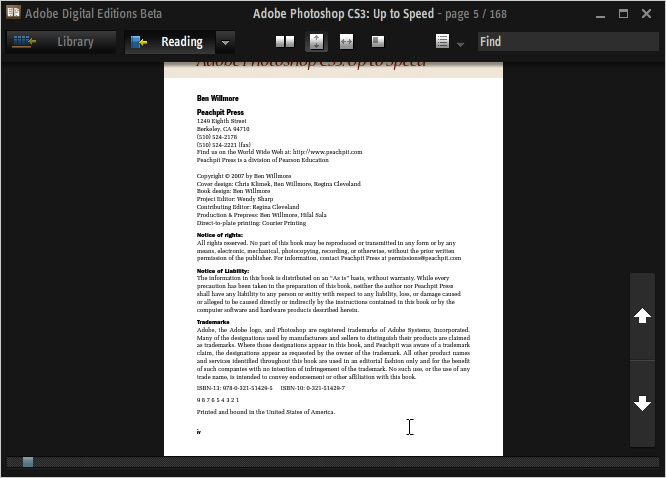
For now, I still have my eye on Photoshop CS3, and it was with interest that I noticed that Peachpit Press had published a book, entitled Adobe Photoshop CS3: Up to Speed, exploring the changes made from CS2. The plot thickened when I found that I could download as an e-book.
However, it was then that I discovered a major change made to Adobe Reader for its eighth version: it no longer reads what Adobe titles Digital Editions. For that, you need either the previous version or to download the beta version of Adobe Digital Editions (yes, it does rather appear that they couldn't tie up the final release dates), which appears to be a Flash front end to Reader.
As it happens, I am not so convinced by this development: the thing is in essence coloured black and the mouse pointer disappears a lot of the time. Having menus and navigational screen furniture constantly disappearing and reappearing doesn't do much to enhance the reputations of Adobe's user interface designers. While it wouldn't be too bad if you could customise the colours, you can't; a light grey has to be better than black. Its taking over the whole screen when maximised is another irritation, especially when it covers up your task bar and the Alt+Tab shortcut is needed to leave it without having to hit the minimise button.
Yes, it does do the job, but I still find myself hankering after an Adobe Reader style interface and I have no idea why this has been foisted upon us when the previous approach was a perfectly good one. All in all, I have only to say it seems a premature roll-out of the approach. Now, where's Reader 7 when I need it?
UNIX Process Management
1st June 2007
Here are a few UNIX commands that I have recently encountered that help with process management and are particularly useful when jobs are running in the background. Here they are:
nohup
It's short for no hang up and stops termination of a job when a user logs off. Another result is that all console messages being directed to a file called nohup.out in the directory current to the job being run, or in the user's home directory, where write access to the current working directory is unavailable.
ps
This returns a list of processes, their ID's and their statuses. By default, this is for your own processes, but you can look beyond this with the myriad of options that can be passed. For instance, the -U switch allows you to look at a job for other users while the -f one shows more information than the standard call and this even includes the commands submitted to start the ongoing processes.
kill
The name says it all, and it's far quicker than the rigmarole that you have to endure with the Windows task manager; I wonder if there is a command line approach to process termination on Windows.