TOPIC: SHELL
Fixing garbled background images in GNOME Shell after upgrading to Ubuntu GNOME 14.04
 2nd May 2014
On upgrading from Ubuntu GNOME 13.10 to Ubuntu GNOME 14.04, a few rough edges were to be noticed. One was the display of my chosen background image: it was garbled. Later, I discovered that there is a maximum width of 2560 px for background images in GNOME Shell these days and that things get messy beyond that.
In my case, the image width was around 6000 px, and I was used to it getting resized in GNOME Shell 3.8 and its predecessors. It appears that the functionality got removed after that, though, so the workaround of manual image resizing in the GIMP needed to be employed. Though having big images open in memory creates an additional overhead, not handling them very well at all looks like a bug caused by setting 2560 px as a maximum screen width for the GNOME Shell panel and the complete removal of Nautilus from desktop rendering duties. Let's hope that sense is seen with ever larger screen sizes and resolutions coming our way.
It's the sort of thing that did get me looking at adding on Cinnamon 2.2 for a while before setting background image scaling using the indispensable GNOME Tweak Tool was discovered. LinuxG.net has a useful tutorial on this for anyone with such an adventurous streak in them. For now though, I am OK with my set-up, but the GNOME project's focus on minimalism could affect us in other ways, so I can see why Clem Lefebvre started the Cinnamon one primarily for Linux Mint and the desktop environment is appearing elsewhere too. After all, Gedit lost its menu bar in GNOME 3.12 so it's just as well that we have alternatives.
Update 2014-05-06: It appears that the desktop image bug that afflicts GNOME Shell 3.10 got sorted for GNOME Shell 3.12. At least, that is the impression that an Antergos instance in a VirtualBox virtual machine gives me.
How to compile and install Nightingale when PPA repositories fail on Ubuntu 13.10
3rd December 2013
When I upgraded to Ubuntu GNOME 13.10 and went for the 64-bit variant, I tried a previously tried and tested approach for installing Nightingale that used a PPA, only for it not to work. At that point, the repository had not caught up with the latest Ubuntu release (it has by the time of writing) and other pre-compiled packages would not work either. However, there was one further possibility left, and that was downloading a copy of the source code and compiling that. My previous experiences of doing that kind of thing have not been universally positive, so it was not my first choice, but I gave it a go anyway.
To get the source code, I first needed to install Git so I could take a copy from the version controlled repository and the following command added the tool and all its dependencies:
sudo apt-get install git autoconf g++ libgtk2.0-dev libdbus-glib-1-dev libtag1-dev libgstreamer-plugins-base0.10-dev zip unzip
With that lot installed, it was time to check out a copy of the latest source code, and I went with the following:
git clone https://github.com/nightingale-media-player/nightingale-hacking.git
The next step was to go into the nightingale-hacking sub-folder and issue the following command:
./build.sh
That should produce a subdirectory named nightingale that contains the compiled executable files. If this exists, it can be copied into /opt. If not, then create a folder named nightingale under /opt using copy the files from ~/nightingale-hacking/compiled/dist into that location. Ubuntu GNOME 13.10 comes with GNOME Shell 3.8, the next step took a little fiddling before it was sorted: adding an icon to the application menu or dashboard. This involved adding a file called nightingale.desktop in /usr/share/applications/ with the following contents:
[Desktop Entry]

Name=Nightingale

Comment=Play music

TryExec=/opt/nightingale/nightingale

Exec=/opt/nightingale/nightingale

Icon=/usr/share/pixmaps/nightingale.xpm

Type=Application

X-GNOME-DocPath=nightingale/index.html

X-GNOME-Bugzilla-Bugzilla=Nightingale

X-GNOME-Bugzilla-Product=nightingale

X-GNOME-Bugzilla-Component=BugBuddyBugs

X-GNOME-Bugzilla-Version=1.1.2

Categories=GNOME;Audio;Music;Player;AudioVideo;

StartupNotify=true

OnlyShowIn=GNOME;Unity;

Keywords=Run;

Actions=New

X-Ubuntu-Gettext-Domain=nightingale
[Desktop Action New]

Name=Nightingale

Exec=/opt/nightingale/nightingale

OnlyShowIn=Unity
It was created from a copy of another *.desktop file and the categories in there together with the link to the icon were as important as the title and took a little tinkering before all was in place. Also, you may find that /opt/nightingale/chrome/icons/default/default.xpm needs to be become /usr/share/pixmaps/nightingale.xpm using the cp command before your new menu entry gains an icon to go with it. While the steps that I describe here worked for me, there is more information on the Nightingale wiki if you need it.
A look at Windows 8.1
4th July 2013
Last week, Microsoft released a preview of Windows 8.1 and some hailed the return of the Start button, yet the reality is not as simple as that. Being a Linux user, I am left wondering if ideas have been borrowed from GNOME Shell instead of putting back the Start Menu like it was in Windows 7. What we have got is a smoothing of the interface that is there for those who like to tweak settings and not available by default. GNOME Shell has been controversial too, so borrowing from it is not an uncontentious move, even if there are people like me who are at home with that kind of interface.
What you get now is more configuration options to go with the new Start button. While right-clicking on the latter does get you a menu, this is no Start Menu like we had before. Instead, we get a settings menu with a "Shut down" entry. That's better than before, which might be saying something about what was done in Windows 8, and it produces a sub-menu with options of shutting down or restarting your PC as well as putting it to sleep. Otherwise, it is a place for accessing system configuration items and not your more usual software, not a bad thing, but it's best to be clear about these things. Holding down the Windows key and pressing X will pop up the same menu if you prefer keyboard shortcuts, and I have a soft spot for them too.
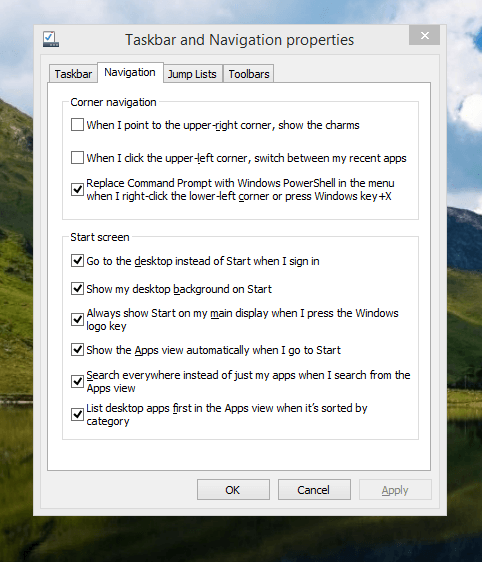
The real power is to be discovered when you right-click on the task bar and select Properties from the pop-up menu. Within the dialogue box that appears, there is the Navigation tab that contains a whole plethora of interesting options. Corner navigation can be scaled back to remove the options of switching between applications in the upper-left corner or getting what is called the Charms menu from the upper-right corner. Things get interesting in the Start Screen section. This where you tell Windows to boot to the desktop instead of the Start Screen and adjust what the Start button gives you. For instance, you can make it use your desktop background and display the Start Screen Apps View. Both of these make the new Start interface less intrusive and make the Apps View feel not unlike the way GNOME Shell overlays your screen when you hit the Activities button or hover over the upper-left corner of the desktop.
It all seems rather more like a series of little concessions, and not the restoration that some (many?) would prefer. Classic Shell still works for all those seeking an actual Start Menu and even replaces the restored Microsoft Start button too. So, if the new improvements aren't enough for you, you still can take matters into your own hands until you start to take advantage of what's new in 8.1.
Apart from the refusal to give us back a Windows 7 style desktop experience, we now have a touchscreen keyboard button added to the taskbar. So far, it always appears there even when I try turning it off. For me, that's a bug, so it's something that I'd like to see fixed before the final release.
All in all, Windows 8.1 feels more polished than Windows 8 was and will be a free update when the production version is released. My explorations have taken place within a separate VMware virtual machine because updating a Windows 8 installation to the 8.1 preview is forcing a complete re-installation on yourself later on. Though there are talks about Windows 9 now, I am left wondering if going for point releases like 8.2, 8.3, etc. might be a better strategy for Microsoft. It still looks as if Windows 8 could do with continual polishing before it gets more acceptable to users. 8.1 is a step forward, and more like it may be needed yet.
A need to update graphics hardware
16th June 2013
As someone who doesn't play computer games, I rarely prioritise graphics card upgrades. Yet, I recently upgraded graphics cards in two of my PCs despite nothing being broken. My backup machine, built nearly four years ago, has run multiple Linux distributions. It uses an ASRock K10N78 motherboard from MicroDirect with an integrated NVIDIA graphics chip that performs adequately, if not exceptionally. The only issue was slightly poor text rendering in web browsers, but this alone wasn't enough to justify adding a dedicated graphics card.
More recently, I ran into trouble with Sabayon 13.04 with only the 2D variant of the Cinnamon desktop environment working on it and things getting totally non-functional when a full re-installation of the GNOME edition was attempted. Everything went fine until I added the latest updates to the system, when a reboot revealed that it was impossible to boot into a desktop environment. Some will relish this as a challenge, but I need to admit that I am not one of those. In fact, I tried out two Arch-based distros on the same PC and got the same results following a system update on each. So, my explorations of Antergos and Manjaro have to continue in virtual machines instead.
When I tried Linux Mint 15 Cinnamon, it worked perfectly. However, newer distributions with systemd didn't work with my onboard NVIDIA graphics. Since systemd will likely come to Linux Mint eventually, I decided to add a dedicated graphics card. Based on good past experiences with Radeon, I chose an AMD Radeon HD 6450 from PC World, confirming it had Linux driver support. Installation was simple: power off, insert card, close case, power on. Later, I configured the BIOS to prioritise PCI Express graphics, though this step wasn't necessary. I then used Linux Mint's Additional Driver applet to install the proprietary driver and restarted. To improve web browser font rendering, I selected full RGBA hinting in the Fonts applet. The improvement was obvious, though still not as good as on my main machine. Overall, the upgrade improved performance and future-proofed my system.
After upgrading my standby machine, I examined my main PC. It has both onboard Radeon graphics and an added Radeon 4650 card. Ubuntu GNOME 12.10 and 13.04 weren't providing 3D support to VMware Player, which complained when virtual machines were configured for 3D. Installing the latest fglrx driver only made things worse, leaving me with just a command line instead of a graphical interface. The only fix was to run one of the following commands and reboot:
sudo apt-get remove fglrx
sudo apt-get remove fglrx-updates
Looking at the AMD website revealed that they no longer support 2000, 3000 or 4000 series Radeon cards with their latest Catalyst driver, the last version that did not install on my machine since it was built for version 3.4.x of the Linux kernel. A new graphics card then was in order if I wanted 3D graphics in VMware VM's and both GNOME and Cinnamon appear to need this capability. Another ASUS card, a Radeon HD 6670, duly was acquired and installed in a manner similar to the Radeon HD 6450 on the standby PC. Apart from not needing to alter the font rendering (there is a Font tab on the Gnome Tweak Tool where this can be set), the only real exception was to add the Jockey software to my main PC for installation of the proprietary Radeon driver. The following command does this:
sudo apt-get install jockey-kde
After completing installation, I ran the jockey-kde command and selected the first driver option. Upon restart, the system worked properly except for an AMD message in the bottom-right corner warning about unrecognised hardware. Since there were two identical entries in the Jockey list, I tried the second option. After restarting, the incompatibility message disappeared and everything functioned correctly. VMware even ran virtual machines with 3D support without any errors, confirming the upgrade had solved my problem.
Hearing of someone doing two PC graphics card upgrades during a single weekend may make you see them as an enthusiast, but my disinterest in computer gaming belies this. Maybe it highlights that Linux operating systems need 3D more than might be expected. The Cinnamon desktop environment now issues messages if it is operating in 2D mode with software 3D rendering and GNOME always had the tendency to fall back to classic mode, as it had been doing when Sabayon was installed on my standby PC. However, there remain cases where Linux can rejuvenate older hardware and I installed Lubuntu onto a machine with 10-year-old technology on there (an 1100 MHz Athlon CPU, 1GB of RAM and 60GB of hard drive space in a case dating from 1998) and it works surprisingly well too.
It appears that having fancier desktop environments like GNOME Shell and Cinnamon means having the hardware on which it could run. For a while, I have been tempted by the possibility of a new PC, since even my main machine is not far from four years old either. However, I also spied a CPU, motherboard and RAM bundle featuring an Intel Core i5-4670 CPU, 8GB of Corsair Vengeance Pro Blue memory and a Gigabyte Z87-HD3 ATX motherboard included as part of a pre-built bundle (with a heat sink and fan for the CPU) for around £420. Even for someone who has used AMD CPU's since 1998, that does look tempting, but I'll hold off before making any such upgrade decisions. Apart from exercising sensible spending restraint, waiting for Linux UEFI support to mature a little more may be no bad idea either.
Update 2013-06-23: The new graphics card in my main machine works well and has reduced system error messages; Ubuntu GNOME 13.04 likely had issues with my old card. On my standby machine, I found and removed a rogue .fonts.conf file in my home directory, which dramatically improved font display. If you find this file on your system, consider removing or renaming it to see if it helps. Alternatively, adjusting font rendering settings can improve display quality, even on older systems like Debian 6 with GNOME 2. I may test these improvements on Debian 7.1 in the future.
Saving Windows Command Prompt & Powershell command history to a file for later useage
15th May 2013
It's remarkable what ideas Linux gives that you wouldn't encounter that clearly in the world of Windows. One of these is output and command line history, so a script can be created. In the Windows world, this would be called a batch file. Linux usefully has the history command, and it does the needful for taking a snapshot like so:
history > ~/commands.sh
All the commands stored in a terminal's command history get stored in the commands.sh in the user's home area. The command for doing the same thing from the Windows command line is not as obvious because it uses the doskey command that is intended for command line macro writing and execution. Usefully, it has a history option that tells it to output all the commands issued in a command line session. Unless, you create a file with them in there, there appears to be no way to store all those commands across sessions, unlike UNIX and Linux. Therefore, a command like the following is a partial solution that is more permanent than using the F7 key on your keyboard:
doskey /history > c:\commands.bat
Windows PowerShell has something similar too, and it even has aliases of history and even h. All PowerShell scripts have file extensions of ps1 and the example below follows that scheme:
get-history > c:\commands.ps1
However, I believe that even PowerShell doesn't carry over command history between sessions, though Microsoft is working on adding this useful functionality. While they could co-opt Cygwin of course, that doesn't seem to be their way of going about things.
Sorting a kernel upgrade error in Linux Mint 13
30th November 2012
Linux Mint 14 may be out now, but I'll be sticking with its predecessor for now. Being a user of GNOME Shell instead of Cinnamon or Mate, I'll wait for extensions to get updated for 3.6 before making a move away from 3.4 where the ones that I use happily work. Given that Linux Mint 13 is set to get support until 2017, it's not as if there is any rush either. Adding the back-ported packages repository to my list of software sources means that I will not miss out on the latest versions of MDM, Cinnamon and Mate anyway. With Ubuntu set to stick to GNOME 3.6 until after 13.04 is released, adding the GNOME 3 Team PPA will be needed if 3.8 arrives with interesting goodies; there are interesting noises that suggest the approach taken in Linux Mint 12 may be used to give more of a GNOME 2 desktop experience. Options abound and there are developments in the pipeline that I hope to explore too.
However, there is one issue that I have had to fix which stymies upgrades within the 3.2 kernel branch. A configuration file (/etc/grub.d/10_linux) points to /usr/share/grub/grub-mkconfig_lib instead of /usr/lib/grub/grub-mkconfig_lib so I have been amending it every time I needed to do a kernel update. However, it just reverts to the previous state, so I thought of another solution: creating a symbolic link in the incorrect location that points to the correct one so that updates complete without manual intervention every time. The command that does the needful is below:
sudo ln -s /usr/lib/grub/grub-mkconfig_lib /usr/share/grub/grub-mkconfig_lib
Of course, figuring out what causes the reversion would be good too, but the symbolic link fix works so well that there's little point in exploring it further. Of course, if anyone can add how you'd do that, I'd welcome this advice too. New knowledge is always good.
Upgrading from Windows 7 to Windows 8 within a VMWare Virtual Machine
1st November 2012
Though my main home PC runs Linux Mint, I do like to have the facility to use Windows software occasionally, and virtualisation has allowed me to continue doing that. For a good while, it was a Windows 7 guest within a VirtualBox virtual machine and, before that, one running Windows XP fulfilled the same role. However, it did feel as if things were running slower in VirtualBox than once might have been the case, so I jumped ship to VMware Player. While it may be proprietary and closed source, it is free of charge and has been doing what was needed. A subsequent recent upgrade of a video driver on the host operating system allowed the enabling of a better graphical environment in the Windows 7 guest.
Instability
However, there were issues with stability and I lost the ability to flit from the VM window to the Linux desktop at will, with the system freezing on me and needing a reboot. Working in Windows 7 using full-screen mode avoided this, yet it did feel as I was constrained to working on a Windows-only machine whenever I did so. The graphics performance was imperfect too, with screening refreshing being very blocky with some momentary scrambling whenever I opened the Start menu. Others would not have been as patient with that as I was, though there was the matter of an expensive Photoshop licence to be guarded too.
In hindsight, a bit of pruning could have helped. An example would have been driver housekeeping in the form of removing VirtualBox Guest Additions because they could have been conflicting with their VMware counterparts. For some reason, those thoughts entered my mind to make me consider another, more expensive option instead.
Considering NAS & Windows/Linux Networking
That would have taken the form of setting aside a PC for running Windows 7 and having a NAS for sharing files between it and my Linux system. In fact, I did get to exploring what a four bay QNAP TS-412 would offer me and realised that you cannot put normal desktop hard drives into devices like that. For a while, it looked as if it would be a matter of getting drives bundled with the device or acquiring enterprise grade disks to main the required continuity of operation. The final edition of PC Plus highlighted another one, though: the Western Digital Red Pro range. These are part way been desktop and enterprise classifications and have been developed in association with NAS makers too.
While looking at the NAS option certainly became an education, it has exited any sort of wish list that I have. After all, it is the cost of such a setup that gets me asking if I really need such a thing. While the purchase of a Netgear FS 605 Ethernet switch would have helped incorporate it, there has been no trouble sorting alternative uses for that device since it bumps up the number of networked devices that I can have, never a bad capability to have. As I was to find, there was a less expensive alternative that would become sufficient for my needs.
In-situ Windows 8 Upgrade
Microsoft has been making available evaluation copies of Windows 8 Enterprise that last for 90 days before expiring. One is in my hands has been running faultlessly in a VMware virtual machine for the past few weeks. That made me wonder if upgrading from Windows 7 to Windows 8 help with my main Windows VM problems. Being a curious risk-taking type I decided to answer the question for myself using the £24.99 Windows Pro upgrade offer that Microsoft have been running for those not needing a disk up front; they need to pay £49.99 while you can get one afterwards for an extra £12.99 and £3.49 postage if you wish, a slightly cheaper option. Though there also was a time cost in that it occupied a lot of a weekend for me, it seems to have done what was needed, so it was worth the outlay.
Given the element of risk, Photoshop was deactivated to be on the safe side. That wasn't the only pre-upgrade action that was needed because the Windows 8 Pro 32-bit upgrade needs at least 16 GB before it will proceed. Of course, there was the matter of downloading the installer from the Microsoft website too. This took care of system evaluation and paying for the software, as well as the actual upgrade itself.
The installation took a few hours, with virtual machine reboots along the way. Naturally, the licence key was needed too, as well as the selection of a few options, though there weren't many of these. Being able to carry over settings from the pre-existing Windows 7 instance certainly helped with this and with making the process smoother too. No software needed reinstatement, and it doesn't feel as if the system has forgotten very much at all, a successful outcome.
Post-upgrade Actions
Just because I had a working Windows 8 instance didn't mean that there wasn't more to be done. In fact, it was the post-upgrade sorting that took up more time than the actual installation. For one thing, my digital mapping software wouldn't work without .Net Framework 3.5 and turning on the operating system feature from the Control Panel fell over at the point where it was being downloaded from the Microsoft Update website. Even removing Avira Internet Security after updating it to the latest version had no effect, and that was a finding during the Windows 8 system evaluation process. The solution was to mount the Windows 8 Enterprise ISO installation image that I had and issue the following command from a command prompt running with administrative privileges:
dism.exe /online /enable-feature /featurename:NetFX3 /Source:d:\sources\sxs /LimitAccess
For sake of assurance regarding compatibility, Avira has been replaced with Trend Micro Titanium Internet Security. The Avira licence won't go to waste, since I have another home in mind for it. Removing Avira without crashing Windows 8 proved impossible, though, and necessitating booting Windows 8 into Safe Mode. Because of much faster startup times, that cannot be achieved with a key press at the appropriate moment because the time window is too short now. One solution is to set the Safe Boot tick box in the Boot tab of MSCONFIG (or System Configuration, as it otherwise calls itself) before the machine is restarted. While there may be others, this was the one that I used. With Avira removed, clearing the same setting and rebooting restored normal service.
Dealing with a Dual Personality
One observer has stated that Windows 8 gives you two operating systems for the price of one: the one on the Start screen and the one on the desktop. Having got to wanting to work with one at a time, I decided to make some adjustments. Adding Classic Shell got me back a Start menu, and I omitted the Windows Explorer (or File Explorer as it is known in Windows 8) and Internet Explorer components. Though Classic Shell will present a desktop like what we have been getting from Windows 7 by sweeping the Start screen out of the way for you, I found that this wasn't quick enough for my liking, so I added Skip Metro Suite to speed up things. Though the tool does more than sweeping the Start screen out of the way, I have switched off these functions. Classic Shell has been configured too, so the Start screen can be accessed with a press of the Windows key. It has updated too so that boot into the desktop should be faster now. As for me, I'll leave things as they are for now. Even the possibility of using Windows' own functionality to go directly to the traditional desktop will be left untested while things are left to settle. Tinkering can need a break.
Outcome
After all that effort, I now have a seemingly more stable Windows virtual machine running Windows 8. Flitting between it and other Linux desktop applications has not caused a system freeze so far, and that was the result that I wanted. There now is no need to consider having separate Windows and Linux PC's with a NAS for sharing files between them, so that option is well off my wish-list. There are better uses for my money.
Not everyone has had my experience, though, because I saw a report that one user failed to update a physical machine to Windows 8 and installed Ubuntu instead; they were a Linux user anyway, even if they used Fedora more than Ubuntu. It is possible to roll back from Windows 8 to the previous version of Windows because there is a windows.old directory left primarily for that purpose. However, that may not help you if you have a partially operating system that doesn't allow you to do just that. In time, I'll remove it using the Disk Clean-up utility by asking it to remove previous Windows installations or running File Explorer with administrator privileges. Somehow, the former approach sounds the safer.
What About Installing Afresh?
While there was a time when I went solely for upgrades when moving from one version of Windows to the next, the annoyance of the process got to me. If I had known that installing the upgrade twice onto a computer with a clean disk would suffice, it would have saved me a lot. Staring from Windows 95 (from the days when you got a full installation disk with a PC and not the rescue media that we get now) and moving through a sequence of successors not only was time-consuming, but it also revealed the limitations of the first in the series when it came to supporting more recent hardware. It was enough to have me buying the full retailed editions of Windows XP and Windows 7 when they were released; the latter got downloaded directly from Microsoft. While these were retail versions that you could move from one computer to another, Windows 8 will not be like that. In fact, you will need to get its System Builder edition from a reseller and that can only be used on one machine. It is the merging of the former retail and OEM product offerings.
What I have been reading is that the market for full retail versions of Windows was not a big one anyway. However, it was how I used to work as you have read above, and it does give you a fresh system. Most probably get Windows with a new PC and don't go building them from scratch like I have done for more than a decade. Maybe the System Builder version would apply to me anyway, and it appears to be intended for virtual machine use as well as on physical ones. More care will be needed with those licences by the looks of things, and I wonder what needs not to be changed so as not to invalidate a licence. After all, making a mistake might cost between £75 and £120 depending on the edition.
Final Thoughts
So far, Windows 8 is treating me well, and I have managed to bend it to my will too, always a good thing to be able to say. In time, it might be that a System Builder copy could need buying yet, but I'll leave well alone for now. Though I needed new security software, the upgrade still saved me money over a hardware solution to my home computing needs and I have a backup disk on order from Microsoft too. That I have had to spend some time settling things was a means of learning new things for me but others may not be so patient and, with Windows 7 working well enough for most, you have to ask if it's only curious folk like me who are taking the plunge. Still, the dramatic change has re-energised the PC world in an era when smartphones and tablets have made so much of the running recently. That too is no bad thing because an unchanging technology is one that dies and there are times when significant changes are needed, as much as they upset some folk. For Microsoft, this looks like one of them, and it'll be interesting to see where things go from here for PC technology.
How the Cinnamon desktop environment offers a conventional alternative to the experimental approaches of others
28th January 2012
The computer on which I am writing these words is running Linux Mint with the Cinnamon desktop environment, a fork of GNOME Shell. This looks as if it will be the default face of GNOME 3 in the next version of Linux Mint, with the MGSE dressing up of GNOME Shell looking more and more like an interim measure until something more consistent was available. While some complained that what was delivered in version 12 of the distribution was a sort of greatest hits selection, I reckon that bets were being hedged by the project team.
Impressions of what's coming
By default, you get a single panel at the bottom of your screen with everything you need in there. However, it is possible to change the layout so that the panel is at the top or there are two panels, one at the top and the other at the bottom. So far, there is no means of configuring which panel applet goes where, as was the case in Linux Mint 11 and its predecessors. However, the default placements are very sensible, so I have no cause for complaint at this point.
Just because you cannot place applets doesn't mean that there is no configurability, though. Since Cinnamon is extensible, you can change the way that time is displayed in the clock, as well as enabling additional applets. It is also possible to control visual effects, such as the way new application windows pop up on a screen.
GNOME 3 is there underneath all of this, though there's no sign of the application dashboard of GNOME Shell. The continually expanding number of slots in the workspace launcher is one sign, as is the enabling of a hotspot at the top right hand corner by default. This brings up an overview screen showing what application windows are open in a workspace. The new Mint menu even gets the ability to search through installed applications, together with the ability to browse through what's available.
In summary, Cinnamon already looks good, though a little polish and extra configuration options wouldn't go amiss. An example of the former is the placement of desktop numbers in the workspace switcher, and I already have discussed the latter. It does appear that the Linux Mint approach to desktop environments is taking shape with a far more conventional feel than the likes of Unity or GNOME Shell. Just as Cinnamon has become available in openSUSE, I can see it gracing LMDE too whenever Debian gets to moving over to GNOME 3 as must be inevitable now unless they take another approach such as MATE.
In comparison with a revolution
While Linux Mint are choosing convention and streamlining GNOME to their own designs, it appears that Ubuntu's Unity is getting ever more experimental as the time when Ubuntu simply evolved from one release to the next becomes an increasingly more distant memory. The latest development is the announcement that application menus could get replaced by a heads-up display (HUD) instead. That would be yet another change made by what increasingly looks like a top-down leadership, reminiscent of what exists at Apple. While it is good to have innovation, you have to ask where users fit in all of this when Linux Mint already has gained from what has been done so far and may gain more again. Still, seeing what happens to Ubuntu sounds like an interesting pastime, though I'm not sure that I'd be depending on the default spin of this distro as my sole operating system right now. Also, changing the interface every few months wouldn't work in a corporate environment at all, so you have to wonder where Mark Shuttleworth is driving all this, though Microsoft is engaging in a bit of experimentation of its own. We are living in interesting times for the computer desktop, so it's just as well that there are safe havens like Linux Mint, too. Watching from afar sounds safer.
Testing of Ubuntu 12.04 Alpha 1 reveals a polished Unity desktop with room for improvement
22nd January 2012
After an aborted installation in VirtualBox using the direct installation, I got a VM instance of Ubuntu 12.04 in place by installing from a loaded Live CD session. That proceeded without any trouble and downloaded the required updates too. First impressions revealed a polished Unity interface that ran without any crashes. The task of adding VirtualBox's Guest Additions in the usual way was all that was needed to tart up the experience even more. However, there remains a wish list for improvements to the Unity desktop, so here are mine:
- Merging of an application title bar with the desktop's top panel on maximisation: In 11.10, removing the
appmenupackages does force menus into application windows and that seems to be destined as a configurable item in Unity at some point; it'd be good to see it in 12.04 though it's not in the first alpha release. The merging of the panel and title bar would be a good thing to have as a user setting too because I am unconvinced by the current behaviour when there is plenty of screen space. - Rearranging icons on the application launcher: There appears to be no obvious way to do this at the moment and attempting to move them with a mouse only moves the launcher up and down. There is no doubt that this behaviour is a bonus for those working with small screens, but it is a nuisance unless there is another means for achieving the same end.
- Desktop environment switcher on the login screen: This seems to have disappeared for now. Hopefully, this is an oversight that will see correction in later stages of the development of Ubuntu 12.04. This is how I currently get Ubuntu 11.10 to boot into GNOME Shell, so its loss would be a step backwards. Then, a Gubuntu project would become truly necessary, though I have to say that Linux Mint makes such a viable alternative that I wonder how they would get going.
In summary, it does look as if the Unity interface is getting more and more polished. However, there are niggles that I have described above that, I think, need addressing, and I hope that many of them will be addressed in either 12.04 or 12.10. Though usability seems to be improving, I still am left with the impression that it has a way to go yet.
A new repository for GNOME 3 Extensions
6th December 2011
Not before time, the GNOME project has set up a central website for GNOME Shell extensions. It seems to be in the hands of extension developers to make GNOME 3 more palatable to those who find it not to their taste in its default configuration. If you are using Firefox, installation is as easy as clicking the ON/OFF icon for a particular plugin on its web page and then selecting install in the dialogue box that pops up. Of all the browsers that you can use on GNOME, it seems to be Firefox that is the only one that has this ability at the moment.
Though the website may have the alpha legend on there at present, it works well enough so far, so I have had no hesitation in using it for those extensions that are of interest to me. This is an interesting development that deserves to stay, especially when it detects that a plugin is incompatible with your version of GNOME.
Currently, I use GNOME 3.2, and it pops up a useful menu for deactivating extensions when the desktop fails to load. That's a welcome development because I have had extensions crashing GNOME 3.0 on me and running the GNOME Tweak Tool on the fallback desktop often was the only alternative. GNOME 3 seems to be growing up nicely.