Changing to web fonts
 12th February 2012
While you can add Windows fonts to Linux installations, I have found that their display can be flaky to say the least. Linux Mint and Ubuntu display them as sharp as I'd like, but I have struggled to get the same sort of results from Arch Linux, while I am not so sure about Fedora or openSUSE either.
This led me to explore web fonts for my websites, with Google Web Fonts meeting my needs through options like Open Sans and Arimo. There have been others with which I have dallied, such as Droid Sans, but these are the ones on which I have settled for now. Both are in use on this website now, and I added calls for them to the web page headers using the following code (lines are wrapping due to space constraints):
<link href="http://fonts.googleapis.com/css?family=Open+Sans:300italic,400italic,600italic,700italic,400,300,600,700" rel="stylesheet" type="text/css">

<link href='http://fonts.googleapis.com/css?family=Arimo:400,400italic,700,700italic' rel='stylesheet' type='text/css'>
With those lines in place, it then is a matter of updating font-family and font declarations in CSS style sheets with "Open Sans" or "Arimo" as needed, while keeping alternatives defined in case the Google font service goes down for whatever reason. A look at a development release of the WordPress Twenty Twelve theme caused me to come across Open Sans and I like it for its clean lines and Arimo, which was found by looking through the growing Google Web Fonts catalogue, is not far behind. Looking through that catalogue now causes for me a round of indecision since there is so much choice. For that reason, I think it's better to be open to the recommendations of others.
Command line setting of Windows file attributes
11th February 2012
Aside from permissions that can be set using the cacls command, Windows files have properties like read only, archive and hidden. Of course, these are not the same or as robust as access permissions, but they may have a use in stopping accidental updates to files when you don't have access to use of the cacls command. While you could set these attributes using the properties page of any file, executing the attrib command on the Windows command is more convenient. Here are some possible usage options:
Set the read-only flag on a file:
attrib +r test.txt
Remove the read-only flag from a file (found a use for this one recently):
attrib -r test.txt
Set the archive flag on a file:
attrib +a test.txt
Remove the archive flag from a file:
attrib -a test.txt
Set the hidden only flag on a file:
attrib +h test.txt
Remove the hidden flag from a file:
attrib -h test.txt
Using the /s option and wildcards processes a number of files at a time and /d applies the command to directories. They could come in handy when removing read only attributes (also called bits in places) from files copied from read only optical media, such as CD's and DVD's.
A new phone
4th February 2012
After a few years with a straightforward Nokia 1661 and a PAYG Blackberry 8520, I decided to go and upgrade from the former to an HTC Wildfire S. So far, the new phone has been good to me with only a few drawbacks. Other than working out how to insert a SIM card, the phone has been easy to use with just a few nuances to learn, such as finger pinch zooming and dealing with an onscreen keyboard as opposed to a real one.
The touchscreen and 3G connectivity are major upgrades from my Blackberry, making web browsing much faster, especially on the larger screen. Checking Google Reader and emails on the go is quicker, with the screen responding well most of the time. It does get dirty, so using a screen protector or regularly cleaning with a lens cloth is advisable. As it happens, I'm still adjusting to the onscreen keyboard, which remains the one area where the Blackberry remains superior. Rotating the phone sideways helps by enlarging the keys, reducing typing errors even for my average-sized fingers. Switching between alphabetic, numeric, and punctuation keyboards still takes some getting used to.
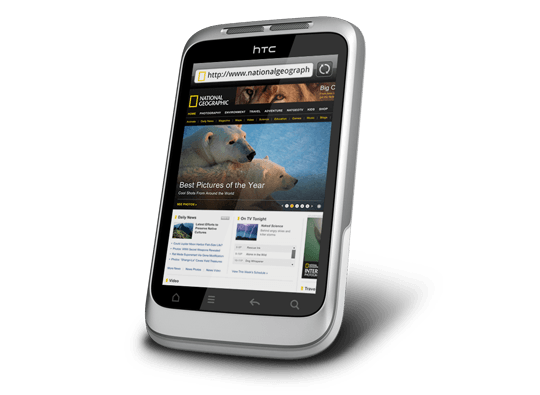
Otherwise, the user interface is bright and pleasing to the eye, with the typical presentation of both a clock and current weather on there. Handily, the screen is locked easily too with a press of the button at the top right of the phone. That will put a stop to inadvertent phone calls, emailing, web browsing and other things, so it is to be commended. To unlock the screen, all that's needed is to swipe the lock bar to the bottom. Any alerts are viewed similarly with holding down your finger on the top bar presenting an extension that can be pulled all the way down to see what's there.
The Android Marketplace icon on the home screen lets me easily add apps with automatic updates, though this requires monitoring data usage on your phone plan. The WordPress app works better than on my Blackberry, but UberSocial's retweeting function is worse on Android. It displays all account feeds on one screen and requires swiping for actions like replying or retweeting, which I find awkward. I might try an alternative app. I've downloaded several others, including CrossCountry Trains' app (which is good, despite failing to find Macclesfield-Edale Sunday trains) and LinkedIn (which works well). You can move apps to the microSD card to save internal storage space, though I don't plan to install many.
The Wildfire performs well at its core function: making and receiving calls. It imported contacts from my SIM card, though Bluetooth transfer from an old phone is also possible. Call sound quality is clear and loud. The side rocker button adjusts speaker volume during calls and ringtone volume otherwise. By default, the phone vibrates and rings simultaneously for incoming calls, which I may change later. The same applies to notification sounds for text messages, emails, and tweets.
Battery life is this phone's main weakness. It needs charging every night, unlike my previous phones. The bright, responsive screen likely causes this drain. Many users report similar issues online, with some experiencing even worse battery performance. While there are tips for extending battery life, they involve disabling key features like 3G or data connectivity, which defeats the purpose of having a smartphone. Thus, I'm considering buying a spare battery, as I did for my Pentax DSLR. Some users recommend higher-capacity replacement batteries, though this seems riskier.
All in all, first impressions of the HTC Wildfire are good ones. Over time, I should find out more about the ins and outs of the gadget. After all, it is a mini-computer with its own operating system and other software. Since I continue to learn more and more about PC's every day, the same should be the case here too.