Sometimes, a firmware update is in order
 28th February 2011
After a recent trip to Oxford, I have started to mull over adding a longer lens (could make more distant architectural detail photos a possibility) to complement my trusty Sigma 18-125mm f/3.8-5.6 DC HSM zoom lens that now is entering approaching its third year in my hands. While I have made no decision about the acquisition of another lens, there are some tempting bargains out there, it seems. However, the real draw on my attention is the lack of autofocus with the aforementioned Sigma, and I now find it difficult to believe that I was blaming the manufacturer for not keeping up with Pentax when it really was the other way around. A bit of poking around on the web revealed that all that I needed to do was download a firmware update from the Pentax website. While being slowed down by the lack of autofocus cannot have done bad things for my photography, I still wonder at why I didn't try updating the camera for as long as I have.
In the file for updating my K10D, there was a README file containing the instructions for carrying out the update with the included binary file that was set to take the camera from version 1.00 to 1.30 (hold down the Menu button while starting the camera to see what you have). In summary, both files were copied onto an SD card that was inserted into the camera and it turned off. The next step was to power up the camera with the menu button held down to start the update. To stop erroneous updates, there is an "Are you sure?" style Yes/No menu popped up before anything else happens. Selecting Yes sets things into motion, and you have to wait until the word "COMPLETE" appears in the bottom-left corner before turning the camera and removing the card. Now that I think of it, I should have checked the battery before doing anything because the consequences of losing power in the middle of what I was doing would have been annoying, especially with my liking the photographic results produced by the camera.
Risk taking aside, the process was worth its while, with HSM now working as it should have done all this time. It seems quiet and responsive too from my limited tests to date. Even better, the autofocus doesn't hunt anywhere near as much as the 18-55 mm Pentax kit lens that came with the camera. The next decision is whether to stick with my manual focussing ways or lapse into trusting autofocus from now on, though my better reason is to stick with the slower approach unless the subjects are fast. Now that I think of it, train and bus photos for my transport website have become much easier, as have any wildlife photos that I care to capture. Speaking of the latter brings me back to that telephoto quandary that I mentioned at the beginning. Well, there's a tempting Sigma 50-200 mm that has caught my eye...
Making a custom button to hide or display the Google Toolbar in Firefox
27th February 2011
While adding more toolbars to Firefox is all very fine, they can take up space on the screen. Even with the big screens that many of us have these days, it's still nice to be able to see more of what we use web browsers to visit: web pages. For the Web Developer extension's toolbar, there is the Toggle Web Developer Toolbar plugin for showing and hiding the thing when so desired. As it happens, I keep it hidden until I need it and I fancied doing the same thing with the Google Toolbar but found none. Instead, I happened on a tutorial that used the Custom Buttons plugin to define a custom button. That gives you an entry named Add new button... to the context menu that appears when you right-click on the main menu bar near the top of the Firefox window. When you select the that extra entry in the menu, you get the dialogue box that you see below.
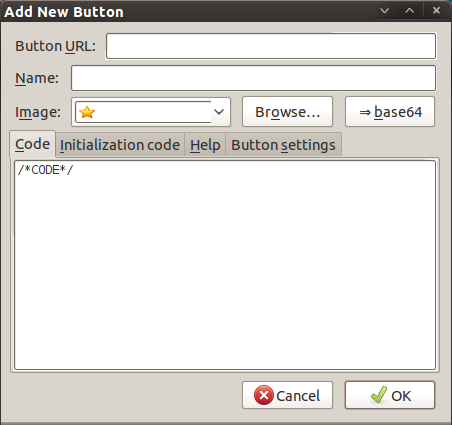
In there, that are some form fields that need filling. Button URL is an option without which you can do, but I entered "Toggle Google Toolbar" into the Name field while also sourcing an image to be used on the button instead of the default (a Google logo, naturally...). The last step is to add the code below underneath the /*CODE*/ comment line, leaving the latter in place.
const toolbar = document.getElementById("gtbToolbar");

toolbar.collapsed = !toolbar.collapsed;
With all that completed, clicking on the OK button is all that's needed to finish off the button definition. With that done, the next step is to add the button where you want it by right-clicking on the top menu bar again and selecting the Customise... entry. From the list of buttons that appears, just pick the new one and drag it to where you want it to go. Then, you're done with what might sound like a roundabout away of putting in place a space saver, but I can live with that.
Trying out Lubuntu and Debian Squeeze as possible Ubuntu Unity alternatives
19th February 2011
The last few weeks have seen me poking around with a few different operating systems to see how they perform. While I am too sure what exactly has kicked off all of this curiosity, all the OS's that I have examined have been of the UNIX/Linux variety. With the inclusion of Unity in the forthcoming Ubuntu "Natty Narwhal" 11.04, I am mindful of the need to be keeping an eye on alternative options should there ever be a need to jump ship. However, a recent encounter with an alpha version has reassured me a little.
Forgetting the Ubuntu password (a silly thing to do, I know) for my Toshiba laptop meant a reinstallation that allowed these explorations to happen. Only for that, I may not have looked in amazement at the impressive minimalism of CrunchBang Linux before settling on Lubuntu to see how it did. Since these were Live CD runs, I was trying things out before committing to any installation. Since Lubuntu is based on Ubuntu as its name suggests, I wasted little name in finding my way around the LXDE desktop. By default, everything supplied with the distro is lightweight, with Chromium coming in place of Firefox. There's no sign of OpenOffice.org either, with offerings like Abiword coming in its stead. For the sake of familiarity, I started to add the weight of things without reducing the speed of things, it seems. Well, the speedy start-up wasn't afflicted anyway. Being an Ubuntu clone meant that it didn't long to add on Firefox using the apt-get command. LibreOffice was downloaded for installation using the dpkg command, and it seems much more fleet-footed than its OpenOffice.org counterpart. As if these nefarious actions weren't enough, I started to poke in the settings to up the number of virtual desktops too. All in all, it never stopped me going against what be termed the intent of the thing. Despite what Linux User & Developer has had to say, I think the presentation of the LXDE desktop isn't unpleasant, either. In fact, I reckon that I quite like it, so the next thing to do is to restore the entry for Windows 7 on the GRUB menu. Well, there's always something that needs doing...
While I may have learned about it after the event, the release of Debian "Squeeze" 6.0 was of interest to me too. The new release comes on two kernels: GNU/Linux and FreeBSD. Regarding the latter, I did try having a look, only for it to lock up my main home PC when I tried booting it up in a VirtualBox virtual machine. Given that it's a technical preview anyway, I think it's better to leave it mature for a while, no matter how fascinating the prospect may be. Or is it VirtualBox 4.x that hasn't around long enough? Debian's latest Linux incarnations showed no such inclinations, though I found that the CD ISO image that I'd downloaded didn't give such a complete system when I fired it up after doing the installation. Being someone who knows his way around Linux anyway, it was no problem to add the missing pieces using apt-get, though that'd stop it being an option for new users unless the DVD installation yields more complete results. Other than that, it worked well, and I quickly became comfortable with the OS, which has a much fresher feel than version 5.x ("Lenny"). In summary, I look forward to continuing my investigations of the new Debian release.
To round up my explorations of different UNIX/Linux operating systems, I have updated my test installations of Ubuntu 11.04. While initial looks at the next Ubuntu release weren't so encouraging, things are coming along by all accounts. For one thing, Unity can be switched off in favour of the more familiar GNOME desktop that we've had for the last few years. Messages warning about the lack of 3D graphics support have been replaced by graceful degradation to GNOME, which is definitely an improvement. In case it hasn't been so obvious, I am one of those who needs convincing by the likes of Unity and GNOME Shell, so I'll sit on the fence for a while. After all, there are always alternatives like LXDE if I want to decamp to something else entirely. One of the nice things about Linux is the amount of choice we all have; while it might be difficult to choose sometimes, it's always good to find alternatives when someone makes a decision that doesn't suit you.