You always can install things yourself...
 26th November 2009
With Linux distributions offering you everything on a plate, there is a temptation to stick with what they offer rather than taking things into your own hands. For example, Debian's infrequent stable releases and the fact that they don't seem to change software versions throughout the lifetime of such a release means that things such as browser versions are fixed for the purposes of stability; Lenny has stuck with Firefox 3.06 and called it IceWeasel for some unknown reason. However, I soon got to grab a tarball for 3.5 and popped its contents into /opt where the self-contained package worked without a hitch. The same modus operandi was used to add Eclipse PDT and that applied to Ubuntu too until buttons stopped working, forcing a jumping of ship to NetBeans.
Of course, you could make a mess when veering away from what is in a distribution, but that should be good enough reason not to get carried away with software additions. With the availability of DEB packages for things like Adobe Reader, RealPlayer, VirtualBox, Google Chrome and Opera, keeping things clean isn't so hard. While your mileage may vary when it comes to how well things work out for you, I have only ever had the occasional problem anyway.
What reminded me of this was a recent irritation with the OpenOffice package included in Ubuntu 9.10 whereby spell checking wasn't working. While there were thoughts about in situ fixes like additional dictionary installations, I ended up plumping for what could be called the lazy option: grabbing a tarball full of DEB packages from the OpenOffice website and extracting its contents into /tmp and, once the URE package was in place, installing from there using the command:
dpkg -i o*
To get application shortcuts added to the main menu, it was a matter of diving into the appropriate subfolder and installing from the GNOME desktop extension package. Of course, Ubuntu's OpenOffice variant was removed as part of all this but, if you wanted to live a little more dangerously, the external installation goes into /opt which means that there shouldn't be too much of a conflict anyway. In any case, the DIY route got me the spell checking in OpenOffice Writer that I needed, so all was well and another Ubuntu rough edge eradicated from my life, for now anyway.
Converting from CGM to Postscript
24th November 2009
One thing that I recently had to investigate was the possibility of converting CGM vector graphics files into Postscript and from there into PDF. Having used ImageMagick for converting images before, that was an obvious option. However, that cannot process CGM files on its own and needs a delegate or helper application as well. This is the case with raw digital camera files too, with UFRaw being the program chosen. For CGM images, the more obscure RALCGM is what's needed, and tracking it down is a bit of an art. Though the history is that it was developed at the U.K.'s Rutherford Appleton Laboratory, it appears that it was left to go off into the wilderness rather than someone keeping an eye on things. With that in mind, here are the installation packages for Windows and Linux (RPM):
RALCGM is a handy command line tool that can covert from CGM to Postscript on its own without any need for ImageMagick at all. From what I have seen, fonts on graphical output may look greyer than black, but it otherwise does its job well. However, considering that it is a freely available tool, one cannot complain too much. There are other packages for doing vector to raster conversion and the ones that I have seen do have GUI's but the freedom to look at for cost software wasn't mine to have. The required command looks something like the following:
ralcgm -d PS -oL test.cgm test.ps
The switch -d PS uses the software's Postscript driver and -oL specifies landscape orientation. If you like to find out more, here's a PDF rendition of the help file that comes with the thing:
So you just need a web browser?
21st November 2009
When Google announced that it was working on an operating system, it was bound to result in a frisson of excitement. However, a peek at the preview edition that has been doing the rounds confirms that Chrome OS is a very different beast from those operating systems to which we are accustomed. The first thing that you notice is that it only starts up the Chrome web browser. In this, it is like a Windows terminal server session that opens just one application. Of course, in Google's case, that one piece of software is the gateway to its usual collection of productivity software like Gmail, Calendar, Docs & Spreadsheets and more. Then, there are offerings from others too, with Microsoft just beginning to come into the fray to join Adobe and many more. As far as I can tell, all files are stored remotely, so I reckon that adding the possibility of local storage and management of those local files would be a useful enhancement.
With Chrome OS, Google's general strategy starts to make sense. First create a raft of web applications, follow them up with a browser and then knock up an operating system. It just goes to show that Google Labs doesn't simply churn out stuff for fun, but that there is a serious point to their endeavours. In fact, you could say that they sucked us in to a point along the way. Speaking for myself, I may not entrust all of my files to storage in the cloud, yet I am perfectly happy to entrust all of my personal email activity to Gmail. It's the widespread availability and platform independence that has done it for me. For others spread between one place and another, the attractions of Google's other web apps cannot be understated. Maybe, that's why they are not the only players in the field either.
With the rise of mobile computing, that kine of portability is the opportunity that Google is trying to use to its advantage. For example, mobile phones are being used for things now that would have been unthinkable a few years back. Then, there's the netbook revolution started by Asus with its Eee PC. All of this is creating an ever internet connected bunch of people, so having devices that connect straight to the web like they would with Chrome OS has to be a smart move. Some may decry the idea that Chrome OS will be available on a device only basis, but I suppose they have to make money from this too; search can only pay for so much, and they have experience with Android too.
There have been some who wondered about Google's activities killing off Linux and giving Windows a good run for its money; Chrome OS seems to be a very different animal to either of these. It looks as if it is a tool for those on the move, an appliance, rather than the pure multipurpose tools that operating systems usually are. If there is a symbol of what an operating system usually means for me, it's the ability to start with a bare desktop and decide what to do next. Transparency is another plus point, with the Linux command line having that in spades. For those who view PC's purely as means to get things done, such interests are peripheral, and it is for these that the likes of Chrome OS has been created. In other words, the Linux community need to keep an eye on what Google is doing but should not take fright because there are other things that Linux always will have as unique selling points. Even though the same sort of thing applies to Windows too, Microsoft's near stranglehold on the enterprise market will take a lot of loosening, perhaps keeping Chrome OS in the consumer arena. Counterpoints to that include the use GMail for enterprise email by some companies and the increasing footprint of web-based applications, even bespoke ones, in business computing. In fact, it's the latter that can be blamed for any tardiness in Internet Explorer development. In summary, Chrome OS is a new type of thing rather than a replacement for what's already there. We may find that co-existence is how things turn out, but what it means for Linux in the netbook market is another matter. Only time will tell on that one.
Consolidation
19th November 2009
For a while, the Windows computing side of my life has been spread across far too many versions of the pervasive operating systems with the list including 2000 (desktop and server), XP, 2003 Server, Vista and 7; 9x hasn't been part of my life for what feels like an age. At home, XP has been the mainstay for my Windows computing needs, with Vista Home Premium loaded on my Toshiba laptop. The latter variant came in for more use during that period of home computing "homelessness" and, despite a cacophony of complaints from some, it seemed to work well enough. Since the start of the year, 7 has also been in my sights with beta and release candidate instances in virtual machines, leaving me impressed enough to go popping the final version onto both the laptop and in a VM on my main PC. Microsoft finally has got around to checking product keys over the net, so that meant a licence purchase for each installation using the same downloaded 32-bit ISO image. 7 is still doing well for me, so I am beginning to wonder whether having an XP VM is becoming pointless. The reason for that train of thought is that 7 is becoming the only version that I really need for anything that takes me into the world of Windows.
Work is a different matter, with a recent move away from Windows 2000 to Vista heavily reducing my exposure to the venerable old stager (businesses usually take longer to migrate, and any good IT manager usually delays any migration by a year anyway). 2000 is sufficiently outmoded by now that even my brother was considering a move to 7 for his work because of all the Office 2007 files that have been coming his way. While he may be no technical user, the bad press gained by Vista hasn't passed him by, so a certain wariness is understandable. Saying that, my experiences with Vista haven't been unpleasant, and it always worked well on the laptop, while the same also can be said for its corporate desktop counterpart. Much of the noise centred around issues of hardware and software compatibility, and that certainly is apparent at work with my having some creases left to straighten.
With all of this general forward heaving, you might think that IE6 would be shuffling its mortal coil by now, but a recent check on visitor statistics for this website places it at about 13% share, tantalisingly close to oblivion but still too large to ignore it completely. All in all, it is lingering like that earlier blight of web design, Netscape 4.x. If I was planning a big change to the site design, setting up a Win2K VM would be in order, not to completely put off those labouring with the old curmudgeon. For smaller changes, the temptation is not to bother checking, but that is questionable when XP is set to live on for a while yet. That came with IE6 and there must be users labouring with the old curmudgeon, and that's ironic with IE8 being available for SP2 since its original launch a while back. Where all this is leading me is towards the idea of waiting for IE6 share to decrease further before tackling any major site changes. After all, I can wait with the general downward trend in market share; there has to be a point when its awkwardness makes it no longer viable to support the thing. That would be a happy day.
When buttons stop working...
16th November 2009
One of the things that stopped working as it should after my recent Ubuntu 9.10 upgrade was the Eclipse PDT installation that I had in place. Editing files went a bit haywire and creating projects had me pushing buttons with nothing happening. Whether this was a Java or GNOME issue, I don't know, but I found it happening too on openSUSE 11.2 (there should be more on that distro in a later entry). That was enough to get me looking again at NetBeans.
In both openSUSE (NB version 6.5) and Ubuntu (NB version 6.7.1), I plucked the default offering of NetBeans from the respective software repositories and added the PHP plugin in both cases. Unlike when I last gave the platform a go, things seemed to go smoothly, and it looks to have replaced Eclipse for PHP development duties. While project scanning may take a little while, it's far from annoying, a departure from my earlier dalliance with using NetBeans as a PHP editor was stymied by performance that was so sluggish as to make the thing a pain to use. Up to now, NetBeans' footprint when it comes to its use of PC power never was light, so I am wondering if dual-core and quad-core CPU's help along with a copious supply of RAM. Only time will tell if these initial positive impressions stay the course; for now, I'll be keeping an open mind.
Rough?
11th November 2009
Was it because Canonical and friends kept Ubuntu in such a decent state from 8.04 through to 9.04 that things went a little quiet in the blogosphere on the subject of the well-known Linux distribution? If so, 9.10 might be proving more of a talking point, and you have to wonder if this is such a good thing with the appearance of Windows 7 on the scene. Looking on the bright side, 10.04 will be an LTS release, so there is some chance that any rough edges that are on display now could be resolved by next April. Even so, it might have been better not to see anything so obvious at all.
In truth, Ubuntu always has had its gaps, and I have seen a few of their ilk over the last two years. Of these, a few have triggered postings on here. In fact, issues with accessing the BBC iPlayer still bring a goodly number of folk to this website. That may just be a matter of grabbing RealPlayer, now helpfully available as a DEB package, from the requisite place on the web and ensuring that Ubuntu-Restricted-Extras is in place too, but you have to know that in the first place.
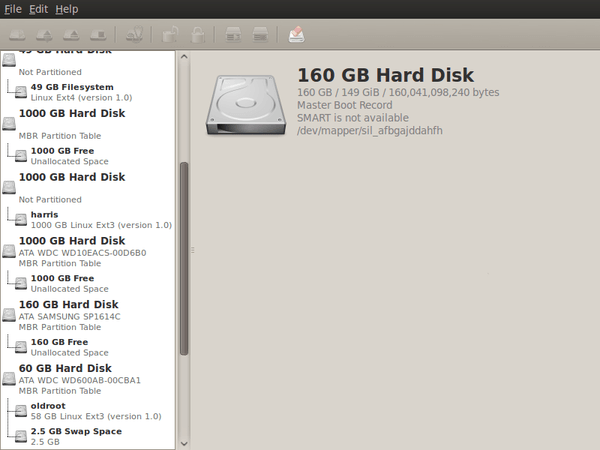
Even so, unexpected behaviours like Palimpsest seeing every partition on a disk as a different drive and SIL Raid mappings being seen for hard drives that used to live on the main home PC that bit the dust earlier this year; it only happens on one of the machines that I have running Ubuntu so it may be hardware thing and newly added hard drive uses none of the SIL mapping either.
Perhaps more seriously (is it something that a new user should be encountering?), a misfiring variant of Brasero had me moving to K3b. Then, UFRaw was sluggish in batch mode, yet that's nothing that having a Debian VM won't overcome. Rough edges like these do get you asking if 9.10 was ready for the big time, while making you reluctant to recommend it to mainstream users like my brother.
The counterpoint to the above is that 9.10 includes a host of under the bonnet changes like the introduction of Ext4 hard drive formatting, Xsplash to allow the faster system loading to occur unseen and GNOME 2.28. To someone looking in from outside like me, that looks like a lot of work and might explain the ingress of the annoyances that I have seen. Add to that the fact that we are between Debian releases, so things like the optimised packaging of ImageMagick or UFRaw may not be so high up the list of the things to do, especially with the more general speed optimisations that were put in place for 9.10.
With 10.04 set to be an LTS release, I'd be hoping that consolidation is the order of the day over the next five or six months, but it seems to be the inclusion of new features and other such progress that get magazine reviewers giving higher ratings (Linux Format has given it a mark of 9 out of 10). With the mooted inclusion of GNOME 3 and its dramatically different interface in 10.10, they should get their fill of that. However, I'd like to see some restraint for the take of a smooth transition from the familiar GNOME 2.x to the new. If GNOME 3 stays very like its alpha builds, then the question of how users will take to it arises. Of course, there's still some time before we see GNOME 3 and, having seen how the Ubuntu developers transformed GNOME 2.28, I wouldn't be surprised if the impact of any change could be dulled.
In summary, my few weeks with Ubuntu 9.10 as my main OS have thrown up no major roadblocks that would cause me to look at moving elsewhere; Fedora would be tempting if that situation were to arise. The irritations that I have seen are more like signs of a lack of polish and remain peripheral to day-to-day working if you discount CD/DVD burning. To be honest, there always have been some element of roughness on Ubuntu, but has the lack of sizeable change spoilt us? Whatever about how things feel afterwards, significant changes can mean new problems to resolve and inspire blog posts describing any solutions, so it's not all bad. If that's what Canonical wants to see, they might get it, and the year ahead looks as if it will be an interesting one after a recent quieter period.
A use for choice
8th November 2009
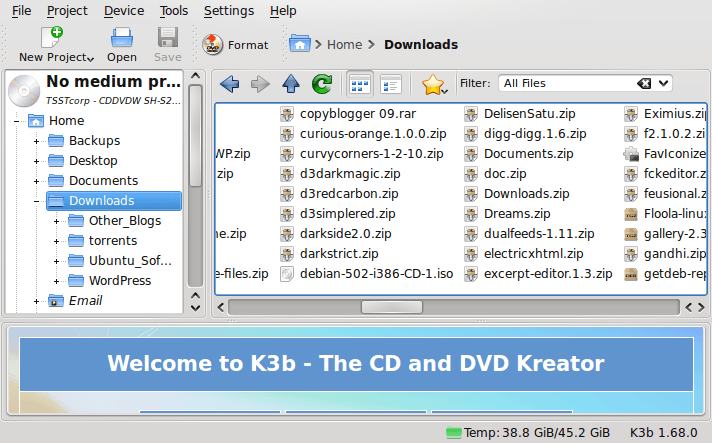
After moving to Ubuntu 9.10, Brasero stopped behaving as well as it did in Ubuntu 9.04. Any bootable disks that I have created with it weren't without glitches. After a recent update, things got better with a live CD actually booting up a PC rather than failing to find a file system like those created with its forbear. While unsure if the observed imperfections stemmed from my using the RC for the upgrades and installations, I got to looking for a solution and gave K3b a go. It certainly behaves like I'd expect it, and a live CD created with it worked without fault. The end result is that Brasero has been booted off my main home system for now. That may mean that all the in-built GNOME convenience is lost to me, but I can live without the extras; after all, it's the quality of the created disks that matters.
DePo Masthead
6th November 2009
There is a place on WordPress.com where I share various odds and ends about public transport in the U.K. It's called On Trains and Buses, and I try not to go tinkering with the design side of things too much. You only can change the CSS and my previous experience of doing that with this edifice while it lived on there taught me not to expect too much even if there are sandbox themes for anyone to turn into something presentable, not that I really would want to go doing that in full view of everyone (doing if offline first and copying the CSS afterwards when it's done is my preferred way of going about it). Besides, I wanted to see how WordPress.com fares these days anyway.
While my public transport blog just been around for a little over a year, it's worn a few themes over that time, ranging from the minimalist The Journalist v1.9 and Vigilance through to Spring Reloaded. After the last of these, I am back to minimalist again with DePo Masthead, albeit with a spot of my own colouring to soften its feel a little. Though I must admit growing to like it, it came to my attention that it was a bespoke design from Derek Powazek that Automattic's Noel Jackson turned into reality. The result would appear that you cannot get it anywhere but from the WordPress.com Subversion theme repository. For those not versed in the little bit of Subversion action that is needed to get it, I did it for you and put it all into a zip file without making any changes to the original, hoping that it might make life easier for someone.
Troubleshooting SATA drive detection issues in Ubuntu 9.10
4th November 2009
One of the early signs that I noticed after upgrading my main PC to Ubuntu 9.10 was a warning regarding the health of one of my hard disks. While others have reported that this can be triggered by the least bit of roughness in a SMART profile, that's not how it was for me. The PATA disk that has hosted my Ubuntu installation since the move away from Windows had a few bad sectors but no adverse warning. It was a 320 GB Western Digital SATA drive that was raising alarm bells with its 200 bad sectors.
The conveyor of this news was Palimpsest (not sure how it got that name even when I read the Wikipedia entry) and that is part of the subject of this post. Some have been irritated by its disk health warnings, yet it's easy to make them go away by turning off Disk Notifications in the dialogue that going to System > Preferences > Startup Applications will bring up for you. To fire up Palimpsest itself, there's always the command line, but you'll find it at System > Administration > Disk Utility too.
My complaint about it is that I see the same hard drive listed in there more than once, and it takes some finding to separate the real entries from the "bogus" ones. Whether this is because Ubuntu has seen my SATA drives with SIL RAID mappings (for the record, I have no array set up) or not is an open question, but it's one that needs continued investigation and I already have had a go with the dmraid command.
Even GParted shows both the original /dev/sd* type addressing and the /dev/mapper/sil_* equivalent, with the latter being the one with which you need to work (Ubuntu now lives on a partition on one of the SATA drives, which is how I noticed this). All in all, it looks less than tidy, so additional interrogation is in order, especially when I have no recollection of 9.04 doing anything of the sort.
Slower ImageMagick DNG processing in Ubuntu 9.10
2nd November 2009
A little while, I encountered a problem with ImageMagick processing DNG files in Ubuntu 9.04. Not realising that I could solve me own problem by editing a file named delegates.xml, I took to getting a Debian VM to do the legwork for me. That's where you'll find all the commands used when helper software is used by ImageMagick to help it on its way. On its own, ImageMagick cannot deal with DNG files, so the command line variant of UFRaw (itself a front end for DCRaw) is used to create a PNM file that ImageMagick can handle. The problem a few months back was that the command in delegates.xml wasn't appropriate for a newer version of UFRaw and I got it into my head that things like this were hard-wired into ImageMagick. Now, I know better and admit my error.
With 9.10, it appears that the command in delegates.xml has been corrected, only for another issue to raise its head. UFRaw 0.15, it seems, isn't the speediest when it comes to creating PNM files and, while my raw file processing script works after a spot of modification to deal with changes in output from the identify command used, it takes far too long to run. Since GIMP also uses UFRaw, I wonder if the same problem has surfaced there too. However, it has been noticed by the Debian team, with the outcome being that they have a package for version 0.16 of the software in their unstable branch that looks as if it has sorted the speed issue. However, I am seeing that 0.15 is in the testing branch, which tempts me to stick with Lenny (5.x) if any successor turns out to have slower DNG file handling with ImageMagick and UFRaw. In my estimation, 0.13 does what I need, so why go for a newer release if it turns out to be slower?