Evoluent Vertical Mouse 3 Configuration in Ubuntu 9.10
 31st October 2009
On popping Ubuntu 9.10 onto a newly built PC, I noticed that the button mappings weren't as I had expected them to be. The button just below the wheel no longer acted like a right mouse button on a conventional mouse, and it really was throwing me. The cause was found to be in a file name evoluent-verticalmouse3.fdi that is found either in /usr/share/hal/fdi/policy/20thirdparty/ or /etc/hal/fdi/policy/.
So, to get things back as I wanted, I changed the following line:
<merge key="input.x11_options.ButtonMapping" type="string">1 2 2 4 5 6 7 3 8</merge>
to:
<merge key="input.x11_options.ButtonMapping" type="string">1 2 3 4 5 6 7 3 8</merge>
If there is no sign of the file on your system, then create one named evoluent-verticalmouse3.fdi in /etc/hal/fdi/policy/ with the following content and you should be away. All that's needed to set things to rights is to disconnect the mouse and reconnect it again in both cases.
<?xml version="1.0" encoding="ISO-8859-1"?>

<deviceinfo version="0.2">

<device>

<match key="info.capabilities" contains="input.mouse">

<match key="input.product" string="Kingsis Peripherals  Evoluent VerticalMouse 3">

<merge key="input.x11_driver" type="string">evdev</merge>

<merge key="input.x11_options.Emulate3Buttons" type="string">no</merge>

<merge key="input.x11_options.EmulateWheelButton" type="string">0</merge>

<merge key="input.x11_options.ZAxisMapping" type="string">4 5</merge>

<merge key="input.x11_options.ButtonMapping" type="string">1 2 3 4 5 6 7 3 8</merge>

</match>

</match>

</device>

</deviceinfo>
While I may not have appreciated the sudden change, it does show how you remap buttons on these mice, and that can be no bad thing. Saying that, hardware settings can be personal things, so it's best not to go changing defaults based on one person's preferences. It just goes to show how valuable discussions like that on Launchpad about this matter can be. For one, I am glad to know what happened and how to make things the way that I want them to be, though I realise that it may not suit everyone; that makes me reticent about asking for such things to be made the standard settings.
Service management in Ubuntu 9.10
29th October 2009
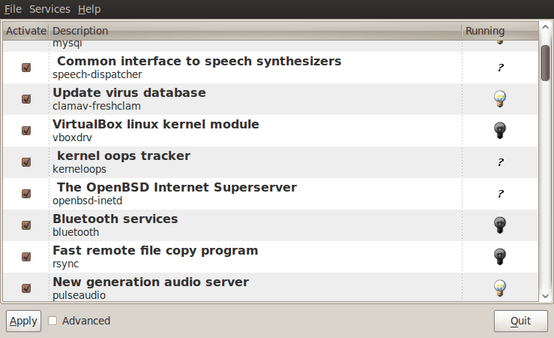
The final release of Ubuntu 9.10 is due out today, but there is a minor item that seems to have disappeared from the System > Administration menu, in the release candidate at least: Services. While some readers may put me right, I can't seem to find it anywhere else. Luckily, there is a solution in the form of the GNOME Boot-Up Manager or BUM as it is known sometimes. It is always handy to have a graphical means of restarting services, and BUM suffices for the purpose. While restarting Apache from the command line is all well and good, but the GUI approach has its place too.
A multitude of operating systems
27th October 2009
Like buses, it appears that a whole hoard of operating systems is descending upon us at once. OS X 10.6 came first before it was the turn of Windows 7 last week with all the excitement that it generated in the computing and technology media. Next up will be Ubuntu, already a source of some embarrassment for the BBC's Rory Cellan-Jones when he got his facts muddled; to his credit he later corrected himself, though I do wonder how up to speed is his appreciated that Ubuntu has its distinct flavours with a netbook variant being different to the main offering that I use. Along with Ubuntu 9.10, Fedora 12 and openSUSE 11.2 are also in the wings. As if all these weren't enough, the latest issue of PC Plus gives an airing to less well-known operating systems like Haiku (the project that carries on BeOS).
The inescapable conclusion is that, far from the impressions of mainstream computer users who know only Windows, we are swimming in a sea of operating system options in which you may drown if you decide to try sampling them all. That may explain why I stick with Ubuntu for home use due to reasons of familiarity and reliability and leave much of the distro hopping to others. Of course, it shouldn't surprise anyone that Windows is the choice of where I work, with 2000 being usurped by Vista in the next few weeks (IT managers always like to be behind the curve for the sake of safety).
Still able to build PC systems
25th October 2009
This weekend has been something of a success for me on the PC hardware front. Earlier this year, a series of mishaps rendered my former main home PC unusable; it was a power failure that finished it off for good. My remedy was a rebuild using my then usual recipe of a Gigabyte motherboard, AMD CPU and crucial memory. However, assembling the said pieces never returned the thing to life and I ended up in no man's land for a while, dependent on and my backup machine and laptop. That wouldn't have been so bad but for the need for accessing data from the old behemoth's hard drives, but an external drive housing set that in order. Nevertheless, there is something unfinished about work with machines having a series of external drives hanging off them. That appearance of disarray was set to rights by the arrival of a bare-bones system from Novatech in July, with any assembly work restricted to the kitchen table. There was a certain pleasure in seeing a system come to life after my developing a fear that I had lost all of my PC building prowess.
That restoration of order still left finding out why those components bought earlier in the year didn't work together well enough to give me a screen display on start-up. Having electronics testing equipment and the knowledge of its correct use would make any troubleshooting far easier, but I haven't got these. While there is a place near to me where I could go for this, you are left wondering what might be said to a PC build gone wrong. Of course, the last thing that you want to be doing is embarking on a series of purchases that do not resolve the problem, especially in the current economic climate.
One thing to suspect when all doesn't turn out as hoped is the motherboard and, for whatever reason, I always suspect it last. It now looks as if that needs to change after I discovered that it was the Gigabyte motherboard that was at fault. Whether it was faulty from the outset or it came a cropper with a rogue power supply or careless with static protection is something that I'll never know. An Asus motherboard did go rogue on me in the past, and it might be that it ruined CPU's and even a hard drive before I laid it to rest. Its eventual replacement put a stop to a year of computing misfortune and kick-started my reliance on Gigabyte. While that faith is under question now, the 2009 computing hardware mishap seems to be behind me and any PC rebuilds will be done on tables and motherboards will be suspected earlier when anything goes awry.
Returning to the present, my acquisition of an ASRock K10N78 and subsequent building activities has brought a new system using an AMD Phenom X4 CPU and 4 GB of memory into use. In fact, I am writing these very words using the thing. It's all in a new TrendSonic case too (placing an elderly behemoth into retirement) and with a SATA hard drive and DVD writer. Since the new motherboard has onboard audio and graphics, external cards are not needed unless you are an audiophile and/or a gamer; for the record, I am neither. Those additional facilities make for easier building and fault-finding should the undesirable happen.
The new box is running the release candidate of Ubuntu 9.10, which seems to be working without a hitch too. Since earlier builds of 9.10 broke in their VirtualBox VM, you should understand the level of concern that this aroused in my mind; the last thing that you want to be doing is reinstalling an operating system because its booting capability breaks every other day. Thankfully, the RC seems to have none of these rough edges, so I can upgrade the Novatech box, still my main machine and likely to remain so for now, with peace of mind when the time comes.
Never undercutting the reseller: Pondering options for buying Windows 7 licenses in light of Microsoft pricing
23rd October 2009
Quite possibly, THE big technology news of the week has been the launch of Windows 7. Regular readers may be aware that I have been having a play with the beta and release candidate versions of the thing since the start of the year. In summary, I have found to work both well and unobtrusively. While there have been some rough edges when accessing files through VirtualBox's means of accessing the host file system from a VM, that's the only perturbation to be reported and, even then, it only seemed to affect my use of Photoshop Elements.
Therefore, I had it in mind to get my hands on a copy of the final release after it came out. Of course, there was the option of pre-ordering, but that isn't for everyone, so there are others. A trip down to the local branch of PC World will allow you to satisfy your needs with different editions: full, upgrade (if you already have a copy of XP or Vista, it might be worth trying out the Windows Secrets double installation trick to get it loaded on a clean system) and family packs. The last of these is very tempting: three Home Premium licences for around £130.
Though wandering around to your local PC components emporium is an alternative, you have to remember that OEM versions of the operating system are locked to the first (self-built) system on which they are installed. Apart from that restriction, the good value compared with retail editions makes them worth considering as long as you realise the commitment that you are making.
The last option that I wish to bring to your attention is buying directly from Microsoft themselves. You would think that this may be cheaper than going to a reseller, but that's not the case with the Family Pack costing around £150 in comparison to PC World's pricing, and it doesn't end there. That they only accept Maestro debit cards along with credit cards from the likes of Visa and Mastercard perhaps is another sign that Microsoft is new to the whole idea of selling online.
In contrast, Tesco is no stranger to online selling, yet they also have Windows 7 on offer though they aren't noted for computer sales; PC World may be forgiven for wondering what that means, but who would buy an operating system along with their groceries? I suppose that the answer to that would be that people who are accustomed to delivering one's essentials at a convenient time should be able to do the same with computer goods too. That convenience of timing is another feature of downloading an OS from the web, and many a Linux fan should know what that means. While Microsoft may have discovered this of late, that's better than never.
Because of my positive experience with the pre-release variants of Windows 7, I am very tempted to get my hands on the commercial release. Because I have until early next year with the release candidate and XP works sufficiently well (it ultimately has given Vista something of a soaking), I will be able to bide my time. When I do make the jump, it'll probably be Home Premium that I'll choose because it seems difficult to justify the extra cost of Professional. It was different in the days of XP, when its Professional edition did have something to offer technically minded home users like me. With 7, XP Mode might be a draw, but with virtualisation packages like VirtualBox available for no cost, it's difficult to justify spending extra. In any case, I have Vista Home Premium loaded on my Toshiba laptop and that seems to work fine, despite all the bad press that Vista has got itself.
Going mobile
20th October 2009
Now that the mobile web is upon us, I have been wondering about making my various web presences more friendly for users of that platform, and my interest has been piqued especially by the recent addition of such capability to WordPress.com. With that in mind, I grabbed the WordPress Mobile Edition plugin and set it to work, both on this blog and my outdoors one. Well, the results certainly seem to gain a seal of approval from mobiReady so that's promising. While it comes with a version of the Carrington Mobile theme, you need to pop that into the themes directory on your web server yourself, as WordPress' plugin installation routines won't do that for you. It could be interesting to see how things go from here, and the idea of creating my own theme while using the plugin for redirection honours sounds like a way forward; I have found the place where I can make any changes as needed. Homemade variants of the methodology may find a use with my photo gallery and Textpattern sub-sites.
Something to watch?
14th October 2009
Apparently, PayPal does recurring payments. This one passed me by until I noticed that a certain (reputable) software vendor had set up just such a thing on me. As it happens, I have no recollection of being told about it, but it was a little while ago, so I may have forgotten. Regardless of the history, I shall be a keeping an eagle eye out for such things from this point forward. Since you cannot be too careful with your money these days, it's best to learn as you live...
An upgrade to Photoshop Elements 8? Not convincing for me...
12th October 2009
It now seems that we have a new version of Photoshop Elements from Adobe for every year, unless you're a Mac user. Version 7 convinced me to splash out and that gained me Camera Raw recognition of my Pentax K10D along with subtly enhanced image processing power that I have been putting to good use to get more pleasing results than I ever got before.
What can be achieved by using levels, curves and the shadow/highlight adjustment tool for exposure correction has amazed me recently. Quick selection functionality has allowed me to treat skies differently from everything else in landscape photos, a flexible graduated filter if you like. It seems to work on Windows 7 along with Vista and XP, so I plan to stick with it for a while yet.
As you may have gathered from this, it would take some convincing to make me upgrade and, for me, version 8 doesn't reach that mark. All in all, it appears that it is a way of giving Mac users a new release with added goodness after having to stay with 6 for so long; yes, there are new features like automatic tagging in the image organiser, but they just don't grab me. Given that they already have Aperture from Apple and Windows users seem to get more releases, it's a wonder that any Mac user would toy with Elements anyway. Maybe, that's Adobe's suspicion, too.
Testing a Firefox performance fix
9th October 2009
Recently, I have been having problems with Firefox being sluggish, so I resorted to a Lifehacker tip to see if that helped. It was a matter of opening up the Error Console from the Tools menu and entering the following long line into the command bar and hitting the evaluate button:
Components.classes["@mozilla.org/browser/nav-history-service;1"].getService(Components.interfaces.nsPIPlacesDatabase).DBConnection.executeSimpleSQL("VACUUM");
It did the track once or twice, but its database hoovering claims are on trial as far as I am concerned. Keeping an eye on what's eating system resources will be on the menu too, especially after seeing what my brief foray with Ubuntu One was doing. A move to Google Chrome cannot be ruled out of the question, either.
Seeing how things develop
7th October 2009
One of the things that I do out of curiosity and self-interest is to keep tabs on what is happening with development versions of software that I use. It is for this reason that I always have a development version of WordPress on the go to ensure that the next stable version doesn't bring my blog to its knees. There have been contributions from my own self to the development effort, mainly in the form of bug reports, with the occasional bug fix too.
In the same vein, I have had a development version of Ubuntu installed in a VirtualBox virtual machine. While there have been breakages and reinstallations along the way when an update results in disruption, it is intriguing, too, to see how a Linux distribution comes to fruition. In the early days of Karmic Koala (9.10), everything was thrown together more loosely and advances looked less obvious. While it is true to say the ext4 file systems support was already in place, the interface looked like a tweaked version of the standard GNOME desktop. Over time, the desktop has been customised and boot messages hidden out of sight. Eye candy like new icons and backgrounds have begun to entice while other features such as an encrypted home folder, Software Store and Ubuntu One all come into place. Installation screens became slicker and boot times reduced. All of this may seem incremental, but revolutions can break things, and you only have to look at the stuttering progress of Windows to see that. Even with all of these previews, I still plan to do a test run of the final revision of 9.10 before committing to putting it in place on my main home PC. Bearing the scars of misadventures over the years has taught me well.
Though Windows development is a less open process, I have been partial to development versions there too. In fact, beta and release candidate installations of Windows 7 have convinced me to upgrade from Windows XP for those times when a Windows VM needs to be fired up in anger. A special offer has had me ordering in advance and sitting back and waiting. With my Windows needs being secondary to my Linux activities, I am not so fussed about taking my time and I have no intention of binning Windows XP just yet anyway.
The trouble with all of this previewing is that you get buffeted by the ongoing development. That is very true of Ubuntu 9.10 and has been very much part and parcel of the heave that brought WordPress 2.7 into being last year. Things get added and then removed as development tries to find that sweet spot, or a crash results, forcing you to rebuild things. It is small wonder that you are told not to put unfinished software on a production system. Another consequence might be that you really question why you are watching all of this and come to decide that what you already have is a place of safety in comparison to what's coming. So far, that has never turned out to be true, but there's no harm in looking before you leap either.