Installing MS TrueType Core Fonts on Fedora
 28th July 2009
Once you have enabled the appropriate software repository, you can install the msttcorefonts (Microsoft TrueType core fonts like Arial, Times Roman, Verdana, Georgia, etc.) package on Debian and Ubuntu. With Fedora, it surprisingly isn't so straightforward. There is a recipe using the command line that worked for me, and I'm not going to repeat it here, so I'll leave you to go where I found it. In fact, it forms part of a wider unofficial Fedora FAQ that may be of more interest to you than solving this.
Update for Fedora 12 (2009-11-24):
You also need chkfontpath so the following needs doing before the final part of the command sequence, changing the filename as appropriate for your situation:
yum install xfs

rpm -ivh http://dl.atrpms.net/all/chkfontpath-1.10.1-2.fc12.i686.rpm
Making Nautilus work like it does in Ubuntu for any other GNOME-using distro
26th July 2009
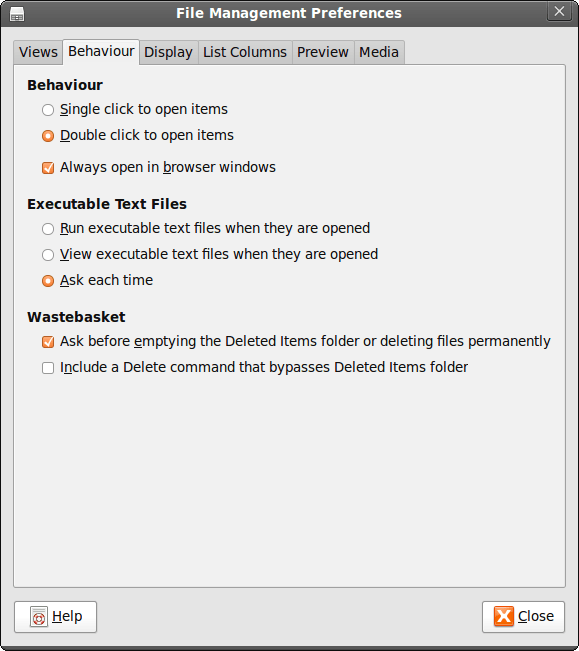
While It's a personal preference, I like the way that Nautilus (GNOME's default file manager if you need to know) is set to work on Ubuntu by default. For some tastes, it might look too similar to Windows Explorer, but having all the action happening in the same window is a convenience that users of other GNOME using distributions may not realise is there at all. By default, Debian and Fedora use what is called spatial mode, with each double-clicking action on a folder icon firing up a new window. Personally, I think that clutters the desktop without good cause, yet it's easy to change. All that's needed is to go to Edit>Preferences in a Nautilus window, proceed to the Behaviour tab and toggle the Always open in browser windows tick box as shown below. Quite why this is not the default in all GNOME using distributions is beyond me, but others may prefer what I dislike and Linux is all about choice, after all. Well, you can decide to use Gnome Commander instead and there are times when I do the same along with being a command line user too.
Using the Windows Command Line for Security Administration
24th July 2009
While there are point and click tools for the job, being able to set up new user groups, attach them to folders and assign users to them using the command line has major advantages when there are a number to be set up and logs of execution can be retained too. In light of this, it seems a shame that terse documentation along with the challenge of tracking down answers to any questions using Google, or whatever happens to be your search engine of choice, makes it less easy to discern what commands need to be run. This is where a book would help, but the whole experience is in direct contrast to the community of information providers that is the Linux user community, with Ubuntu being a particular shining example. Saying that, the Windows help system is not so bad once you can track down what you need. For instance, knowing that you need commands like CACLS and NET LOCALGROUP, the ones that have been doing the back work for me, it offers useful information quickly enough. To illustrate the usefulness of the aforementioned commands, here are a few scenarios.
Creating a new group:
net localgroup [name of new group] /comment:"[more verbose description of new group]" /add
Add a group to a folder:
cacls [folder address] /t /e /p [name of group]
The /t switch gets cacls to apply changes to the ACL for the specified folder and all its subfolders, a recursive action in other words, while the /e specifies ACL editing rather than its replacement and /p induces replacement of permissions for a given user or group. Using :n, :f, :c or :r directly after the name of a specified user or group assigns no, full, change (write) or read access, respectively. Replacing /p with /r revokes access, and leaving off the :n/:f/:c/:r will remove the group or user from the folder.
Add a user to a group:
net localgroup [name of group] [user name (with domain name if on a network)] /add
In addition to NET LOCALGROUP, there is also NET GROUP for wider network operations, something that I don't have cause to do. Casting the thinking net even wider, I suspect that VB scripting and its ability to tweak the Windows Management Interface might offer more functionality than what is above (PowerShell also comes to mind while we are on the subject) but I am sharing what has been helping me, and it can be difficult to find if you don't know where to look.
Enabling DVD playback in Ubuntu 9.04
22nd July 2009
This information is scattered about the web, so I decided to collect something together in one place in case it helps anyone else. Here are two commands that appeared to do the deed for me:
sudo apt-get install ubuntu-restricted-extras totem-xine libxine1-ffmpeg libdvdread4
sudo /usr/share/doc/libdvdread4/install-css.sh
The libdvdread piece is what sorts out encrypted disks and needs a two stage installation, hence the second command. For non-encrypted disks, ubuntu-restricted-extras might be all that's needed if my experience is typical. Taking things further, Wim Wenders' Buena Vista Social Club (Region 2 disk) worked when I tried it, too. In the interests of completeness, I tried the command combination on a virgin 9.04 installation with restricted and multiverse repositories enabled. Along the way, I spied a whole raft of helper components being set in place, and things worked like I would have expected with the aforementioned DVD afterwards. As with anything related to computing, your mileage may vary and, for more information, you can have a look here.
A spot of roughness with VirtualBox 3.02 on Ubuntu
20th July 2009
Among the various things that I needed to do on Saturday, I got to look at why VirtualBox Windows guests could not shut down and the processes killed. Though it wasn't clear at the outset, my suspicions began to centre on the sound hardware emulation and how it interacted with the host's sound capabilities. A look at the VirtualBox log sent me that way after a spot of experimentation with reinstalling Windows 7 and adding the Guest Additions along with removal and reinstatement of the same for a Windows XP guest that makes my like easier. It also seems that the same problem blighted the start-up of Linux guests too. Either removing virtual sound hardware or using the null sound driver seems to allow things to run smoothly. That may not sound ideal, yet it doesn't bother me, with the host providing all that I need. Also, it's a moot point whether I have come across a bug in VirtualBox or whether using Ubuntu on a hardware configuration on which it wasn't originally installed is the cause, but I have found a way forward that suits me. Saying that, if I find that the issue disappears in a future, that would be even better.
Anquet and VirtualBox Shared Folders: Solving Virtual Machine storage issues between Linux and Windows
18th July 2009
For a while now, I have had Anquet installed in a virtual machine instance of Windows XP, but it has been throwing errors continuously on start up. Perhaps surprisingly, it only dawned upon me recently what might have been the cause. A bit of fiddling revealed that my storing the mapping data Linux side and sharing it into the VM wasn't helping, and copying it to a VM hard drive set things to rights.
This type of thing can also cause problems when it comes to getting Photoshop to save files using VirtualBox's Shared Folders feature too. Untangling the situation is a multi-layered exercise. On the Linux side, permissions need to be in order and that involves some work with chmod (775 is my usual remedy) and chgrp to open things up to the vboxusers group.
Adding in Windows' foibles when it comes to networked drives and their mapping to drive letters brings extra complexity; any shared folders are made visible to Windows in a path of this form: \\vboxsvr\shared_folder_name\. The solution is either a lot of rebooting, extensive use of the net use command, or both. It induces the sort of going and coming that causes copying things over and back as needed to look less involved and more sensible, if a little more manual than might be liked.
A self-hosted online photo album option
16th July 2009
When I was perusing a recent copy of Linux Format, I encountered a feature describing a self-hosted alternative to the likes of Flickr: Gallery. From my quick look, it looks fully featured, offering themes and even shopping cart facilities for those who want to sell their wares. The screenshots on the open-source project's website look promising but, for a fuller appraisal, I would need to spend some time trying to bend it to my will. Before anyone mentions it, I am aware that WordPress can be used for photoblogging, but this tool seems to take things a bit further. It's the sort of thing about which I might have wondered, given the pervasiveness of content management systems these days. My own custom-built photo gallery is devoid of a slick back end, hence why Gallery caught my eye, but I'll continue with it and may even get to adding the needful myself.
Some oddness with table cell display in Opera resolved
14th July 2009
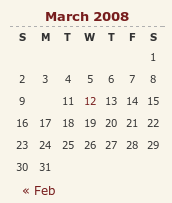
A while back, I reported a baffling problem with Opera managing to miss out an entry in the calendar widget on my hillwalking blog. After a bit of fiddling, I managed to track down the problem: setting position:relative in the CSS for hyperlink tags on my theme. While commenting out CSS declarations may seem a low technology way of finding problems like this, it still retains its place, as this little episode proves. Changing it to position:static for the hyperlinked numbers in the table resolved the issue, while I left the defaults as they were in case they had an adverse impact elsewhere.
If all this sounds rather too empirical in its approach, then I can only agree with you, yet a fix is a fix nonetheless. However, display:block is also set for the table entries, which means that may have a part to play too. Regardless of the trial and error feel to the solution, I could not find the problem documented anywhere, so I am sharing it here to help any others who encounter the same sort of weirdness.
From laptop limbo to a new desktop: A weekend restoration of computing order
12th July 2009
This weekend, I finally put my home computing displacement behind me. My laptop had become my main PC, with a combination of external hard drives and an Octigen external hard drive enclosure keeping me motoring in laptop limbo. Having had no joy in the realm of PC building, I decided to go down the partially built route and order a bare-bones system from Novatech. That gave me a Foxconn case and motherboard loaded up with an AMD 7850 dual-core CPU and 2 GB of RAM. With the motherboard offering onboard sound and video capability, all that was needed was to add drives. I added no floppy drive but instead installed a SATA DVD Writer (not sure that it was a successful purchase, though, but that can be resolved at my leisure) and the hard drives from the old behemoth that had been serving me until its demise. A session of work on the kitchen table and some toing and froing ensued as I inched my way towards a working system.
Once I had set all the expected hard disks into place, Ubuntu was capable of being summoned to life, with the only impediment being an insistence of scanning the 1 TB Western Digital and getting stuck along the way. Not having the patience, I skipped this at start up and later unmounted the drive to let fsck to do its thing while I got on with other tasks; the hold up had been the presence of VirtualBox disk images on the drive. Speaking of VirtualBox, I needed to scale back the capabilities of Compiz, so things would work as they should. Otherwise, it was a matter of updating various directories with files that had appeared on external drives without making it into their usual storage areas. Windows would never have been so tolerant and, as if to prove the point, I needed to repair an XP installation in one of my virtual machines.
In the instructions that came with the new box, Novatech stated that time was a vital ingredient for a build, and they weren't wrong. While the delivery arrived at 09:30, I later got a shock when I saw the time to be 15:15! However, it was time well spent when I noticed the speed increase on putting ImageMagick through its paces with a Perl script. In time, I might get brave and be tempted to add more memory to get up to 4 GB; the motherboard may only have two slots, but that's not such a problem with my planning on sticking with 32-bit Linux for a while to come. My brief brush with its 64-bit counterpart revealed some roughness that warded me off for a little while longer. For now, I'll leave well alone and allow things to settle down again. Lessons for the future remain, over which I may even mull in another post...
Bumping newly edited older articles in Textpattern
10th July 2009
Whether this is intended or not, you can put a pre-existing article to the top of your website's Atom or RSS feed by saving it as draft while it is being modified before restoring its status to live again. This is handy when you have got permanent articles that you are enhancing over the course of time, and you want to give your visitors a reason to return and maybe even prompt search engines too. Though new articles will achieve this always, it's nice to see that older articles don't get lost in space either. While this may be a hack, I am using Textpattern for permanent postings, rather than blogging, so I remain well pleased to see the availability of the feature.